

Terminology
- Object Storage Service (OSS)
- OSS authorization configuration
/aimiaobi subdirectory in a specified OSS bucket.
Why configure OSS authorization?
Scenario | Description |
|---|---|
Security and compliance | Store sensitive business data in your own cloud environment to meet requirements such as China’s Multi-Level Protection Standard, industry regulations, or internal IT policies. |
Resource control | Manage storage permissions, lifecycle rules, access logs, and audit capabilities yourself. Avoid risks from third-party storage dependencies. |
Cost optimization | Reuse existing OSS resources, such as subscription-based storage capacity or CDN origin bandwidth, to reduce long-term storage and traffic costs. |
End-to-end OSS authorization configuration
Step 1: Prepare OSS resources
① Enable OSS
Log on to the OSS console. Confirm that OSS is enabled for your account.
② Create a bucket
Create a new bucket. The recommended region is cn-beijing (China North 2). You may also reuse an existing bucket.
③ Create the root directory
In the bucket, manually create the path: /aimiaobi.
④ Configure CORS
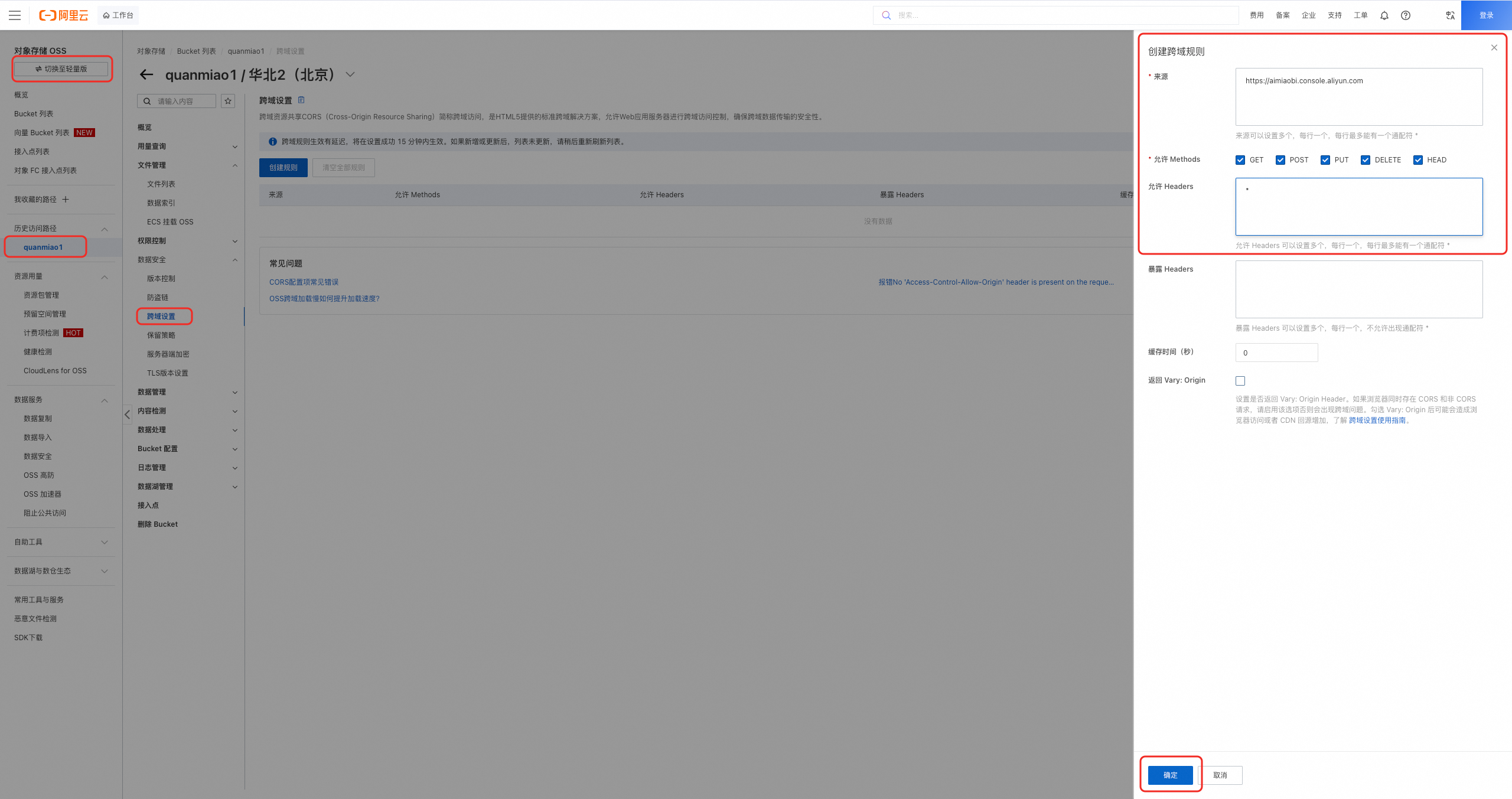
- Path: OSS console > Bucket > Data Security > CORS Settings. Or access it at
https://oss.console.aliyun.com/bucket/oss-{region}/{bucket}/data-security/cors(replace{region}and{bucket}with your actual values). - CORS rule settings (enter exactly as shown):
Field | Value | Description |
|---|---|---|
Origin | Quanmiao console domain name. Include the protocol. | |
Allowed Methods |
| Select All |
Allowed Headers |
| Allow any request header, including |
Other | Use default values. |
Step 2: Authorize and configure in Miaosou
Go to the Miaosou console, then go to Settings and configure authorization and settings under Cloud Storage.
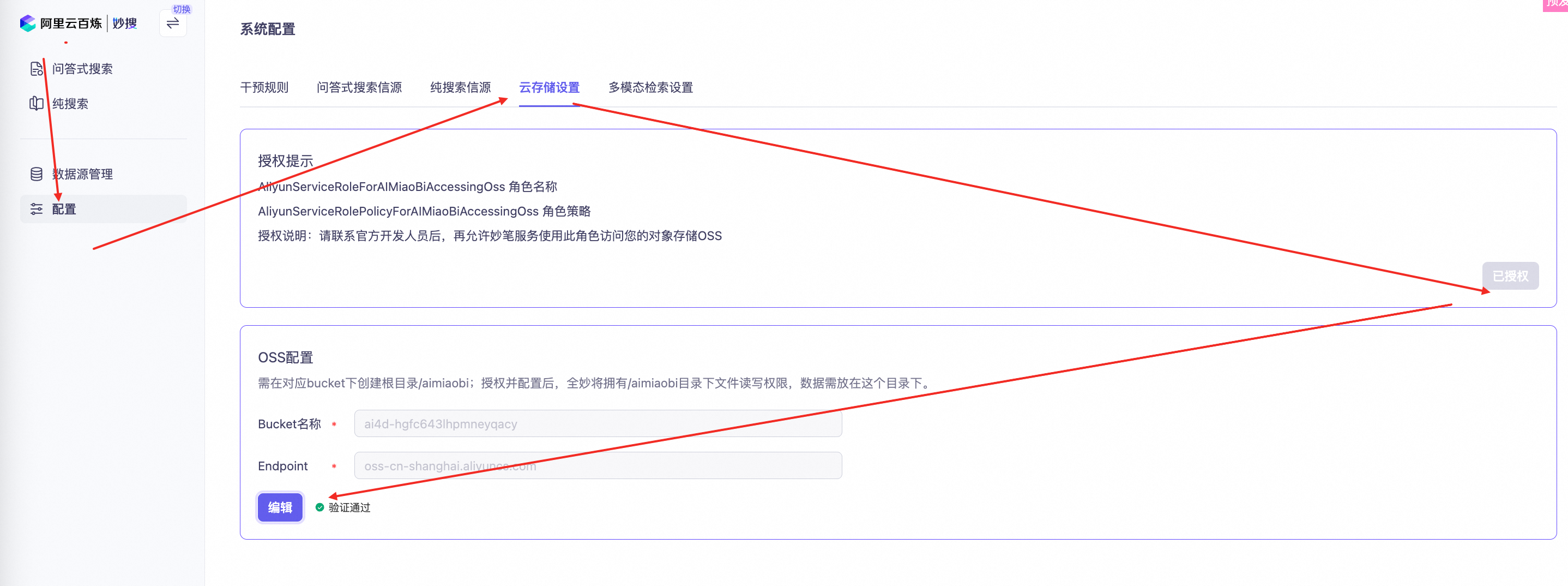
① Authorize (attach RAM role)
Click the Authorize button. After successful authorization, the button changes to Authorized. Quanmiao now has read and write access to the /aimiaobi directory in all buckets. However, files still upload to Miaosou’s own storage because bucket parameters are not yet configured.
② Configure (attach bucket)
-
Enter the following two values and click Save:
- Endpoint: OSS service endpoint, such as
oss-cn-shanghai.aliyuncs.com. - Bucket name: The name of the bucket you created, such as
quanmiao-xxxx.
- Endpoint: OSS service endpoint, such as
-
On saving, the system automatically uploads a test file to
/aimiaobiand verifies read and write access. If you see Verification passed, then OSS connectivity, permissions, and CORS are all working correctly.
Cancel OSS authorization configuration
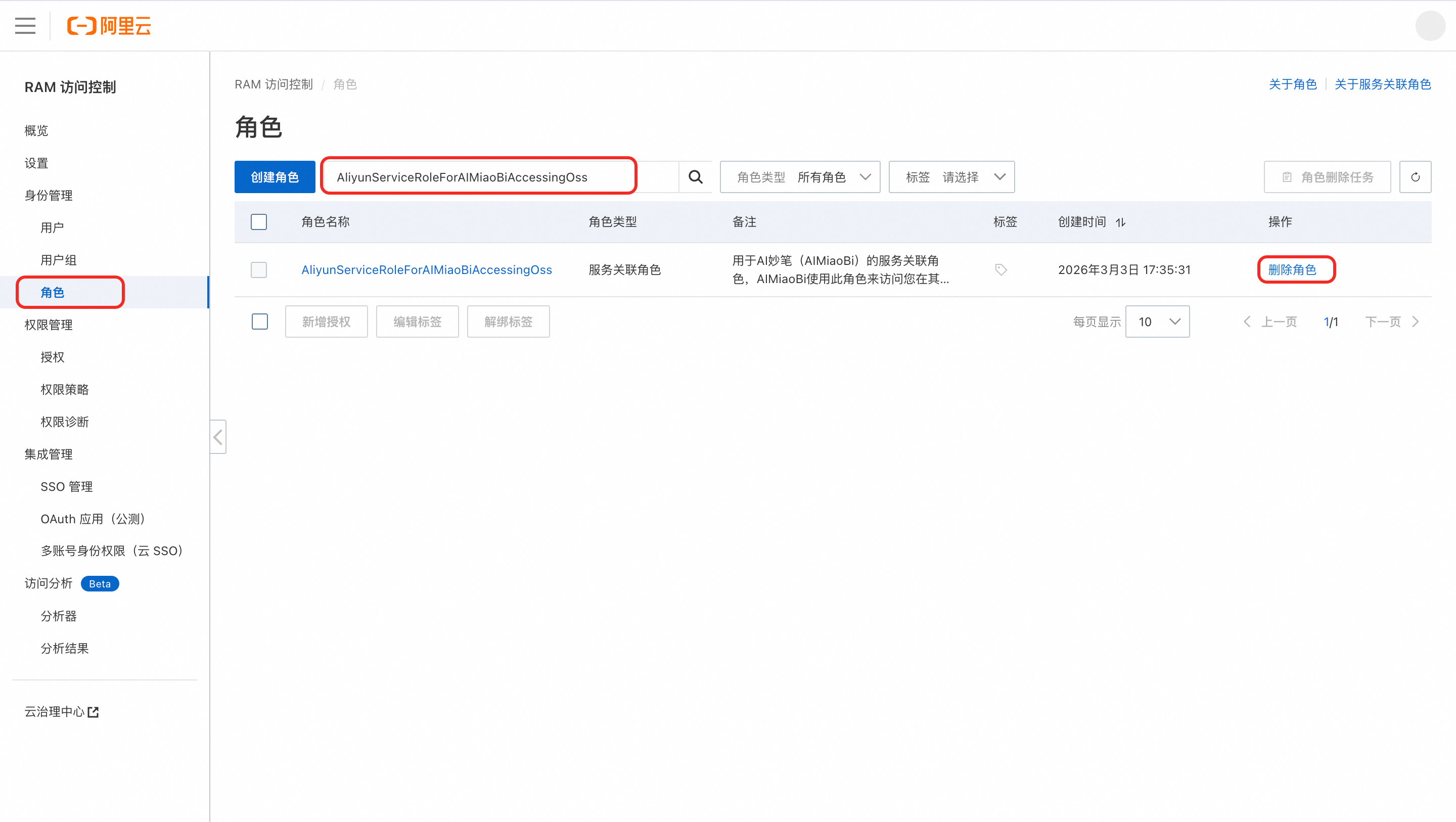
Go to RAM Access Management > Roles. Search for the role named AliyunServiceRoleForAIMiaoBiAccessingOss, then delete it.
No active orders
In the Alibaba Cloud RAM console, delete the RAM role associated with Quanmiao: RAM Access Management > Roles > Search for AliyunServiceRoleForAIMiaoBiAccessingOss > Delete role.
Active orders exist
Do not delete the RAM role yourself. Doing so may affect historical data.
Contact Quanmiao product and R&D support:
- DingTalk group ID: 166725003249 (include the following: [OSS unbind] + aliUid + reason).
- The R&D team marks the role as deletable. After that, you can delete it using the method above.
Key limits and behaviors
Feature | Behavior Logic | Notes |
|---|---|---|
File upload | New files upload directly to | This does not consume Quanmiao’s storage quota. |
File deletion | Strongly consistent synchronous deletion: When you delete a document or dataset in the console, the corresponding file in OSS is deleted at the same time. | Deletion is irreversible. |
File download or preview | Quanmiao either proxies requests through its backend or generates a temporary OSS STS signed URL, depending on your security policy. | |
Directory isolation | Quanmiao can access only | This follows the principle of least privilege. |