

Learn about the features included in the ParseX platform, including Parse, Extract, configuration, and related capabilities.
ParseX provides document intelligence capabilities for developers and Agents. It converts documents, images, and audio/video into readable content, or retrieves specified fields from text-and-image materials, helping Agent applications complete document-related tasks.
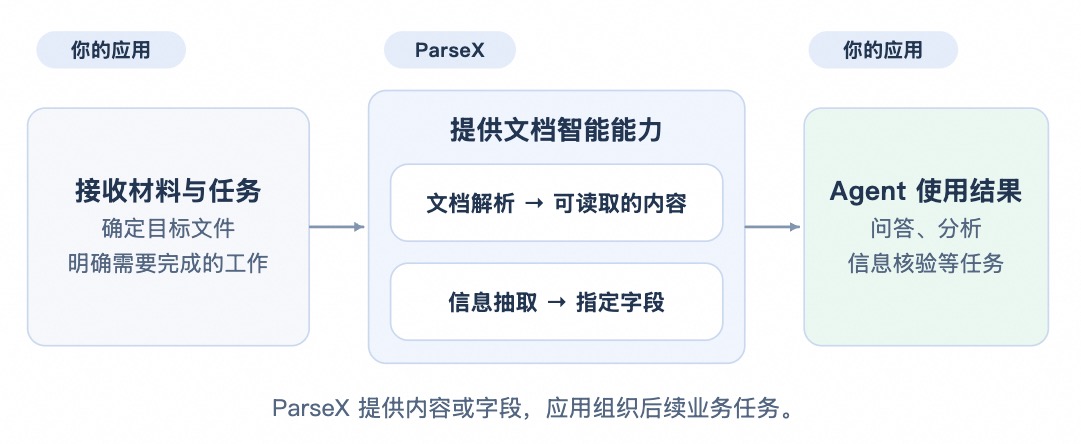 For example, a contract verification Agent can first use ParseX to obtain the contract amount and payment terms, then check these terms against business rules.
Two Core Capabilities
- Parse (Document Parsing): Parse files into content that is easy to read, retrieve, and process downstream.
- Extract (Field Extraction): Extract key field results from documents based on your business field definitions.
Choosing Between Parsing and Extraction
| Comparison | Document Parsing | Field Extraction |
|---|---|---|
| Goal | Read and organize the content in materials | Obtain the information you specify |
| Input | Documents, images, audio, or video | Text-and-image materials, or reusable parsing results of such materials |
| Requirements to specify | Content scope, image and media handling requirements | Field names, types, and meanings |
| Output | Body text, tables, image descriptions, or media content with time positions | Structured information such as field values and sources in the original text |
| Choose when | The Agent needs to read materials and understand context | The application already knows exactly which data to retrieve |
Typical Agent Scenarios
| Task the Agent needs to complete | What ParseX provides | How the application continues to use it |
|---|---|---|
| Answer questions from product manuals | Manual body text, tables, and figure descriptions | Build a retrieval index, find relevant passages, and compose answers |
| Analyze business reports | Report content, or pre-specified periods, amounts, and metrics | Calculate changes against historical data and explain the causes |
| Verify contract information | Contract parties, amounts, terms, and sources in the original text | Check each item against business rules and show users the evidence |
| Find operation steps in training videos | Video segment content with corresponding time positions | Retrieve relevant steps and guide users to replay the segments |
| Organize interview recordings | Speech content with corresponding time positions | Summarize viewpoints around research questions and replay the original speech |
Standard Workflow
- Choose Parse or Extract Use Parse when you need document content and structure; use Extract when you need fixed business fields.
- Validate Results in the Console Submit samples and check the results. For Parse, focus on content completeness and structure; for Extract, focus on field definitions, field values, and missing values.
- Save and Reuse the Configuration Save the validated definition as a configuration, which can be reused in subsequent calls.