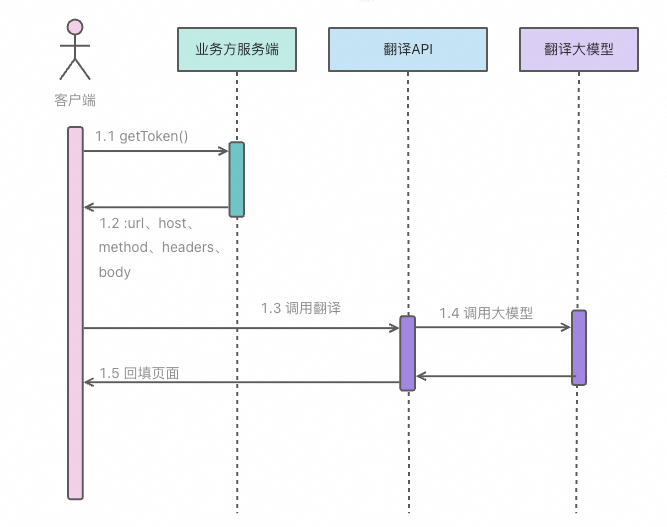
// Generate a signature by using the calculateSignature method.
import * as crypto from 'crypto';
export interface SignatureRequest {
  httpMethod: string;
  canonicalUri: string;
  host: string;
  xAcsAction: string;
  xAcsVersion: string;
  headers: Record<string, string>;
  body: any;
  queryParam: Record<string, any>;
}
export interface BatchTranslateRequest {
  scene: string;
  sourceLanguage: string;
  streaming: boolean;
  targetLanguage: string;
  text: { [key: string]: string };
}
export class Request implements SignatureRequest {
  httpMethod: string;
  canonicalUri: string;
  host: string;
  xAcsAction: string;
  xAcsVersion: string;
  headers: Record<string, string>;
  body: any;
  queryParam: Record<string, any>;
  constructor(httpMethod: string, canonicalUri: string, host: string, xAcsAction: string, xAcsVersion: string) {
    this.httpMethod = httpMethod;
    this.canonicalUri = canonicalUri || '/';
    this.host = host;
    this.xAcsAction = xAcsAction;
    this.xAcsVersion = xAcsVersion;
    this.headers = {};
    this.body = null;
    this.queryParam = {};
    this.initHeader();
  }
  private initHeader() {
    const date = new Date();
    this.headers = {
      'host': this.host,
      'x-acs-action': this.xAcsAction,
      'x-acs-version': this.xAcsVersion,
      'x-acs-date': date.toISOString().replace(/\..+/, 'Z'),
      'x-acs-signature-nonce': crypto.randomBytes(16).toString('hex')
    }
  }
}
const ALGORITHM = 'ACS3-HMAC-SHA256';
const accessKeyId = process.env.ACCESS_KEY_ID; // Your Access Key ID.
const accessKeySecret = process.env.ACCESS_KEY_SECRET; // Your Access Key Secret.
const workspaceId = process.env.WORKSPACE_ID; // Your workspace ID from Model Studio.
const encoder = new TextEncoder();
const httpMethod = 'POST';
const canonicalUri = '/anytrans/translate/batchForHtml';
const xAcsAction = 'BatchTranslateForHtml';
const xAcsVersion = '2025-07-07';
const host = 'anytrans.cn-beijing.aliyuncs.com';
export interface SignedRequest {
  url: string;
  method: string;
  host: string;
  headers: Record<string, string>;
  body?: any; // Can be a Uint8Array or a Base64 string.
}
export function getAuthorization(signRequest: SignatureRequest): SignedRequest {
  try {
    const newQueryParam: Record<string, any> = {};
    processObject(newQueryParam, "", signRequest.queryParam);
    signRequest.queryParam = newQueryParam;
    // Step 1: Build the canonical request string.
    const canonicalQueryString = Object.entries(signRequest.queryParam)
      .sort(([a], [b]) => a.localeCompare(b))
      .map(([key, value]) => `${percentCode(key)}=${percentCode(value)}`)
      .join('&');
    // The request payload. For requests with an empty body, such as GET requests, the RequestPayload is an empty string.
    const requestPayload = signRequest.body || encoder.encode('');
    const hashedRequestPayload = sha256Hex(requestPayload);
    signRequest.headers['x-acs-content-sha256'] = hashedRequestPayload;
    // Convert all keys to lowercase.
    signRequest.headers = Object.fromEntries(
      Object.entries(signRequest.headers).map(([key, value]) => [key.toLowerCase(), value])
    );
    const sortedKeys = Object.keys(signRequest.headers)
      .filter(key => key.startsWith('x-acs-') || key === 'host' || key === 'content-type')
      .sort();
    // A list of signed headers. The header names are in lowercase, sorted alphabetically, and separated by semicolons (;).
    const signedHeaders = sortedKeys.join(";")
    // Construct the canonical headers. The canonical headers are concatenated in ascending order of their lowercase header names.
    const canonicalHeaders = sortedKeys.map(key => `${key}:${signRequest.headers[key]}`).join('\n') + '\n';
    const canonicalRequest = [
      signRequest.httpMethod,
      signRequest.canonicalUri,
      canonicalQueryString,
      canonicalHeaders,
      signedHeaders,
      hashedRequestPayload
    ].join('\n');
    console.log('canonicalRequest=========>\n', canonicalRequest);
    // Step 2: Build the string to sign.
    const hashedCanonicalRequest = sha256Hex(encoder.encode(canonicalRequest));
    const stringToSign = `${ALGORITHM}\n${hashedCanonicalRequest}`;
    console.log('stringToSign=========>', stringToSign);
    // Step 3: Calculate the signature.
    const signature = hmac256(accessKeySecret!, stringToSign);
    console.log('signature=YOUR_SIGNATURE>', signature);
    // Step 4: Build the Authorization header.
    const authorization = `${ALGORITHM} Credential=${accessKeyId},SignedHeaders=${signedHeaders},Signature=YOUR_SIGNATURE
    console.log('authorization=========>', authorization);
    signRequest.headers['Authorization'] = authorization;
    // Build the complete URL.
    let url = `https://${signRequest.host}${signRequest.canonicalUri}`;
    if (signRequest.queryParam && Object.keys(signRequest.queryParam).length > 0) {
      const query = new URLSearchParams(signRequest.queryParam);
      url += '?' + query.toString();
    }
    return {
      url,
      host: signRequest.host,
      method: signRequest.httpMethod.toUpperCase(),
      headers: signRequest.headers,
      body: signRequest.body
    };
  } catch (error) {
    console.error('Failed to get authorization');
    console.error(error);
    throw error;
  }
}
function percentCode(str: string): string {
  return encodeURIComponent(str)
    .replace(/\+/g, '%20')
    .replace(/\*/g, '%2A')
    .replace(/~/g, '%7E');
}
function hmac256(key: string, data: string): string {
  const hmac = crypto.createHmac('sha256', key);
  hmac.update(data, 'utf8');
  return hmac.digest('hex').toLowerCase();
}
function sha256Hex(bytes: any): string {
  const hash = crypto.createHash('sha256');
  const digest = hash.update(bytes).digest('hex');
  return digest.toLowerCase();
}
function processObject(map: Record<string, any>, key: string, value: any): void {
  // If the value is null, no further processing is required.
  if (value === null) {
    return;
  }
  if (key === null) {
    key = "";
  }
  // If the value is an array, iterate over each element and process it recursively.
  if (Array.isArray(value)) {
    value.forEach((item, index) => {
      processObject(map, `${key}.${index + 1}`, item);
    });
  } else if (typeof value === 'object' && value !== null) {
    // If the value is an object, iterate over each key-value pair and process it recursively.
    Object.entries(value).forEach(([subKey, subValue]) => {
      processObject(map, `${key}.${subKey}`, subValue);
    });
  } else {
    // For keys that start with a period (.), remove the leading period to maintain key continuity.
    if (key.startsWith('.')) {
      key = key.slice(1);
    }
    map[key] = String(value);
  }
}
export function formDataToString(formData: Record<string, any>): string {
  const tmp: Record<string, any> = {};
  processObject(tmp, "", formData);
  let queryString = '';
  for (let [key, value] of Object.entries(tmp)) {
    if (queryString !== '') {
      queryString += '&';
    }
    queryString += encodeURIComponent(key) + '=' + encodeURIComponent(value);
  }
  return queryString;
}
// Method for calculating signatures with fixed variables.
export interface FixedSignatureResult {
  httpMethod: string;
  canonicalUri: string;
  host: string;
  xAcsAction: string;
  xAcsVersion: string;
  signature: string;
  date: string;
  nonce: string;
  workspaceId: string;
  authorization: string;
}
export function calculateSignature(req: BatchTranslateRequest): SignedRequest {
  // Create a request instance.
  const signRequest = new Request(httpMethod, canonicalUri, host, xAcsAction, xAcsVersion);
  // Set query parameters.
  signRequest.queryParam = {
    RegionId: 'cn-beijing',
  };
  // Create a Uint8Array for the body.
  const bodyUint8Array = encoder.encode(JSON.stringify({
    ...req,
    workspaceId,
  }));
  // The request body used for signature calculation.
  signRequest.body = bodyUint8Array;
  signRequest.headers['content-type'] = 'application/json';
  // Get the signature.
  const result = getAuthorization(signRequest);
  // Convert the body to a Base64 string for transmission.
  const bodyBase64 = Buffer.from(bodyUint8Array).toString('base64');
  return {
    ...result,
    body: bodyBase64 // Return a Base64 string instead of a Uint8Array.
  };
}