

本文主要介绍如何通过调用三方RTC 链路,与百炼多模态交互开发套件集成,实现视频通话的流程。
在音视频交互场景,您可能在您的项目中使用了成熟的技术方案。如第三方的RTC 服务来实现音视频的转发和处理。为了方便您通过最小的改动接入阿里云百炼多模交互开发套件,我们提供了提交图片序列的方式实现视频通话(LiveAI) 功能。
调用流程
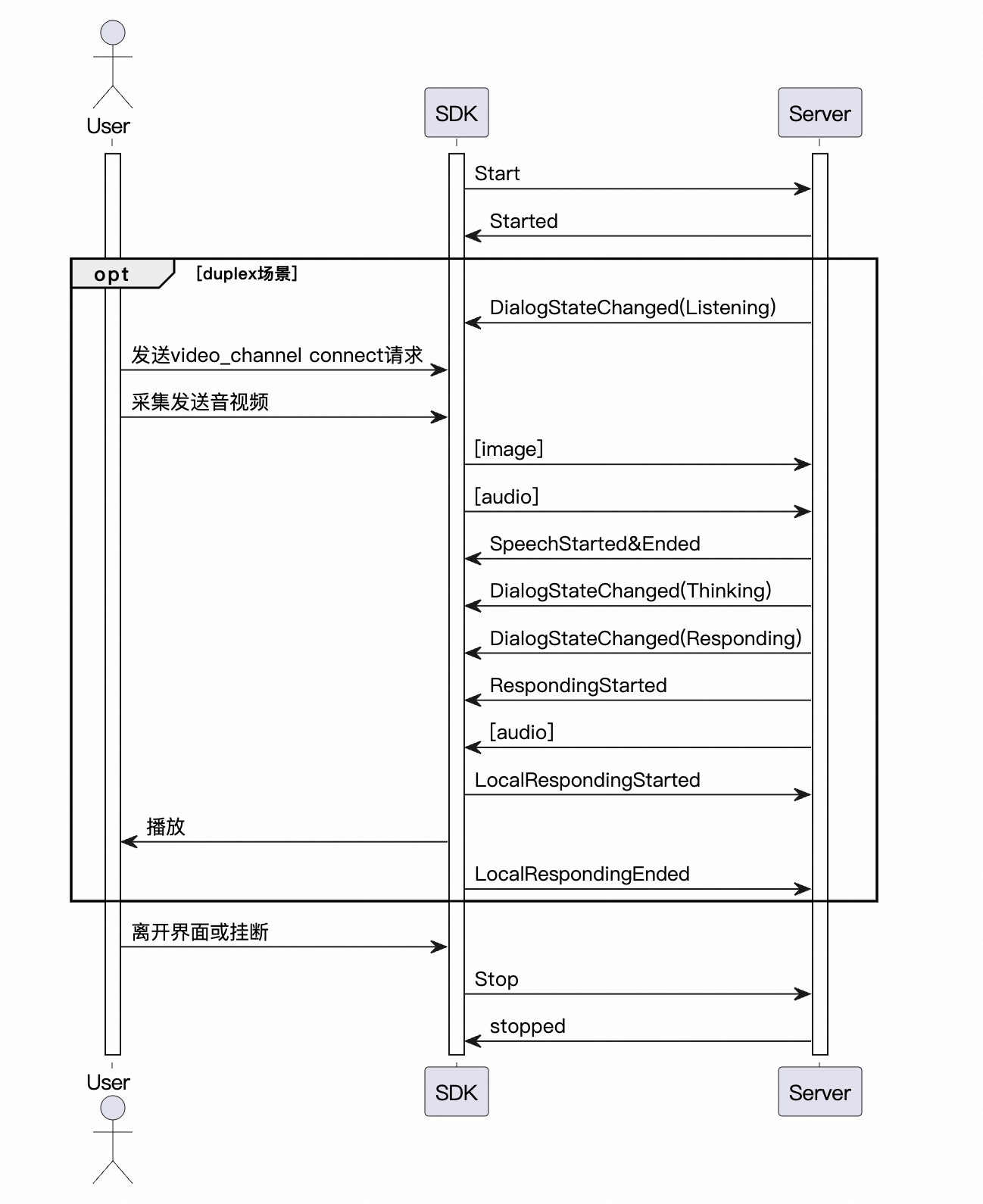
在典型的方案中,我们推荐您的客户端(网页或者APP)通过RTC与您的服务端建立连接,传输视频和音频。然后您将服务端采集到的视频帧以 500ms/张 的速度发送给多模交互SDK,同时保持实时的音频输入。 注意:LiveAI发送图片只支持base64编码,每张图片的大小在180K以下。- LiveAI调用时序
调用示例
我们在各语言的 SDK 文档中提供了通过 Websocket 链路接入 LiveAI 的示例,以下是通过服务端接入LiveAI 功能的简单示例。更多调用说明请参考SDK安装。public void testMultimodalLiveAI() {
log.info("############ Starting LiveAI Test ############");
try {
// Build request parameters for duplex mode
MultiModalRequestParam params = buildBaseRequestParams("duplex");
log.info("Request parameters: {}", JsonUtils.toJson(params));
// Initialize conversation
conversation = new MultiModalDialog(params, getCallback());
conversation.start();
// Start send video frame loop
startVideoFrameStreaming();
// Wait for listening state
waitForListeningState();
conversation.sendHeartBeat();
// Send video channel connect request, will response command : switch_video_call_success
conversation.requestToRespond("prompt", "", connectVideoChannelRequest());
// Send audio data directly (no manual start needed for duplex)
sendAudioFromFile("./src/main/resources/what_in_picture.wav");
// Wait for listening state twice
waitForListeningState();
sendAudioFromFile("./src/main/resources/what_color.wav");
// Wait for conversation completion
waitForConversationCompletion(3);
// Clean up
stopConversation();
isVideoStreamingActive = false;
if (videoStreamingThread != null && videoStreamingThread.isAlive()) {
videoStreamingThread.interrupt();
}
} catch (Exception e) {
log.error("Error in LiveAI test: ", e);
} finally {
log.info("############ LiveAI Test Completed ############");
}
}
/**
* Build video channel connection request for LiveAI
*
* @return UpdateParams containing video channel connection configuration
*/
private MultiModalRequestParam.UpdateParams connectVideoChannelRequest(){
Map<String, String> video = new HashMap<>();
video.put("action", "connect");
video.put("type", "voicechat_video_channel");
ArrayList<Map<String, String>> videos = new ArrayList<>();
videos.add(video);
MultiModalRequestParam.BizParams bizParams = MultiModalRequestParam.BizParams.builder().videos(videos).build();
return MultiModalRequestParam.UpdateParams.builder().bizParams(bizParams).build();
}
/**
* Start continuous video frame streaming for LiveAI
*/
private void startVideoFrameStreaming() {
log.info("Starting continuous video frame streaming for LiveAI...");
vqaUseUrl = false;
isVideoStreamingActive = true;
videoStreamingThread = new Thread(() -> {
try {
while (isVideoStreamingActive && !Thread.currentThread().isInterrupted()) {
Thread.sleep(VIDEO_FRAME_INTERVAL_MS);
MultiModalRequestParam.UpdateParams videoUpdate =
MultiModalRequestParam.UpdateParams.builder()
.images(getMockImageRequest())
.build();
if (conversation != null && isVideoStreamingActive) {
conversation.updateInfo(videoUpdate);
log.debug("Video frame sent to LiveAI");
}
}
} catch (InterruptedException e) {
log.info("Video streaming thread interrupted - stopping video stream");
Thread.currentThread().interrupt();
} catch (Exception e) {
log.error("Error in video streaming thread: ", e);
} finally {
log.info("Video streaming thread terminated");
}
});
videoStreamingThread.setDaemon(true);
videoStreamingThread.setName("LiveAI-VideoStreaming");
videoStreamingThread.start();
log.info("Video streaming thread started successfully");
}