Voice passthrough to Image Generation Agent (WebSocket)

This document describes how to use the WebSocket protocol to send voice requests directly to the Image Generation Agent for text-to-image generation.

Key concepts

Direct passthrough: Sends a voice request directly to an agent, bypassing intent recognition.

image.png

Use cases

This feature is suitable for scenarios that require text-to-image generation, such as AI-powered printers or educational devices.

Prerequisites

You must first read Start a session to understand the overall WebSocket protocol for real-time multimodal interaction.

Activate Model Studio and get an API key

Refer to Get an API key. The API key authenticates requests to Model Studio.

Console configuration

  1. In the Multimodal Development Kit console, create a multimodal interaction application. Select the All-in-one edition (not the Vision edition), enable speech recognition, and disable speech synthesis.
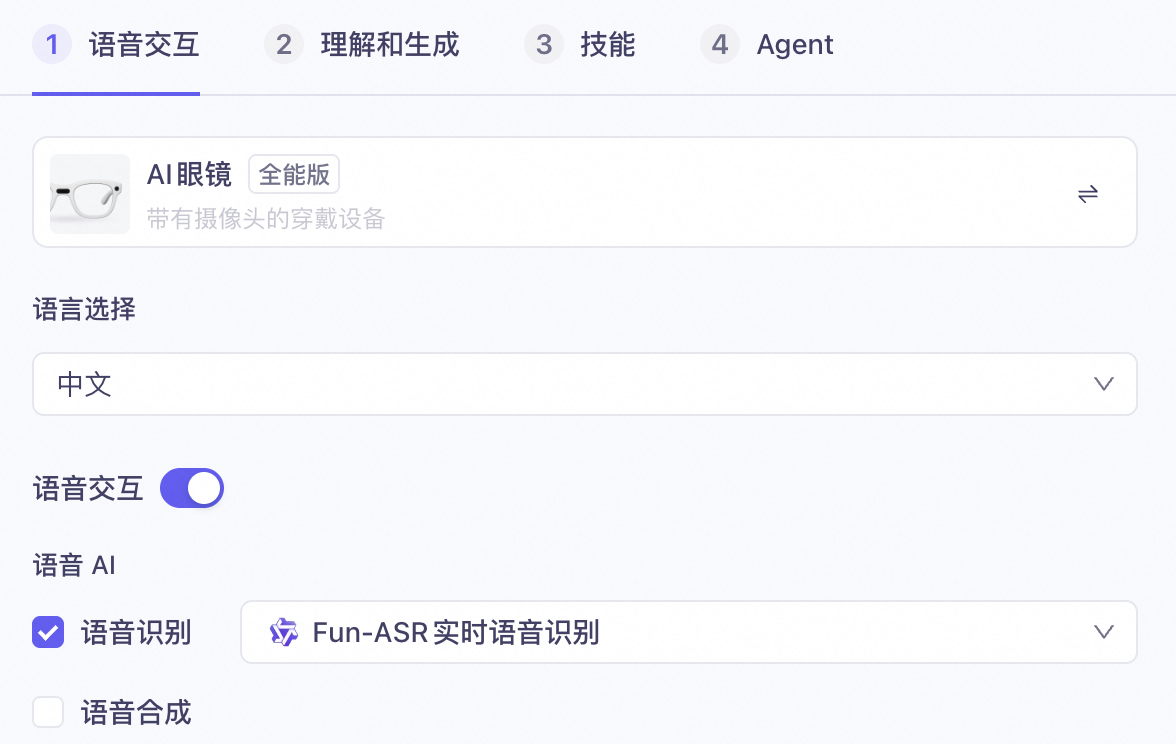
    image.png
  2. Keep intent recognition and the text model enabled.
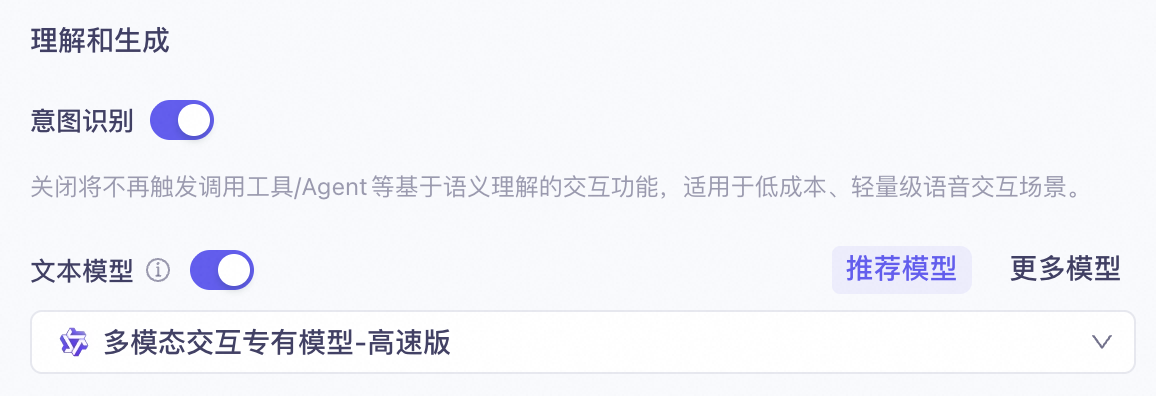
    image.png
    Both intent recognition and text model configurations must be enabled. With the configuration described in this document, using the Image Generation Agent does not incur fees for intent recognition or the text model.
  3. Disable follow-up responses, knowledge base, web search, and long-term memory.
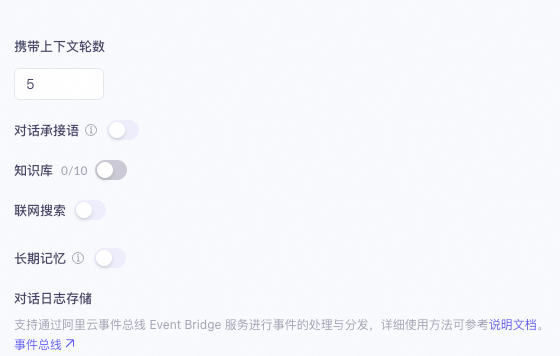
    image.png
  4. Clear all skills and MCP services. Keep only the Image Generation Agent.
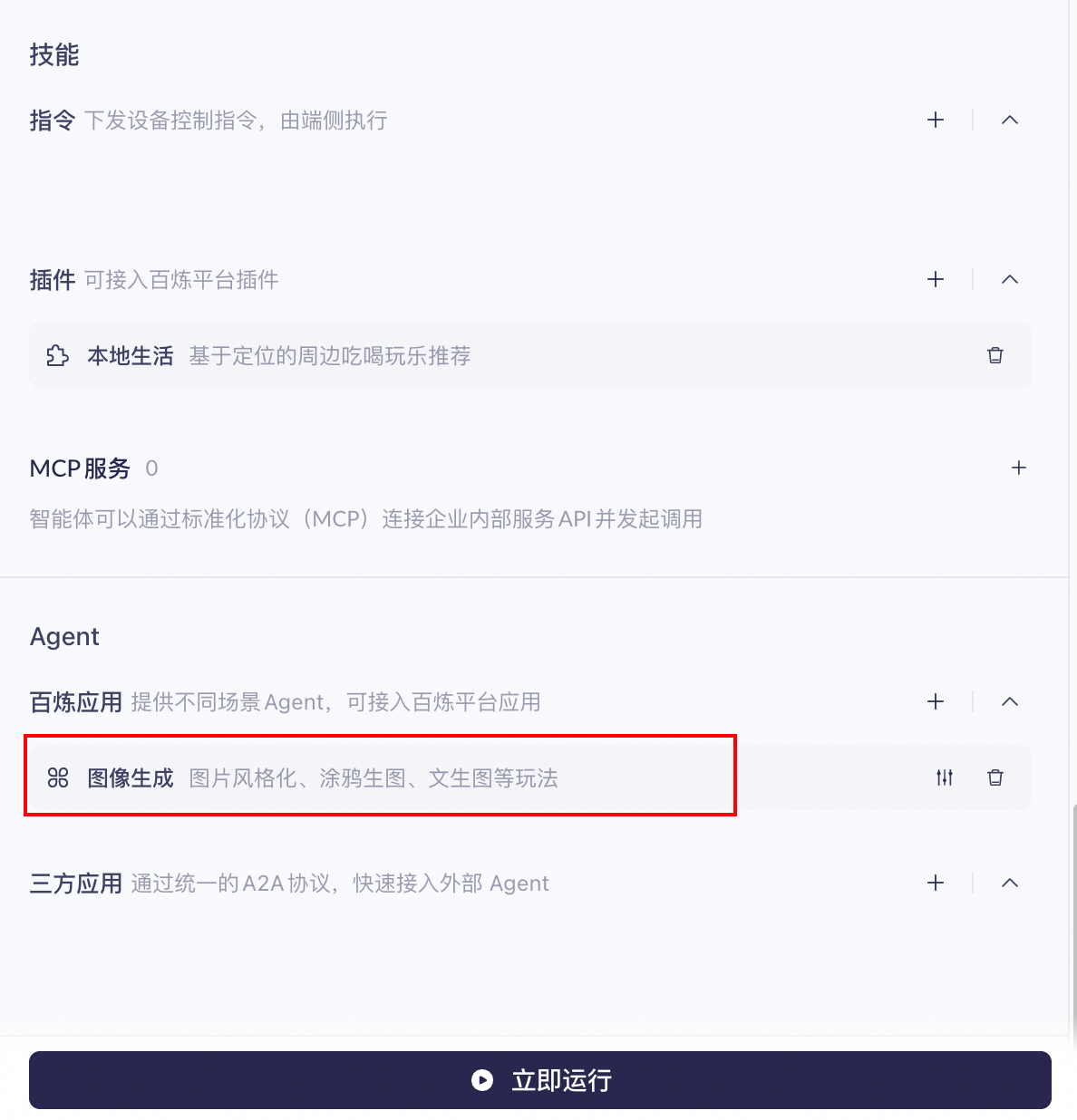
    image.png
  5. Configure the Image Generation Agent. Currently, direct voice passthrough to the Image Generation Agent only supports the text-to-image mode. The sketch-to-image and image assistant modes are not supported.
  6. Each function provides options for model selection, prompts, smart positive prompt optimization, and negative prompts. You can add variables to your prompts to dynamically pass in different content.
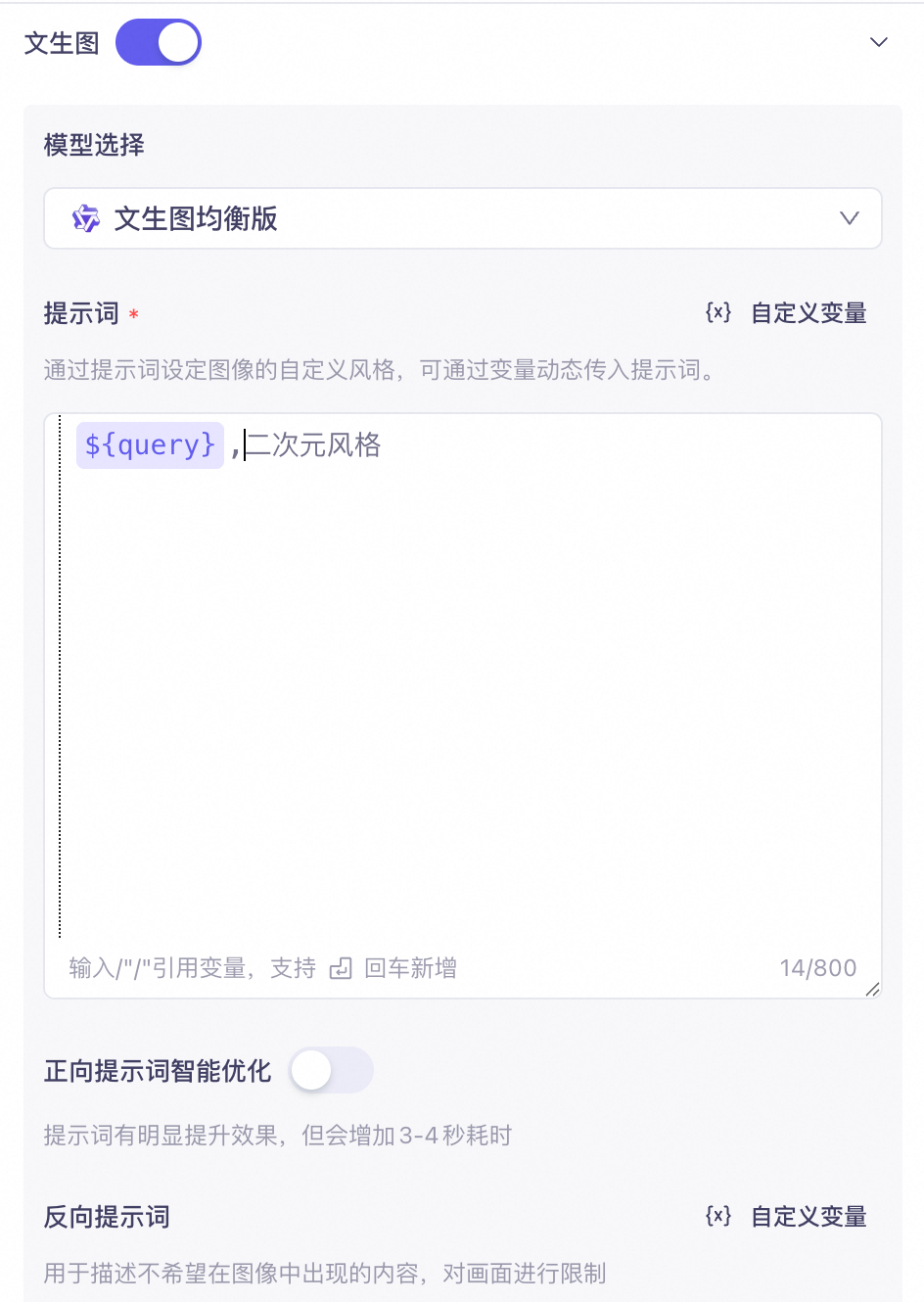
    image.png
    image.png
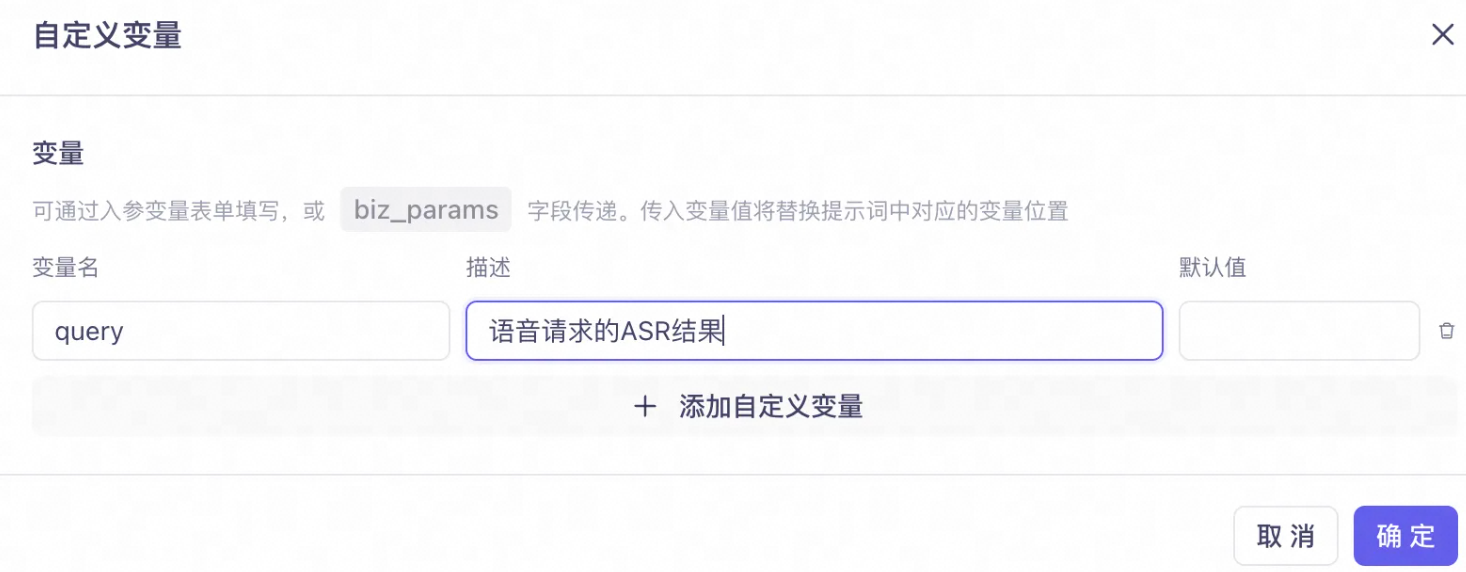
    When using direct voice passthrough to the Image Generation Agent, you must define a custom query variable in the prompt. You only need to define the variable; you do not need to set its value. The system automatically uses this variable to inject the speech recognition (ASR) result from the voice request into the image generation prompt. If you do not define the query variable, the system cannot inject the voice request content into the prompt.For example, if you set the text-to-image prompt to ${query}, anime style and the ASR result is "a cute puppy", the final prompt received by the image generation model will be "a cute puppy, anime style".
  7. After you complete the configuration, click Publish in the upper-right corner. You must publish the application before you can test it.

WebSocket protocol integration

Start a session

Refer to the instructions in Start a session. You must apply the following configurations in the session start message.

Enable streaming text responses

  • Set the parameters.downstream.intermediate_text field to dialog.
  • Set the parameters.downstream.incremental_response field to true.

Set direct passthrough agent and parameters

Use the parameters.biz_params.commands[] field to set the direct passthrough agent. Use the parameters.biz_params.user_defined_params field to set the parameters to pass through to the agent.

Parent parameter

Parameter

Sub-parameter

Type

Description

commands[]

name

String

Set to the fixed value agent_command.

exec_params

Object

app_id

String

The ID of the agent to which the request is passed directly. For this procedure, set this to image_to_image to target the Image Generation Agent.

intent

String

For this procedure, set this to open_image_to_image.

slots

Array

The slot information required by the agent.

user_defined_params

Object

Parameters to pass through to the agent.

image_to_image

Object

Specifies the parameters passed to the Image Generation Agent.

user_prompt_params

Object

Used to pass custom variables defined in the prompt for the Image Generation Agent.

parameters.biz_params.commands.exec_params.slots parameter

name

string

Yes

The name of the slot.

norm_value

string

Yes

The value of the slot.

For the Image Generation Agent, you must populate the function and size slots.
{
      "slots": [
          {
            "name": "function",
            "norm_value" :"textToImage"
          },
          {
            "name":"size",
            "norm_value":"768*768"
          }
      ]
}
The function parameter specifies the image generation feature. Three values are supported, but this document only covers text-to-image.
  • textToImage: text-to-image
  • imageAssistant: image assistant
  • sketchToImage: sketch-to-image
The size parameter specifies the resolution of the generated image. The supported resolution depends on the selected mode and model. The following table lists the supported resolution ranges.

Image generation mode

Model configuration

Supported resolution

text-to-image

Lightweight

The image width and height must be in the range of [200, 2048], with an aspect ratio between [1:4, 4:1]. For example, 256x2048 is not allowed because its aspect ratio is 1:8.

Balanced

Advanced

The total number of pixels (width × height) must be between 1,638,400 (1280×1280) and 2,073,600 (1440×1440).

Image aspect ratio: [1:4, 4:1]

parameters.biz_params.user_defined_params.image_to_image.user_prompt_params parameter
This parameter is required for passing custom prompt variables to the Image Generation Agent. This procedure requires you to define a query custom variable in the prompt, making this parameter mandatory. Note that the value for query must be an empty string (""). The system automatically populates this variable with the ASR result from the voice request.

Parameter

Sub-parameter

Type

Required

Description

user_prompt_params

positive

object

Yes

Custom variables for the positive prompt. Required for this procedure.

negative

object

No

Custom variables for the negative prompt.

{
    "biz_params": {
        "commands": [
            {
                "exec_params": {
                    "app_id": "image_to_image",
                    "intent": "open_image_to_image",
                    "slots": [
                        {
                            "name": "function",
                            "norm_value": "textToImage"
                        },
                        {
                            "name": "size",
                            "norm_value": "768*768"
                        }
                    ]
                },
                "name": "agent_command"
            }
        ],
        "user_defined_params": {
            "image_to_image": {
                "user_prompt_params": {
                    "positive": {
                        "query": ""
                    }
                }
            }
        }
    }
}
The parameters.downstream.intermediate_text and parameters.downstream.incremental_response fields can only be set in the initial message when establishing the WebSocket connection and remain effective for the entire session.In contrast, the parameters.biz_params.commands[] and parameters.biz_params.user_defined_params fields can be set in the initial message or dynamically updated after the connection is established using the UpdateInfo - Input Message message.

Session start message

{
    "header": {
        "action": "run-task",
        "streaming": "duplex",
        "task_id": "b96c2068b*****"
    },
    "payload": {
        "function": "generation",
        "input": {
            "app_id": "mm_***********",
            "directive": "Start",
            "workspace_id": "llm-***********"
        },
        "model": "multimodal-dialog",
        "parameters": {
            "biz_params": {
                "commands": [
                    {
                        "exec_params": {
                            "app_id": "image_to_image",
                            "intent": "open_image_to_image",
                            "slots": [
                                {
                                    "name": "function",
                                    "norm_value": "textToImage"
                                },
                                {
                                    "name": "size",
                                    "norm_value": "768*768"
                                }
                            ]
                        },
                        "name": "agent_command"
                    }
                ],
                "user_defined_params": {
                    "image_to_image": {
                        "user_prompt_params": {
                            "positive": {
                                "query": ""
                            }
                        }
                    }
                }
            },
            "client_info": {
                "device": {
                    "uuid": "uuid_12345"
                },
                "location": {
                    "city_name": "China (Hangzhou)",
                    "latitude": "120.121",
                    "longitude": "30.221"
                },
                "user_id": "test_12345"
            },
            "downstream": {
                "audio_format": "pcm",
                "debug": false,
                "incremental_response": "true",
                "intermediate_text": "dialog",
                "pitch_rate": 100,
                "sample_rate": 48000,
                "speech_rate": 100,
                "type": "Audio",
                "voice": "longanhuan",
                "volume": 50
            },
            "upstream": {
                "mode": "duplex",
                "type": "AudioAndVideo"
            }
        },
        "task": "multimodal-generation",
        "task_group": "aigc"
    }
}

Conversation states

When using direct voice passthrough to the Image Generation Agent, the conversation state cycle changes from listening→thinking→responding→listening to listening→thinking→listening. Because this mode does not perform speech synthesis (TTS), the responding state is skipped.

Response event

To parse the image generation response, listen for the RespondingContent event. If image generation takes a long time (for example, due to a high resolution), the service first sends one or more heartbeats before returning the final URL of the generated image.

Parameter

Sub-parameter

Type

Required

Description

output

event

string

Yes

Event name: RespondingContent

dialog_id

string

Yes

The dialog ID.

round_id

string

Yes

The ID of the current interaction round.

llm_request_id

string

Yes

The request ID for the LLM call.

text

string

Yes

The URL of the generated image. While the image is being generated, the value is RUNNINGRUNNING. After generation is complete, the value is the image URL.

spoken

string

Yes

The content for speech synthesis. You can ignore this field if speech synthesis is disabled. In this implementation, the content is the same as the text field.

finished

bool

Yes

Indicates whether the output is complete.

finish_reason

string

No

The reason the output finished. Currently, the only value is:

  • stop: Indicates a normal completion.

extra_info

object

No

Other extended information. Currently supports:

  • agent_info: Information about the agent. See the following section for details.

output.extra_info.agent_info parameter

Parameter

Sub-parameter

Type

Required

Description

round

string

Yes

The conversation round.

device

device_id

string

Yes

The device.uuid used in the request.

intent_infos

intent

string

Yes

The intent being executed. In this scenario, the value is open_image_to_image.

domain

string

Yes

The agent being used. In this scenario, the value is image_to_image.

Heartbeat response

{
    "header": {
        "task_id": "b96c206****",
        "event": "result-generated",
        "attributes": {

        }
    },
    "payload": {
        "output": {
            "event": "RespondingContent",
            "text": "RUNNINGRUNNING",
            "spoken": "RUNNINGRUNNING",
            "finished": false,
            "extra_info": {
                "tool_infos": [
                    {
                        "output": "",
                        "tool_name": "image_to_image",
                        "success": true,
                        "arguments": {

                        },
                        "type": "agent"
                    }
                ],
                "agent_info": {
                    "intent_infos": [
                        {
                            "domain": "image_to_image",
                            "intent": "open_image_to_image"
                        }
                    ],
                    "location": {
                        "city": "China (Hangzhou)",
                        "latitude": "120.121",
                        "longitude": "30.221"
                    },
                    "device": {
                        "device_id": "uuid_12345"
                    },
                    "round": 2
                },
                "query": "Generate an image of a lamb."
            },
            "dialog_id": "48b2f122-****",
            "round_id": "0dc854c6c****",
            "llm_request_id": "0614e****"
        }
    }
}
Example of a response containing the generated image URL
{
    "header": {
        "task_id": "b96c20****",
        "event": "result-generated",
        "attributes": {

        }
    },
    "payload": {
        "output": {
            "event": "RespondingContent",
            "text": "img_url",
            "spoken": "img_url",
            "finished": true,
            "finish_reason": "stop",
            "extra_info": {
                "tool_infos": [
                    {
                        "output": "",
                        "tool_name": "image_to_image",
                        "success": true,
                        "arguments": {

                        },
                        "type": "agent"
                    }
                ],
                "agent_info": {
                    "intent_infos": [
                        {
                            "domain": "image_to_image",
                            "intent": "open_image_to_image"
                        }
                    ],
                    "location": {
                        "city": "China (Hangzhou)",
                        "latitude": "120.121",
                        "longitude": "30.221"
                    },
                    "device": {
                        "device_id": "uuid_12345"
                    },
                    "round": 2
                },
                "query": "Generate an image of a lamb."
            },
            "dialog_id": "48b2f122-****",
            "round_id": "0dc854c6c****",
            "llm_request_id": "0614e****"
        }
    }
}

Connect using the Device-side C SDK

Initialize the configuration.
mmi_user_config_t mmi_config = C_MMI_CONFIG_DEFAULT();

mmi_config.text_mode = C_MMI_TEXT_MODE_BOTH;    // Can also be set to C_MMI_TEXT_MODE_LLM_ONLY
mmi_config.incremental_response = 1;
...    // Other configurations

c_mmi_config(&mmi_config);
To enable image generation, run the following code:
cJSON *biz = cJSON_CreateObject();
cJSON *commands = cJSON_AddArrayToObject(biz, "commands");
cJSON *command = cJSON_CreateObject();
cJSON *exec_params = cJSON_AddObjectToObject(command, "exec_params");
cJSON_AddStringToObject(exec_params, "app_id", "image_to_image");
cJSON_AddStringToObject(exec_params, "intent", "open_image_to_image");
cJSON *slots = cJSON_AddArrayToObject(exec_params, "slots");
cJSON *s_function = cJSON_CreateObject();
cJSON *s_size = cJSON_CreateObject();
cJSON_AddStringToObject(s_function, "name", "function");
cJSON_AddStringToObject(s_function, "norm_value", "textToImage");
cJSON_AddStringToObject(s_size, "name", "size");
cJSON_AddStringToObject(s_size, "norm_value", "768*768");
cJSON_AddItemToArray(slots, s_function);
cJSON_AddItemToArray(slots, s_size);
cJSON_AddStringToObject(command, "name", "agent_command");
cJSON_AddItemToArray(commands, command);
cJSON *user_defined_params = cJSON_AddObjectToObject(biz, "user_defined_params");
cJSON *image_to_image = cJSON_AddObjectToObject(user_defined_params, "image_to_image");
cJSON *user_prompt_params = cJSON_AddObjectToObject(image_to_image, "user_prompt_params");
cJSON *positive = cJSON_AddObjectToObject(user_prompt_params, "positive");
cJSON_AddStringToObject(positive, "query", "");
c_mmi_update_biz_params(biz);
Then, describe the image that you want to generate in your voice input. The service will return the URL of the generated image.
Agent Development
Agent Context
Agent Governance & Evolution
Store
Application Marketplace