

This topic provides best practice examples for AMB Search APIs. You can use these examples to get started and develop your applications.
Function overview
1.1. Brief description
AMB Search includes a built-in web search feature that generates intelligent search results from general knowledge and information. For searches across more specific domains and enterprise knowledge, AMB Search also lets you import data sources through APIs or by uploading files. You can use the following APIs to configure and manage your enterprise knowledge. Go to the console:

1.2. Product page display

1.2.1. Data source management
Console entrance
This feature is located in the Data Source Management menu. This menu provides instructions for data ingestion and lets you use Platform as a Service (PaaS) APIs to maintain data sources and the knowledge within datasets.
Function description
You can maintain one or more data sources from which the intelligent search module can retrieve knowledge. Three types of data sources are currently supported:
- Built-in data source: This is a built-in data source that cannot be modified. It currently includes web search, which supports searching for website data that is publicly available on the Internet.
- Import data source through API: If your company provides a search API, AMB Search can integrate it with its Large Language Model (LLM) capabilities. This option currently requires you to contact our technical support team for maintenance because it is not yet available for custom configuration.
- Upload files as a data source: If your company provides the knowledge, AMB Search provides the search and LLM capabilities. You can use the dataset-related APIs under Data Source Management to maintain indexes and the knowledge they contain.
API:Data source management
1.2.2. System configuration -> General/Media asset search source
Console entrance
This feature is located on the General Search Source and Media Asset Search Source tabs in the System Configuration menu.
Function description
You can enable or disable indexes and configure the number of retrieved articles and chunks (segments) for the two tabs in the intelligent search module.
API:System configuration - Data source management
1.2.3. Intelligent search
Console entrance
- The multimodal search box on the AMB Search home page.

- Search Materials in the upper-right corner of the AMB Search home page.

Function description
This feature provides in-depth multimodal search for general fields and industries, such as film and television, media, and marketing.
API:Intelligent search
You can configure the data source in the chatconfig.SearchSource field.
Overall PaaS API integration plan
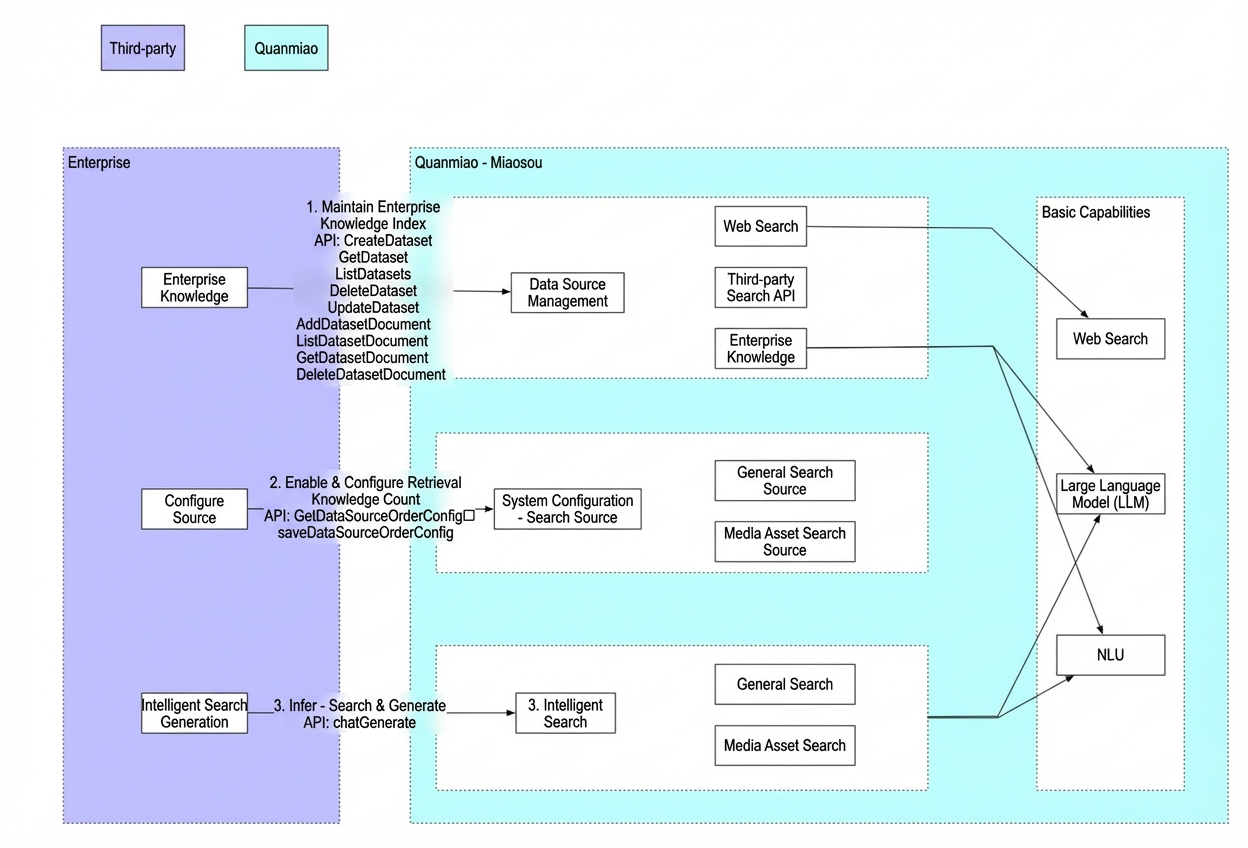
2.1. Plan overview
2.2. API details
-
AMB Search - Data Source: Used to maintain enterprise knowledge.
- CreateDataset - Data source - Create
- GetDataset - Data source - Details
- UpdateDataset - Data source - Modify
- ListDatasets - Data source - List
- DeleteDataset - Data source - Delete
- AddDatasetDocument - Data source - Add document to dataset
- GetDatasetDocument - Data source - Get document details
- UpdateDatasetDocument - Data source - Modify document
- ListDatasetDocuments - Data source - Document list
- SearchDatasetDocuments - Data source - Search documents
- DeleteDatasetDocument - Data source - Delete dataset document
- System configuration - Data source management: Used to configure data sources. You can perform this configuration in the console.
-
RunSearchGeneration - AMB Search - Intelligent search: Provides end-to-end intelligent search generation and inference capabilities.
- RunSearchGeneration - AMB Search - Intelligent search
- ListSearchTasks - Query the list of historical AMB Search generation tasks
- ListSearchTaskDialogues - Query the list of AMB Search generation task details
- ListSearchTaskDialogueDatas - Query the data list in the details of a search generation task dialogue
PaaS API integration examples
3.1. Prerequisites
- You have activated this product for your Alibaba Cloud account.
- Obtain an AgentKey, AccessKeyId, and AccessKeySecret. For more information, see Obtain an AccessKey and AgentKey.
- Obtain a WorkspaceId. For more information, see Obtain a Workspace ID.
- Import the AMB software development kit (SDK). Make sure to obtain the latest SDK version.
- Import third-party dependencies: The Server-Sent Events (SSE) example in this topic uses the open source OkHttp component. If you use the example code, you must import the following POM dependency.
3.2. Management API (HTTP) -ListDatasets
Preparation:
- You have activated the product on your Alibaba Cloud account.
- Obtain an AccessKey. This corresponds to ALIBABA_CLOUD_ACCESS_KEY_ID in the example.
- Obtain an AccessKeySecret. This corresponds to ALIBABA_CLOUD_ACCESS_KEY_SECRET in the example.
- Obtain a WorkspaceId. This corresponds to WorkspaceId in the example.
API description
- Miaosou - Data Source List API
API documentation
Online debugging
ListDatasets_AMB_API Debugging-Alibaba Cloud OpenAPI Developer Portal.
Example call
- Java SDK:
3.3. Inference API (HTTP-SSE)-RunSearchGeneration
Preparation
- The product has been activated for your Alibaba Cloud account.
- Obtain an AccessKey. This corresponds to ALIBABA_CLOUD_ACCESS_KEY_ID in the example.
- Obtain an AccessKeySecret. This corresponds to ALIBABA_CLOUD_ACCESS_KEY_SECRET in the example.
- Obtain a WorkspaceId. This corresponds to WorkspaceId in the example.
API description
- Miao Sou is an intelligent search API.
API documentation
Example call
- Java SDK:
- Python:
Response example
The
event:task-finished message indicates that the search generation task is complete.Simple demo examples
The following demo examples are designed for different scenarios. You can use these examples directly.
Summarize and generate answer + Data source - Web search
Summarize and generate answer + Data source - Web search + Skip follow-up question
Answer with original sentences + Data source - Web search
Summarize by timeline + Data source - Web search
Media asset search + Exact search + Data source - Web search
Best practices for business scenarios
4.1. Scenario 1:Intelligent web search
Scenario description
You can use general knowledge from the Internet for intelligent search generation when no enterprise-specific knowledge is available.
Technical integration steps
-
Configure the data source:
- In the 1.2.2. System configuration: General/Media asset search source section, enable web search and configure the number of items to retrieve.
-
Integrate with the intelligent search API:
- Call the API described in the 1.2.3. Intelligent search section and specify the web search dataset as the search source.
4.2. Scenario 2: Intelligent search with an enterprise search API
Scenario description
If your company has its own search capabilities, such as an enterprise knowledge base search or a third-party general domain search, you can integrate its search API. By leveraging the AMB Search LLM, you can achieve flexible, enterprise-grade intelligent search generation.
Technical integration steps:
-
Prepare the third-party enterprise search API:
- You must provide the API according to the recommended API template. Non-standard APIs or unsupported authentication methods require custom development. For more information, see Third-party search API specifications.
-
Configure the third-party enterprise search API:
- You must provide the account and API definition to the technical team for backend maintenance. The ability to customize third-party APIs will be available in a future release.
-
Configure the data source:
- In the 1.2.2. System configuration: General/Media asset search source section, enable the corresponding index and configure the number of items to retrieve.
-
Integrate with the intelligent search API:
- Call the API described in the 1.2.3. Intelligent search section and specify the corresponding dataset as the search source.
4.3. Scenario 3: Upload files as a data source
Scenario description:
If your enterprise knowledge requires semantic indexing, or if your existing enterprise knowledge search capabilities are not effective, you can use AMB Search to build a semantic index for your enterprise knowledge base. This index can then be used for intelligent search generation.
Technical integration steps:
-
Data integration: You can maintain the enterprise knowledge semantic index using the features in the 1.2.1. Data source management section.
- For a proof of concept (POC) or to build a temporary, fixed dataset, you can contact the technical team for a batch import.
-
Build using an API:
- Dataset - Add interface: Initializes a new dataset. This is a one-time global operation that you can perform in advance, for example, using curl.
- Dataset - Add document data interface: Adds enterprise knowledge to the dataset that you created in the previous step.
-
Configure the data source:
- In the 1.2.2. System configuration: General/Media asset search source section, enable the corresponding index and configure the number of items to retrieve.
-
Integrate with the intelligent search API:
- Call the API described in the 1.2.3. Intelligent search section and specify the corresponding dataset as the search source.