Get an AccessKey and an AgentKey for Alibaba Cloud Model Studio.
AccessKey
An AccessKey is a long-term credential for an Alibaba Cloud user. It includes an AccessKey ID and an AccessKey secret. Use an AccessKey to authenticate programmatic requests from APIs, CLIs, SDKs, Cloud Shell, and Terraform.
Create an AccessKey for a RAM user (recommended)
If you do not have a RAM user, create a RAM user and enable OpenAPI Call Access.
To create an AccessKey for a RAM user:
- Go to the RAM console. In the left-side navigation pane, choose Identities > Users. The page lists all RAM users in your Alibaba Cloud account.
- Find the RAM user you want and click the name in the User Logon Name/Display Name column to open the user details page.
- On the user details page, create an AccessKey pair.
Create an AccessKey for an Alibaba Cloud account (not recommended)
Create an AccessKey for your Alibaba Cloud account on the AccessKey Pair page.
AgentKey (deprecated)
An AgentKey specifies the workspace for an application from the Alibaba Cloud Model Studio App Square, such as Quanmiao, to access resources within that workspace.
Procedure:
- Go to the Alibaba Cloud Model Studio console homepage.
-
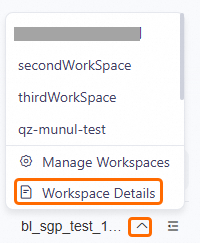
In the lower-left corner of the page, click the
 icon, and then click Workspace Details to get the AgentKey.
By default, RAM users can only view the IDs of the sub-workspaces they have joined.