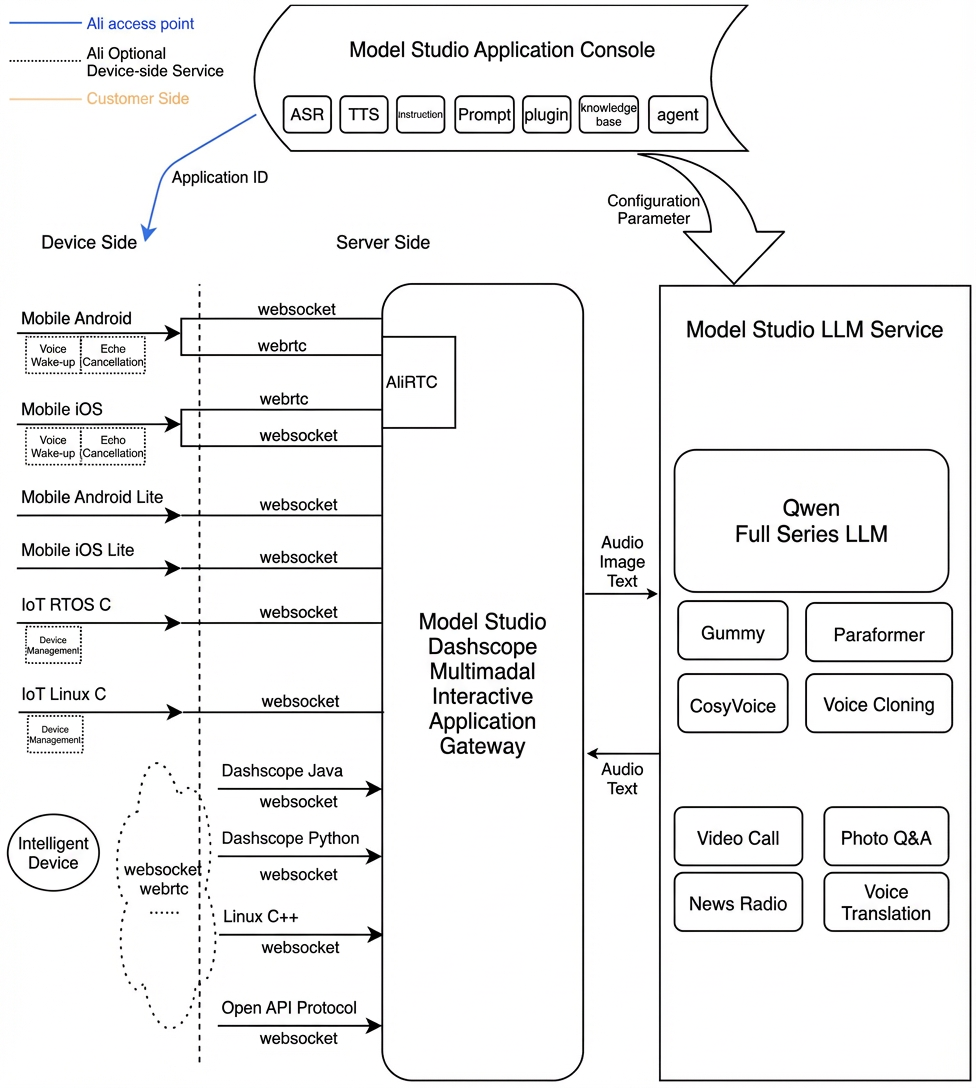
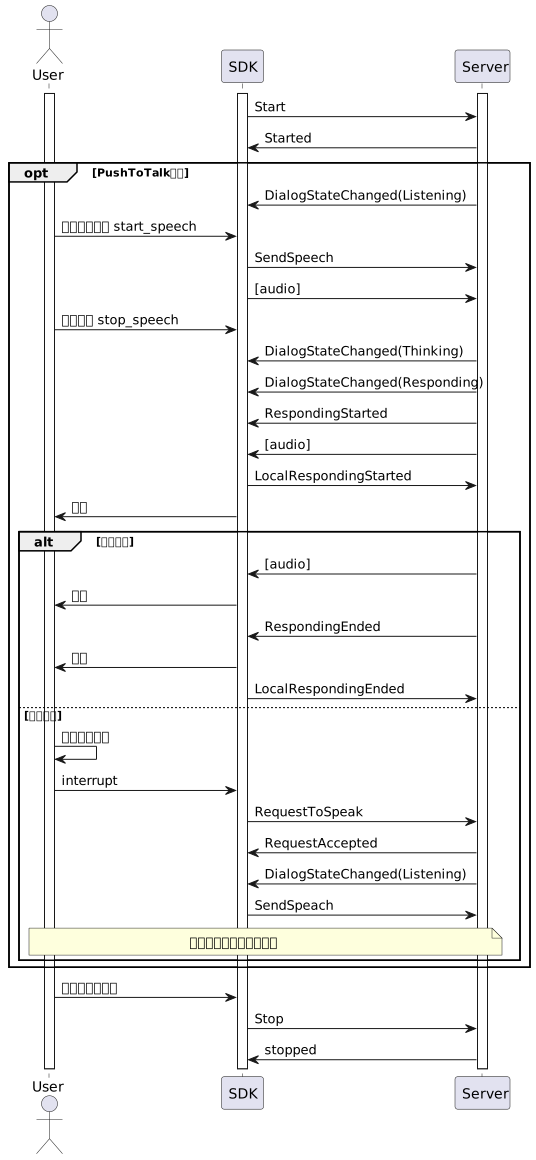
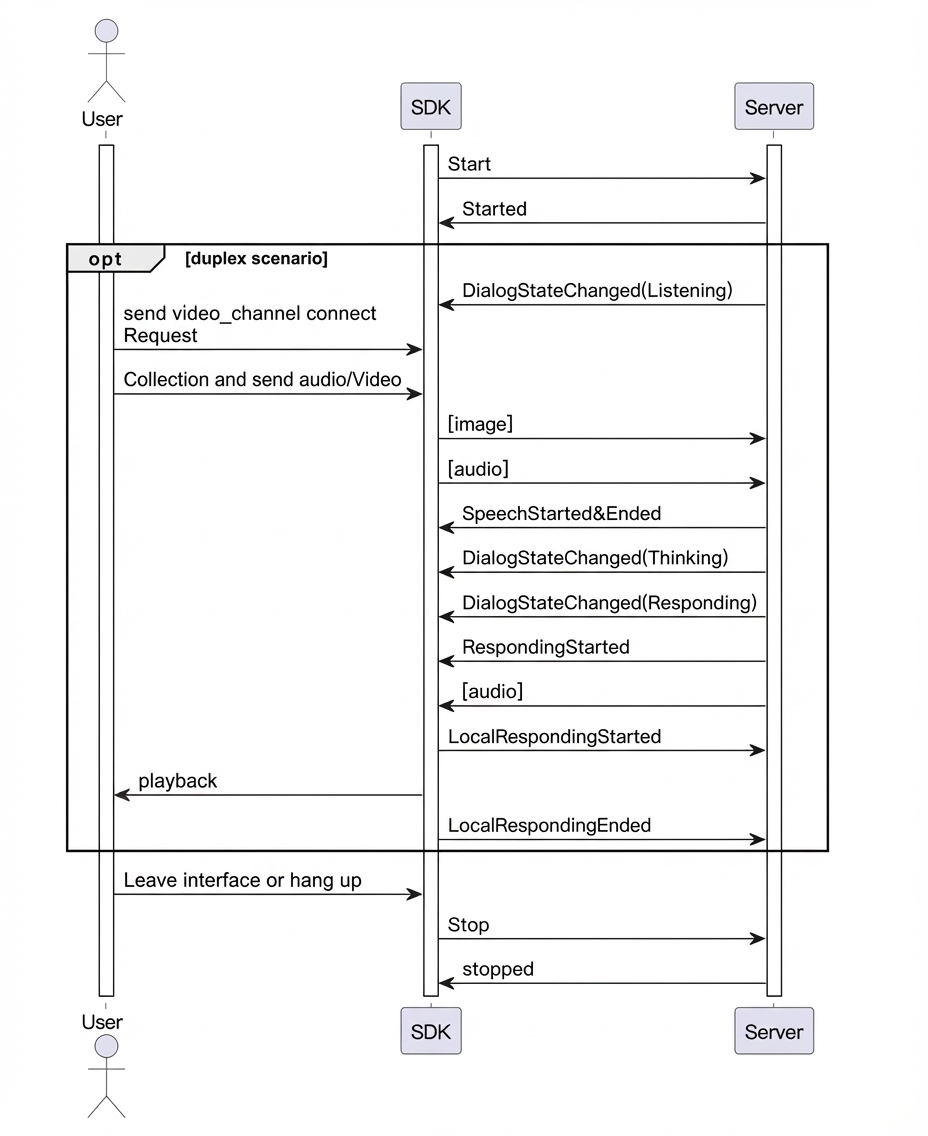
package org.alibaba.speech.examples.speech_plus;
import com.alibaba.dashscope.multimodal.MultiModalDialog;
import com.alibaba.dashscope.multimodal.MultiModalDialogCallback;
import com.alibaba.dashscope.multimodal.MultiModalRequestParam;
import com.alibaba.dashscope.multimodal.State;
import com.alibaba.dashscope.utils.Constants;
import com.alibaba.dashscope.utils.JsonUtils;
import com.google.gson.Gson;
import com.google.gson.JsonArray;
import com.google.gson.JsonElement;
import com.google.gson.JsonObject;
import org.alibaba.speech.examples.speech_plus.utils.FileWriterUtil;
import org.slf4j.Logger;
import org.slf4j.LoggerFactory;
import javax.sound.sampled.AudioInputStream;
import javax.sound.sampled.AudioSystem;
import java.io.File;
import java.io.FileInputStream;
import java.io.IOException;
import java.nio.ByteBuffer;
import java.util.*;
import static java.lang.Thread.sleep;
/**
* Demonstrates how to use the MultiModalDialog class for various interaction modes,
* including push-to-talk, tap-to-talk, duplex communication, text synthesis,
* visual Q&A, and agent DJ functionality.
*
* @author songsong.shao
* @date 2025/4/28
*/
public class MultiModalDialogTestCases {
private static final Logger log = LoggerFactory.getLogger(MultiModalDialogTestCases.class);
// Constants for audio processing
private static final int AUDIO_CHUNK_SIZE = 3200; // Audio chunk size in bytes
private static final int SLEEP_INTERVAL_MS = 100; // Sleep interval in milliseconds
private static final int WAIT_TIMEOUT_MS = 2000; // Wait timeout in milliseconds
private static final int VIDEO_FRAME_INTERVAL_MS = 500;
// State management variables
private static State.DialogState currentState;
private static MultiModalDialog conversation;
private static int enterListeningTimes = 0;
private static FileWriterUtil fileWriterUtil;
private static boolean vqaUseUrl = false;
private volatile boolean isVideoStreamingActive = false;
private Thread videoStreamingThread;
// Configuration parameters - set these before running tests
public static String workspaceId = "";
public static String appId = "";
public static String dialogId = "";
public static String apiKey = "";
public static String model = "";
/**
* Tests the push-to-talk interaction mode.
* Flow: Set the mode to `push2talk`, wait for the Listening state, start speech, send audio, stop speech, and wait for the response.
*/
public void testMultimodalPush2Talk() {
log.info("############ Starting Push2Talk Test ############");
try {
// Build request parameters for push-to-talk mode
MultiModalRequestParam params = buildBaseRequestParams("push2talk");
log.debug("Request parameters: {}", JsonUtils.toJson(params));
// Initialize conversation with callback
conversation = new MultiModalDialog(params, getCallback());
conversation.start();
// Wait for the system to enter listening state
waitForListeningState();
// Start speech recognition
conversation.startSpeech();
// Send audio data from file
sendAudioFromFile("../../../../sample-data/1_plus_1.wav");
// Stop speech recognition
conversation.stopSpeech();
// Wait for conversation completion
waitForConversationCompletion(2);
// Clean up
stopConversation();
} catch (Exception e) {
log.error("Error in push2talk test: ", e);
} finally {
log.info("############ Push2Talk Test Completed ############");
}
}
/**
* Tests the tap-to-talk interaction mode.
* Flow: Set the mode to `tap2talk`, wait for the Listening state, manually start speech, send audio, and wait for the response.
*/
public void testMultimodalTap2Talk() {
log.info("############ Starting Tap2Talk Test ############");
try {
// Build request parameters for tap-to-talk mode
MultiModalRequestParam params = buildBaseRequestParams("tap2talk");
log.debug("Request parameters: {}", JsonUtils.toJson(params));
// Initialize conversation
conversation = new MultiModalDialog(params, getCallback());
conversation.start();
// Wait for listening state
waitForListeningState();
// Manually start speech (required for tap2talk mode)
conversation.startSpeech();
// Send audio data
sendAudioFromFile("../../../../sample-data/1_plus_1.wav");
// Wait for conversation completion
waitForConversationCompletion(2);
// Clean up
stopConversation();
} catch (Exception e) {
log.error("Error in tap2talk test: ", e);
} finally {
log.info("############ Tap2Talk Test Completed ############");
}
}
/**
* Tests the duplex communication interaction mode.
* Flow: Set the mode to `duplex`, wait for the Listening state, send audio, and wait for the response.
*/
public void testMultimodalDuplex() {
log.info("############ Starting Duplex Test ############");
try {
// Build request parameters for duplex mode
MultiModalRequestParam params = buildBaseRequestParams("duplex");
log.info("Request parameters: {}", JsonUtils.toJson(params));
// Initialize conversation
conversation = new MultiModalDialog(params, getCallback());
conversation.start();
// Wait for listening state
waitForListeningState();
// Send audio data directly (no manual start needed for duplex)
sendAudioFromFile("../../../../sample-data/1_plus_1.wav");
// Wait for conversation completion
waitForConversationCompletion(2);
// Clean up
stopConversation();
} catch (Exception e) {
log.error("Error in duplex test: ", e);
} finally {
log.info("############ Duplex Test Completed ############");
}
}
/**
* Tests the text synthesis feature.
* Flow: Send text for TTS and save the synthesized audio.
*/
public void testMultimodalTextSynthesizer() {
log.info("############ Starting Text Synthesizer Test ############");
try {
// Initialize file writer for audio output
fileWriterUtil = new FileWriterUtil();
// Build request parameters
MultiModalRequestParam params = buildBaseRequestParams("push2talk");
log.debug("Request parameters: {}", JsonUtils.toJson(params));
// Initialize conversation
conversation = new MultiModalDialog(params, getCallback());
conversation.start();
// Wait for listening state
waitForListeningState();
// Create output file for synthesized audio
fileWriterUtil.createFile("./test.pcm");
// Request text synthesis
String textToSynthesize = "Happiness is a skill. It's the inner peace you feel when you let go of wanting too much.";
conversation.requestToRespond("transcript", textToSynthesize, null);
// Wait for synthesis completion
waitForConversationCompletion(2);
// Finalize audio file
fileWriterUtil.finishWriting();
// Clean up
conversation.stop();
} catch (IOException e) {
log.error("File operation error in text synthesizer test: ", e);
} catch (Exception e) {
log.error("Error in text synthesizer test: ", e);
} finally {
log.info("############ Text Synthesizer Test Completed ############");
}
}
/**
* Tests the visual Q&A feature by using a URL-based image.
* Flow: Send a visual Q&A request, receive a `visual_qa` command, send an image list, and get the response.
*/
public void testMultimodalVQA() {
log.info("############ Starting VQA Test (URL-based) ############");
try {
vqaUseUrl = true;
// Build request parameters
MultiModalRequestParam params = buildBaseRequestParams("push2talk");
log.debug("Request parameters: {}", JsonUtils.toJson(params));
// Initialize conversation
conversation = new MultiModalDialog(params, getCallback());
conversation.start();
// Wait for listening state
waitForListeningState();
// Send VQA request
conversation.requestToRespond("prompt", "Take a picture and tell me what you see.", null);
// Wait for VQA processing completion
waitForConversationCompletion(3);
// Clean up
stopConversation();
} catch (Exception e) {
log.error("Error in VQA test: ", e);
} finally {
log.info("############ VQA Test Completed ############");
}
}
/**
* Tests the visual Q&A feature by using a Base64-encoded image.
* Flow: Send a visual Q&A request, receive a `visual_qa` command, send the Base64-encoded image, and get the response.
*/
public void testMultimodalVQABase64() {
log.info("############ Starting VQA Test (Base64-based) ############");
try {
vqaUseUrl = false;
// Build request parameters
MultiModalRequestParam params = buildBaseRequestParams("push2talk");
log.debug("Request parameters: {}", JsonUtils.toJson(params));
// Initialize conversation
conversation = new MultiModalDialog(params, getCallback());
conversation.start();
// Wait for listening state
waitForListeningState();
// Send VQA request
conversation.requestToRespond("prompt", "Take a picture and tell me what you see.", null);
// Wait for VQA processing completion
waitForConversationCompletion(3);
// Clean up
stopConversation();
} catch (Exception e) {
log.error("Error in VQA Base64 test: ", e);
} finally {
log.info("############ VQA Base64 Test Completed ############");
}
}
/**
* Tests the brightness adjustment feature.
* Flow: Send a brightness adjustment request and process the response.
*/
public void testMultimodalAdjustBrightness() {
log.info("############ Starting Brightness Adjustment Test ############");
try {
vqaUseUrl = true;
// Build request parameters
MultiModalRequestParam params = buildBaseRequestParams("push2talk");
log.debug("Request parameters: {}", JsonUtils.toJson(params));
// Initialize conversation
conversation = new MultiModalDialog(params, getCallback());
conversation.start();
// Wait for listening state
waitForListeningState();
// Send brightness adjustment request
conversation.requestToRespond("prompt", "Increase the brightness to 10.", null);
// The following code block demonstrates creating a status update. It is not used in this test.
JsonObject status = new JsonObject();
JsonObject bluetoothAnnouncement = new JsonObject();
bluetoothAnnouncement.addProperty("status", "stopped");
status.add("bluetooth_announcement", bluetoothAnnouncement);
MultiModalRequestParam.UpdateParams updateParams = MultiModalRequestParam.UpdateParams.builder()
.clientInfo(MultiModalRequestParam.ClientInfo.builder()
.status(status)
.build())
.build();
// Wait for processing completion
waitForConversationCompletion(2);
log.info("############ Before stopping conversation ############");
// Clean up
stopConversation();
} catch (Exception e) {
log.error("Error in brightness adjustment test: ", e);
} finally {
log.info("############ Brightness Adjustment Test Completed ############");
}
}
/**
* Tests the Agent DJ feature.
* Flow: Send a radio station request and process the response.
*/
public void testMultimodalAgentDJ() {
log.info("############ Starting Agent DJ Test ############");
try {
vqaUseUrl = false;
// Build request parameters
MultiModalRequestParam params = buildBaseRequestParams("push2talk");
log.debug("Request parameters: {}", JsonUtils.toJson(params));
// Initialize conversation
conversation = new MultiModalDialog(params, getCallback());
conversation.start();
// Wait for listening state
waitForListeningState();
// Send DJ request
conversation.requestToRespond("prompt", "Turn on the news radio station.", null);
// Wait for DJ processing completion
waitForConversationCompletion(3);
// Clean up
stopConversation();
} catch (Exception e) {
log.error("Error in Agent DJ test: ", e);
} finally {
log.info("############ Agent DJ Test Completed ############");
}
}
/**
* Tests the LiveAI feature with real-time video streaming and audio interaction.
* Flow: Set the mode to duplex, start video streaming, wait for the Listening state, connect the video channel, send audio queries, and then process responses that have visual context.
*/
public void testMultimodalLiveAI() {
log.info("############ Starting LiveAI Test ############");
try {
// Build request parameters for duplex mode
MultiModalRequestParam params = buildBaseRequestParams("duplex");
log.info("Request parameters: {}", JsonUtils.toJson(params));
// Initialize conversation
conversation = new MultiModalDialog(params, getCallback());
conversation.start();
// Start send video frame loop
startVideoFrameStreaming();
// Wait for listening state
waitForListeningState();
conversation.sendHeartBeat();
// Sends a request to connect the video channel. The service responds with a `switch_video_call_success` command.
conversation.requestToRespond("prompt", "", connectVideoChannelRequest());
// Send audio data directly (no manual start needed for duplex)
sendAudioFromFile("./src/main/resources/what_in_picture.wav");
// Wait for listening state twice
waitForListeningState();
sendAudioFromFile("./src/main/resources/what_color.wav");
// Wait for conversation completion
waitForConversationCompletion(3);
// Clean up
stopConversation();
isVideoStreamingActive = false;
if (videoStreamingThread != null && videoStreamingThread.isAlive()) {
videoStreamingThread.interrupt();
}
} catch (Exception e) {
log.error("Error in LiveAI test: ", e);
} finally {
log.info("############ LiveAI Test Completed ############");
}
}
// ==================== Helper Methods ====================
/**
* Builds base request parameters with common configuration.
* @param mode The interaction mode (push2talk, tap2talk, duplex)
* @return Configured MultiModalRequestParam
*/
private MultiModalRequestParam buildBaseRequestParams(String mode) {
return MultiModalRequestParam.builder()
.customInput(
MultiModalRequestParam.CustomInput.builder()
.workspaceId(workspaceId)
.appId(appId)
.build())
.upStream(
MultiModalRequestParam.UpStream.builder()
.mode(mode)
.audioFormat("pcm")
.build())
.downStream(
MultiModalRequestParam.DownStream.builder()
.voice("longxiaochun_v2")
.sampleRate(48000)
.build())
.clientInfo(
MultiModalRequestParam.ClientInfo.builder()
.userId("1234")
.device(MultiModalRequestParam.ClientInfo.Device.builder()
.uuid("1234")
.build())
.build())
.apiKey(apiKey)
.model(model)
.build();
}
/**
* Builds a video channel connection request for LiveAI.
* This request establishes the video streaming channel that provides visual context for AI responses.
*
* @return UpdateParams containing video channel connection configuration
*/
private MultiModalRequestParam.UpdateParams connectVideoChannelRequest(){
Map<String, String> video = new HashMap<>();
video.put("action", "connect");
video.put("type", "voicechat_video_channel");
ArrayList<Map<String, String>> videos = new ArrayList<>();
videos.add(video);
MultiModalRequestParam.BizParams bizParams = MultiModalRequestParam.BizParams.builder().videos(videos).build();
return MultiModalRequestParam.UpdateParams.builder().bizParams(bizParams).build();
}
/**
* Waits for the system to enter the Listening state.
*/
private void waitForListeningState() {
while (currentState != State.DialogState.LISTENING) {
try {
Thread.sleep(SLEEP_INTERVAL_MS);
} catch (InterruptedException e) {
Thread.currentThread().interrupt();
throw new RuntimeException("Interrupted while waiting for listening state", e);
}
}
log.info("System entered listening state");
}
/**
* Sends audio data from a file to the conversation.
* @param filePath Path to the audio file
*/
private void sendAudioFromFile(String filePath) {
File audioFile = new File(filePath);
if (!audioFile.exists()) {
log.error("Audio file not found: {}", filePath);
return;
}
try (AudioInputStream audioInputStream = AudioSystem.getAudioInputStream(audioFile)) {
byte[] audioBuffer = new byte[AUDIO_CHUNK_SIZE];
int bytesRead;
int totalBytesRead = 0;
log.info("Starting to send audio data from: {}", filePath);
// Read and send audio data in chunks
while ((bytesRead = audioInputStream.read(audioBuffer)) != -1) {
totalBytesRead += bytesRead;
// Send audio chunk to conversation
conversation.sendAudioData(ByteBuffer.wrap(audioBuffer, 0, bytesRead));
// Add small delay to simulate real-time audio streaming
Thread.sleep(SLEEP_INTERVAL_MS);
}
log.info("Finished sending audio data. Total bytes sent: {}", totalBytesRead);
} catch (Exception e) {
log.error("Error sending audio from file: {}", filePath, e);
}
}
/**
* Waits for the conversation to complete.
* @param expectedListeningTimes Expected number of listening state entries
*/
private void waitForConversationCompletion(int expectedListeningTimes) {
while (enterListeningTimes < expectedListeningTimes) {
try {
Thread.sleep(WAIT_TIMEOUT_MS);
} catch (InterruptedException e) {
Thread.currentThread().interrupt();
throw new RuntimeException("Interrupted while waiting for conversation completion", e);
}
}
log.info("Conversation completed after {} listening cycles", expectedListeningTimes);
}
/**
* Stops the conversation and cleans up resources.
*/
private void stopConversation() {
try {
if (conversation != null) {
conversation.stop();
Thread.sleep(1000); // Allow time for cleanup
}
} catch (InterruptedException e) {
Thread.currentThread().interrupt();
log.warn("Interrupted while stopping conversation");
}
}
/**
* Returns the callback implementation for handling conversation events.
* @return MultiModalDialogCallback instance
*/
public static MultiModalDialogCallback getCallback() {
return new MultiModalDialogCallbackImpl();
}
/**
* Implementation of MultiModalDialogCallback for handling various conversation events.
*/
public static class MultiModalDialogCallbackImpl extends MultiModalDialogCallback {
@Override
public void onConnected() {
log.info("WebSocket connection established");
}
@Override
public void onStarted(String dialogId) {
log.info("Dialog started with ID: {}", dialogId);
}
@Override
public void onStopped(String dialogId) {
log.info("Dialog stopped with ID: {}", dialogId);
}
@Override
public void onSpeechStarted(String dialogId) {
log.info("Speech recognition started for dialog: {}", dialogId);
}
@Override
public void onSpeechEnded(String dialogId) {
log.info("Speech recognition ended for dialog: {}", dialogId);
}
@Override
public void onError(String dialogId, String errorCode, String errorMsg) {
log.error("Error occurred - Dialog: {}, Code: {}, Message: {}", dialogId, errorCode, errorMsg);
enterListeningTimes++; // Allows the test to terminate on error
}
@Override
public void onStateChanged(State.DialogState state) {
log.info("Dialog state changed to: {}", state);
currentState = state;
if (currentState == State.DialogState.LISTENING) {
enterListeningTimes++;
log.info("Entered listening state {} times", enterListeningTimes);
}
}
@Override
public void onSpeechAudioData(ByteBuffer audioData) {
try {
// Write audio data to file if file writer is available
if (fileWriterUtil != null) {
fileWriterUtil.Writing(audioData);
}
} catch (IOException e) {
log.error("Error writing audio data to file: ", e);
throw new RuntimeException("Failed to write audio data", e);
}
}
@Override
public void onRespondingStarted(String dialogId) {
log.info("Response generation started for dialog: {}", dialogId);
if (conversation != null) {
conversation.localRespondingStarted();
}
}
@Override
public void onRespondingEnded(String dialogId, JsonObject jsonObject) {
log.info("Response generation ended for dialog: {}", dialogId);
if (conversation != null) {
conversation.localRespondingEnded();
}
}
@Override
public void onRespondingContent(String dialogId, JsonObject content) {
log.info("Response content received - Dialog: {}, Content: {}", dialogId, content);
// Handle visual Q&A commands
handleVisualQACommands(content);
}
@Override
public void onSpeechContent(String dialogId, JsonObject content) {
log.info("Speech content received - Dialog: {}, Content: {}", dialogId, content);
}
@Override
public void onRequestAccepted(String dialogId) {
log.info("Request accepted for dialog: {}", dialogId);
}
@Override
public void onClosed() {
log.info("Connection closed");
enterListeningTimes++; // Increment to trigger test completion
}
/**
* Handles visual Q&A commands from the response content.
* @param content Response content containing potential commands
*/
private void handleVisualQACommands(JsonObject content) {
if (!content.has("extra_info")) {
return;
}
JsonObject extraInfo = content.getAsJsonObject("extra_info");
if (!extraInfo.has("commands")) {
return;
}
try {
String commandsStr = extraInfo.get("commands").getAsString();
log.info("Processing commands: {}", commandsStr);
JsonArray commands = new Gson().fromJson(commandsStr, JsonArray.class);
for (JsonElement command : commands) {
JsonObject commandObj = command.getAsJsonObject();
if (commandObj.has("name")) {
String commandName = commandObj.get("name").getAsString();
if ("visual_qa".equals(commandName)) {
log.info("Visual Q&A command detected - triggering image capture");
// Send mock image data for visual Q&A
MultiModalRequestParam.UpdateParams updateParams =
MultiModalRequestParam.UpdateParams.builder()
.images(getMockImageRequest())
.build();
if (conversation != null) {
conversation.requestToRespond("prompt", "", updateParams);
}
}
}
}
} catch (Exception e) {
log.error("Error processing visual Q&A commands: ", e);
}
}
}
/**
* Creates mock image data for testing purposes.
* @return A list of image objects, which can be URL-based or Base64-encoded depending on the vqaUseUrl flag.
*/
public static List<Object> getMockImageRequest() {
List<Object> images = new ArrayList<>();
try {
JsonObject imageObject = new JsonObject();
if (vqaUseUrl) {
// Use URL-based image
imageObject.addProperty("type", "url");
imageObject.addProperty("value", "https://help-static-aliyun-doc.aliyuncs.com/assets/img/zh-CN/7043267371/p909896.png");
imageObject.addProperty("bucket", "bucketName");
imageObject.add("extra", new JsonObject());
} else {
// Use Base64-encoded image
imageObject.addProperty("type", "base64");
imageObject.addProperty("value", getLocalImageBase64());
}
images.add(imageObject);
} catch (Exception e) {
log.error("Error creating mock image data: ", e);
}
return images;
}
/**
* Converts a local image file to a Base64 string.
* @return Base64-encoded image string
*/
public static String getLocalImageBase64() {
String imagePath = "./src/main/resources/jpeg-bridge.jpg";
try (FileInputStream fileInputStream = new FileInputStream(new File(imagePath))) {
byte[] imageBytes = new byte[fileInputStream.available()];
fileInputStream.read(imageBytes);
String base64Image = Base64.getEncoder().encodeToString(imageBytes);
log.info("Successfully converted image to Base64, size: {} bytes", imageBytes.length);
return base64Image;
} catch (IOException e) {
log.error("Error converting image to Base64: {}", imagePath, e);
return null;
}
}
/**
* Starts continuous video frame streaming for LiveAI.
*/
private void startVideoFrameStreaming() {
log.info("Starting continuous video frame streaming for LiveAI...");
vqaUseUrl = false;
isVideoStreamingActive = true;
videoStreamingThread = new Thread(() -> {
try {
while (isVideoStreamingActive && !Thread.currentThread().isInterrupted()) {
Thread.sleep(VIDEO_FRAME_INTERVAL_MS);
MultiModalRequestParam.UpdateParams videoUpdate =
MultiModalRequestParam.UpdateParams.builder()
.images(getMockImageRequest())
.build();
if (conversation != null && isVideoStreamingActive) {
conversation.updateInfo(videoUpdate);
log.debug("Video frame sent to LiveAI");
}
}
} catch (InterruptedException e) {
log.info("Video streaming thread interrupted - stopping video stream");
Thread.currentThread().interrupt();
} catch (Exception e) {
log.error("Error in video streaming thread: ", e);
} finally {
log.info("Video streaming thread terminated");
}
});
videoStreamingThread.setDaemon(true);
videoStreamingThread.setName("LiveAI-VideoStreaming");
videoStreamingThread.start();
log.info("Video streaming thread started successfully");
}
/**
* Main method to run the test cases.
* Configure the required parameters before running.
*/
public static void main(String[] args) {
log.info("############ Initializing multi-modal dialog tests ############");
// Configure WebSocket API URL
Constants.baseWebsocketApiUrl = "wss://dashscope.aliyuncs.com/api-ws/v1/inference";
log.info("WebSocket API URL: {}", Constants.baseWebsocketApiUrl);
// Reset state variables
enterListeningTimes = 0;
// TODO: Configure your test parameters.
MultiModalDialogTestCases.workspaceId = "";
MultiModalDialogTestCases.appId = "";
MultiModalDialogTestCases.apiKey = "";
MultiModalDialogTestCases.model = "multimodal-dialog";
// Validate configuration
if (apiKey.isEmpty() || workspaceId.isEmpty() || appId.isEmpty()) {
log.error("Please configure workspaceId, appId, and apiKey before running tests");
return;
}
// Create test instance and run a specific test
MultiModalDialogTestCases testCases = new MultiModalDialogTestCases();
try {
// Run the desired test case
testCases.testMultimodalPush2Talk();
// Uncomment other test cases as needed:
// testCases.testMultimodalTap2Talk();
// testCases.testMultimodalDuplex();
// testCases.testMultimodalTextSynthesizer();
// testCases.testMultimodalVQA();
// testCases.testMultimodalVQABase64();
// testCases.testMultimodalAdjustBrightness();
// testCases.testMultimodalAgentDJ();
// testCases.testMultimodalLiveAI();
} catch (Exception e) {
log.error("Error running test cases: ", e);
}
log.info("############ Multi-modal dialog tests completed ############");
}
}