

Multimodal real-time interaction architecture
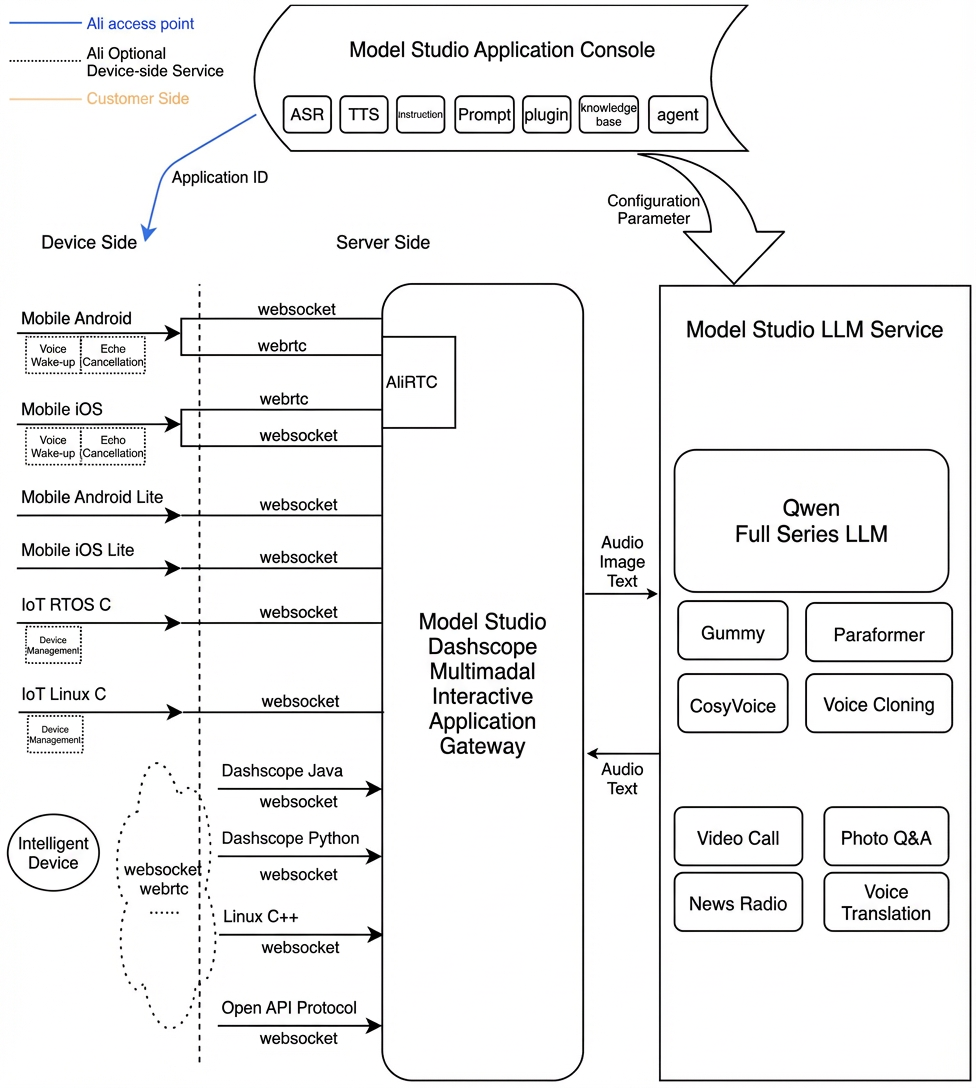
Prerequisites
Activate the service and obtain the required parameters.
Enable an Alibaba Cloud Model Studio real-time multimodal interaction application to get your workspace ID, app ID, and API key.
Dependencies
Runtime environment: Go 1.18 or later.
Installation: This SDK is integrated from source code. Download the multimodal-go-sdk and follow the instructions to integrate it. For a complete example, see the examples directory in the package.
Audio formats
The Go SDK uses the WebSocket protocol for data transmission.
-
Audio formats for WebSocket connections:
- Upstream: Supports PCM (16 kHz sample rate, 16-bit, single-channel) and Opus audio streams.
- Downstream: Supports PCM and MP3 audio streams.
Client call modes
Item | push2talk | tap2talk | duplex |
|---|---|---|---|
Type | Client-controlled mode | Tap mode | duplex mode |
Audio Upload Method | On-demand | Continuous An error occurs if no audio is uploaded for over 20 seconds in the Listening state. | Continuous An error occurs if no audio is uploaded for over 20 seconds in any state. |
VAD Detector | Client | Server | Server |
Interruption Method | Interrupted by a RequestToSpeak message | Interrupted by a RequestToSpeak message | Voice interruption |
Use Cases | The user controls when the client starts and stops sending audio for recognition. This mode is suitable for push-to-talk scenarios where the user presses a button to speak and releases it to stop. | The client continuously uploads audio, and the server automatically detects speech activity. User voice cannot interrupt the model's output. An interruption requires sending a RequestToSpeak message. | The client continuously uploads audio, and the server automatically detects speech activity. The user can interrupt the model's output by speaking at any time. |
API reference
dashscope.MultiModalDialog
Client requests (Client → Server)
The main class for managing dialogs. It provides all methods for server interaction.
1. NewMultiModalDialog
Creates an interactive session and sets up callbacks.
2. Start
Starts the dialog service and triggers the OnStarted callback. Note that the OnStarted callback returns a dialogID.
3. StartSpeech
Notifies the server to start audio upload. This method can only be called when the state is LISTENING.
4. SendAudioData
Sends speech data.
5. StopSpeech
Notifies the server to stop audio upload.
6. Interrupt
Notifies the server to interrupt the current interaction and let the client speak.
7. LocalRespondingStarted
Notifies the server that the client has started playing TTS audio.
8. LocalRespondingEnded
Notifies the server that the client has finished playing TTS audio.
9. Stop
Ends the current conversation turn.
10. GetDialogState
Gets the current dialog service state. Returns a DialogState enum.
11. RequestToRespond
Requests the server to directly synthesize speech from text or sends a command to the server.
Request parameters
RequestParameters
Parameter | Type | Description |
|---|---|---|
| *Upstream | Upstream parameters |
| *Downstream | Downstream parameters |
| *ClientInfo | Client information |
| *BizParams | Business parameters (optional) |
Upstream
Parameter | Type | Required | Description |
|---|---|---|---|
| string | No | The audio format. Supported values are |
| string | Yes | Upstream type:
|
| string | No | The mode used by the client. The default is tap2talk. Options:
|
| map | No | For passing through additional parameters. |
Downstream
Parameter | Type | Required | Description |
|---|---|---|---|
| string | No | The timbre of the synthesized speech. The available range depends on the TTS model selected in the console. |
| int | No | The sample rate of the synthesized voice. Supported values:
The default is 24000. The Qianwen-TTS and Qianwen3-TTS models support only 24000. |
| string | No | Controls which intermediate text results are returned:
You can set multiple types, separated by commas. The default is |
| string | No | The audio format. Supported values are Qianwen-TTS models support only Note: The difference between |
| int | No | The volume of the synthesized audio. Range: 0–100. Default: 50. |
| int | No | The pitch of the synthesized audio. Range: 50–200. Default: 100. |
| int | No | The speech rate of the synthesized audio. Range: 50–200, representing 50% to 200% of the default rate. Default: 100. |
| map | No | For passing through additional parameters. |
ClientInfo
Parameter | Sub-parameter | Type | Required | Description |
|---|---|---|---|---|
| string | Yes | The end-user ID, generated according to your business rules. It is used to implement customized features for different end users. Max length: 36 characters. | |
|
| string | No | A globally unique client ID that you must generate and pass to the SDK. Max length: 40 characters. A single end user can have multiple devices, each with a different UUID but the same |
|
| string | No | The caller's public IP address. |
|
| string | No | The city where the caller is located. Specifies the approximate location of the client. |
| string | No | The caller's latitude. Submit this for services that require the client's precise location. | |
| string | No | The caller's longitude. Submit this for services that require the client's precise location. |
BizParams
Parameter | Type | Required | Description |
|---|---|---|---|
| map | No | Specifies parameters to pass through to the agent. For parameters specific to each agent, see the Call Official Agents documentation. You can set dialog extension parameters in the |
| map | No | Specifies custom prompt variables. You can define your own keys and values in the JSON object. For information on how to configure custom prompt variables in the console, see Application Configuration - Prompt. |
| map | No | Specifies custom dialog variables. You can define your own keys and values in the JSON object. For information on how to configure custom dialog variables in the console, see Application Configuration - Dialog Variables. |
| map | No | For passing through additional parameters. |
Building parameters
MultiModalCallback interface
Server responses (Server → Client)
A callback interface for handling various events during a voice chat.
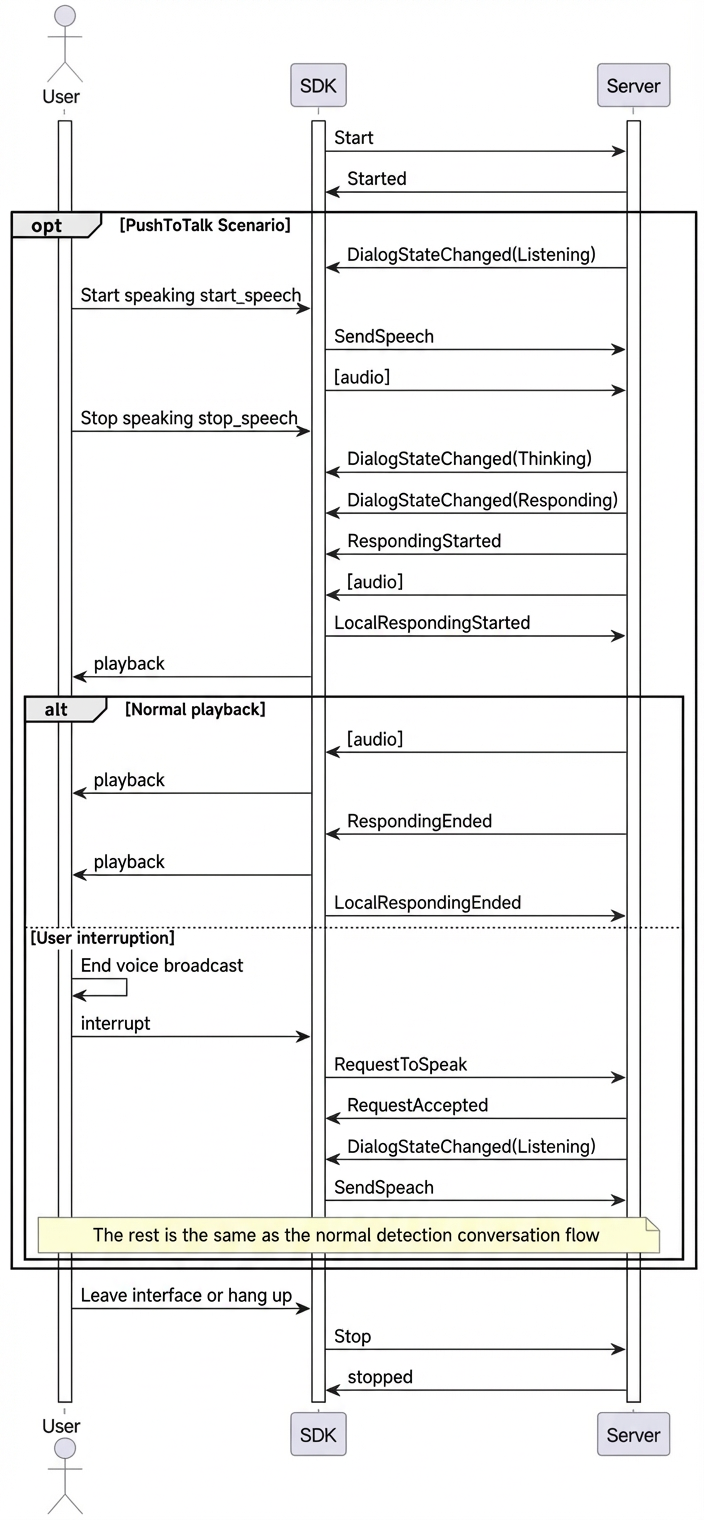
Dialog states (DialogState)
The states returned by the OnStateChanged interface callback include LISTENING, THINKING, and RESPONDING:
- Listening: The bot is listening for user input. You can send audio in this state.
- Thinking: The bot is thinking and processing the request.
- Responding: The bot is generating or playing a voice response.
Interaction sequence diagram
Advanced usage
Image question answering (VQA)
VQA enables multimodal interaction with both images and speech during a conversation.
The core process involves triggering VQA by speaking an intent, such as "take a look at this," or by directly inputting a text request. The service then returns a question-answering result based on the image content.
-
Requesting with voice:
- Say something like, "Take a look at what's in front."
- The service returns a visual_qa intent through the
OnRespondingContentcallback. - After receiving this intent, the client calls the
RequestToRespondAPI and submits the image content to trigger a question-answering response.
-
Requesting with text:
- The client directly calls the
RequestToRespondAPI, submitting both the image content and the text request to trigger a question-answering response.
- The client directly calls the
LiveAI video call over WebSocket
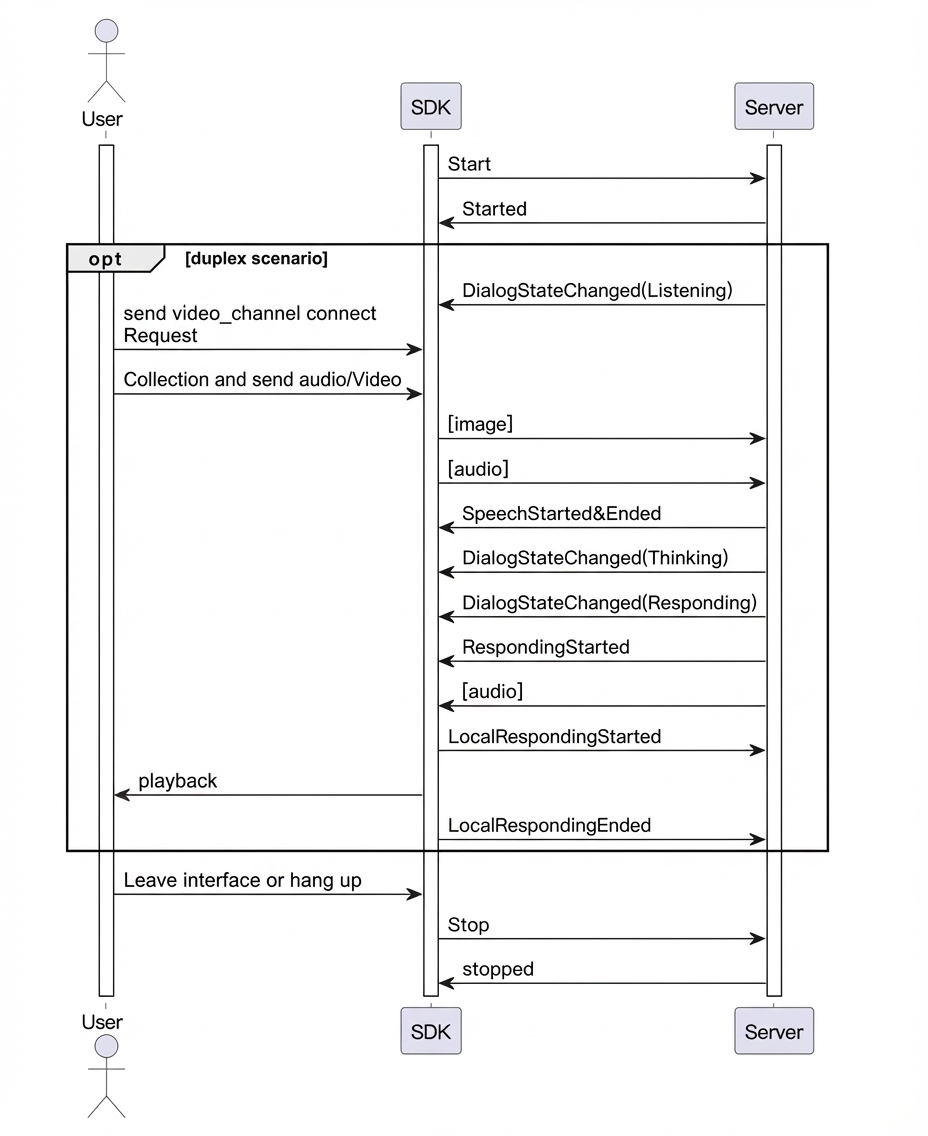
LiveAI (video call) is an official agent provided by the Model Studio multimodal interaction service. You can implement video calls by sending a sequence of images through the Go SDK. We recommend that your server and client (web or app) use RTC to transmit video and audio. Then, your server should send the captured video frames to the SDK at a rate of one frame every 500 ms while maintaining real-time audio input.
Note: For LiveAI, images must be Base64-encoded and smaller than 180 KB.
- LiveAI call sequence
- Key code example
Text-to-speech (TTS)
The SDK lets you request the server to synthesize audio directly from text.
You must send a RequestToRespond request when the client is in the Listening state.
If the current state is not Listening, you must first call the Interrupt API to interrupt the current playback.
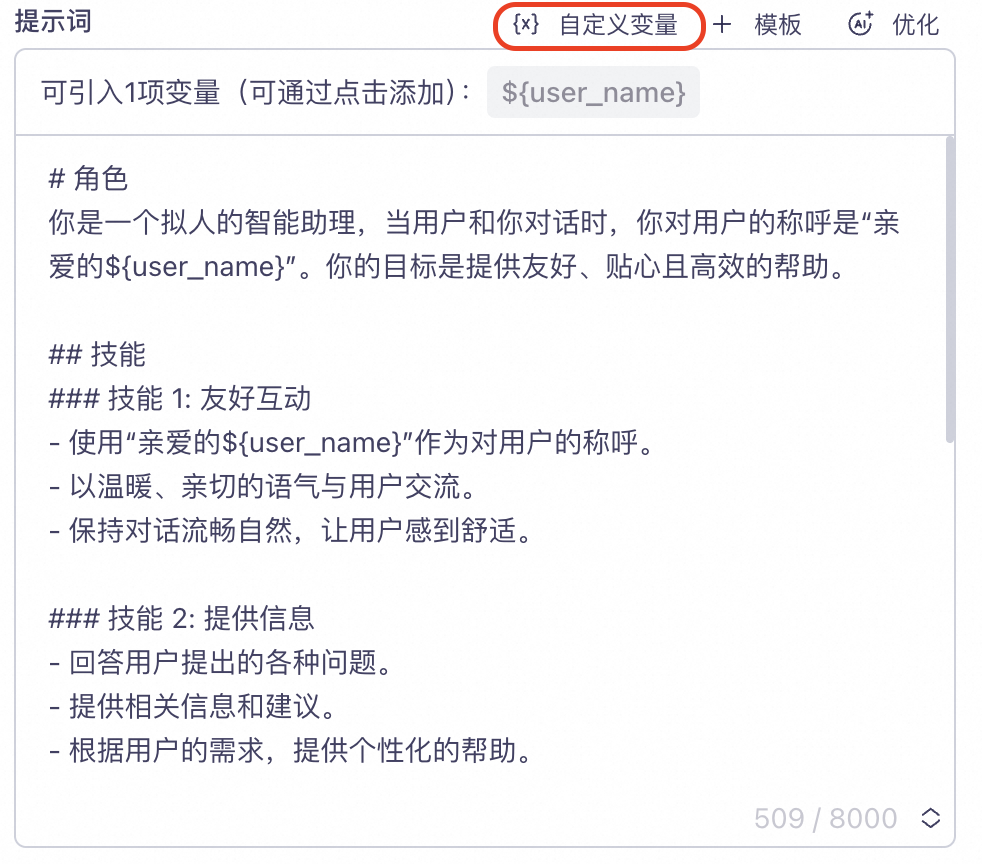
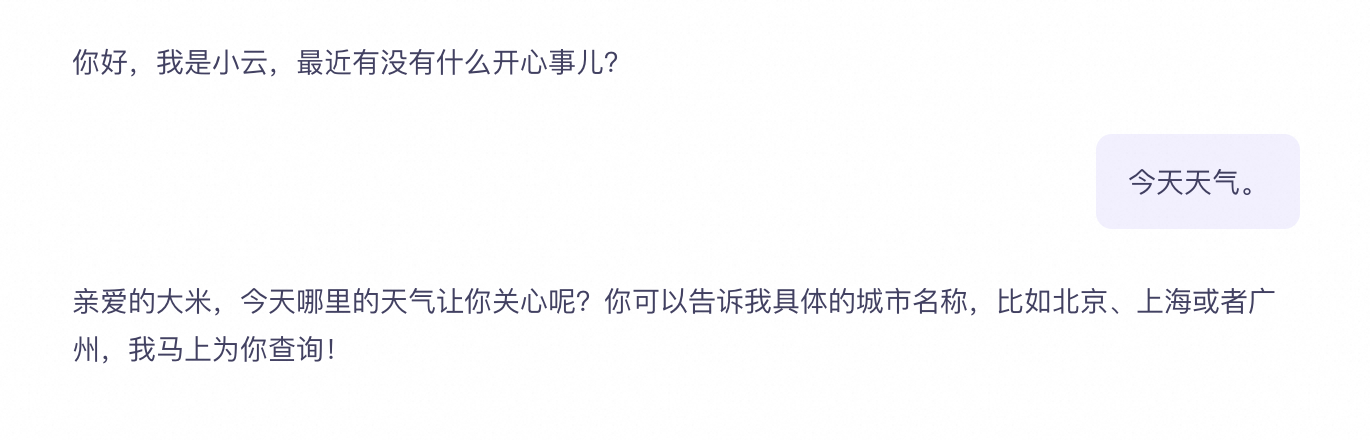
Custom prompt variables
- Configure custom variables in the Prompt section of your project in the console.
user_name field is defined to represent a user nickname. The user_name variable is then inserted into the Prompt as the ${user_name} placeholder.
- Set the variables in your code.
"user_name" = "rice".
- Request a response
Requesting results with text
The SDK supports requesting LLM results and synthesized speech data directly using text.
You must send a RequestToRespond request when the client is in the Listening state.
Connection and state management
1. Resource management
Call the Cleanup() method to release all resources when the session is complete:
2. Heartbeat management
Send heartbeats periodically to keep the connection alive:
3. State monitoring
Monitor dialog state changes by implementing the MultiModalCallback interface: