

This topic describes how to use WebSocket for real-time transcription of meeting minutes.
Prerequisites
Activate the service and obtain and configure an API key. To prevent security risks from code leaks, configure the API key as an environment variable instead of hard coding it in your code.
Overall call flow
For more information, see Real-time meeting.
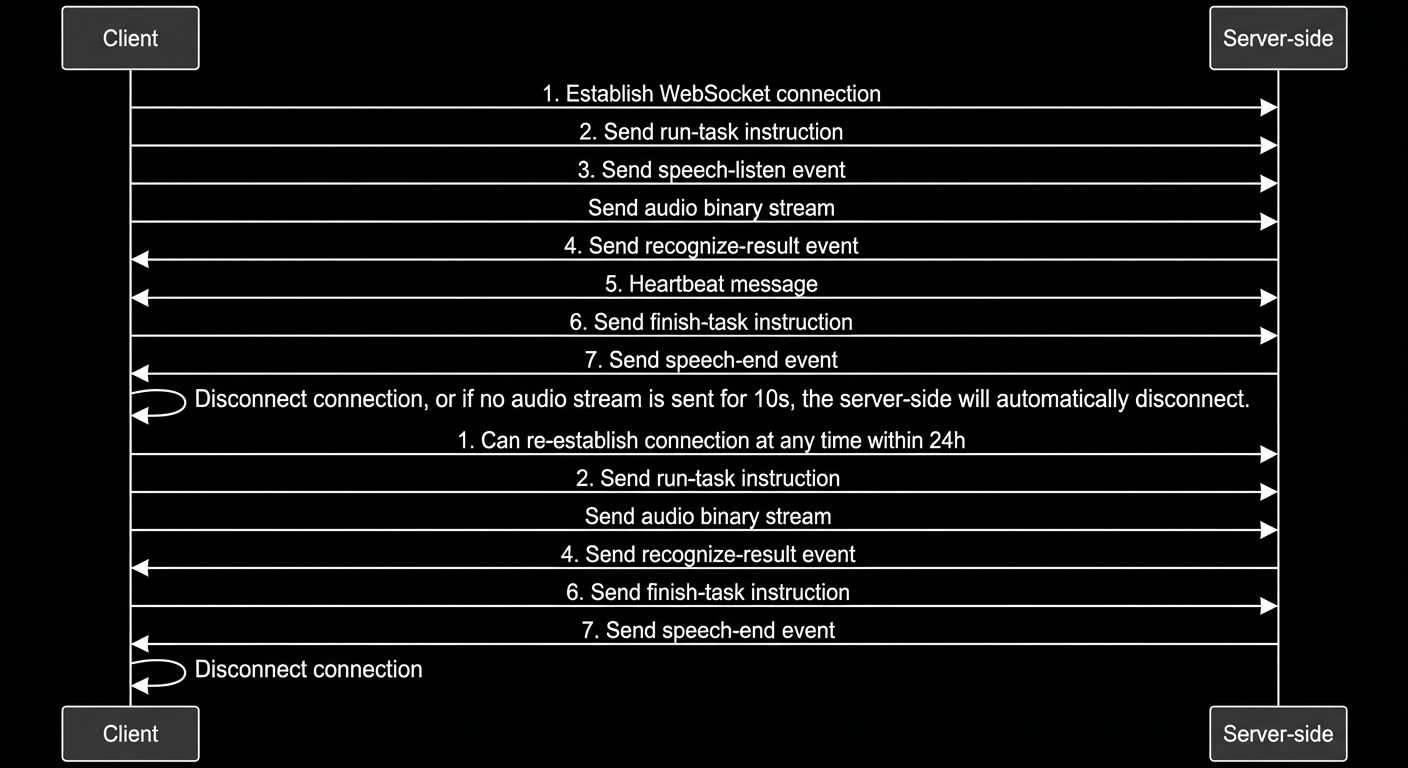
Call time series chart
Establish a WebSocket connection
This corresponds to step 1 in the time series chart.
For common programming languages, many ready-to-use WebSocket libraries and examples are available, such as:
- Go:
gorilla/websocket - PHP:
Ratchet - Node.js:
ws
Connection request header
WebSocket access URL
Send instructions to the server
You can send instructions to the server to start and stop transcription.
There are two types of instructions: run-task and finish-task. Both must be sent as JSON data in a Text Frame. The protocol for these instructions is as follows:
run-task instruction
This corresponds to step 2 in the time series chart. It notifies the server to start a transcription task.
The protocol fields are as follows:
Field | Type | Description |
|---|---|---|
header | Object | |
header.action | String | Set to run-task. |
header.task_id | String | A custom 16-character random string used for troubleshooting. The subsequent finish-task must use the same task_id. |
header.streaming | String | Set to duplex. |
payload | Object | |
payload.model | String | Set to tingwu-meeting-realtime. |
payload.task_group | String | Set to aigc. |
payload.task | String | Set to multimodal-generation. |
payload.function | String | Set to generation. |
payload.input | Object | |
payload.input.appId | String | The ID of the application published in the meeting minutes console. You can obtain it from the console. |
payload.input.directive | String | Set to start. |
payload.input.dataId | String | The dataId obtained from CreateTask. |
finish-task
This corresponds to step 6 in the time series chart. It notifies the server that the audio has been completely sent.
The protocol fields are as follows:
Field | Type | Description |
|---|---|---|
header | Object | |
header.action | String | Set to finish-task. |
header.task_id | String | Enter the task_id that you specified in the run-task command. |
header.streaming | String | Set to duplex. |
payload | Object | |
payload.model | String | Set to tingwu-meeting-realtime. |
payload.task_group | String | Set to aigc. |
payload.task | String | Set to multimodal-generation. |
payload.function | String | Set to generation. |
payload.input | Object | |
payload.input.directive | String | Set to stop. |
Send audio to the server
Convert the raw audio directly into a binary stream without any additional processing. Note the following:
- The audio sampling rate for speech recognition must be 8000 Hz or 16000 Hz. It must be consistent with the parameter passed when calling CreateTask.
- The audio coding format must be consistent with the parameter passed when calling CreateTask.
- Supported audio formats: PCM, Opus, AAC, Speex, and MP3.
Receive events from the server
After you send an instruction or audio, the server sends different types of events. Each event represents a different processing stage. You must handle each event according to the sequence shown in the time series chart.
There are five types of events: speech-listen, recognize-result, heartbeat, speech-end, and task-failed.
speech-listen event
This corresponds to step 3 in the time series chart. The server returns the speech-listen event after it receives the run-task instruction. This event indicates that the server has received your transcription instruction, completed initialization, and is ready to receive audio.
The protocol fields are as follows:
Field | Type | Description |
|---|---|---|
header | Object | |
header.event | String | Set to result-generated. |
header.task_id | String | The task_id you specified in the run-task instruction. |
payload | Object | |
payload.output | Object | |
payload.output.action | String | Set to speech-listen. |
payload.output.dataId | String | The dataId you passed. |
recognize-result event
This corresponds to step 4 in the time series chart. The server returns a recognize-result event while you are sending audio. This event can also be returned after you send the finish-task instruction. It contains the current recognition and translation results from the server.
The protocol fields are as follows:
Field | Type | Description |
|---|---|---|
header | Object | |
header.event | String | Set to result-generated. |
header.task_id | String | The task_id you specified in the run-task instruction. |
payload | Object | |
payload.output | Object | |
payload.output.action | String | Set to recognize-result. |
payload.output.transcription | Object | The original transcription result. |
payload.output.transcription.sentenceId | Integer | The sentence ordinal number. |
payload.output.transcription.time | Integer | The duration of the audio that has been processed. |
payload.output.transcription.text | String | The recognized text. |
payload.output.transcription.words | Array[Word] | Character timestamp information. |
payload.output.transcription.sentenceEnd | Boolean | true: The current text forms a complete sentence. false: The current text does not form a complete sentence. The recognition result may be updated. |
payload.output.transcription.stashResult | Object | The staging result of speech recognition. It contains information about the next sentence that is not yet segmented. You can concatenate the stashResult with the text result for subsequent processing. |
payload.output.transcription.stashResult.sentenceId | Integer | The sentence ID of the next sentence. |
payload.output.transcription.stashResult.text | String | The ASR text of the stash result. |
payload.output.transcription.stashResult.words | Array[Word] | The word information of the stash result. |
payload.output.translations | Object | The translation result. |
payload.output.translations[targetLang].sourceLang | String | The source language. |
payload.output.translations[targetLang].targetLang | String | The target language. |
payload.output.translations[targetLang].translateResult | Array[Object] | The translated sentence result. |
payload.output.translations[targetLang].translateResult[i].sentenceId | Integer | The translated sentence number. It increments from 0. |
payload.output.translations[targetLang].translateResult[i].text | String | The sentence translation result. |
payload.output.translations[targetLang].translateResult[i].beginTime | Integer | The start time of the translated sentence, in milliseconds. This is returned when translating a SentenceEnd recognition result. |
payload.output.translations[targetLang].translateResult[i].endTime | Integer | The end time of the translated sentence, in milliseconds. This is returned when translating a SentenceEnd recognition result. |
payload.output.translations[targetLang].translateResult[i].partial | Boolean | If true, this is the translation result for the stashed recognition content. |
Field | Type | Description |
|---|---|---|
beginTime | Integer | The start time of the current word in the audio. |
endTime | Integer | The end time of the current word in the audio. |
text | String | The content of the current word. |
Sentence start detected
Mid-sentence detection
Sentence end detected
Translation result
Heartbeat event
This corresponds to step 5 in the time series chart. If you send silent audio for an extended period, the server sends a heartbeat event to keep the connection alive. The heartbeat event is sent 30 seconds after the previous event. The client does not need to reply to the heartbeat event.
The protocol fields are as follows:
Field | Type | Description |
|---|---|---|
header | Object | |
header.event | String | Set to result-generated. |
header.task_id | String | The task_id you specified in the run-task instruction. |
payload | Object | |
payload.output | Object | |
payload.output.action | String | Set to ping. |
speech-end event
This corresponds to step 7 in the time series chart. The speech-end event indicates that all results for the current real-time transcription have been sent. You can then close the WebSocket connection.
The protocol fields are as follows:
Field | Type | Description |
|---|---|---|
header | Object | |
header.event | String | Set to result-generated. |
header.task_id | String | The task_id you specified in the run-task instruction. |
payload | Object | |
payload.output | Object | |
payload.output.action | String | Set to speech-end. |
task-failed event
If a task fails during processing because of incorrect client parameters or an internal server error, the server returns a task-failed event and then terminates the WebSocket connection.
The protocol fields are as follows:
Field | Type | Description |
|---|---|---|
header | Object | |
header.event | String | Set to result-generated. |
header.task_id | String | The task_id you specified in the run-task instruction. |
payload | Object | |
payload.output | Object | |
payload.output.action | String | Set to task-failed. |
payload.output.errorCode | String | The error code. |
payload.output.errorMessage | String | The error message. |
Pause and resume a meeting
During a WebSocket session, you can pause the meeting at any time by sending a finish-task instruction.
If the client does not send any text instructions or binary audio streams for 10 seconds, the connection is automatically terminated.
A single meeting dataId is valid for 24 hours. During this period, you can resume the specified meeting at any time by re-establishing a WebSocket connection and providing the same meeting dataId.
Code examples
Error codes
Error code | Error message | Description |
|---|---|---|
InvalidParameter | Invalid parameter. For more information, see the official documentation. | The parameter is invalid. Check the parameters that you provided. |
Agent.FrameSequenceIllegal | The WebSocket frame sequence is invalid. | The instruction call sequence is invalid. |
Agent.InputActionIllegal | The input action is invalid. | The action field in the instruction is invalid. |
Agent.InputAppIdIllegal | The input appId is invalid. | The appId field is invalid. |
Agent.AppNotPublished | The application is not published. | The application with the specified ID has not been published. |
Agent.InputInvalidDataId | The input dataId is invalid. | The dataId is invalid. |
Agent.CustomTaskIdInvalid | The custom task ID must be 16 characters long. | The length of the taskId field is invalid. It must be a 16-character string. |
BIL.ServiceNotActivate | The user has not activated the service. | You have not activated the Tingwu Agent service. |
BIL.UserArrears | The user's account has an overdue payment. | Your account has an overdue payment. |
Agent.AppInfoNotExist | The application information does not exist. | The application information for the specified ID does not exist. Save and publish the application configuration in the console first. |
ServerError | An internal server error occurred. | Internal server error. |