

This topic describes the real-time interfaces of the Tingwu Java software development kit (SDK) and helps developers quickly call the real-time services of Tingwu.
Prerequisites
- Install the latest version of the DashScope SDK (version 2.21.7 or later).
Interface description
TingWuRealtimeParam.java
This is the parameter configuration class. The following table lists the main parameters for creating a task. The interaction protocol for industrial instruction transcription (WebSocket) is used as an example.
Name | Type | Required | Description |
|---|---|---|---|
appId | string | Yes | The application ID. |
sampleRate | int | No | The audio sample rate. Only 16000 Hz is supported. |
format | string | Yes | The format of the audio to be recognized. Supported formats: pcm, wav, mp3, opus, speex, aac, and amr. For opus and speex formats, ogg encapsulation is required. For the wav format, pcm encoding is required. |
maxEndSilence | int | No | Optional. The maximum duration of silence in ms. If silence exceeds this duration, the system considers the sentence complete and finishes the transcription. |
terminology | string | No | The ID of the correction instruction set. |
Sample code
TingWuRealtime.java
- The Tingwu real-time client interface.
TingWuRealtimeCallback
- This callback returns server-side events and results.
Call sequence
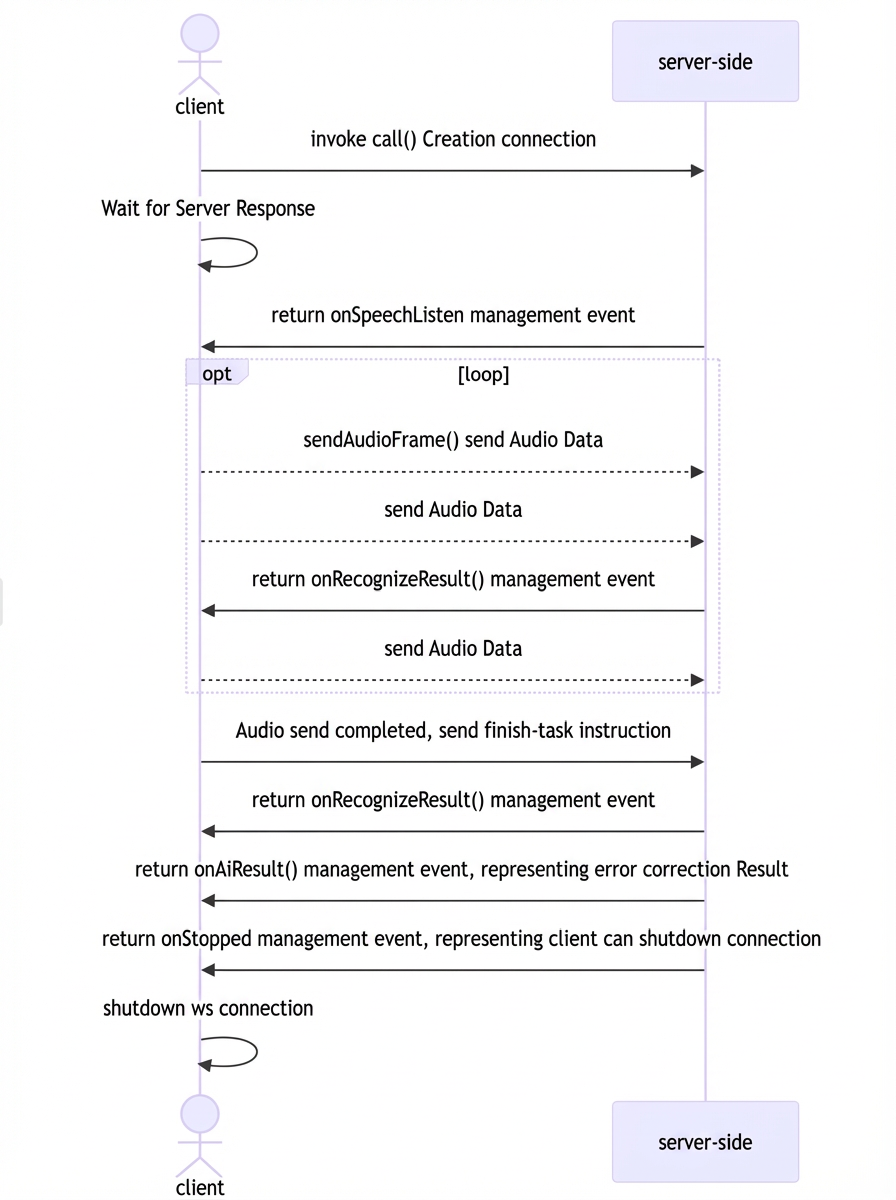
The following time series chart shows the call sequence for the Tingwu real-time interface. After you establish a connection and receive the SpeechListen event, you can send streaming audio data. The server then returns streaming recognition and correction results.
Response results
Using the interaction protocol for industrial instruction transcription (WebSocket) as an example, after you send an instruction or audio, the server sends you different types of events. Each event represents a different processing stage. You must strictly follow the time series chart to handle these events.
There are four types of events: speech-listen, recognize-result, ai-result, and speech-end.
speech-listen event
This corresponds to process 3 in the sequence diagram. The speech-listen event is returned after the run-task instruction. It indicates that the server has received your transcription instruction and completed the initialization. You can now start sending audio.
The protocol fields are as follows:
Field | Type | Description |
|---|---|---|
header | Object | |
header.event | String | Always result-generated. |
header.task_id | String | The task_id that you specified in the run-task instruction. |
payload | Object | |
payload.output | Object | |
payload.output.action | String | Always speech-listen. |
payload.output.dataId | String | The ID of the current transcription task. You can use this ID to submit feedback. You can also use this ID to view the billing items for the task in your bill. |
recognize-result event
This corresponds to process 4 in the sequence diagram. The recognize-result event is returned after you send audio. It may also be returned after you send the finish-task instruction. This event contains the text and translation results that the server has recognized so far.
The protocol fields are as follows:
Field | Type | Description |
|---|---|---|
header | Object | |
header.event | String | Always result-generated. |
header.task_id | String | The task_id that you specified in the run-task instruction. |
payload | Object | |
payload.output | Object | |
payload.output.action | String | Always recognize-result. |
payload.output.transcription | Object | The original transcription result. |
payload.output.transcription.sentenceId | Integer | The sentence sequence number. |
payload.output.transcription.beginTime | Integer | The start time in the audio for the first character of the currently recognized part of the sentence, in ms. |
payload.output.transcription.endTime | Integer | The end time in the audio for the last character of the currently recognized part of the sentence, in ms. |
payload.output.transcription.sentenceEnd | Boolean | Indicates whether the current sentence is complete. |
payload.output.transcription.text | String | The content of the currently recognized part of the sentence. |
payload.output.transcription.words | List[Word] | Word segmentation information for the sentence. |
payload.output.translations | Object | The translation result of the transcription. |
payload.output.translations.sentenceEnd | Boolean | Indicates whether the current sentence is complete. |
payload.output.translations.translations | Object | The result set for the target translation languages. |
payload.output.translations.translations.zh | Object | Currently, only translation to Chinese is supported, so there will only be one zh object. |
payload.output.translations.translations.zh.lang | String | Set the value to zh. |
payload.output.translations.translations.zh.sentenceId | Integer | The sentence sequence number. |
payload.output.translations.translations.zh.beginTime | Integer | The start time in the audio for the first character of the currently translated part of the sentence, in ms. |
payload.output.translations.translations.zh.endTime | Integer | The end time in the audio for the last character of the currently translated part of the sentence, in ms. |
payload.output.translations.translations.zh.sentenceEnd | Boolean | Indicates whether the current sentence is complete. |
payload.output.translations.translations.zh.text | String | The content of the currently translated part of the sentence. |
payload.output.translations.translations.zh.words | List[Word] | Word segmentation information for the translated sentence. |
Field | Type | Description |
|---|---|---|
beginTime | Integer | The start time of the current word in the audio. |
endTime | Integer | The end time of the current word in the audio. |
text | String | The content of the current word. |
ai-result event
This corresponds to process 6 in the sequence diagram. The ai-result event is returned after the last recognize-result event. It represents the final transcription result, which has been corrected using the specified instruction set.
The protocol fields are as follows:
Field | Type | Description |
|---|---|---|
header | Object | |
header.event | String | Always result-generated. |
header.task_id | String | The task_id that you specified in the run-task instruction. |
payload | Object | |
payload.output | Object | |
payload.output.action | String | Always ai-result. |
payload.output.aiResult | Object | |
payload.output.aiResult.correction | String | The final result of the industrial instruction transcription. |
speech-end event
This corresponds to process 7 in the sequence diagram. The speech-end event is sent after the ai-result event. It indicates that the industrial instruction transcription is complete. You can then close the WebSocket connection.
The protocol fields are as follows:
Field | Type | Description |
|---|---|---|
header | Object | |
header.event | String | Always result-generated. |
header.task_id | String | The task_id that you specified in the run-task instruction. |
payload | Object | |
payload.output | Object | |
payload.output.action | String | This is fixed to the end of the speech. |
task-failed event
If a task fails during processing because of incorrect parameters from the client or an internal server error, the server returns a task-failed event and then closes the WebSocket connection.
The protocol fields are as follows:
Field | Type | Description |
|---|---|---|
header | Object | |
header.event | String | Always result-generated. |
header.task_id | String | The task_id that you specified in the run-task instruction. |
payload | Object | |
payload.output | Object | |
payload.output.action | String | The value is always set to task-failed. |
payload.output.errorCode | String | Error code |
payload.output.errorMessage | String | Error message |
Error codes
Error code | Error message | Description |
|---|---|---|
InvalidParameter | Invalid parameter. For more information, see the official documentation. | The parameter is invalid. Check the parameters that you passed. |
InvalidParameter | The value of maxEndSilence is invalid. It must be between 0 and 6000. | The value of the maxEndSilence parameter is invalid. |
InvalidParameter | The term is not found. | The specified instruction set does not exist. |
InvalidParameter | The sample rate is invalid. | The value of the sample rate parameter is invalid. |
InvalidParameter | The audio format is invalid. | The value of the audio coding format parameter is invalid. |
InvalidParameter | The term is invalid. | The specified instruction set ID is invalid. |
Agent.FrameSequenceIllegal | The WebSocket frame sequence is invalid. | The instruction call sequence is invalid. |
Agent.InputActionIllegal | The input action is invalid. | The value of the action field in the instruction is invalid. |
Agent.InputAppIdIllegal | The input application ID is invalid. | The value of the application ID field is invalid. |
Agent.AppNotPublished | The application has not been published. | The specified application has not been published. |
Agent.CustomTaskIdInvalid | The custom task ID must be 16 characters long. | The length of the task ID is invalid. |
BIL.ServiceNotActivate | The user has not activated the service. | You have not activated the Tingwu Agent service. |
BIL.UserArrears | The user's account has an overdue payment. | Your account has an overdue payment. |
Agent.AppInfoNotExist | The application information does not exist. | The specified application ID information does not exist. You must first save and publish the application configuration in the console. |
ServerError | A server error occurred. | Internal server error. |