

tingwu-sdk-python-realtime

This topic introduces the real-time API of the TingWu Python SDK, helping developers quickly invoke TingWu’s real-time service.

Prerequisites

Activate the service and obtain and configure an API key. To prevent security risks from code leaks, configure the API key as an environment variable instead of hard coding it in your code.
To grant temporary access permissions to third-party applications or users, or want to strictly control risky operations such as accessing or deleting sensitive data, you can use a temporary authentication token.Compared to a long-term API key, a temporary authentication token is valid for only a short period (60 seconds) and offers higher security. It is suitable for temporary call scenarios and can effectively reduce the risk of API key leaks.Usage: In your code, replace the API key used for authentication with the obtained temporary authentication token.

API Description

TingWuRealtime

  • Initialization parameters
This is the entry class for TingWu’s real-time service. Use this API to request the Qwen real-time service. For example, when using the Industrial Production Instruction Transcription Interactive Protocol (WebSocket), the main parameters supported for task creation are as follows:

Name

Type

Required

Description

appId

string

Yes

Application ID

sampleRate

int

No

Audio sample rate. Only 16000 Hz is supported.

format

string

Yes

Set the audio format to be recognized. Supported audio formats: pcm, wav, mp3, opus, speex, aac, amr. For opus and speex audio formats, ogg encapsulation is required. For wav audio format, pcm encoding is required.

maxEndSilence

int

No

Optional. Maximum silence duration in ms. If silence exceeds this duration, the system considers the sentence finished and transcription complete.

terminology

string

No

Correction instruction set ID

data_id

stting

No

Dataset ID

callback

TingWuRealtimeCallback

Yes

Callback for TingWu real-time transcription events and results.

Sample Code

tingwu_realtime = TingWuRealtime(
            model=self.model,
            audio_format=self.format,
            sample_rate=self.sample_rate,
            app_id=self.appId,
            base_address=self.base_address,
            api_key=self.api_key,
            terminology=self.terminology,
            callback=callback,
            max_end_silence=3000
        )
  • start(self, **kwargs)
Initiates a request.
  • send_audio_data(self, speech_data: bytes)
Sends transcription audio data.
  • stop(self)
Ends the request.

TingWuRealtimeCallback

Callbacks for TingWu real-time transcription events and results.
class TingWuRealtimeCallback:
    """An interface that defines callback methods for getting TingWu results.
       Derive from this class and implement its function to provide your own data.
    """

    def on_open(self) -> None:
        pass # connected callback

    def on_started(self, task_id: str) -> None:
        pass # protocal handshake over

    def on_speech_listen(self, result: dict):
        pass # callback speech listen event

    def on_recognize_result(self, result: dict):
        pass # callback recognize result

    def on_ai_result(self, result: dict):
        pass # callback ai result

    def on_stopped(self) -> None:
        pass # recognize over

    def on_error(self, error_code: str, error_msg: str) -> None:
        pass

    def on_close(self, close_status_code, close_msg):
        pass

Invocation Timing

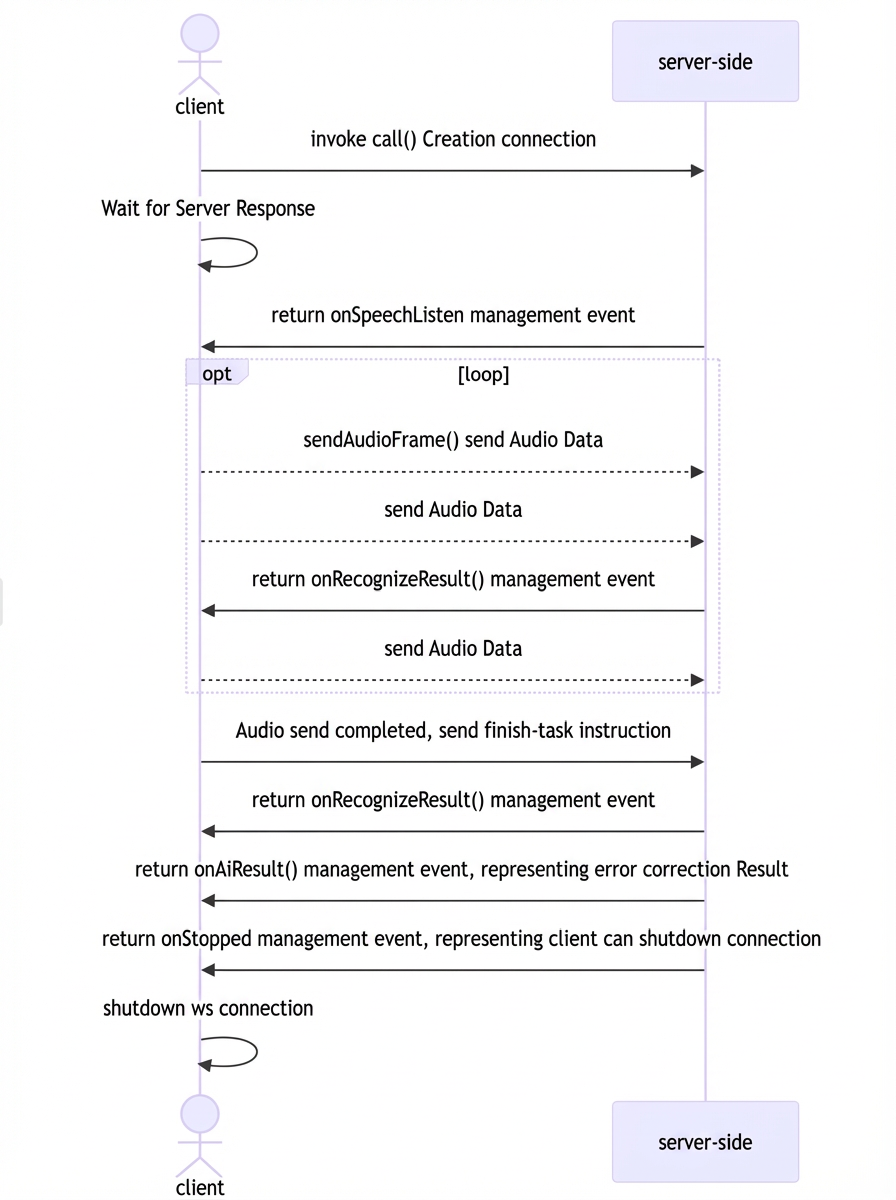
You can invoke the TingWu real-time API as follows: After establishing a WebSocket connection, send streaming audio data upon receiving a SpeechListen event. The server then returns streaming recognition and correction results.
Screenshot

Response Result Description

For example, when using the Industrial Production Instruction Transcription Interactive Protocol (WebSocket), after sending an instruction or audio, the server sends different types of events. Each event represents a distinct processing stage. Strictly follow the time series chart to handle each event appropriately. There are four event types: speech-listen, recognize-result, ai-result, and speech-end.

speech-listen event

This corresponds to process 3 in the sequence diagram. The speech-listen event is returned after the run-task instruction. It indicates that the server has received your transcription instruction and completed the initialization. You can now start sending audio. The protocol fields are as follows:

Field

Type

Description

header

Object

header.event

String

Always result-generated.

header.task_id

String

The task_id that you specified in the run-task instruction.

payload

Object

payload.output

Object

payload.output.action

String

Always speech-listen.

payload.output.dataId

String

The ID of the current transcription task. You can use this ID to submit feedback. You can also use this ID to view the billing items for the task in your bill.

The following is an example of a speech-listen event:
{
  "header": {
    "event": "result-generated",
    "task_id": "f2E3zvK*******wp"
  },
  "payload": {
    "output": {
      "action": "speech-listen",
      "dataId": "Adb*******uY"
    }
  }
}

recognize-result event

This corresponds to process 4 in the sequence diagram. The recognize-result event is returned after you send audio. It may also be returned after you send the finish-task instruction. This event contains the text and translation results that the server has recognized so far. The protocol fields are as follows:

Field

Type

Description

header

Object

header.event

String

Always result-generated.

header.task_id

String

The task_id that you specified in the run-task instruction.

payload

Object

payload.output

Object

payload.output.action

String

Always recognize-result.

payload.output.transcription

Object

The original transcription result.

payload.output.transcription.sentenceId

Integer

The sentence sequence number.

payload.output.transcription.beginTime

Integer

The start time in the audio for the first character of the currently recognized part of the sentence, in ms.

payload.output.transcription.endTime

Integer

The end time in the audio for the last character of the currently recognized part of the sentence, in ms.

payload.output.transcription.sentenceEnd

Boolean

Indicates whether the current sentence is complete.

payload.output.transcription.text

String

The content of the currently recognized part of the sentence.

payload.output.transcription.words

List[Word]

Word segmentation information for the sentence.

payload.output.translations

Object

The translation result of the transcription.

payload.output.translations.sentenceEnd

Boolean

Indicates whether the current sentence is complete.

payload.output.translations.translations

Object

The result set for the target translation languages.

payload.output.translations.translations.zh

Object

Currently, only translation to Chinese is supported, so there will only be one zh object.

payload.output.translations.translations.zh.lang

String

Set the value to zh.

payload.output.translations.translations.zh.sentenceId

Integer

The sentence sequence number.

payload.output.translations.translations.zh.beginTime

Integer

The start time in the audio for the first character of the currently translated part of the sentence, in ms.

payload.output.translations.translations.zh.endTime

Integer

The end time in the audio for the last character of the currently translated part of the sentence, in ms.

payload.output.translations.translations.zh.sentenceEnd

Boolean

Indicates whether the current sentence is complete.

payload.output.translations.translations.zh.text

String

The content of the currently translated part of the sentence.

payload.output.translations.translations.zh.words

List[Word]

Word segmentation information for the translated sentence.

The Word type protocol is as follows:

Field

Type

Description

beginTime

Integer

The start time of the current word in the audio.

endTime

Integer

The end time of the current word in the audio.

text

String

The content of the current word.

The following is an example of a recognize-result event:
{
  "header": {
    "event":"result-generated",
    "task_id": "f2E3zvK*******wp"
  },
  "payload": {
    "output": {
      "action": "recognize-result",
      "transcription": {
        "sentenceId": 0,
        "beginTime": 100,
        "endTime": 2720,
        "sentenceEnd": true,
        "text": "This is a sentence for testing.",
        "words": [
          {
            "beginTime": 100,
            "endTime": 427,
            "text": "This"
          },
          {
            "beginTime": 427,
            "endTime": 755,
            "text": "is a"
          },
          {
            "beginTime": 755,
            "endTime": 1082,
            "text": "sentence"
          },
          {
            "beginTime": 1082,
            "endTime": 1410,
            "text": "used for"
          },
          {
            "beginTime": 1410,
            "endTime": 1737,
            "text": "testing"
          },
          {
            "beginTime": 1737,
            "endTime": 2065,
            "text": "of"
          },
          {
            "beginTime": 2065,
            "endTime": 2392,
            "text": "text"
          },
          {
            "beginTime": 2392,
            "endTime": 2720,
            "text": "."
          }
        ]
      },
      "translations": {
        "sentenceEnd": true,
        "translations": {
          "zh": {
            "sentenceId": 0,
            "beginTime": 100,
            "endTime": 2720,
            "text": "This is a sentence for testing.",
            "lang": "zh",
            "words": [
              {
                "beginTime": 100,
                "endTime": 427,
                "text": "This"
              },
              {
                "beginTime": 427,
                "endTime": 755,
                "text": "is a"
              },
              {
                "beginTime": 755,
                "endTime": 1082,
                "text": "sentence"
              },
              {
                "beginTime": 1082,
                "endTime": 1410,
                "text": "used for"
              },
              {
                "beginTime": 1410,
                "endTime": 1737,
                "text": "testing"
              },
              {
                "beginTime": 1737,
                "endTime": 2065,
                "text": "of"
              },
              {
                "beginTime": 2065,
                "endTime": 2392,
                "text": "text"
              },
              {
                "beginTime": 2392,
                "endTime": 2720,
                "text": "."
              }
            ],
            "sentenceEnd": true
          }
        }
      }
    }
  }
}

ai-result event

This corresponds to process 6 in the sequence diagram. The ai-result event is returned after the last recognize-result event. It represents the final transcription result, which has been corrected using the specified instruction set. The protocol fields are as follows:

Field

Type

Description

header

Object

header.event

String

Always result-generated.

header.task_id

String

The task_id that you specified in the run-task instruction.

payload

Object

payload.output

Object

payload.output.action

String

Always ai-result.

payload.output.aiResult

Object

payload.output.aiResult.correction

String

The final result of the industrial instruction transcription.

The following is an example of an ai-result event:
{
  "header": {
    "event": "result-generated",
    "task_id": "f2E3zvK*******wp"
  },
  "payload": {
    "output": {
      "action": "ai-result",
      "aiResult": {
        "correction": "Right fender paint slag SQE."
      }
    }
  }
}

speech-end event

This corresponds to process 7 in the sequence diagram. The speech-end event is sent after the ai-result event. It indicates that the industrial instruction transcription is complete. You can then close the WebSocket connection. The protocol fields are as follows:

Field

Type

Description

header

Object

header.event

String

Always result-generated.

header.task_id

String

The task_id that you specified in the run-task instruction.

payload

Object

payload.output

Object

payload.output.action

String

This is fixed to the end of the speech.

The following is an example of a speech-end event:
{
  "header": {
    "event": "result-generated",
    "task_id": "f2E3zvK*******wp"
  },
  "payload": {
    "output": {
      "action": "speech-end"
    }
  }
}

task-failed event

If a task fails during processing because of incorrect parameters from the client or an internal server error, the server returns a task-failed event and then closes the WebSocket connection. The protocol fields are as follows:

Field

Type

Description

header

Object

header.event

String

Always result-generated.

header.task_id

String

The task_id that you specified in the run-task instruction.

payload

Object

payload.output

Object

payload.output.action

String

The value is always set to task-failed.

payload.output.errorCode

String

Error code

payload.output.errorMessage

String

Error message

The following is an example of a task-failed event:
{
  "header": {
    "event": "result-generated",
    "task_id": "f2E3zvK*******wp"
  },
  "payload": {
    "output": {
      "action": "task-failed",
      "errorCode": "Error code",
      "errorMessage": "Error message"
    }
  }
}
For more information about specific error codes and their meanings, see Error codes.

Error Code Description

Error code

Error message

Description

InvalidParameter

Invalid parameter. For more information, see the official documentation.

The parameter is invalid. Check the parameters that you passed.

InvalidParameter

The value of maxEndSilence is invalid. It must be between 0 and 6000.

The value of the maxEndSilence parameter is invalid.

InvalidParameter

The term is not found.

The specified instruction set does not exist.

InvalidParameter

The sample rate is invalid.

The value of the sample rate parameter is invalid.

InvalidParameter

The audio format is invalid.

The value of the audio coding format parameter is invalid.

InvalidParameter

The term is invalid.

The specified instruction set ID is invalid.

Agent.FrameSequenceIllegal

The WebSocket frame sequence is invalid.

The instruction call sequence is invalid.

Agent.InputActionIllegal

The input action is invalid.

The value of the action field in the instruction is invalid.

Agent.InputAppIdIllegal

The input application ID is invalid.

The value of the application ID field is invalid.

Agent.AppNotPublished

The application has not been published.

The specified application has not been published.

Agent.CustomTaskIdInvalid

The custom task ID must be 16 characters long.

The length of the task ID is invalid.

BIL.ServiceNotActivate

The user has not activated the service.

You have not activated the Tingwu Agent service.

BIL.UserArrears

The user's account has an overdue payment.

Your account has an overdue payment.

Agent.AppInfoNotExist

The application information does not exist.

The specified application ID information does not exist. You must first save and publish the application configuration in the console.

ServerError

A server error occurred.

Internal server error.

Code example

The following example shows how to use the Python software development kit (SDK) to transcribe industrial production instructions.
import logging
import time
import sys
from dashscope.multimodal.tingwu.tingwu_realtime import TingWuRealtime, TingWuRealtimeCallback

# Configure logging - a key improvement
logger = logging.getLogger('dashscope')
logger.setLevel(logging.DEBUG)

# Create a console handler and set the level to debug
console_handler = logging.StreamHandler(sys.stdout)  # Explicitly specify output to stdout
console_handler.setLevel(logging.DEBUG)

# Create a formatter
formatter = logging.Formatter(
    '%(asctime)s - %(name)s - %(levelname)s - %(message)s')
# Add the formatter to the handler
console_handler.setFormatter(formatter)

# Add the handler to the logger
logger.addHandler(console_handler)

# Force flush the log output
logger.propagate = False

class TestCallback(TingWuRealtimeCallback):
    def __init__(self):  # Fix: __init__ method name
        super().__init__()
        self.can_send_audio = False
        print("TestCallback initialized")  # Add debug output
        sys.stdout.flush()  # Force flush

    def on_open(self) -> None:
        print('TingWuClient:: on websocket open.')  # Use print to ensure output
        logger.info('TingWuClient:: on websocket open.')
        sys.stdout.flush()

    def on_started(self, task_id: str) -> None:
        print(f'TingWuClient:: on task started. task_id: {task_id}')
        logger.info('TingWuClient:: on task started. task_id: %s', task_id)
        sys.stdout.flush()

    def on_speech_listen(self, result: dict):
        print(f'TingWuClient:: on speech listen. result: {result}')
        logger.info('TingWuClient:: on speech listen. result: %s', result)
        self.can_send_audio = True  # Mark that audio data can be sent
        sys.stdout.flush()

    def on_recognize_result(self, result: dict):
        print(f'TingWuClient:: on recognize result. result: {result}')
        logger.info('TingWuClient:: on recognize result. result: %s', result)
        sys.stdout.flush()

    def on_ai_result(self, result: dict):
        print(f'TingWuClient:: on ai result. result: {result}')
        logger.info('TingWuClient:: on ai result. result: %s', result)
        sys.stdout.flush()

    def on_stopped(self) -> None:
        print('TingWuClient:: on task stopped.')
        logger.info('TingWuClient:: on task stopped.')
        self.can_send_audio = False  # Mark that audio data cannot be sent
        sys.stdout.flush()

    def on_error(self, error_code: str, error_msg: str) -> None:
        print(f'TingWuClient:: on error. error_code: {error_code}, error_msg: {error_msg}')
        logger.info('TingWuClient:: on error. error_code: %s, error_msg: %s',
                    error_code, error_msg)
        sys.stdout.flush()

    def on_close(self, close_status_code, close_msg):
        print(f'TingWuClient:: on websocket close. close_status_code: {close_status_code}, close_msg: {close_msg}')
        logger.info('TingWuClient:: on websocket close. close_status_code: %s, close_msg: %s',
                    close_status_code, close_msg)
        sys.stdout.flush()

class RunTingWuRealtime:
    @classmethod
    def setup_class(cls):
        cls.model = 'tingwu-industrial-instruction'
        cls.format = 'pcm'
        cls.sample_rate = 16000
        cls.file = './data/meeting_audio.pcm'
        cls.appId = 'your-app-id'
        cls.base_address = 'wss://dashscope.aliyuncs.com/api-ws/v1/inference'
        cls.api_key = 'Your-dashscope-api-key'
        cls.terminology = 'your-terminology-id'

    def start_with_stream(self):
        print("Starting test...")
        sys.stdout.flush()

        callback = TestCallback()

        print("Creating TingWuRealtime instance...")
        sys.stdout.flush()

        tingwu_realtime = TingWuRealtime(
            model=self.model,
            audio_format=self.format,
            sample_rate=self.sample_rate,
            app_id=self.appId,
            base_address=self.base_address,
            api_key=self.api_key,
            terminology=self.terminology,
            callback=callback,
            max_end_silence=3000
        )

        print("Starting TingWu connection...")
        sys.stdout.flush()
        tingwu_realtime.start()

        # Wait for the connection to be established
        time.sleep(2)
        # Wait for the system state to transition to speech_listen
        try:
            print(f"Opening file: {self.file}")
            sys.stdout.flush()

            with open(self.file, 'rb') as f:
                chunk_count = 0
                while True:
                    chunk = f.read(3200)
                    if not chunk:
                        print("File reading complete")
                        sys.stdout.flush()
                        break

                    # Fix logic error: Send only when can_send_audio is True
                    if callback.can_send_audio:
                        tingwu_realtime.send_audio_frame(chunk)
                        time.sleep(0.1)
                        chunk_count += 1
                        if chunk_count % 10 == 0:  # Print every 10 chunks
                            print(f"Sent {chunk_count} audio chunks")
                            sys.stdout.flush()
                    else:
                        print("Waiting for permission to send audio...")
                        sys.stdout.flush()
                        time.sleep(0.1)  # Wait for a short period
            logger.info('============= File reading complete')
            time.sleep(100)  # Wait for a period of time
        except FileNotFoundError:
            print(f"File not found: {self.file}")
            sys.stdout.flush()
        except Exception as e:
            print(f"An error occurred: {e}")
            sys.stdout.flush()
        finally:
            print("Sending stop instruction...")
            sys.stdout.flush()
            tingwu_realtime.stop()
            time.sleep(10)  # Wait for a period of time
            tingwu_realtime.close()
            print("TingWu connection closed")

if __name__ == '__main__':
    print('Starting test_tingwu_realtime test')
    sys.stdout.flush()

    logger.debug('Start test_tingwu_realtime.')

    test_env = RunTingWuRealtime()
    test_env.setup_class()  # Set up the test environment
    test_env.start_with_stream()  # Call the test method

    print('Test complete')
    sys.stdout.flush()
Agent Development
Agent Context
Agent Governance & Evolution
Store
Application Marketplace