

Human image detection
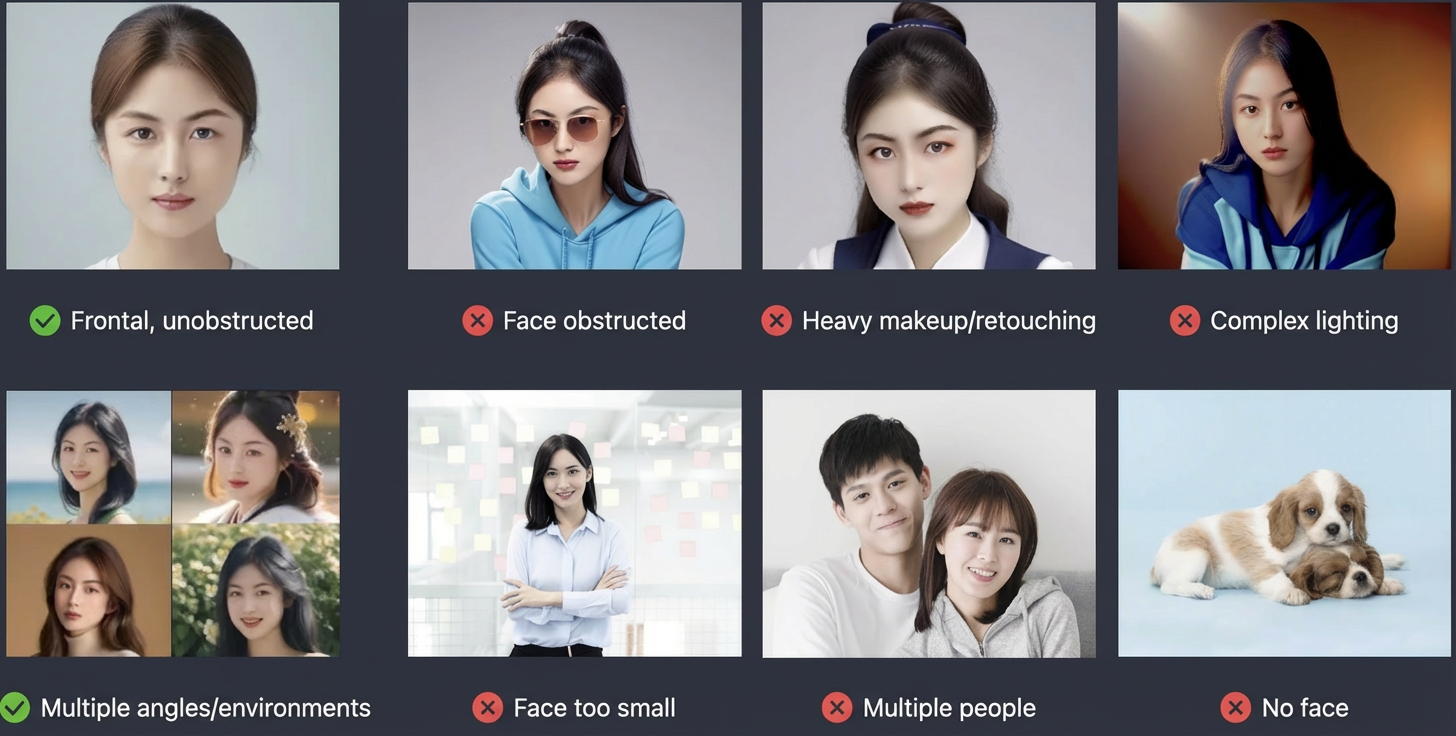
Image selection recommendations
- Face count: Each image must contain only one face. Images with multiple faces or no faces are not supported.
- Face quality: The image must contain a frontal face that is larger than 128 × 128 pixels and not blocked by objects, such as sunglasses or hands. Avoid heavy makeup and excessive retouching.
- Image quality: The image resolution must be between 256 × 256 pixels and 4096 × 4096 pixels. The file size cannot exceed 5 MB. The image must be clear and free of complex lighting and shades.
Model overview
Model name | Model description |
facechain-facedetect | Detects faces in uploaded images to check if they meet the standards for FaceChain fine-tuning. The detection analyzes multiple dimensions, including face count, size, angle, lighting, and definition. It supports image groups as input and returns a detection result for each image. |
HTTP API
Feature description
This model provides a synchronous API. After you submit a job, the results are returned in the response.
Prerequisites
- You must activate the service and obtain an API key. For more information, see Obtain and configure an API key.
Job submission API call
POST https://{WorkspaceId}.cn-beijing.maas.aliyuncs.com/api/v1/services/vision/facedetection/detect
Replace {WorkspaceId} with your actual workspace ID.
Request parameters
Parameter Passing | Field | Type | Required | Description | Example |
|---|---|---|---|---|---|
Header | Content-Type | String | Yes | Request type: application/json | application/json |
Authorization | String | Yes | API key. Example: Bearer d1**2a | Bearer d1**2a | |
Body | model | String | Yes | The model to call. This is a static field. | facechain-facedetect |
input.images | Array | Yes | The URL of the input image. The resolution must be between 256 × 256 pixels and 4096 × 4096 pixels. The file size cannot exceed 5 MB. Supported formats include JPEG, PNG, JPG, and WEBP. The URL must be publicly accessible and use HTTP or HTTPS.You can also obtain a temporary public URL. | "images": [ "http://a/a.jpg", ] |


Response parameters
Field | Type | Description | Example |
|---|---|---|---|
output.is_face | Array | The detection results for the list of submitted images. The results correspond to the input images in order.
| "is_face":[ true, true, false, false ] |
output.failed_reason | Array | The reason why the image detection failed. | no face detected |
usage | Object | The billing usage statistics for this request. The facechain-facedetect model is currently free for a limited time, so the usage information is empty. | - |
request_id | String | The unique system code for this request. | 7574ee8f-38a3-4b1e-9280-11c33ab46e51 |
Request example
The following example shows a cURL command script that you can use to call this model.
Response example
Error response example
If an error occurs during a job submission request, the response includes the code and message fields to indicate the cause of the error.
Status codes
For information about the common status codes for the Large Model Service Platform, see Error Messages.
HTTP return code* | Error code (code) | Error message (message) | Description |
400 | InvalidParameter | Required parameter(s) missing or invalid, please check the request parameters. | The API call parameters are invalid. |