

Qwen-Image is a general-purpose image generation model that supports multiple artistic styles and excels at complex text rendering . It handles multi-line layouts, paragraph-level text generation, and fine-grained detail rendering.
Quick access: User guide | Try it online (Beijing | Singapore) | Technical blog |
Examples
Prompt | Generated image |
|---|---|
A winter city street scene in Beijing. Two adjacent traditional Chinese shops stand side by side. One has bluish-gray tiled roofs and vermilion walls. Warm lanterns with paper-cut horse designs hang under the eaves. On an overcast day, soft diffused light casts gentle halos that reflect off the damp cobblestone pavement. To the left is a calligraphy shop. An indigo-blue aged signboard displays bold cursive script reading “Text Rendering”. A sign hangs on the shop’s glass door, written top to bottom in Tian Yingzhang’s hard-pen script: “Professional Slides, Bilingual Posters, Advanced Infographics”, with a red seal reading “1k token”. Three vertical calligraphy works hang on the shop wall: “Alibaba”, “Qwen”, and “Image Generation”. An elderly man with white hair stands with his back to the camera, viewing the display. To the right is a flower shop. Its signboard spells “Real Texture” using fresh flowers. Multi-tiered flower racks hold red roses, pink peonies, and green plants. A circular floral border label on the door reads “2k resolution”. A colorful neon sign near the entrance reads “Fine Detailing: People, Nature, Architecture”. Between the two shops sits a snowman holding an old-fashioned blackboard. Chalk on the board reads “Qwen-Image-2.0 Official Release”. On the left side of the street, a young couple leans close together. The woman has a slim face and wears an off-white cashmere coat and skin-tone tights. She holds a heart-shaped transparent balloon printed with white text: “Text-to-Image + Editing = One Tool”. Inside the balloon is a fluffy capybara plush toy. The man wears a well-tailored dark gray wool coat and a light-colored turtleneck sweater. On the right side of the street, a delivery rider speeds past, his backpack printed with “Smaller Model, Faster Speed”. Light and shadow interweave across the entire street. Motion and stillness balance each other. | 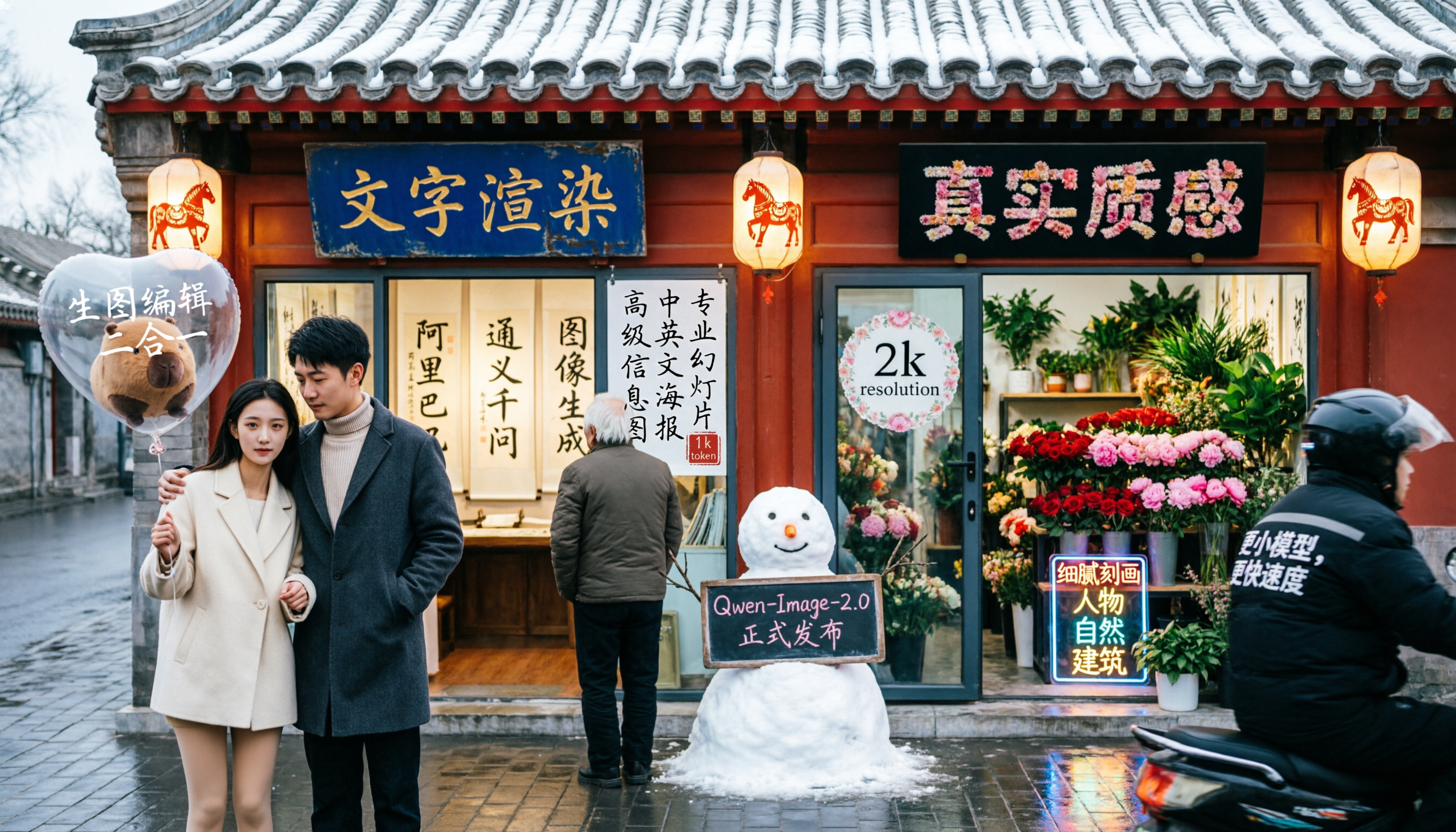 |
Model overview
| Model | Description | Output image specifications |
|---|---|---|
qwen-image-3.0-pro Recommended | The Qwen image generation and editing 3.0 series supports both text-to-image (T2I) and image-to-image/image editing (I2I). For 3.0 series API calls, see Qwen Image Generation and Editing 3.0. | Resolution: Total pixels must be between 512×512 and 2048×2048.Format: PNG |
qwen-image-3.0 RecommendedBalances quality and speed. | ||
qwen-image-2.0-pro RecommendedSame capabilities as qwen-image-2.0-pro-2026-04-22 | Qwen Pro series for image generation and editing. Offers stronger text rendering, realistic texture, and semantic adherence.For image editing, see Qwen-Image Editing. | Resolution: Set width and height freely. Total pixels must be between 512×512 and 2048×2048. Default resolution is 2048×2048.Format: PNGNumber of images: 1–6 |
qwen-image-2.0-pro-2026-06-22 Recommended | ||
| qwen-image-2.0-pro-2026-04-22 | ||
| qwen-image-2.0-pro-2026-03-03 | ||
qwen-image-2.0 RecommendedSame capabilities as qwen-image-2.0-2026-03-03 | Qwen accelerated series for image generation and editing. Balances quality and response speed.For image editing, see Qwen-Image Editing. | |
qwen-image-2.0-2026-03-03 Recommended |
Prerequisites
Before making a call, get an API key and export the API key as an environment variable. To make calls using the SDK, install the DashScope SDK.
Synchronous API (recommended)
HTTP
Synchronous calls return results in a single request.
Beijing:POST https://{WorkspaceId}.cn-beijing.maas.aliyuncs.com/api/v1/services/aigc/multimodal-generation/generation
Singapore:POST https://{WorkspaceId}.ap-southeast-1.maas.aliyuncs.com/api/v1/services/aigc/multimodal-generation/generation
Replace {WorkspaceId} with your actual workspace ID.
Request parameters |
|
Request headers | |
Content-Type string (Required)The content type of the request. Must be application/json. | |
Authorization string (Required)Authenticates the request with a Model Studio API key. Example: Bearer sk-xxxx. | |
Request body | |
model string (required)Model name. Example: qwen-image-2.0-pro. | |
input object (required)Input information.
Properties messages array (required)Array of message objects. Only single-turn conversations are supported, so the array must contain exactly one element.
Properties role string (required)Message role. Set to user.contentarray (required)Array of message content objects.
Properties text string(required)A positive prompt describing the image content, style, and composition you want.Supports Chinese and English. The qwen-image-2.0 series accept up to 1,300 tokens. Other models accept up to 800 tokens. The system truncates excess tokens.Note: Only one text field is allowed. Omitting it or providing more than one returns an error. | |
parameters object (optional)Image processing parameters.
Properties negative_prompt string (optional)A negative prompt describing what you do not want in the image.Supports Chinese and English. Maximum length is 500 characters. Excess characters are truncated automatically.Example: Low resolution, low quality, distorted limbs, malformed fingers, oversaturated colors, wax-like appearance, no facial details, overly smooth surfaces, AI-generated look. Chaotic composition. Blurry or distorted text.size string (optional)Output image resolution, formatted as width*height.qwen-image-2.0 series models: Total pixels must be between 512×512 and 2048×2048. Default resolution is 2048×2048. Recommended resolutions:
integer (optional)Number of output images. Default is 1.For qwen-image-2.0 series models, you can choose 1–6 images.prompt_extend bool (optional)Enable smart prompt rewriting. The model optimizes the positive prompt. Does not affect the negative prompt.
View rewriting examples Only asynchronous calls return the actual rewritten prompt.Original prompt (orig_prompt): A sitting orange cat with a joyful expression, lively and adorable, highly realistic.Actual prompt (actual_prompt): A sitting orange cat with soft, fluffy fur bathed in warm sunlight streaming through a window. Its body is proportionate, legs naturally bent, and it sits calmly on wooden floorboards. Its tail curls gently beside it, conveying relaxation and elegance. Its large, round eyes gleam with brightness and curiosity, its pupils slightly constricted, and its mouth hints at a joyful smile. Its ears tilt forward, showing liveliness and curiosity. The background is a cozy modern living room with light hardwood floors and a half-open window letting in soft natural light. Outside the window, a lush garden glows in the sunlight. Potted green plants sit on the windowsill. The image uses photorealistic style, with rich detail, layered lighting, and emphasis on the cat’s fur texture, facial expression, and natural posture. The overall mood is light, cheerful, and full of life. bool (optional)Adds a “Qwen-Image” watermark to the bottom-right corner of the image. Default: false. Watermark style:  seed seed integer (optional)Random number seed. Valid range: [0,2147483647].Using the same seed yields similar outputs. If omitted, the algorithm uses a random seed.Note: Image generation is probabilistic. Even with the same seed, results may vary. |
Response parameters |
Image URLs are valid for only 24 hours and then automatically purged. Save generated images promptly. |
output objectTask output information.
Properties choices arrayModel output. This array contains exactly one element.
Properties finish_reason stringReason the task stopped. Value is stop for natural stops.message objectModel response message.
Properties role stringMessage role. Fixed value: assistant.contentarray
Properties image stringURL of the generated image (PNG format). Expires after 24 hours. Download and save it promptly.objectTask result statistics. Not returned for qwen-image-2.0 series models.
Properties TOTAL integerTotal number of tasks.SUCCEEDED integerNumber of successful tasks.FAILED integerNumber of failed tasks. | |
usage objectThis field is only returned in async calls. Synchronous ImageSynthesis SDK calls do not return this field.
Properties image_count integerNumber of generated images, currently fixed at 1.width integerWidth of the generated image, in pixels.height integerHeight of the generated image, in pixels. | |
request_id stringUnique request identifier for tracing and troubleshooting. | |
code stringError code. Returned only for failed requests. See Error codes. | |
message stringDetailed error message. Returned only for failed requests. See Error codes. |
DashScope SDK call
The DashScope SDK supports Python and Java.
The parameter names in the SDK closely match the HTTP parameters, and the parameter structures follow language-specific conventions. For synchronous call parameters, see HTTP.
- Python
- Java
Request example
Response example
Image URLs expire after 24 hours. Download the images promptly.
Asynchronous API
HTTP
Asynchronous calls use a two-step HTTP workflow:
- Create a task to get a task ID: Send a request to create a task. The response returns a task ID (task_id).
- Poll for results using the task ID: Poll the task status with the task_id until it completes and returns an image URL.
Step 1: Create a task to get a task ID
Beijing:POST https://{WorkspaceId}.cn-beijing.maas.aliyuncs.com/api/v1/services/aigc/text2image/image-synthesis
Singapore:POST https://{WorkspaceId}.ap-southeast-1.maas.aliyuncs.com/api/v1/services/aigc/text2image/image-synthesis
- After the task is created, use the returned
task_idto query the result. Thetask_idis valid for 24 hours. Do not create duplicate tasks. Instead, use polling to retrieve the result. - For guidance for beginners, see Call APIs with Postman or cURL.
Request parameters |
|
Request headers | |
Content-Type string (Required)The content type of the request. Must be application/json. | |
Authorization string (Required)Authenticates the request with a Model Studio API key. Example: Bearer sk-xxxx. | |
X-DashScope-Async string (Required)Enables asynchronous processing. HTTP requests support only asynchronous calls. Must be enable. | |
Request body | |
model string (required)Model name.Example: qwen-image-3.0-pro. | |
input object (required)Input information.
Properties prompt string (required)A positive prompt describing the visual elements and characteristics you want in the generated image.Supports Chinese and English. Maximum length is 800 characters. Each Chinese character, letter, digit, or symbol counts as one character. Excess characters are truncated automatically.Example: A sitting orange cat with a joyful expression, lively and adorable, highly realistic.negative_prompt string (optional)A negative prompt describing what you do not want in the image.Supports Chinese and English. Maximum length is 500 characters. Excess characters are truncated automatically.Example: Low resolution, low quality, distorted limbs, malformed fingers, oversaturated colors, wax-like appearance, no facial details, overly smooth surfaces, AI-generated look. Chaotic composition. Blurry or distorted text. | |
parameters object (optional)Image processing parameters.
Properties size string (optional)Output image resolution in width*height format. Default resolution is 1664*928. Supported resolutions and their aspect ratios:
integer (optional)Number of generated images. This value is fixed at 1. Setting any other value returns an error.prompt_extend bool (optional)Enable smart prompt rewriting. The model optimizes the positive prompt. Does not affect the negative prompt.
View rewriting examples Only asynchronous calls return the actual rewritten prompt.Original prompt (orig_prompt): A sitting orange cat with a joyful expression, lively and adorable, highly realistic.Actual prompt (actual_prompt): A sitting orange cat with soft, fluffy fur bathed in warm sunlight streaming through a window. Its body is proportionate, legs naturally bent, and it sits calmly on wooden floorboards. Its tail curls gently beside it, conveying relaxation and elegance. Its large, round eyes gleam with brightness and curiosity, its pupils slightly constricted, and its mouth hints at a joyful smile. Its ears tilt forward, showing liveliness and curiosity. The background is a cozy modern living room with light hardwood floors and a half-open window letting in soft natural light. Outside the window, a lush garden glows in the sunlight. Potted green plants sit on the windowsill. The image uses photorealistic style, with rich detail, layered lighting, and emphasis on the cat’s fur texture, facial expression, and natural posture. The overall mood is light, cheerful, and full of life. bool (optional)Adds a “Qwen-Image” watermark to the bottom-right corner of the image. Default: false. Watermark style: seed integer (optional)Random number seed. Valid range: [0,2147483647].Using the same seed yields similar outputs. If omitted, the algorithm uses a random seed.Note: Image generation is probabilistic. Even with the same seed, results may vary. |
Response parameters |
Save the task_id to query the task status and result. |
outputobjectTask output information.
Properties task_id stringThe task ID. Valid for queries for 24 hours.task_status stringThe status of the task.
Enumeration values
| |
request_id stringUnique request identifier for tracing and troubleshooting. | |
code stringError code. Returned only for failed requests. See Error codes. | |
message stringDetailed error message. Returned only for failed requests. See Error codes. |
Step 2: Poll for results using the task ID
- China (Beijing)
- Singapore
GET https://{WorkspaceId}.cn-beijing.maas.aliyuncs.com/api/v1/tasks/{task_id}When calling, replace {WorkspaceId} with your actual workspace ID.- Polling recommendation: Image generation is time-consuming. Use a polling mechanism with a reasonable interval, such as 10 seconds.
- Task state transition: PENDING → RUNNING → SUCCEEDED or FAILED.
- Result link: After a task succeeds, an image URL valid for 24 hours is returned. Download and save the image to permanent storage, such as OSS.
- Requests Per Second (RPS) limit: The default RPS for the query API is 20. For higher-frequency queries or event notifications, we recommend that you configure an asynchronous task callback.
- More operations: For batch queries, task cancellation, and other operations, see Manage asynchronous tasks.
Request parameters |
Replace {task_id} with the task_id value returned by the previous API call. The task_id is valid for queries for 24 hours, Replace {WorkspaceId} with your actual workspace ID. |
Request headers | |
Authorization string (Required)Authenticates the request with a Model Studio API key. Example: Bearer sk-xxxx. | |
URL path parameters | |
task_id string (Required)The ID of the task. |
Response parameters |
Task data (task status and image URLs) is retained for only 24 hours and then automatically purged. Save generated images promptly. |
outputobjectTask output information.
Properties task_id stringThe task ID. Valid for queries for 24 hours.task_status stringThe status of the task.
Enumeration values
stringThe time when the task was submitted. format is YYYY-MM-DD HH:mm:ss.SSS.scheduled_time stringThe time when the task was executed. format is YYYY-MM-DD HH:mm:ss.SSS.end_time stringThe time when the task was completed. format is YYYY-MM-DD HH:mm:ss.SSS.results arrayList of task results, including image URLs, prompts, and error messages for failed tasks.
Properties orig_prompt stringThe original input prompt, corresponding to the request parameter prompt.actual_prompt stringThe optimized prompt used when prompt rewriting is enabled. Not returned when disabled.url stringURL of the generated image. Expires after 24 hours. Download and save the image promptly.stringError code. Returned only for failed requests. See Error codes.message stringDetailed error message. Returned only for failed requests. See Error codes. | |
usage objectOutput statistics. Counts only successful results.
Properties image_count integerNumber of generated images, currently fixed at 1. | |
request_id stringUnique request identifier for tracing and troubleshooting. |
DashScope SDK
The DashScope SDK supports Python and Java.
SDK parameter names closely match their HTTP counterparts. Parameter structures follow language-specific conventions. For asynchronous call parameters, see HTTP.
Image models require longer processing times, so the underlying service uses asynchronous execution. The SDK provides two modes:
- Synchronous call (blocking mode): The SDK waits for the task to complete and returns the final result. This matches standard synchronous call behavior.
- Asynchronous call (non-blocking mode): The call returns immediately with a task ID. Poll for the task status and final result using that ID.
Python SDK
- Synchronous
- Asynchronous
Request example
Response example
URLs expire after 24 hours. Download images promptly.
Java SDK
- Synchronous
- Asynchronous
Request example
Response example
URLs expire after 24 hours. Download images promptly.
Use with the OpenAI Agents SDK
Image generation models such as Qwen-Image are called through the DashScope native API and do not support OpenAI-compatible (compatible-mode) mode, so they cannot be used directly as the reasoning model of an Agent in the OpenAI Agents SDK.
In agent frameworks such as the OpenAI Agents SDK, you can wrap image generation as a tool (function tool) and let a text chat model that supports OpenAI-compatible mode (such as qwen-plus) act as the Agent's reasoning core to orchestrate it. For example:
Before running, install the dependencies: pip install openai-agents dashscope.
Billing and rate limiting
- For free quotas and pricing, see Model pricing.
- For rate limits, see Qwen-Image.
- Billing details: Each successfully generated image is billed. Failed calls or processing errors do not incur charges or consume your new user free quota.
Error codes
If the model call fails and returns an error message, see Error codes for resolution.
FAQ
Q: Should I enable or disable the prompt_extend parameter?
A: Enable this option (default) if you want more diverse image content and for the model to add details. Disable it if you need tighter control over image details, and optimize your prompts using the Text-to-Image Prompt Guide.
Q: What are the differences between qwen-image-2.0 series models?
A:
-
Combined image generation and editing models: Support both text-to-image and image editing.
qwen-image-2.0-proandqwen-image-2.0-pro-2026-04-22: Same capabilities. The Pro series delivers more professional text rendering, finer realistic textures, detailed realistic scenes, and stronger semantic adherence. Supports synchronous calls only.qwen-image-2.0andqwen-image-2.0-2026-03-03: Same capabilities. The accelerated version balances model performance and quality. Supports synchronous calls only.