Qwen-Image Edit API reference

Qwen-Image Edit supports multi-image input and output. Edit text within images, add, remove, or move objects, change subject poses, transfer styles, and enhance details — all through natural language prompts.

Quick links: User guide | Technical blog | Try it online

Model overview

Prompt

Input image

Output image

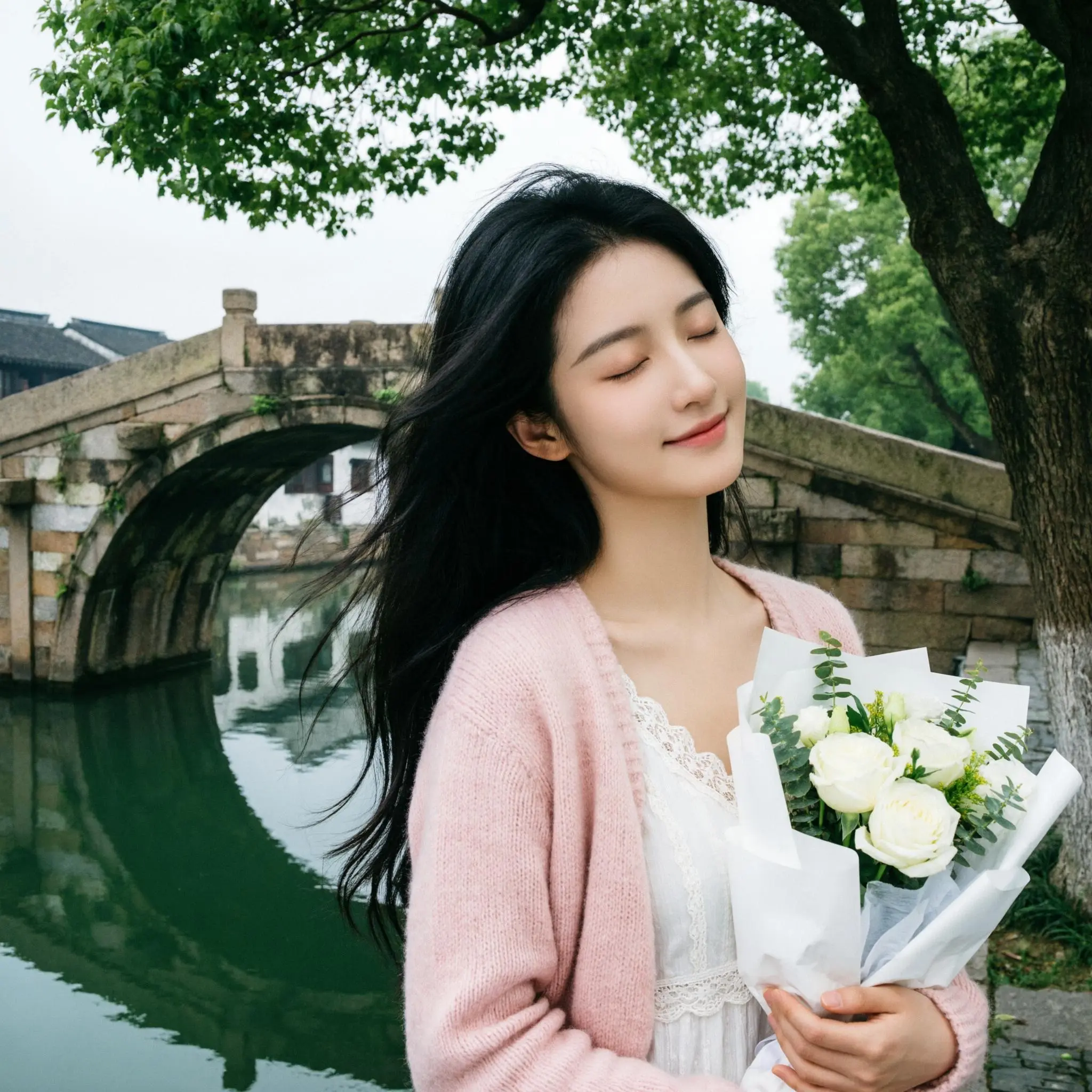
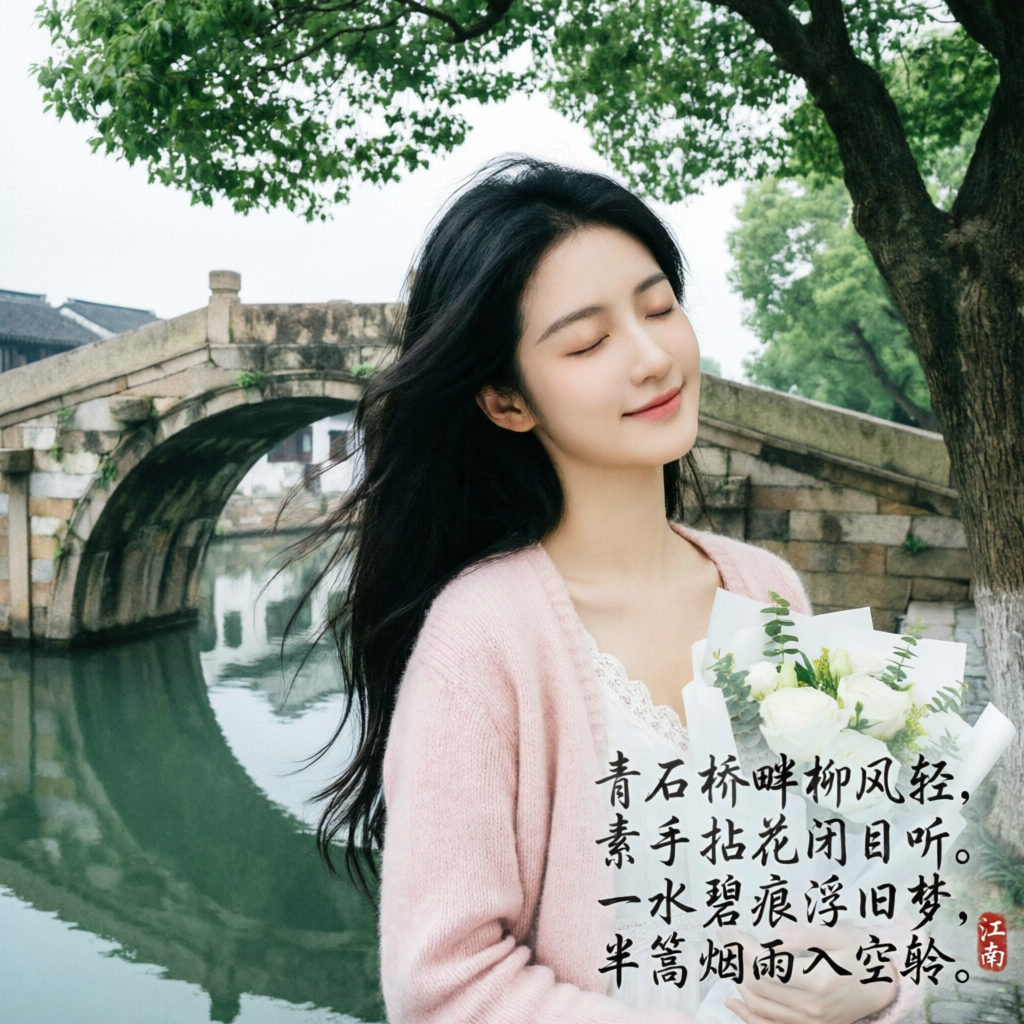
In the lower right corner of the image, next to the stone path and near the base of the tree trunk, add a seven-character quatrain in light gray, handwritten-style ink. The font should be a semi-cursive script with natural, flowing strokes and some "flying white" effects. The text size should be moderate (about 1/10 of the image height) and blend with the overall elegant ink wash atmosphere. The poem is: "By the stone bridge, the willow breeze is light. A fair hand plucks a flower, eyes closed to listen. A trace of green on the water floats an old dream. A pole-length of misty rain enters the empty boat." The verses should be arranged horizontally in two lines (the first two verses on one line, the last two on the second). In the lower right corner of the final character, add a small, vermilion seal with the two characters for "Jiangnan" in seal script. The seal's size should be about 1/3 of a single character's height.

image (18)-2026-03-10-16-39-59

image (19)

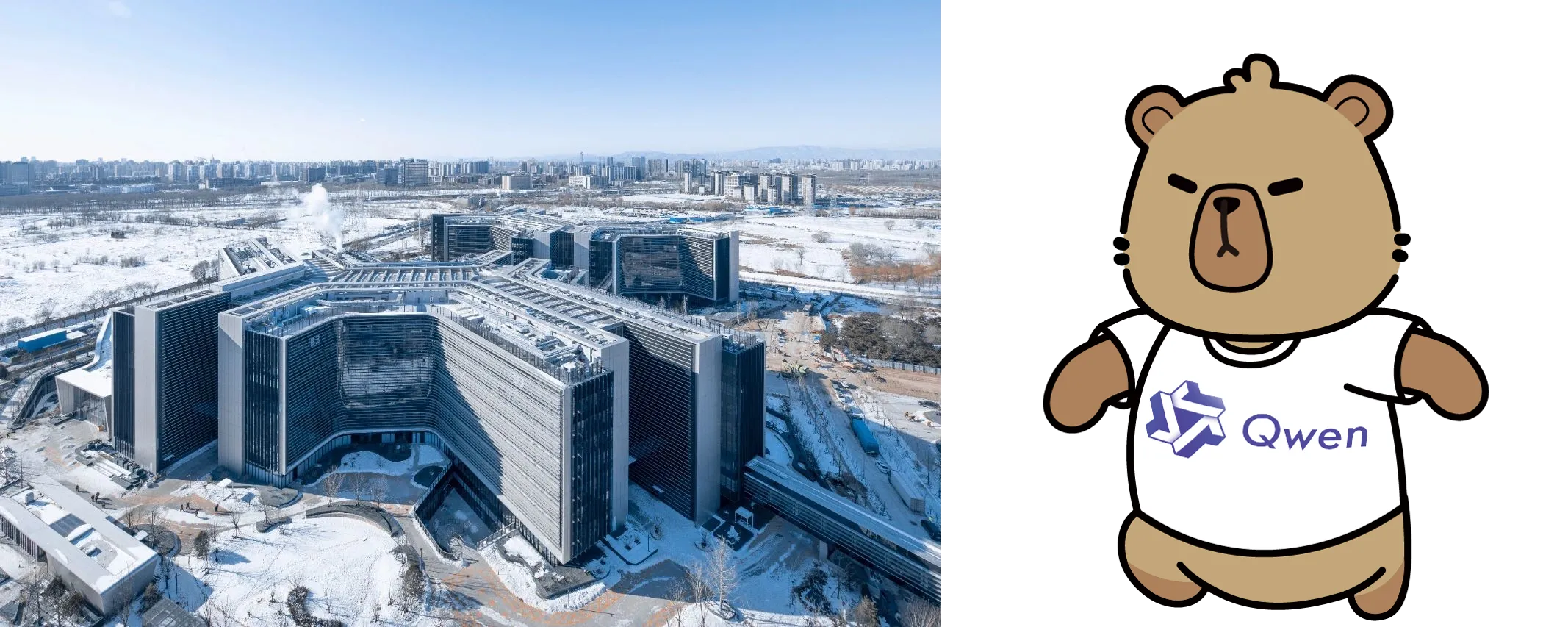
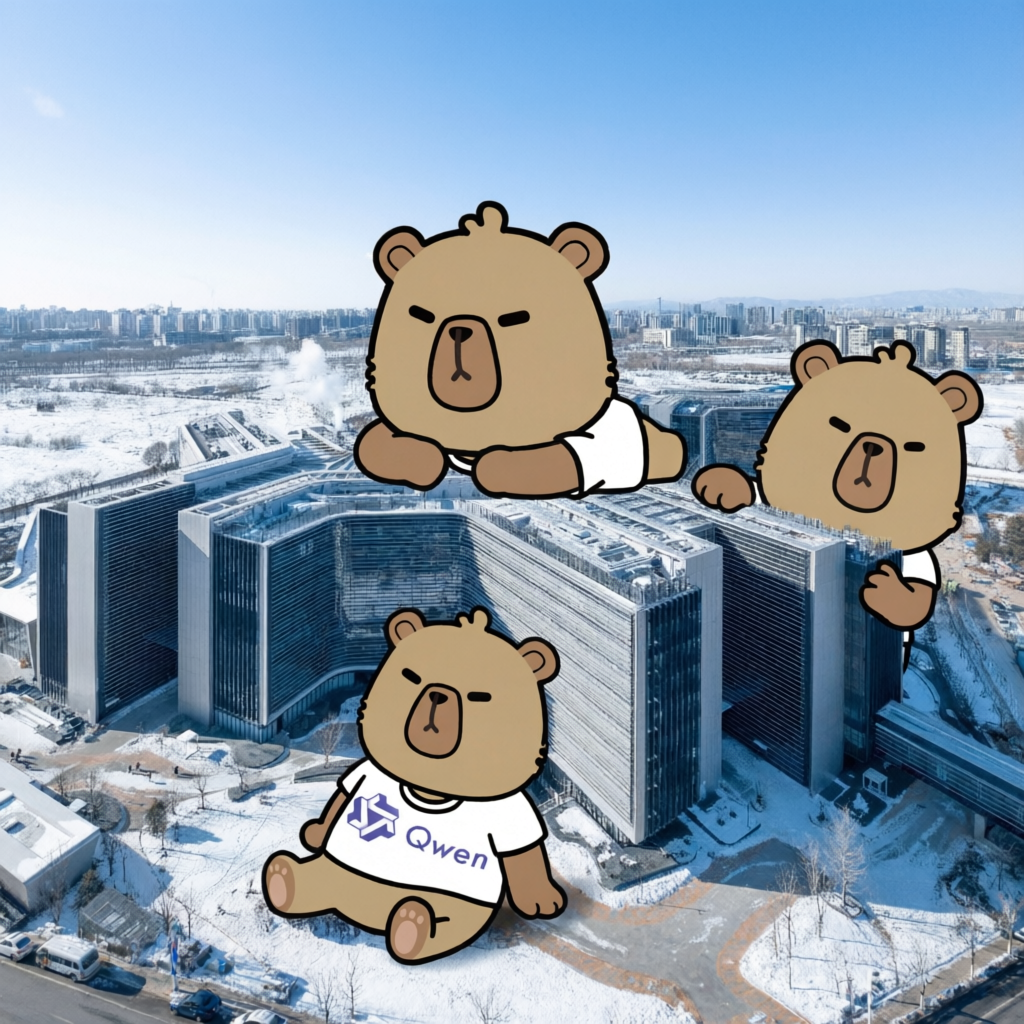
Use the city photo in Image 1 as the base image. Do not change the real buildings, streets, vehicles, or people in the photo. Keep the photo's realism. Place the three cartoon characters from Image 2 around the buildings: one lying on top of a building, one peeking out from the right side of a building, and one sitting on the empty ground in front of a building. The characters should be drawn in a flat graphic style with clear outlines, similar to a mural or poster illustration.

image (15)-combine

image (17)

Model nameModel descriptionOutput image specifications
qwen-image-2.0-pro Recommended
It currently has the same capabilities as qwen-image-2.0-pro-2026-04-22
The Pro series of Qwen image generation and editing models offers enhanced capabilities in text rendering, realistic textures, and semantic adherence.
For image generation, see Qwen-Text to Image.
Image resolution:
  • Customizable: The total number of pixels must be between 512512 and 20482048.
  • Default: The total number of pixels is close to 1024*1024, with an aspect ratio similar to the input image (or the last image in a multi-image input).
Image format: pngNumber of images: 1–6
qwen-image-2.0-pro-2026-06-22 Recommended
qwen-image-2.0-pro-2026-04-22
qwen-image-2.0-pro-2026-03-03
qwen-image-2.0 Recommended
It currently has the same capabilities as qwen-image-2.0-2026-03-03
This is the accelerated version of the Qwen image generation and editing model, balancing performance and response speed.
For image generation, see Qwen-Text to Image.
qwen-image-2.0-2026-03-03 Recommended
Before calling the API, check the Model List to see which models are supported in each region.

Prerequisites

Before making a call, get an API key and export the API key as an environment variable. To call the API using the SDK, install the DashScope SDK. The SDK is available for Python and Java.
The China (Beijing) and Singapore regions have separate API keys and request endpoints. They cannot be used interchangeably. Cross-region calls lead to authentication failures or service errors.

HTTP call

Beijing region: POST https://{WorkspaceId}.cn-beijing.maas.aliyuncs.com/api/v1/services/aigc/multimodal-generation/generation Singapore region: POST https://{WorkspaceId}.ap-southeast-1.maas.aliyuncs.com/api/v1/services/aigc/multimodal-generation/generation When calling, replace {WorkspaceId} with your actual workspace ID.

Request parameters

curl --location 'https://{WorkspaceId}.cn-beijing.maas.aliyuncs.com/api/v1/services/aigc/multimodal-generation/generation' \
--header 'Content-Type: application/json' \
--header "Authorization: Bearer $DASHSCOPE_API_KEY" \
--data '{
    "model": "qwen-image-2.0-pro",
    "input": {
        "messages": [
            {
                "role": "user",
                "content": [
                    {
                        "image": "https://help-static-aliyun-doc.aliyuncs.com/file-manage-files/zh-CN/20260310/jiydyi/image+%2818%29-2026-03-10-16-39-59.webp"
                    },
                    {
                        "text": "In the lower right corner of the image, next to the stone path and near the base of the tree trunk, add a seven-character quatrain in light gray, handwritten-style ink. The font should be a semi-cursive script with natural, flowing strokes and some \"flying white\" effects. The text size should be moderate (about 1/10 of the image height) and blend with the overall elegant ink wash atmosphere. The poem is: \"By the stone bridge, the willow breeze is light. A fair hand plucks a flower, eyes closed to listen. A trace of green on the water floats an old dream. A pole-length of misty rain enters the empty boat.\" The verses should be arranged horizontally in two lines (the first two verses on one line, the last two on the second). In the lower right corner of the final character, add a small, vermilion seal with the two characters for \"Jiangnan\" in seal script. The seal's size should be about 1/3 of a single character's height."
                    }
                ]
            }
        ]
    },
    "parameters": {
        "n": 1,
        "negative_prompt": " ",
        "prompt_extend": true,
        "watermark": false,
        "size": "2048*2048"
    }
}'
Request headers
Content-Type string (Required)The content type of the request. Must be application/json.
Authorization string (Required)Authenticates the request with a Model Studio API key. Example: Bearer sk-xxxx.
Request body
model string (Required)The model name. Example: qwen-image-2.0-pro.
input object (Required)The input object, containing the following field:

Property

messages array (Required)The request content array. Only single-turn conversations are currently supported, so the array must contain exactly one object with the role and content properties.

Property

rolestring (Required)The message sender role. Must be user.contentarray (Required)The message content, consisting of one to three images in the format {"image": "..."} and a single editing instruction in the format {"text": "..."}.

Property

image string (Required)The URL or Base64-encoded data of the input image. You can provide one to three images.For multi-image input, the image order is defined by the array sequence. The aspect ratio of the output image is based on the last image.Image requirements:
  • Image format: JPG, JPEG, PNG, BMP, TIFF, WEBP, or GIF.
    The output image is in PNG format. For animated GIFs, only the first frame is processed.
  • Image resolution: For best results, the image width and height should both be between 384 and 3072 pixels. Low resolution may result in blurry output, while high resolution increases processing time.
  • Image size: No more than 10 MB.
Supported input formats
  1. Public URL:
    • Supports HTTP and HTTPS protocols.
    • For example: https://help-static-aliyun-doc.aliyuncs.com/file-manage-files/zh-CN/20250925/fpakfo/image36.webp.
  2. Temporary URL:
  3. Base64-encoded image string
    • For example: data:image/jpeg;base64,GDU7MtCZz... (This example is truncated for demonstration purposes.)
    • For Base64 encoding specifications, see Pass an image using Base64 encoding.
textstring(Required)A positive prompt describing the desired content, style, and composition of the output image.Supports Chinese and English. The qwen-image-2.0 series accept up to 1,300 tokens. Other models accept up to 800 tokens. The system truncates excess tokens.Note: The content array must contain exactly one text object. Otherwise, an error will occur.
parameters object (Optional)Additional parameters to control image generation.

Property

n integer (Optional)The number of output images. Default: 1.For qwen-image-2.0 series models, you can choose to output one to six images.negative_prompt string (Optional)A negative prompt describing content to exclude from the output. Use it to constrain the generation.Supports Chinese and English. Maximum 500 characters. Each Chinese character, letter, number, or symbol counts as one character. Excess characters are automatically truncated.For example: low resolution, error, worst quality, low quality, disfigured, extra fingers, or bad proportions.size string (Optional)The output image resolution in the format width*height. Example: "1024*1536".qwen-image-2.0 series models:
  • The total number of pixels must be between 512512 and 20482048.
  • By default, the total number of pixels is close to 1024*1024, with an aspect ratio similar to the input image (or the last image in a multi-image input).
If you specify the size parameter, the system uses the width and height specified by size as the target and adjusts the dimensions of the actual output image to the nearest multiples of 16. For example, if you specify 1033*1032, the output image size is 1040*1024.

Recommended resolutions for common aspect ratios

Supported models: All models.prompt_extend bool (Optional)Enables intelligent prompt rewriting. Default: true. When enabled, the model optimizes the positive prompt (text), significantly improving results for simple prompts.Supported models: All models.watermark bool (Optional)Adds a "Qwen-Image" watermark to the bottom-right corner. Default: false.seed integer (Optional)The random number seed. Valid range: [0, 2147483647].Setting the same seed value helps maintain relative stability in generated output. If omitted, the algorithm uses a random seed.Note: Image generation is probabilistic. Even with the same seed, results may vary between calls.

Response parameters

  • Task successful
  • Task error
Task data (task status and image URLs) is retained for only 24 hours and then automatically purged. Save generated images promptly.
{
    "output": {
        "choices": [
            {
                "finish_reason": "stop",
                "message": {
                    "content": [
                        {
                            "image": "https://dashscope-result-sz.oss-cn-shenzhen.aliyuncs.com/xxx.png?Expires=xxx"
                        }
                    ],
                    "role": "assistant"
                }
            }
        ]
    },
    "usage": {
        "height": 2048,
        "image_count": 1,
        "width": 2048
    },
    "request_id": "571ae02f-5c9d-436c-83c2-f221e6df0xxx"
}
output objectThe model's generation results.

Property

choices arrayA list of result choices.

Property

finish_reason stringThe reason the task stopped. Returns stop for a natural stop.message objectThe message returned by the model.

Property

rolestringThe message role. Fixed at assistant.contentarrayThe message content, which contains the generated image information.

Property

image stringURL of the generated image in PNG format. Valid for 24 hours. Download and save the image promptly.
usage objectResource usage for this call. Returned only on success.

Property

image_count integerThe number of generated images.width integerThe width of the generated image in pixels.height integerThe height of the generated image in pixels.
request_id stringUnique request identifier for tracing and troubleshooting.
code stringError code. Returned only for failed requests. See Error codes.
message stringDetailed error message. Returned only for failed requests. See Error codes.

DashScope SDK call

SDK parameter names are mostly consistent with the HTTP API. The parameter structure is encapsulated based on the language features. For a complete list of parameters, see Qwen API reference.

Python SDK call

  • We recommend installing the latest version of the DashScope Python SDK to avoid potential runtime errors. For more information, see Install or upgrade the SDK.
  • Asynchronous interfaces are not supported.

Request examples

import json
import os
from dashscope import MultiModalConversation
import dashscope

# The following is the URL for the Beijing region. Replace {WorkspaceId} with your Bailian workspace ID. URLs vary by region.
dashscope.base_http_api_url = 'https://{WorkspaceId}.cn-beijing.maas.aliyuncs.com/api/v1'

# The model supports one to three input images.
messages = [
    {
        "role": "user",
        "content": [
            {"image": "https://help-static-aliyun-doc.aliyuncs.com/file-manage-files/zh-CN/20260310/rdsgaa/image+%2815%29.png"},
            {"image": "https://help-static-aliyun-doc.aliyuncs.com/file-manage-files/zh-CN/20260310/qokhtl/image+%2816%29.png"},
            {"text": "Use the city photo in Image 1 as the base image. Do not change the real buildings, streets, vehicles, or people in the photo. Keep the photo's realism. Place the three cartoon characters from Image 2 around the buildings: one lying on top of a building, one peeking out from the right side of a building, and one sitting on the empty ground in front of a building. The characters should be drawn in a flat graphic style with clear outlines, similar to a mural or poster illustration."}
        ]
    }
]

# The API keys for the Singapore and Beijing regions are different. To get an API key, see https://help.aliyun.com/document_detail/2613999.html.
# If you have not configured the environment variable, replace the next line with: api_key="sk-xxx"
api_key = os.getenv("DASHSCOPE_API_KEY")

# The qwen-image-2.0 series supports one to six output images.
response = MultiModalConversation.call(
    api_key=api_key,
    model="qwen-image-2.0-pro",
    messages=messages,
    stream=False,
    n=1,
    watermark=False,
    negative_prompt=" ",
    prompt_extend=True,
    size="2048*2048",
)

if response.status_code == 200:
    # To view the full response, uncomment the next line.
    # print(json.dumps(response, ensure_ascii=False))
    for i, content in enumerate(response.output.choices[0].message.content):
        print(f"URL of output image {i+1}: {content['image']}")
else:
    print(f"HTTP status code: {response.status_code}")
    print(f"Error code: {response.code}")
    print(f"Error message: {response.message}")
    print("For more information, see https://help.aliyun.com/document_detail/2614202.html")

Response example

The image URL is valid for 24 hours. Download the image promptly.
input_tokens , output_tokens , and characters fields are compatible. Their values are currently fixed at 0.
{
    "status_code": 200,
    "request_id": "959afba6-544e-487e-b58a-6bd9fea97xxx",
    "code": "",
    "message": "",
    "output": {
        "text": null,
        "finish_reason": null,
        "choices": [
            {
                "finish_reason": "stop",
                "message": {
                    "role": "assistant",
                    "content": [
                        {
                            "image": "https://dashscope-result-hz.oss-cn-hangzhou.aliyuncs.com/xxx.png?Expires=xxx"
                        }
                    ]
                }
            }
        ],
        "audio": null
    },
    "usage": {
        "input_tokens": 0,
        "output_tokens": 0,
        "characters": 0,
        "height": 2048,
        "image_count": 1,
        "width": 2048
    }
}

Call using the Java SDK

Install the latest DashScope Java SDK to avoid runtime errors. See Install or upgrade the SDK.

Request examples

import com.alibaba.dashscope.aigc.multimodalconversation.MultiModalConversation;
import com.alibaba.dashscope.aigc.multimodalconversation.MultiModalConversationParam;
import com.alibaba.dashscope.aigc.multimodalconversation.MultiModalConversationResult;
import com.alibaba.dashscope.common.MultiModalMessage;
import com.alibaba.dashscope.common.Role;
import com.alibaba.dashscope.exception.ApiException;
import com.alibaba.dashscope.exception.NoApiKeyException;
import com.alibaba.dashscope.exception.UploadFileException;
import com.alibaba.dashscope.utils.Constants;
import com.alibaba.dashscope.utils.JsonUtils;

import java.io.IOException;
import java.util.*;

public class QwenImageEdit {

    static {
        // The following is the URL for the Beijing region. Replace {WorkspaceId} with your Bailian workspace ID. URLs vary by region.
        Constants.baseHttpApiUrl = "https://{WorkspaceId}.cn-beijing.maas.aliyuncs.com/api/v1";
    }

    // The API keys for the Singapore and Beijing regions are different. To obtain an API key, see https://help.aliyun.com/en/model-studio/get-api-key.
    // If you have not configured the environment variable, replace the following line with your DashScope API key: apiKey="sk-xxx".
    static String apiKey = System.getenv("DASHSCOPE_API_KEY");

    public static void call() throws ApiException, NoApiKeyException, UploadFileException, IOException {

        MultiModalConversation conv = new MultiModalConversation();

        // The model supports one to three input images.
        MultiModalMessage userMessage = MultiModalMessage.builder().role(Role.USER.getValue())
                .content(Arrays.asList(
                        Collections.singletonMap("image", "https://help-static-aliyun-doc.aliyuncs.com/file-manage-files/zh-CN/20260310/rdsgaa/image+%2815%29.png"),
                        Collections.singletonMap("image", "https://help-static-aliyun-doc.aliyuncs.com/file-manage-files/zh-CN/20260310/qokhtl/image+%2816%29.png"),
                        Collections.singletonMap("text", "Use the city photo from Image 1 as the base image. Do not change the real buildings, streets, vehicles, or people in the photo. Keep the photo realistic. Place the three cartoon characters from Image 2 around the building: one lying on top of the building, one peeking out from the right side of the building, and one sitting on the open ground in front of the building. The characters should be drawn in a flat graphic style with clear outlines, similar to a mural or poster illustration.")
                )).build();
        // The qwen-image-2.0 series models support one to six output images.
        Map<String, Object> parameters = new HashMap<>();
        parameters.put("watermark", false);
        parameters.put("negative_prompt", " ");
        parameters.put("n", 1);
        parameters.put("prompt_extend", true);
        parameters.put("size", "2048*2048");

        MultiModalConversationParam param = MultiModalConversationParam.builder()
                .apiKey(apiKey)
                .model("qwen-image-2.0-pro")
                .messages(Collections.singletonList(userMessage))
                .parameters(parameters)
                .build();

        MultiModalConversationResult result = conv.call(param);
        // To view the complete response, uncomment the following line.
        // System.out.println(JsonUtils.toJson(result));
        List<Map<String, Object>> contentList = result.getOutput().getChoices().get(0).getMessage().getContent();
        int imageIndex = 1;
        for (Map<String, Object> content : contentList) {
            if (content.containsKey("image")) {
                System.out.println("URL of output image " + imageIndex + ": " + content.get("image"));
                imageIndex++;
            }
        }
    }

    public static void main(String[] args) {
        try {
            call();
        } catch (ApiException | NoApiKeyException | UploadFileException | IOException e) {
            System.out.println(e.getMessage());
        }
    }
}

Response examples

The image URL is valid for 24 hours. Download the image promptly.
{
    "requestId": "5d5c3260-fc6c-4b4f-8b35-c06366effxxx",
    "usage": {
        "image_count": 1,
        "width": 2048,
        "height": 2048
    },
    "output": {
        "choices": [
            {
                "finish_reason": "stop",
                "message": {
                    "role": "assistant",
                    "content": [
                        {
                            "image": "https://dashscope-result-sz.oss-cn-shenzhen.aliyuncs.com/xxx.png?Expires=xxx"
                        }
                    ]
                }
            }
        ]
    },
    "status_code": 200,
    "code": "",
    "message": ""
}

Error codes

If the model call fails and returns an error message, see Error codes for resolution.

Billing and rate limiting

  • For model free quotas and billing rates, see the Model List .
  • Refer to Qwen-Image for model rate limiting details.
  • Billing: You are billed per successfully generated image. Failed calls incur no charges and do not consume your new-user free quota.

FAQ

Q: What languages does the Qwen Image Editing model support?

A: The model currently supports Simplified Chinese and English. You can try other languages, but performance is not guaranteed.
Q: How do I view model invocation metrics?
A: One hour after a model invocation completes, go to the Monitoring (China (Beijing)) or Monitoring (Singapore) page to view metrics such as invocation count and success rate. For more information, see Billing and cost management.
Q: How do I get the domain name whitelist for image storage?
A: Images generated by models are stored in OSS. The API returns a temporary public URL. To configure a firewall whitelist for this download URL, note the following: The underlying storage may change dynamically. This topic does not provide a fixed OSS domain name whitelist to prevent access issues caused by outdated information. If you have security control requirements, contact your account manager to obtain the latest OSS domain name list.
Text Generation
Image Generation
Video Generation
World models
3D Model Generation
Audio
  • Audio generation
Realtime API
Text Embedding
Decision Model
TokenPlan
Model Production