

Introduction
This topic describes how to use Xiyan GBI with a database in an Alibaba Cloud Virtual Private Cloud (VPC). Xiyan GBI uses reverse network access to connect to your VPC environment. This allows Xiyan GBI to access your VPC database over a private network and provide its services.
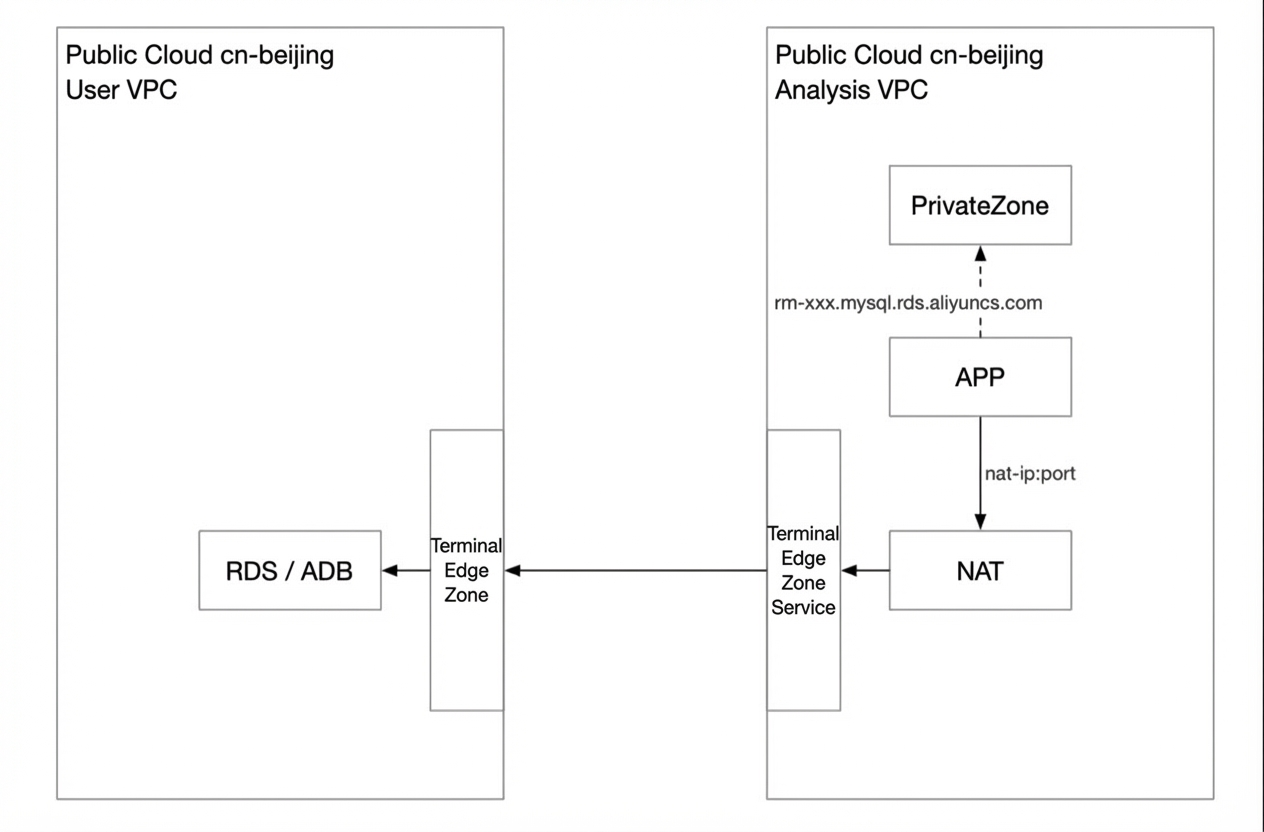
Xiyan GBI uses a PrivateLink network solution. This solution resolves the issue of databases in the Xiyan GBI production environment being inaccessible over the internet. The Xiyan GBI VPC is in the China (Beijing) region.
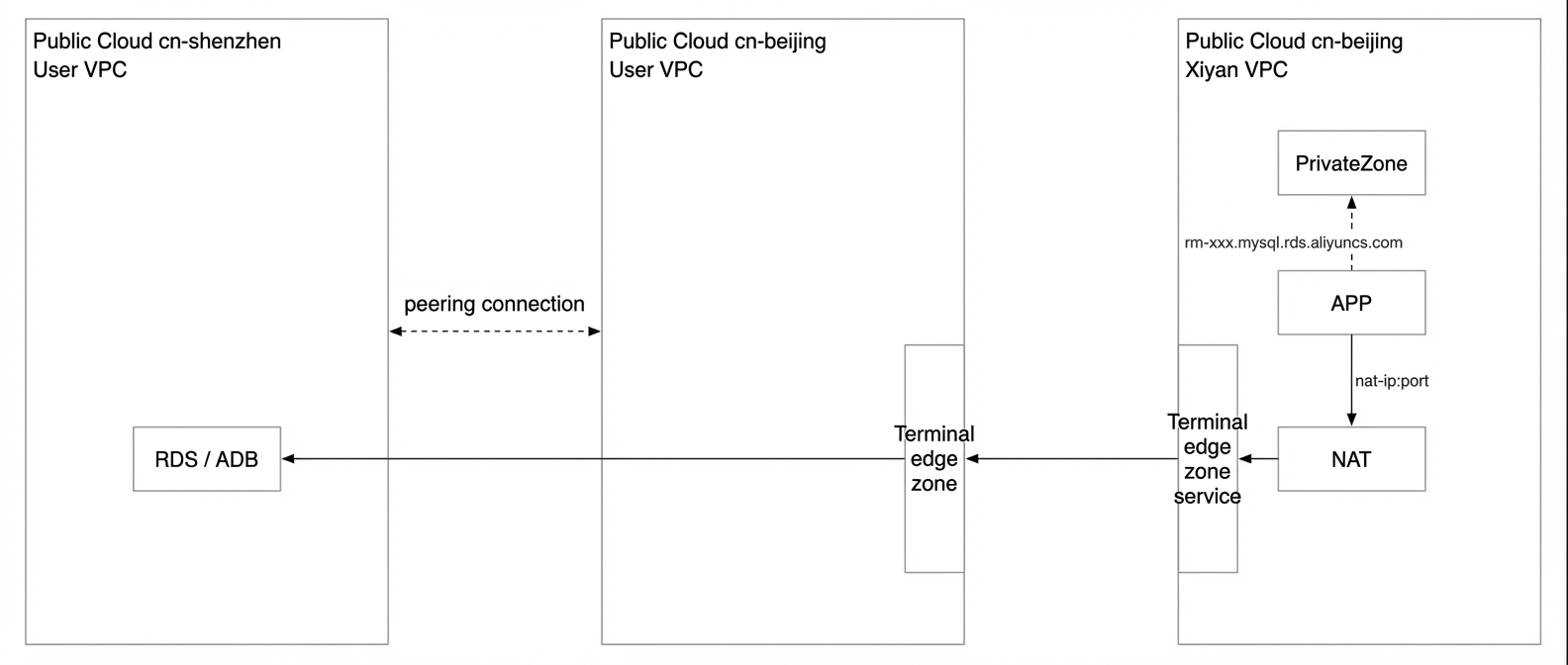
The following figures show the network connectivity.
-
Your VPC and the Xiyan GBI VPC are in the same region, China (Beijing).
-
Your VPC and the Xiyan GBI VPC are in different regions. If your database VPC is not in the China (Beijing) region, an inter-region connection is required.
Procedure
Preparations
- The Xiyan GBI production environment is deployed in the China (Beijing) region. If your database is also in the China (Beijing) region, the VPC connection is straightforward. If your database is in another region, such as China (Shanghai), you must create a new VPC in the China (Beijing) region. Then, use a service such as Cloud Enterprise Network (CEN) or a VPC peering connection to connect your two VPCs. Finally, you must connect your new VPC in the China (Beijing) region to the Xiyan GBI VPC.
- Log on to the Alibaba Cloud Management Console and ensure that you have the required permissions for PrivateLink.
- Have your Alibaba Cloud account ID ready. This ID is required to add your account to the service whitelist.
- You can access databases pending association within your Alibaba Cloud account, create a read-only account, and configure its permissions. Afterward, you must use this account to configure data authorization in the Xiyen console.
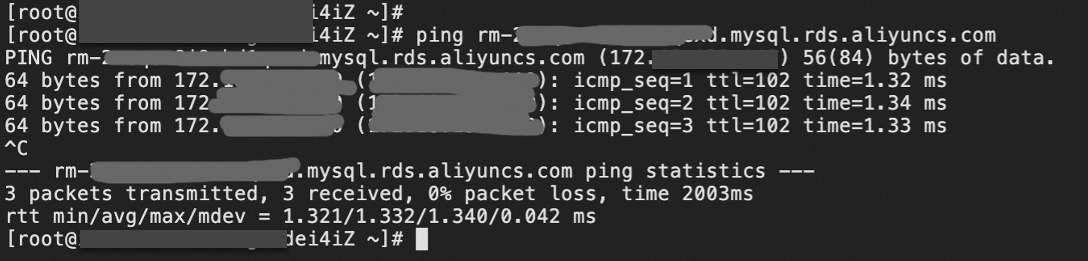
- Obtain the internal domain name and internal IP address of the database that you want to associate. You must provide this information to Xiyan GBI to configure Network Address Translation (NAT) rules.
Configuration steps
Step 1: Provide user information to be added to the service whitelist
On the Alibaba Cloud official website, click the  icon in the upper-right corner (① in the following figure). Select Online After-sales (② in the following figure). Submit a ticket to Xiyan GBI technical support with the following information to request to be added to the service whitelist.

- Problem Description: Establish reverse network access to a VPC and request to be added to the Xiyan GBI whitelist.
- Account ID: On the Alibaba Cloud official website, click your profile picture in the upper-right corner (③ in the preceding figure) to view your Account ID. For example, 196xxx.
- Zone: For example, Zone B.
- Internal endpoint of the database instance: For example, rm-xxxx.mysql.rds.aliyuncs.com.
- Internal IP address of the database instance: For example, 172.x.x.x.
Step 2: Create an endpoint
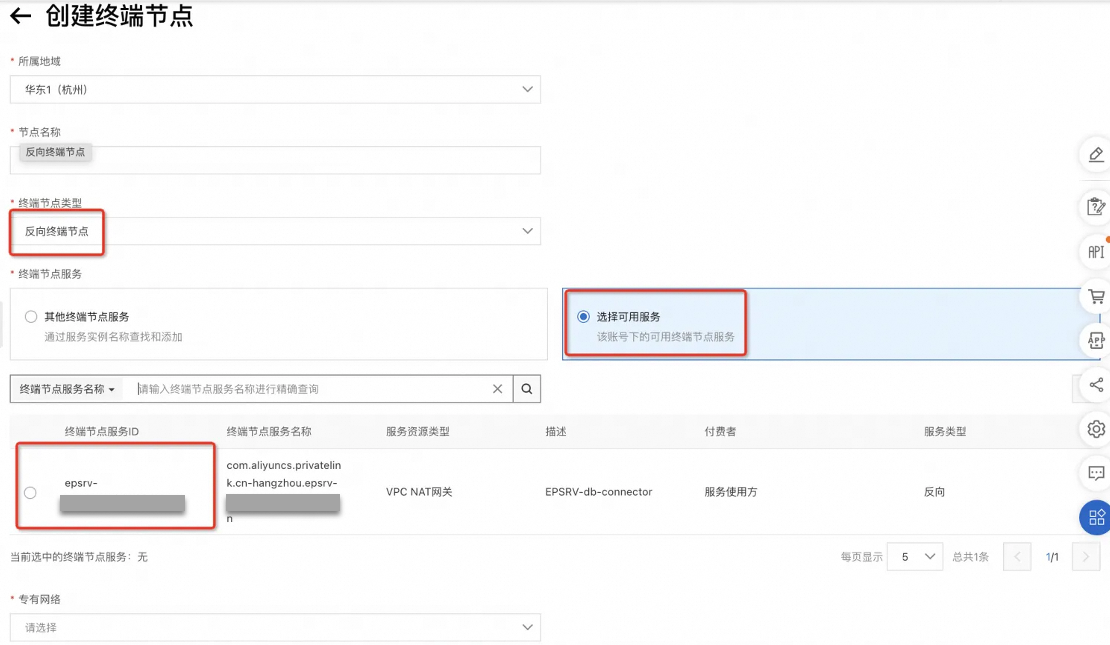
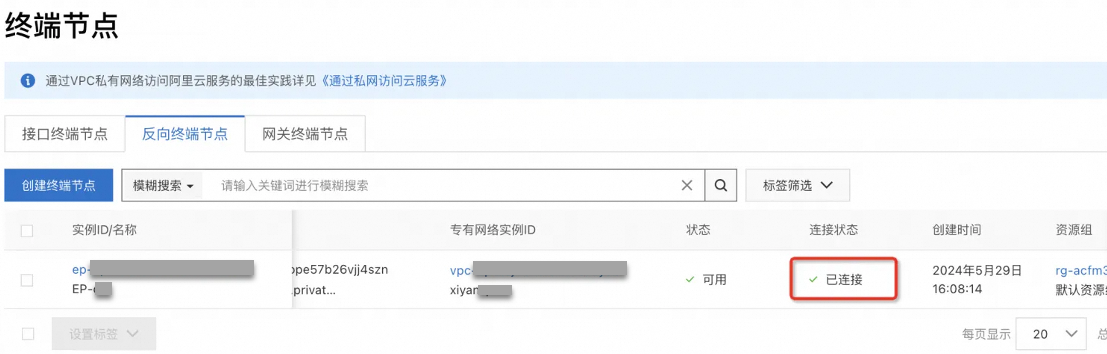
Create an endpoint in your VPC in the China (Beijing) region. An endpoint can be associated with an endpoint service to establish a private network connection to an external service.
Note: When you create the endpoint, set the node type to Reverse. Click Select Available Services. The Xiyan GBI endpoint service (Service ID: epsrv-2zeczobsytmn6nv9actr) appears in the list. Select the service.
The network resources for the Xiyan GBI production environment are in Zone H, so you must also select Zone H. Xiyan GBI may add other zones in the future to improve service availability. We recommend that you reserve other CIDR blocks for this purpose.
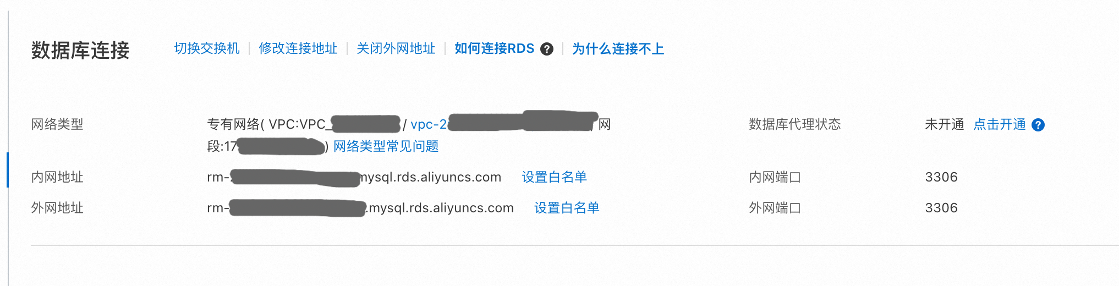
Step 3: Provide the internal domain name and IP address of the database for NAT rule configuration
Log on to the database console to view the internal endpoint. The following example uses RDS:
ping command:
Step 4: Configure the whitelist
- Configure the endpoint whitelist The security group of the endpoint controls data communication from the VPC to the endpoint elastic network interface (ENI). In this scenario, you must allow inbound traffic on all ports. For more information, see Add a security group.
-
Configure the database whitelist
In this scenario, you must grant access permissions from your database to the endpoint. The method for configuring a whitelist varies depending on the database type. The following examples show how to configure whitelists for common databases such as RDS and Hologres.
- To configure the whitelist for RDS, see Configure a whitelist.
- To configure the whitelist for Hologres, see Configure an IP address whitelist and Xiyan GBI.
- To configure the whitelist for AnalyticDB for PostgreSQL, see Configure a whitelist.
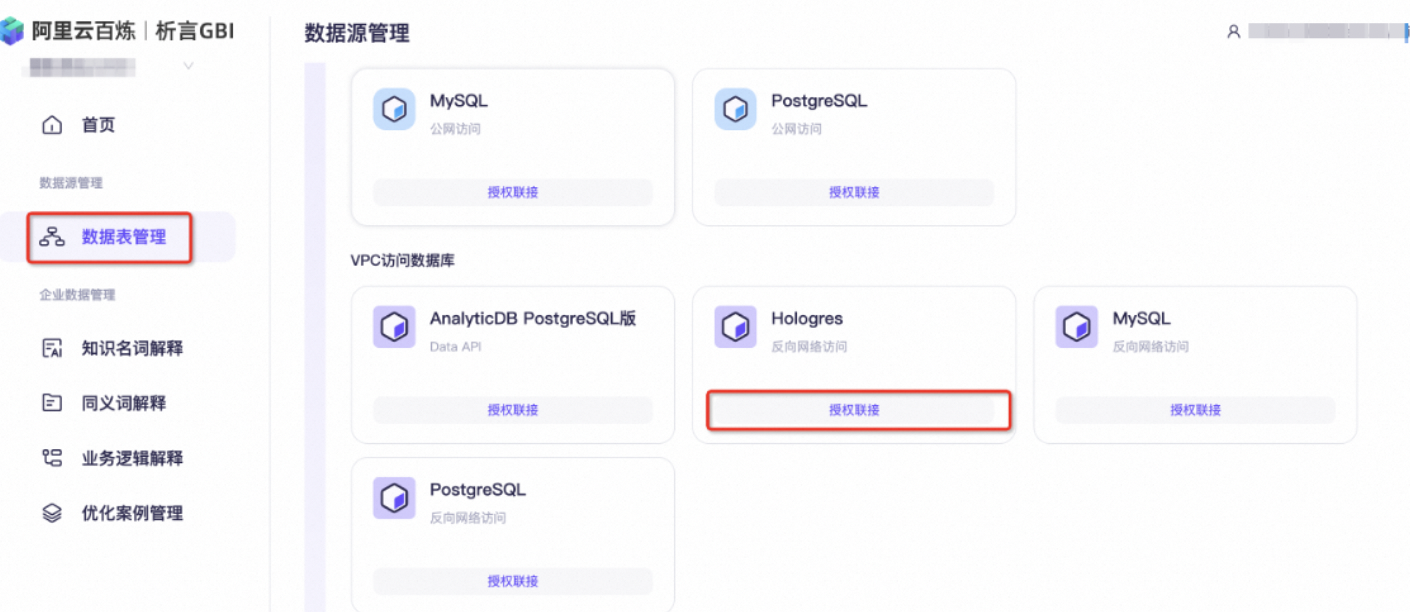
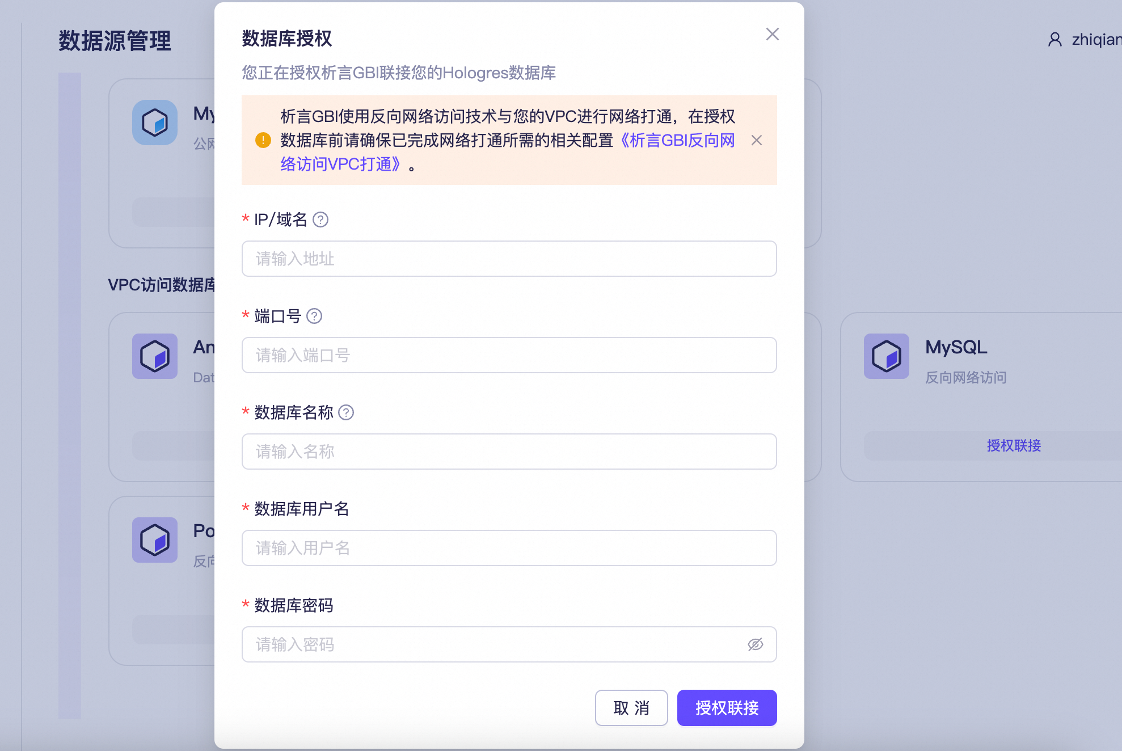
Step 5: Configure the data source in the Xiyan GBI console
Log on to the Xiyan GBI console. Enter the database information, such as the internal domain name within your VPC.
Appendix
VPC interconnection
This solution uses a VPC peering connection to connect VPCs in different regions that belong to the same account. While this is the recommended method, you can also use other interconnection solutions as needed. For more information about VPC peering connections, see the following topics:
- VPC interconnection
- Use a VPC peering connection to enable private communication between VPCs
- VPC peering connection configuration example