Implement volume control with the Device-side C SDK

This topic describes how to control volume using the Device-side C SDK.

1. Prerequisites

1.1. Before you begin

  • This topic builds on Implement chat features with the Device-side C SDK. Before you continue, prepare the environment as described in that topic.
  • This guide assumes you have integrated the SDK and the interactive voice response flow runs correctly.

1.2. Configure volume control

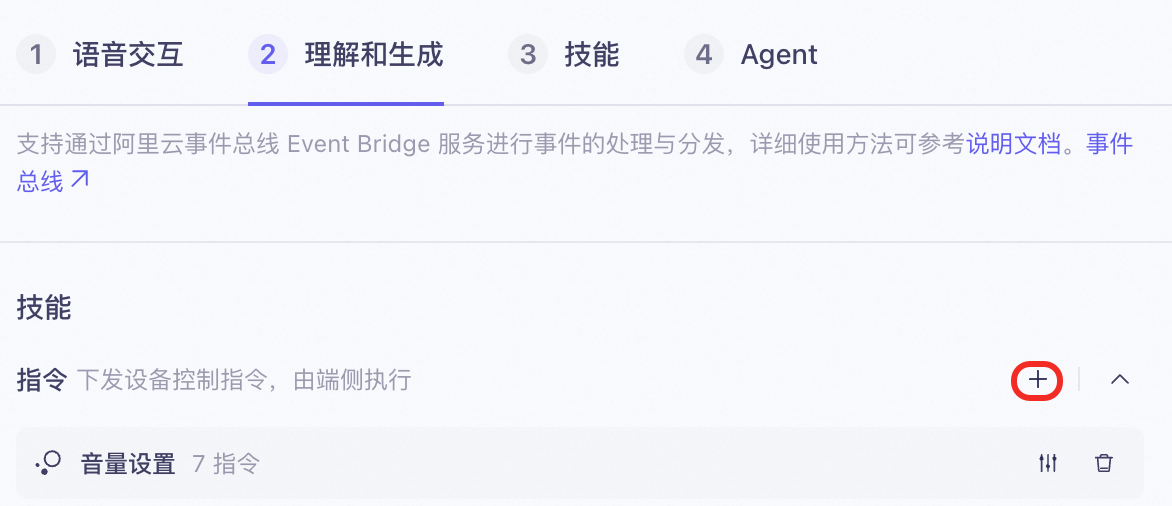
  • Create an application in the Model Studio console.
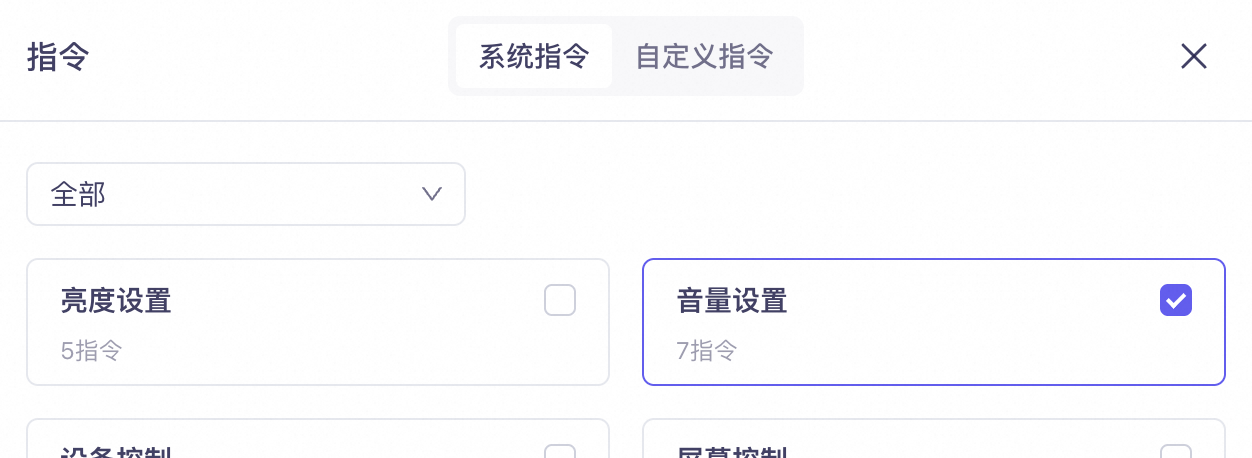
  • Click Skills/Instructions and enable Volume Settings.
    image.png
    image.png

2. Develop client-side features

2.1. SDK directory and file structure

After you decompress the SDK package, the relevant files and directories are structured as follows. For more information, see Device-side C SDK.
qwen_sdk/
├── include
│   ├── c_mmi_cmd
│   │   ├──c_mmi_cmd_volume.h
│   │   ├──c_mmi_cmd.h
│   │   └── ...
├── libs
│   ├── libc_mmi_cmd_volume.a
│   ├── libc_mmi_cmd.a
│   └── ...
└── ...
To enable volume control, load the libc_mmi_cmd.a and libc_mmi_cmd_volume.a static library files.

2.2. Sample code

The SDK abstracts the volume control feature into the following five events.
// Enumerations for volume setting commands.
enum {
    C_MMI_CMD_VOLUME_UNKNOWN = 0,
    C_MMI_CMD_VOLUME_INCREASE,
    C_MMI_CMD_VOLUME_DECREASE,
    C_MMI_CMD_VOLUME_SET,
    C_MMI_CMD_VOLUME_MUTE,
    C_MMI_CMD_VOLUME_UNMUTE
};
The input parameters for the triggering event have the following format.
// Parameters for volume setting commands.
typedef struct {
    uint32_t value;
    uint32_t type;
} c_mm_volume_param_t;
Parameter descriptions
In a multi-modal link, c_mm_volume_param_t.type specifies the volume type. You can typically ignore this parameter. The enumerations are as follows:
enum {
    C_MM_CMD_TYPE_UNKNOWN = 0,
    C_MM_CMD_TYPE_SYSTEM,	// System
    C_MM_CMD_TYPE_MEDIA,	// Media
    C_MM_CMD_TYPE_CALL		// Call
};
The c_mm_volume_param_t.value parameter ranges from 0 to 100. The application layer determines how this value maps to the actual device volume.If c_mm_volume_param_t.value is C_MMI_CMD_VALUE_UNDEFINED, the volume is adjusted by a default amount. The application layer determines this default amount.
Sample code
#include "c_mmi_cmd.h"
#include "c_mmi_cmd_volume.h"

static int32_t _cmd_vol_callback(uint32_t event, char *req_id, void *p)
{
    c_mm_volume_param_t *param = (c_mm_volume_param_t *)p;
    (void)req_id;

    switch (event) {
        case C_MMI_CMD_VOLUME_SET:
            UTIL_LOG_I("set volume to [%u] for [%u]", param->value, param->type);
            break;
        case C_MMI_CMD_VOLUME_INCREASE:
            UTIL_LOG_I("increase volume by [%u] for [%u]", param->value, param->type);
            break;
        case C_MMI_CMD_VOLUME_DECREASE:
            UTIL_LOG_I("decrease volume by [%u] for [%u]", param->value, param->type);
            break;
        case C_MMI_CMD_VOLUME_MUTE:
            UTIL_LOG_I("mute");
            break;
        case C_MMI_CMD_VOLUME_UNMUTE:
            UTIL_LOG_I("unmute");
            break;
        default:
            UTIL_LOG_W("invalid volume command");
            return UTIL_ERR_FAIL;
            break;
    }

    return UTIL_SUCCESS;
}

int32_t main(void)
{
    int32_t err = c_mmi_cmd_volume_register(_cmd_vol_callback);
    if (err) {
        UTIL_LOG_E("volume not loaded");
    }

    return 0;
}
Agent Development
Agent Context
Agent Governance & Evolution
Store
Application Marketplace