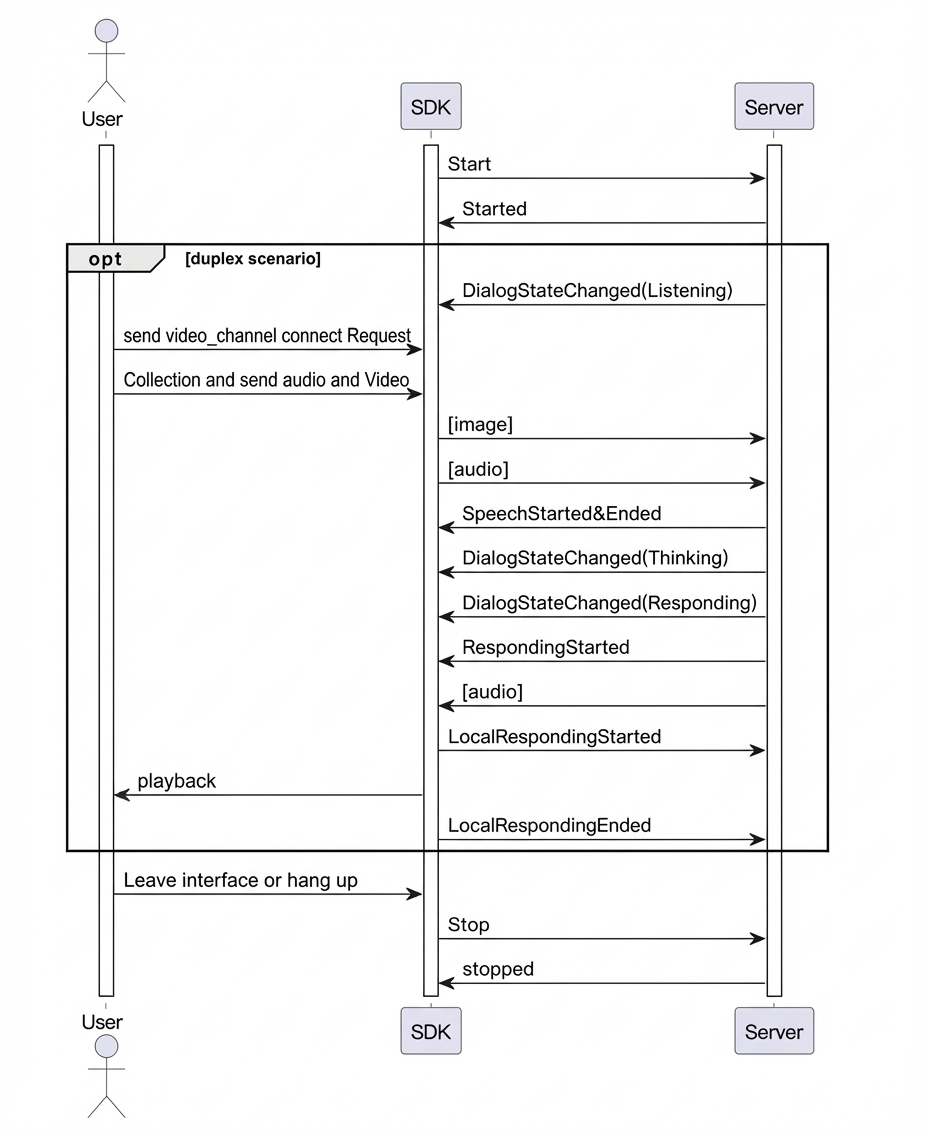
This topic describes how to use a third-party Real-Time Communication (RTC) channel to integrate with the Alibaba Cloud Model Studio multimodal interactive suite and enable video calls.
Your project might already use a third-party RTC service to forward and process audio and video. To simplify integration with the Alibaba Cloud Model Studio multimodal interactive suite, you can enable the video call (LiveAI) feature by submitting a sequence of images. This process requires minimal changes to your existing setup.
In a typical scenario, your client, such as a webpage or an app, connects to your server-side through RTC to transmit video and audio. The server-side then collects video frames and sends them to the multimodal interactive SDK at a rate of one frame every 500 ms, while also maintaining a real-time audio input.
Note: LiveAI supports only Base64 encoded images. Each image must be smaller than 180 KB.
The SDK documentation for each language provides examples of how to access LiveAI through a WebSocket channel. The following examples show how to access the LiveAI feature from the server-side. For more information, see Install the SDK.
Call flow
In a typical scenario, your client, such as a webpage or an app, connects to your server-side through RTC to transmit video and audio. The server-side then collects video frames and sends them to the multimodal interactive SDK at a rate of one frame every 500 ms, while also maintaining a real-time audio input.
Note: LiveAI supports only Base64 encoded images. Each image must be smaller than 180 KB.
- LiveAI call timing