This topic describes how to use the real-time multi-modal interactive Mobile Android Lite SDK provided by the Alibaba Cloud Model Studio Large Language Model (LLM) service. It covers SDK download and installation, key interfaces, and code examples.
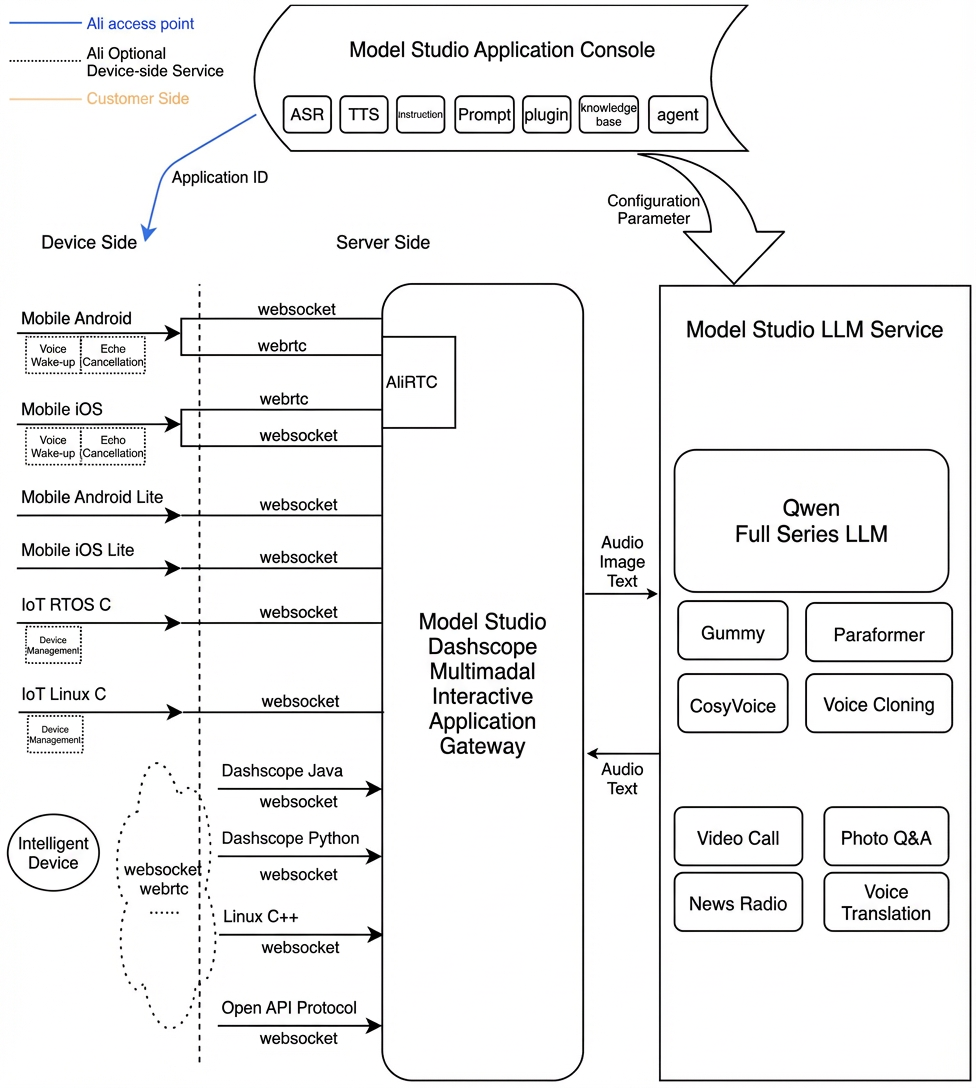
Multi-modal Real-time Interactive Service Architecture
Prerequisites
- Enable an Alibaba Cloud Model Studio real-time multimodal interaction application to get your workspace ID, app ID, and API key.
SDK Integration
Interactive Data Link Description
The multi-modal conversation Android Lite SDK only supports the WebSocket data link for server-side interaction and AudioOnly audio mode for conversations.
-
For audio interaction, use a WebSocket connection because it offers faster connection speeds and lower performance requirements.
-
WebSocket Data Link Audio Format Description.
- Uplink supports PCM and Opus audio formats for speech recognition.
- Downlink supports PCM and MP3 audio streams.
-
WebSocket Data Link Audio Format Description.
Interactive Mode Description
The SDK supports three interactive modes: Push2Talk, Tap2Talk, and Duplex (full-duplex).
- Push2Talk: Press and hold to speak. Release to end recording.
- Tap2Talk: Tap to start speaking. The system automatically detects when the user finishes speaking.
- Duplex: This mode provides full-duplex interaction. After the connection starts, you can speak at any time and interrupt speech. Note: Full-duplex interaction requires the client to integrate an Acoustic Echo Cancellation (AEC) algorithm. The Lite SDK does not provide this algorithm module. You must integrate the Acoustic Echo Cancellation algorithm module yourself or use the full-featured Mobile Android SDK for Alibaba Cloud Model Studio multi-modal conversations.
Invocation Description
The SDK and its invocation demo are described below.
- You can download the SDK and demo dashscope-lite-android-1.0.2.zip and configure the necessary environment and dependencies.
- Then, import the example code from the compressed package and integrate the SDK by following the invocation process.
SDK Reference
You can import dependency libraries.
-
app/src/main/libs
- dashscope-multimodal-dialog-lite-1.*.aar // Alibaba Cloud multi-modal interactive Lite SDK
-
Other dependencies imported by the demo application are listed below.
For more information, see
app/build.gradle.
Key Parameters
Parameter Name | Required | Value | Description |
|---|---|---|---|
url | Yes | String | The server-side address for the request. |
api_key | Yes | String | Alibaba Cloud Model Studio service registration API Key. Create an API key on the Model Studio platform. For security on the mobile client, you can also integrate a short-term token on the server-side and issue it to the client. |
workspace_id | Yes | String | The workspace ID in the Model Studio console. |
app_id | Yes | String | The application ID you created in the console. |
Demo Overview
-
EntranceActivity: This is the entry page. You can modify information such as
url,api_key, andapp_id.- On this page, you can select conversation modes such as Tap2Talk or Push2Talk.
-
MultimodalDialogActivity: This is the conversation interaction implementation class.
-
The demo page references
TYAudioRecorderas the audio input. You must replace it with your own implementation. -
The demo page uses
AudioPlayeras the audio playback output. You can choose to use your own implementation class. -
In audio interaction mode, the demo supports the Visual Question Answering (VQA) (image-to-text) feature. Say "take a photo to identify xxx" to trigger the service to issue a photo-taking intent.
- You can take a photo locally and upload it to OSS (or generate a public link using other content services) to trigger recognition and conversation for a single image.
- You can also directly upload the image's Base64 encoding to request the service or the conversation result of the image.
-
The demo page references
Interface Design
MultimodalDialog Conversation Entry Class
- MultiModalDialog You can initialize the conversation class by passing in necessary global parameters.
- createConversation You can create a session.
- start You can start a conversation.
- stop You can end a conversation.
- destroy
- interrupt You can interrupt interaction.
- startSpeech You can notify the server to start uploading audio. Note that you can only call this method when in the Listening state and only in Push2Talk mode.
- sendAudioData You can notify the server to upload audio.
- stopSpeech You can notify the server to stop uploading audio. Call this method only in Push2Talk mode.
- requestToRespond You can request the server to answer a specific question or play Text-to-Speech (TTS).
- Other Interfaces.
Key Parameter Enumerations
Parameter | Value | Description |
|---|---|---|
DialogMode | TAP2TALK | Manually start, automatically end. |
PUSH2TALK | Manually start, manually end. | |
DUPLEX | Full-duplex interaction. |
MultiModalRequestParam Client-Cloud Interaction Parameter Details
Primary Parameter | Secondary Parameter | Tertiary Parameter | Quaternary Parameter | Type | Required | Description |
|---|---|---|---|---|---|---|
input | workspace_id | string | Yes | The user's workspace ID. | ||
app_id | string | Yes | The application ID created by the customer in the console. Determine which conversation system to use based on the value pattern. | |||
dialog_id | string | No | Conversation ID. If provided, continue the existing conversation. | |||
parameters | upstream | type | string | Yes | Uplink type: AudioOnly for voice calls only AudioAndVideo for video upload | |
mode | string | No | The mode used by the client. Options:
Default is tap2talk | |||
audio_format | string | No | Audio format. Supports PCM and Opus. Default is PCM. | |||
downstream | voice | string | No | The timbre of the synthesized speech. | ||
sample_rate | int | No | The sample rate of the synthesized speech (unit: Hz). Default sample rate is 24000 Hz. | |||
intermediate_text | string | No | Controls which intermediate texts are returned to the user: transcript returns the user's speech recognition result. dialog returns intermediate responses. You can set multiple, comma-separated values. The default value is transcript. | |||
audio_format | string | No | Audio format. Supports PCM and MP3. Default is PCM. | |||
client_info | user_id | string | Yes | The end user ID, used for user-related processing. | ||
device | uuid | string | No | The globally unique ID of the client. Generate it yourself and pass it to the SDK. | ||
network | ip | string | No | The public network IP address of the caller. | ||
location | latitude | string | No | Caller Dimensions | ||
longitude | string | No | The longitude information of the caller. | |||
city_name | string | No. | Caller's city | |||
biz_params | user_defined_params | object | No | Other parameters to pass through to the agent. | ||
user_defined_tokens | object | No | Authentication information required by the agent to pass through. | |||
tool_prompts | object | No | The prompt required by the agent to pass through. | |||
user_query_params | object | No | Custom parameters for user requests to pass through. | |||
user_prompt_params | object | No | Custom parameters for user prompts to pass through. |
IConversationCallback (Callback Interface)
Important Callback Method Descriptions
-
onSpeechContent(output: Map<String, Any>)
This provides speech recognition content.
SpeechContent - Response
Primary Parameter
Secondary Parameter
Tertiary Parameter
Type
Required
Description
output
event
string
Yes
Event name: SpeechContent
dialog_id
string
Yes
Conversation ID
text
string
Yes
The text recognized from the user's speech, streamed as full output.
finished
bool
Yes
Indicates whether the output has finished.
-
onRespondingContent(output: Map<String, Any>)
This provides text returned by the Large Language Model (LLM).
Example:Primary Parameter
Secondary Parameter
Tertiary Parameter
Type
Required
Description
output
finished
bool
Yes
Indicates whether the output has finished.
dialog_id
string
Yes
Conversation ID
event
string
Yes
Message type
text
string
No
The text result returned by the LLM.
spoken
string
No
The text of the content to be played, returned by the LLM. This may differ from the `text` field.
extra_info
object
No
Other extension information. Currently supports:
commands: command string
agent_info: agent information
tool_calls: information returned by the plugin
dialog_debug: conversation debug information
timestamps: timestamps of each node in the data link
Error Handling
onErrorReceived - Response
This section lists error codes and their corresponding error messages.Error Code | Error Name | Description |
|---|---|---|
40000000 | ClientError | Client-side error. |
40000001 | InvalidParameter | Invalid parameter, such as a missing parameter. |
40000002 | DirectiveNotSupported | Unsupported instruction, such as an incorrect instruction name. |
40000003 | MessageInvalid | Invalid instruction, such as an incorrect instruction format. |
40000004 | ConnectError | Connection error, such as client or digital human RTC exit. |
40010000 | AccessDenied | Access denied. |
40010001 | UNAUTHORIZED | Unauthorized. |
40020000 | DataInspectionFailed | Input or output triggers Green Net. |
50000000 | InternalError | Internal server-side error. Contact server-side personnel for troubleshooting. |
50000001 | UnknownError | Unknown internal server-side error. Contact server-side personnel for troubleshooting. |
50010000 | InternalAsrError | Internal ASR error. |
50020000 | InternalLLMError | Internal LLM error. |
50030000 | InternalSynthesizerError | Internal TTS error. |
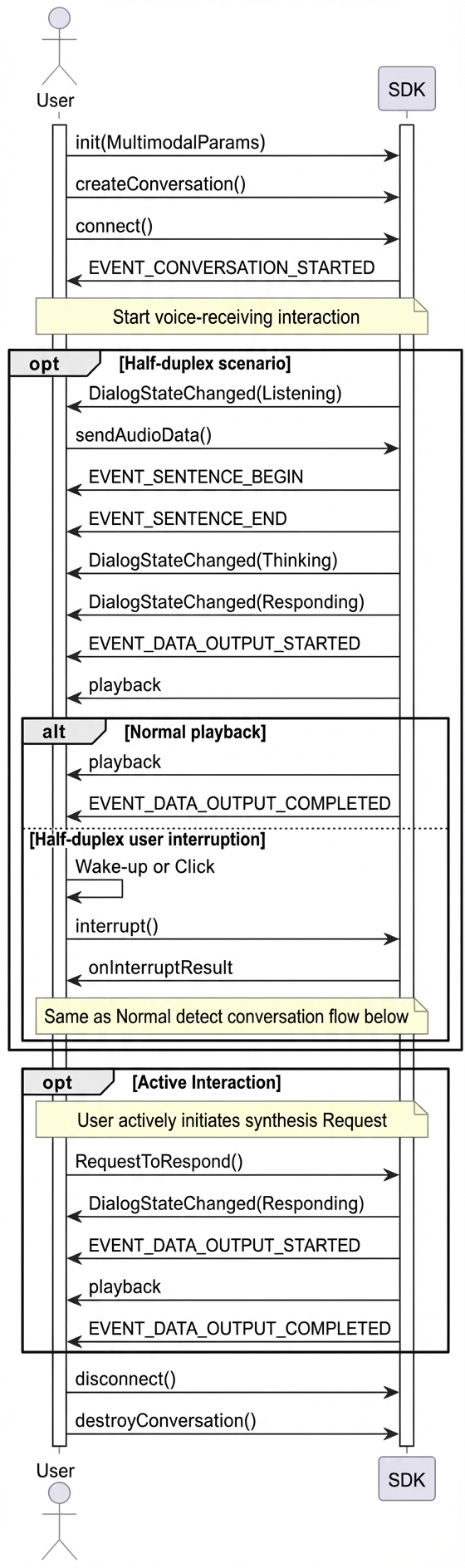
Invocation Timing
Half-duplex Interaction
More SDK Interface Usage Instructions
VQA Interaction
VQA enables multimodal interaction using images and voice by sending images during a conversation.
The core process involves a voice or text request for a photo-taking intent, which triggers the "visual_qa" photo-taking instruction.
After the client receives a photo-taking instruction through the callback function onRespondingContent, you can send an image link or Base64 data. The system supports images smaller than 180 KB.
- You can handle the "visual_qa" command and upload the photo.
Request LiveAI Through WebSocket Data Link
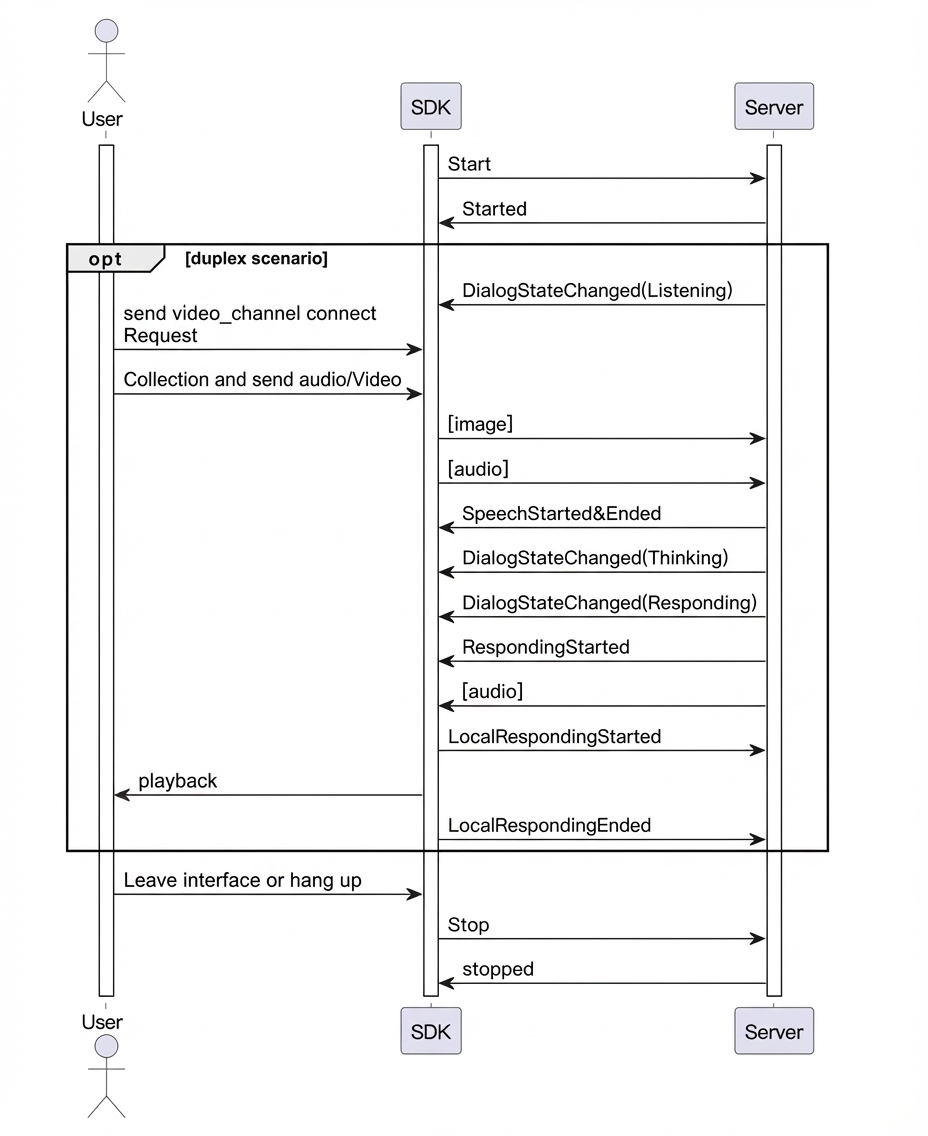
LiveAI (video call) is the official agent provided by Alibaba Cloud Model Studio multimodal interaction. Using the Android Lite SDK, you can also invoke the video call feature by recording video frames yourself within the WebSocket data link.
Note: When invoking LiveAI via WebSocket, sending images only supports Base64 encoding. Each image must be smaller than 180 KB.
- LiveAI Invocation Timing
- Key Code Example
Text-to-Speech (TTS) Synthesis
The SDK supports requesting the server to synthesize audio directly from text.
You can send a requestToRespond request when the client is in the Listening state.
If the current state is not Listening, first call the interrupt interface to interrupt the current broadcast.
Custom Prompt Variables and Value Passing
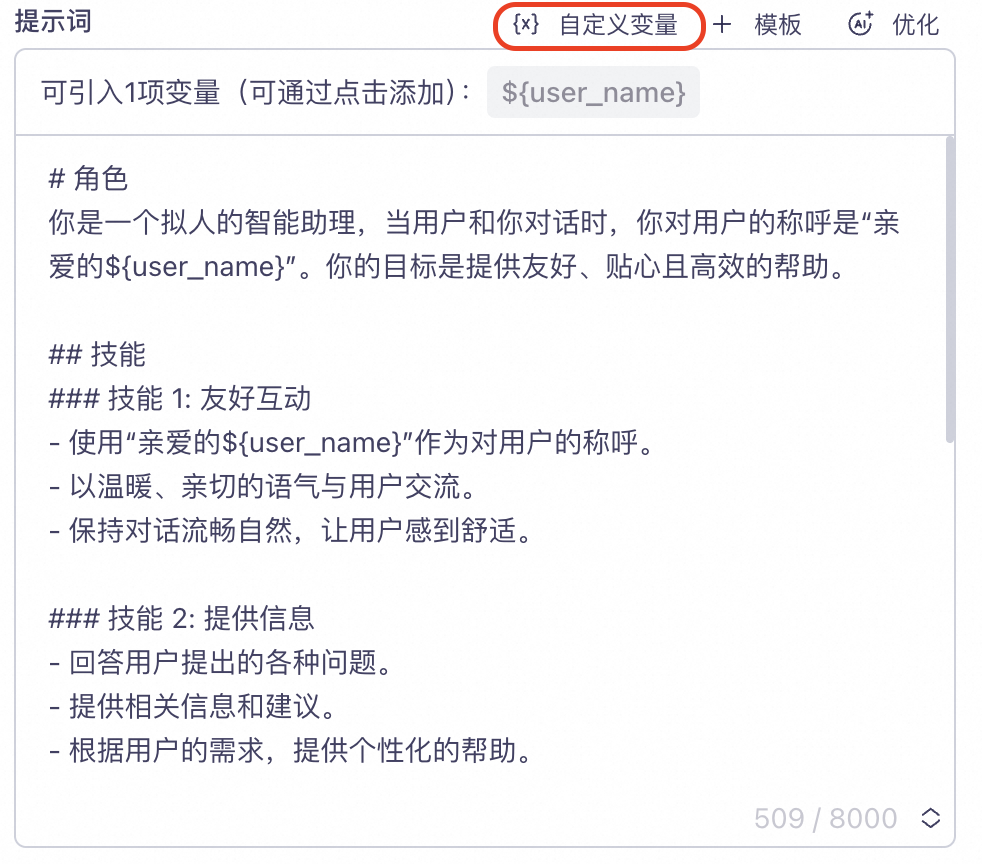
- You can configure custom variables in the [Prompt] project in the console.
user_name field is defined to represent the user's nickname. The user_name variable is inserted into the prompt as a placeholder ${user_name}.
- You can set variables in the code.
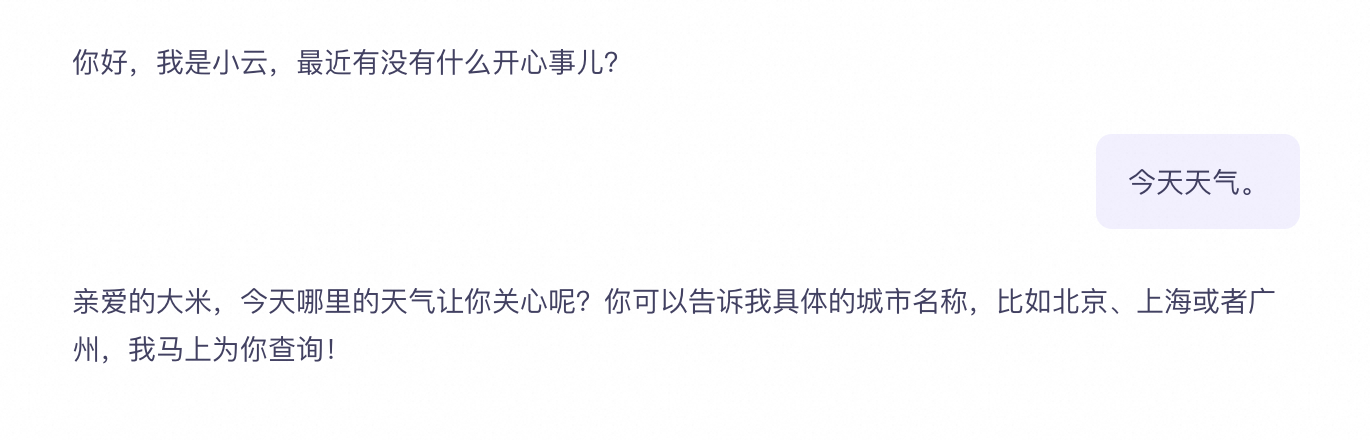
"user_name" = "Rice".
- Request a response.