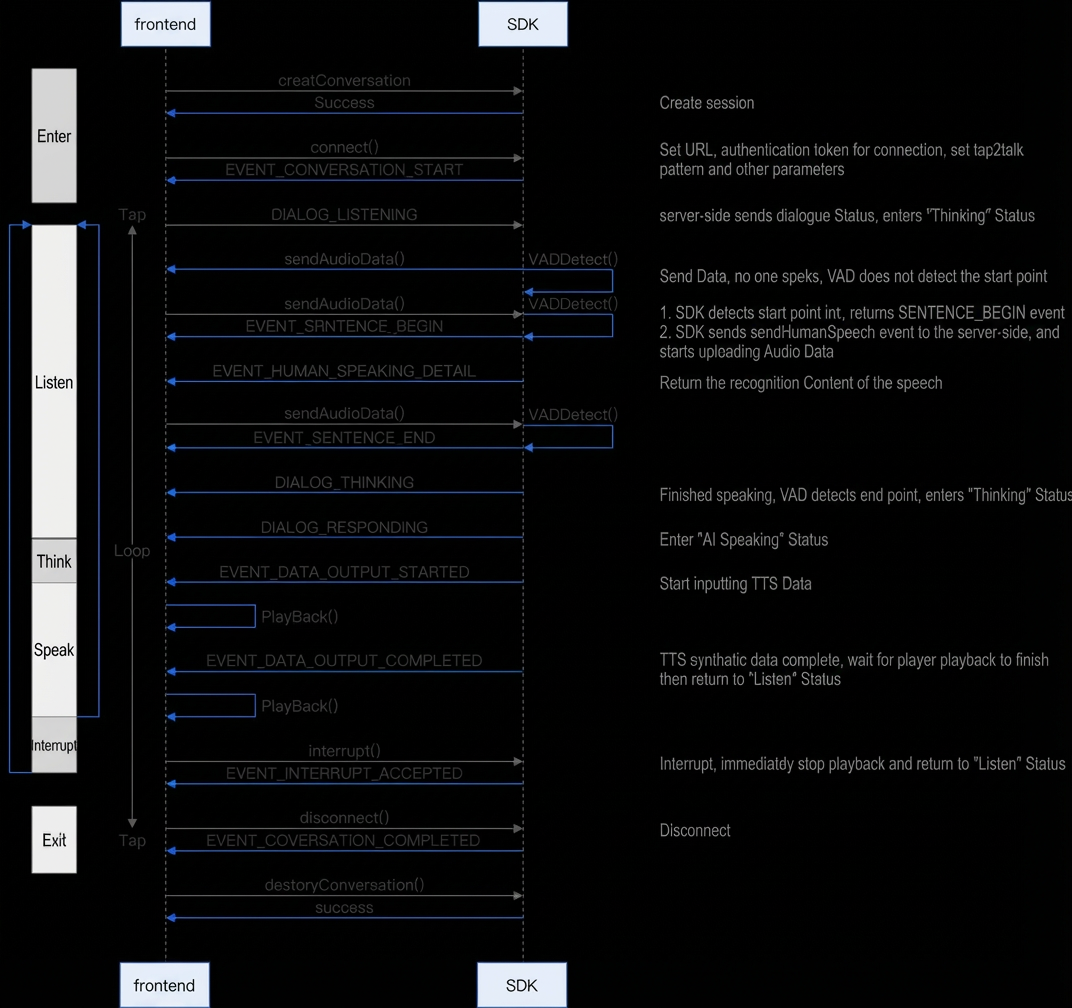
This topic describes how to use the real-time multimodal interaction Linux C++ SDK provided by Alibaba Cloud Model Studio, including SDK download and installation, key interfaces, and code examples.
Prerequisites
Enable an Alibaba Cloud Model Studio real-time multimodal interaction application to get your workspace ID, app ID, and API key.
Multimodal real-time interaction service architecture
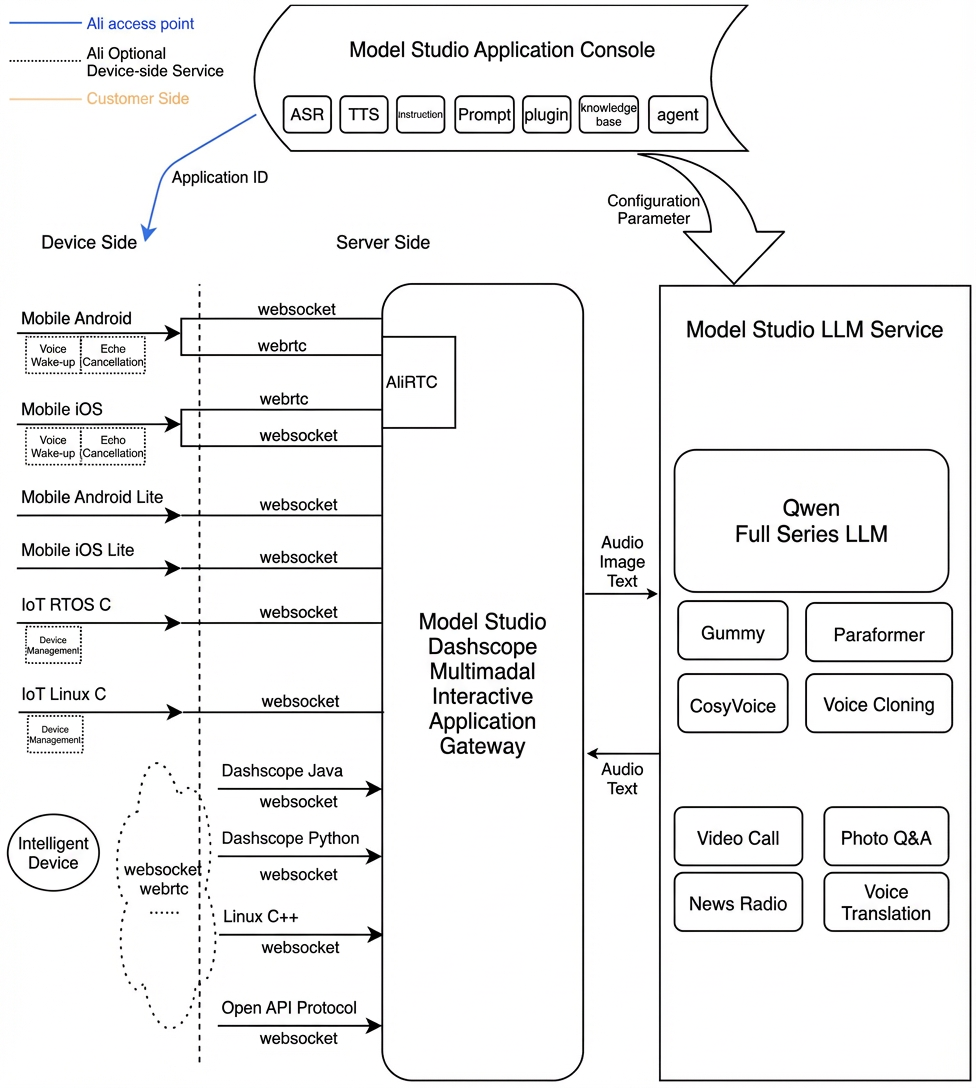
Download and install
| Latest SDK package | Platform | MD5 |
|---|---|---|
| V1.4.10-02E-20260920_Linux.tar.gz | Linux x86_64 | eed1091b64c2ec60ab28bec873531e59 |
| V1.4.10-02E-20260920_Linux_aarch64_10.tar.gz | Linux aarch64 (gcc-arm-10.2) | dfdb9bd7e8e6f7c48dfc04bc5b8bc452 |
| V1.4.10-02E-20260920_Linux_aarch64_11.tar.gz | Linux aarch64 (gcc-arm-11.2) | d62c213f19f4a183c522eb32a80d7207 |
Audio format specifications
Audio format specifications for WebSocket connections:
- Uplink: Supports PCM and Opus audio formats for speech recognition. Only PCM audio (16 kHz sample rate, 16-bit, single channel) can be sent by users. The SDK automatically encodes Opus audio internally.
- Downlink: Supports single-channel PCM, MP3, and Opus audio streams. Opus audio streams are decoded internally by the SDK, and users receive the corresponding PCM data.
Interface reference
CreateConversation
Create an interaction and set callbacks. The corresponding destruction interface is DestroyConversation.
ConversationCallbackMethod
SDK event callback
ConvEvent
Method listMethod name | Description |
int GetStatusCode(); | Get the status code. A normal value is 0 or 20000000. An error code is returned on failure. For error codes, see the SDK documentation. |
ConvEventType GetMsgType(); | Get the type of the current event. See ConvEventType for details. |
ConvEventType GetSubMsgType(); | Get the subtype of the current event. Used when ConvEvent::kRTCMessage occurs. |
const char* GetAllResponse(); | Get the complete JSON-formatted response for this ConvEvent. |
const char* GetErrorMessage(); | Get the error message. |
const char* GetTaskId(); | Get the unique ID for this connection. Use dialog_id and round_id for troubleshooting. |
const char* GetDialogId(); | Get the dialog ID. |
const char* GetRoundId(); | Get the ID for this round of interaction. |
std::vector<unsigned char> GetBinaryData(); | Get binary data returned from the cloud. Used when ConvEvent::kBinary occurs. |
unsigned char* GetBinaryDataInChar(); | Same as GetBinaryData(). Used when ConvEvent::kBinary occurs. |
int GetBinaryDataSize(); | Same as GetBinaryData(). Gets the byte count of this binary data. Used with GetBinaryDataInChar(). Used when ConvEvent::kBinary occurs. |
int GetDialogStateChanged(); | Get the current dialog state. Used when ConvEvent::kDialogStateChanged occurs.
|
float GetSoundDb(); | Returns the volume (in dB) of the most recent input audio, ranging from -160 to 0 dB. Used when ConvEvent::kSoundLevel occurs. |
int GetSoundLevel(); | Returns the volume level (graded from 0 to 100) of the most recent input audio. Used when ConvEvent::kSoundLevel occurs. |
int GetSampleRate(); | Returns the sample rate of this data. Used when ConvEvent::kUserBinary occurs. |
int GetChannelSelect(); | Returns the channel selection for audio data.
Used when ConvEvent::kUserBinary occurs. |
NetworkEventType GetNetworkEvent(); | Network event. See NetworkEventType for details. Used when ConvEvent::kNetworkStatus occurs. |
int GetNetworkLatency(); | Returns network latency in milliseconds. Used when ConvEvent::kNetworkStatus occurs. |
ConvEventType
Event name | Description |
kConversationFailed | An error occurred during the session task. Check the error code and error message. After receiving this event, determine how to proceed based on the error message, or reconnect using this dialog_id to continue the session. |
kConversationConnected | Successfully connected to the AI service. |
kConversationInitialized | AI (server-side) initialization completed. Returns initialization information. |
kConversationStarted | AI (server-side) enters the scene. The session task starts successfully, and the connection is established. |
kConversationCompleted | AI (server-side) exits the scene. The task completes successfully, and the disconnection operation is performed. |
kSentenceBegin | HUMAN starts speaking. In PushToTalk mode, pressing the button triggers this event. In TapToTalk and Duplex modes, this event is triggered when the user starts speaking. |
kSentenceEnd | HUMAN stops speaking. In PushToTalk mode, releasing the button triggers this event. In TapToTalk and Duplex modes, this event is triggered when the user stops speaking. |
kDataOutputStarted | AI (server-side) starts sending TTS data. |
kDataOutputCompleted | AI (server-side) completes TTS synthesis and finishes sending the data. |
kBinary | Indicates that this ConvEvent contains a TTS data packet returned by AI (server-side). |
kSoundLevel | Volume value of the most recent HUMAN speech audio data. |
kDialogStateChanged | The dialog state has changed. |
kInterruptAccepted | AI (server-side) accepts an interrupt request (such as a button press). |
kInterruptDenied | AI (server-side) rejects an interrupt request (such as a button press). |
kVoiceInterruptAccepted | AI (server-side) accepts a voice interrupt request. |
kVoiceInterruptDenied | AI (server-side) rejects a voice interrupt request. |
kConnectionDisconnected | SDK disconnects from the server. |
kConnectionConnected | SDK connects to the server. |
kHumanSpeakingDetail | Detailed information detected from user speech, such as text. |
kRespondingDetail | Detailed information output by the system, such as results returned by the LLM. |
kNetworkStatus | Network status information, such as network latency. |
kKeywordSpotted | Wake-up triggered. |
kKeywordTrusted | Wake-up triggered and confirmed. |
kVoiceTimeout | After wake-up is triggered, no speech is detected for a long time, so the wake-up state exits. |
kOtherMessage | Undefined message. |
kUserBinary | Used in RTC mode. Indicates that this ConvEvent contains a MIC data packet sent by HUMAN (user). |
kRTCMessage | Indicates that the event is formatted as an RTC message. Check GetSubMsgType() for the specific event. |
kConversationStart | Used in RTC mode. "StartedReceived" event. |
kConversationStop | Used in RTC mode. "Stop" event. |
kSendSpeech | Used in RTC mode. "SendSpeech" event. |
kStopSpeech | Used in RTC mode. "StopSpeech" event. |
kRequestToSpeak | Used in RTC mode. "RequestToSpeak" event. |
kRequestToRespond | Used in RTC mode. "RequestToRespond" event. |
kLocalRespondingStarted | Used in RTC mode. "LocalRespondingStarted" event. |
kLocalRespondingEnded | Used in RTC mode. "LocalRespondingEnded" event. |
kAvatarStateChanged | Used in RTC mode. "AvatarStateChanged" event. |
NetworkEventType
Event name | Description |
kNetworkEventUnknown | None. |
kNetworkEventLatency | Network latency event. |
EventTrackCallbackMethod
Obtain key instrumentation log information
DestroyConversation
Destroy the interaction. The corresponding creation interface is CreateConversation.
Connect
Assemble a start request to initiate a connection to the server. A successful return does not mean the connection to the VoiceChat Server succeeded—it only means the start request was built successfully. Check the response to confirm if the connection succeeded.
Model Studio Parameter Settings Instructions
| Top-level parameter | Second-level parameter | Third-level parameter | Type | Required | Description |
| apikey | String | Yes | Temporary credential. For details, see Obtain an API Key. | ||
| workspace | String | Yes | Directory containing resource files.If using version 02C (pure cloud RTC), this parameter is optional.If using version 02A/02E (with local AEC & VAD), this parameter is required. | ||
| url | String | Yes | Gateway domain for requests. For Model Studio, use: "wss://dashscope.aliyuncs.com/api-ws/v1/inference". When you set this Model Studio domain, ws_version automatically switches to the Model Studio interaction protocol. | ||
| chain_mode | String/int | Yes | Default is "ws" or 0. Options are "ws" or 0, and "rtc" or 1. The former enables WebSocket interaction, and the latter enables RTC interaction. | ||
| ws_version | int | No | Interaction protocol version. Usually, you do not need to set this.If url is set to the Model Studio domain, this parameter is automatically set to 3, selecting the Model Studio protocol. | ||
| rtc_version | int | No | Interaction protocol version. Usually, you do not need to set this.If using the Model Studio interaction protocol, set this parameter to 3. | ||
| app_id | String | Yes | When url uses the Model Studio domain (ws_version is 3), app_id is required. Otherwise, it is not needed. | ||
| workspace_id | String | Yes | User workspace ID. | ||
| dialog_id | String | No | Dialog ID. An empty value represents a new dialog. Providing a value continues an existing conversation. Format: 32-character random string. | ||
| mode | String | No | Operation mode. Default is "duplex" or "mix_duplex".
| ||
| debug_path | String | No | Directory for storing logs and audio files. If not set, a debug directory is created under workspace. | ||
| save_log | boolean | No | Whether to store logs. Default is false. | ||
| save_wav | boolean | No | Whether to store audio. Default is false. | ||
| log_level | String | No | Log level. Default is "info" or 2. Options are "verbose/debug/info/warn(warning)/error" or 0/1/2/3/4. | ||
| ping_interval_ms | int | No | Interval for reporting network latency, in milliseconds. Minimum value is 1000 ms. | ||
| channel_select | int | No |
| ||
| voice_activity_detection_attributes | JSONObject | No | VAD-related parameters. | ||
| enable_external_vad_module | boolean/String | No | Enable external VAD module. When set to true/"true", the internal VAD module is disabled, and the external VAD is used. | ||
| enable_vad_module | boolean/String | No | Enable VAD module. Default is false/"false". This parameter works together with enable_external_vad_module. If both are false/"false", the VAD module is disabled, and only cloud VAD is used. | ||
| acoustic_echo_cancelling_attributes | JSONObject | No | AEC-related parameters. | ||
| enable_external_aec_module | boolean/String | No | Enable external AEC module. When set to true/"true", the internal AEC module is disabled, and the reference audio input is ignored (you can choose not to send it). Only the MIC audio is used. Default is false/"false", meaning the internal AEC module is used. | ||
| key_words_spotting_attributes | JSONObject | No | Wake-up related parameters. | ||
| enable_external_kws_module | boolean/String | No | Enable external KWS module. When set to true/"true", the internal KWS module is disabled. External SetAction(kKeywordTrusted) notifies the SDK to trigger wake-up, allowing the SDK to continue the interaction flow.The "kws_duplex" mode is active. | ||
| independent_kws_mode | bool | No | Enable independent operation mode for the internal KWS module. Default is false. When enabled, after the KWS module detects a wake word, the SDK does not proceed automatically. Instead, it waits for the user to call SetAction(kContinue) before continuing the interaction. During this period, the user can perform other business-related tasks.The "kws_duplex" mode is valid. | ||
| vad_asleep_tail_timeout | int | No | The system returns to its initial state if no wake-up is triggered within the specified time after the speaker finishes speaking. The default timeout is 2000 ms.The "kws_duplex" mode is active. | ||
| vad_awake_front_timeout | int | No | Time after wake-up and wake-up recognition before the speaker stops talking, then exits the wake-up state and returns to the initial state. Default is 5000 ms, in milliseconds.The "kws_duplex" mode is valid. | ||
| word_list | JSONArray | No | Custom wake word settings. This parameter is optional. If it is not set, the default configuration in the wake word resource file is used.
| ||
| upstream | JSONObject | Yes | |||
| type | String | Yes | Uplink type:AudioOnly: Audio-only calls.AudioAndVideo: Upload video. | ||
| mode | String | No | Operation mode. Default is "duplex". Options include "tap2talk/push2talk".In "kws_duplex" mode, set this to "duplex". | ||
| sample_rate | int | No | Sample rate for uplink audio. Supported values:
| ||
| audio_format | String | No | Uplink audio format. Default is pcm. Options are pcm and opus.pcm: User sends PCM audio data.opus: User sends PCM audio data. The SDK internally encodes it into opus for transmission. Note: full_duplex and cloud_duplex modes do not support this format.raw-opus: User sends PCM audio data. The SDK internally encodes it into raw-opus for transmission. | ||
| downstream | JSONObject | No | |||
| type | String | No | Downlink media type:Text: No audio is sent.Audio: Output audio (default). | ||
| voice | String | No | Voice tone for synthesized speech. The supported range depends on the TTS model and available tones selected in your application configuration in the console. For specific options, see the Python SDK. | ||
| sample_rate | int | No | Sample rate for synthesized speech. Default is specified by the server. Supported values:
| ||
| audio_format | String | No | Downlink audio format. Default is pcm. Options are pcm, mp3, and opus. Received audio parameters are single-channel, 16-bit.Note: If you set opus, the SDK internally decodes it into pcm data before returning it to you. If you set mp3 or pcm, it is passed through directly. | ||
| volume | int | No | Volume of synthesized audio. Range: 0–100. Default is 50. | ||
| speech_rate | int | No | Speech rate of synthesized audio. Range: 50–200, representing 50%–200% of the default rate. Default is 100. | ||
| pitch_rate | int | No | Pitch of synthesized audio. Range: 50–200. Default is 100. | ||
| frame_size | int | No | Frame size for synthesized audio, in milliseconds. Only effective when downstream.audio_format is opus.Range: 10, 20, 40, 60, 100, 120. Default is 60. | ||
| transmit_rate_limit | int | No | Transmission rate limit for synthesized audio, in bytes per second. Default is unlimited. | ||
| intermediate_text | String | No | Control intermediate text returned to the user:transcript: Returns speech recognition results.dialog: Returns intermediate results from the dialog system.You can set multiple values separated by commas. Default is transcript. | ||
| client_info | JSONObject | Yes | |||
| user_id | String | Yes | The end user ID, which you generate based on your business rules to customize features for different end users. The maximum length is 36 characters. | ||
| device | JSONObject | No | End user ID, used for user-related processing. | ||
| uuid | String | No | The globally unique client ID, which you must generate and pass to the SDK. The maximum length is 40 characters. An end user can have multiple devices. Each device has a different uuid, but all devices share the same user_id. | ||
| network | JSONObject | No | End user ID, used for user-related processing. | ||
| ip | String | No | Public IP address of the caller. | ||
| location | JSONObject | No | End user ID, used for user-related processing. | ||
| latitude | String | No | Caller dimension information. | ||
| longitude | String | No | Longitude of the caller. | ||
| city_name | String | No | City of the caller. | ||
| biz_params | JSONObject | No | |||
| user_defined_params | JSONObject | No | Other parameters to pass through to the agent. | ||
| user_defined_tokens | JSONObject | No | Pass-through authentication information required by the agent. | ||
| user_prompt_params | JSONObject | No | Set and pass custom variables in user-defined prompts. For setup instructions, see the example: Custom prompt variables and value passing. | ||
| user_query_params | JSONObject | No | Set and pass structured dialog variables defined by the user. These provide additional information to the LLM and enhance its environmental awareness when combined with prompt settings. For setup instructions, see the example: Custom dialog variables and value passing. | ||
| nls_rule | JSONObject | No | Universal protocol parameter rules. Directly modify instructions sent in the WebSocket protocol.Example: | ||
| nls_params | JSONObject | No | Universal protocol parameter settings. Directly modify instructions sent in the WebSocket protocol.Example: |
Disconnect
Assemble a stop request to send an instruction telling the server to terminate the connection. A successful return does not mean the disconnection from the VoiceChat Server succeeded—it only means the stop request was built successfully. Check the response to confirm if the disconnection succeeded.
Interrupt
Interrupt the interaction to put the AI into listening state.
SendAudioData
Push real-time captured audio data.
SendRefData
Push reference audio data when sending audio data to the player.
SendResponseData
In Listening or Idle state, notify the server to interact proactively with the user. You can either convert uploaded text directly into speech for delivery or upload text to call the LLM and deliver the result as speech.
parameters settings
Parameter | Type | Required | Description |
type | String | Yes | Interaction type the service should take: transcript: Convert text directly to speech. prompt: Send text to the LLM for a response. |
text | String | Yes | Text to process. Can be an empty string (""). Must not be null. |
parameters | JSONObject | No | |
| JSONArray | No | Image information to analyze. |
| JSONArray | No | Same as biz_params in the Start message. Passes custom parameters for the dialog system. The biz_params in RequestToRespond only take effect for this request. |
Any | Any | No | Will be passed through to the payload of the protocol. |
parameters examples
Switch to video mode
Exit video mode
Send image for Q&A
UpdateMessage
Update parameters, such as P2T parameters, or send parameters like UpdateInfo.
Update custom wake words (only valid for kws_duplex)
Update other parameters
Universal method for updating parameters
For custom server interaction parameters, use "type": "update_custom_nls_parameters" to enable custom parameter functionality.
nls_rule specifies where to add parameters in the protocol. For example, "payload": ["Start_custom2", "SendSpeech_custom3"] means that when you send the "Start" protocol to the server, the parameter "custom2":{"test":2} is added to the payload. Similarly, "header": ["Start_custom1"] means that when you send the "Start" protocol to the server, the parameter "custom1":{"test":1} is added to the header.
Send parameters (UpdateInfo)
Client update events, such as sending image data.
Model Studio protocol parameters
Parameter | Type | Required | Description |
type | String | Yes | update_info. |
parameters | JSONObject | Yes | |
| JSONArray | No | Image data. |
| JSONObject | No | |
| JSONObject | No | Current client status. |
| JSONObject | No | Same as biz_params in the Start message. Passes custom parameters for the dialog system. |
Model Studio protocol example
Send universal parameters
SetAction
Notify the SDK about audio (playback) start or end events.
ConvAction
| Enum name | Description |
| kMicStarted | MIC starts working. |
| kMicStopped | MIC stops recording. |
| kPlayerStarted | Start playback. |
| kPlayerStopped | Playback finished. Note: Ensure all cached data in the player has been fully played before sending this notification. Otherwise, self-interruption or playback data entering ASR may occur. |
| kEnableVoiceInterruption | Enable voice interruption. |
| kDisableVoiceInterruption | Disable voice interruption. |
| kVoiceMute | Voice mute. If in the AI listening phase, actively notify the AI that the user has finished speaking. |
| kVoiceUnmute | Voice unmute. |
| kStartHumanSpeech | Only valid in push2talk mode. Indicates the user starts speaking.Note: After Connect() succeeds, call this only after receiving DialogStateChanged as kDialogIdle. |
| kStopHumanSpeech | Only valid in push2talk mode. Indicates the user finishes speaking. |
| kCancelHumanSpeech | Only valid in push2talk mode. Indicates the user cancels speaking. |
| kPullOutHeadphones | Call this when unplugging headphones to optimize echo cancellation during headphone switching. |
| kContinue | When the interaction flow is paused, continue to the next step. For example, call this after wake-up to proceed. |
| kVoiceDetectedBegin | Used with external VAD. Indicates detection of human speech start. |
| kVoiceDetectedEnd | Used with external VAD. Indicates detection of human speech end. |
| kVoiceTimeout | Used with external KWS. Indicates no speech detected for a long time. |
| kKeywordTrusted | Used with external KWS. Wake-up triggered and confirmed. |
GetState
Get current states.
StateType
Enum name | Description |
kTypeDialogState | Current dialog (AI) state. Enum values are ConvConstants.DialogState. |
kTypeConnectionState | Connection state. |
kTypeMicState | Current MIC state. Enum values are ConvConstants.ConvAppAction. |
kTypePlayerState | Current PLAYER state. Enum values are ConvConstants.ConvAppAction. |
DialogState
Enum name | Description |
kDialogIdle | Currently idle and not working. |
kDialogListening | AI (server-side) is in listening state, receiving user input data (such as MIC audio data). |
kDialogResponding | AI (server-side) is in feedback state, sending AI data (such as TTS audio data). |
kDialogThinking | AI (server-side) is in thinking phase. |
GetResponse
Feed VoiceChat-related responses obtained via RTC into the SDK. The response is parsed internally by the VideoChat Native SDK and converted into interaction states and related events for the app.
Code examples
Voice dialog initialization
This step sets up callback functions to receive all events during the interaction, including dialog state and results.
Initiate voice dialog connection
Build connection parameters, including account information, in JSON format. For details, see the interface documentation. In PushToTalk mode, after a successful connection, the dialog state is Idle.
End voice dialog
Release voice dialog
Interrupt current voice dialog
Call this interface when the dialog is in Responding state to interrupt and enter Listening state.
User starts speaking in PushToTalk mode
Call this interface when the dialog state is Idle to enter Listening state. If the dialog state is Responding or Thinking, it interrupts the current state and re-enters Listening. After a successful call, the user's speech is continuously sent to the server for interaction until stopped.
User stops speaking in PushToTalk mode
The user's speech is continuously sent to the server for interaction until this interface is called. The AI then provides feedback based on what the user said.
Text-to-speech synthesis
The SDK supports directly requesting the server to synthesize audio from text.
You must send the SendResponseData() request when the client is in Listening state.
If the current state is not Listening, first call the Interrupt() interface to interrupt the current playback.
VQA interaction: Send image for multimodal interaction
VQA enables multimodal interaction (image + voice) during a conversation by sending images.
The core process involves sending multimodal interaction commands via the SendResponseData() interface using voice or text.
LiveAI interaction: Send image for multimodal interaction
To use this feature, set upstream.type to AudioAndVideo in the Connect() input parameters. Then, continuously send image data via the UpdateInfo interface to achieve multimodal interaction (image + voice). Supported image sizes are 720p and 480p. In video mode, send once every 500 ms.
Custom prompt variables and value passing
- Configure custom variables in the console project under Prompts.
user_name field to represent the user's nickname. Insert the variable user_name as a placeholder ${user_name} into the Prompt.
In the console Prompts editor, click Custom Variables at the top to add variable fields. Reference them in the Prompt body using the ${variable_name} placeholder format.
- Set variables in code.
"user_name" = "Da Mi".
Custom dialog variables and value passing
- Configure custom variables in the console project under Dialog Variables.
name variable to represent the person in front of you, and an emotion variable to represent the user's mood.
In the console Prompts editor, under the Dialog Variables panel, click the + Add button in the upper right corner. Enter variable names (such as name and emotion) and their descriptions (such as person in front of you and user's mood).
- Set variables in code.
"name" = "Zhang San" and "emotion" = "sad".
SDK error codes
Enumeration Value | Enum | Description |
0 | kSuccess | |
10 | kDefaultError | |
11 | kMemAllocError | Memory allocation failed |
50 | kInitFailed | Initialization failed due to unsupported mode |
51 | kNotConnected | Connection failed, such as network timeout |
52 | kEngineNull | Interaction engine not created. Cannot be used. |
53 | kIllegalParam | Invalid parameter setting |
54 | kIllegalInitParam | Invalid initialization parameters |
55 | kInvalidState | Current interaction state does not allow calling this interface |
56 | kHasInvoked | This interface has already been called |
57 | kNotCreateConversation | Session not created (createConversation not called) before performing operations |
58 | kSkipSendData | Current interaction state ignores this audio |
59 | kSendDataFailed | Audio sending failed |
60 | kInvalidAudioData | Invalid audio |
61 | kStopFailed | stop() failed, such as timeout |
62 | kCancelFailed | cancel() failed, such as timeout |
63 | kInvokeTimeout | Interface call timeout |
64 | kRequestDenied | Interruption request denied |
65 | kRequestAccepted | Interruption request allowed |
66 | kSkipDestroyConversation | SDK not created. Skip destruction operation. |
67 | kInvokeInvalidAction | SetAction() called with invalid event |
100 | kCeiInitFailed | Internal engine initialization failed. Commonly occurs during connect(). |
101 | kCeiSetParamFailed | Internal engine parameter configuration failed |
111 | kVadSdkFileNotFound | Internal engine initialization failed because resource files were not found. Check that resource files are complete and up to date. |
112 | kVadSdkInvalidParam | Invalid initialization parameters for internal VAD engine |
113 | kVadSdkInvalidState | Internal VAD engine running in abnormal state, such as VAD already released |
114 | kVadSdkProcessFailed | Data sent to internal VAD engine in abnormal state |
115 | kVadSdkCreateFailed | Internal VAD engine initialization failed, usually due to missing resource files or incompatible old versions |
200 | kEmptyConvEvent | Invalid ConvEvent |
201 | kInvalidConvEventMsgType | Invalid ConvEvent message type |
301 | kServerNotAccess | Failed to connect to server, such as server unreachable or DNS resolution failure |
310 | kNoSupportMode | Unsupported server interaction protocol |
311 | kJsonFormatError | Message received from server does not conform to JSON format |
312 | kSslError | SSL failure, such as handshake failure |
313 | kSslConnectFailed | SSL connection failed |
350 | kNlsIsNullptr | |
351 | kNlsInvokeTimeout | Request operation to server timed out |
352 | kNlsStartFailed | Failed to send session start request to server. Often due to network issues. |
353 | kNlsStopFailed | Failed to send session stop request to server. Often due to network issues. |
354 | kNlsCancelFailed | Failed to send session cancel request to server. Often due to network issues. |
355 | kNlsStartInboundFailed | Failed to send dialog task start request to server. Often due to network issues. |
358 | kNlsCancelBoundFailed | Failed to send dialog task cancel request to server. Often due to network issues. |
359 | kNlsSetParamsFailed | Request parameter setting error, such as invalid token |
360 | kNlsSendAudioFailed | Failed to send audio data to server. Often due to network issues. |
361 | kNlsControlFailed | Failed to send commands like UpdateInfo to server |
400 | kEncoderExistent | |
401 | kDecoderExistent | |
402 | kEncoderInexistent | Encoder does not exist |
403 | kDecoderInexistent | |
404 | kOpusEncoderCreateFailed | Opus encoder creation failed |
405 | kOpusDecoderCreateFailed | |
406 | kOggOpusEncoderCreateFailed | OggOpus encoder creation failed |
407 | kInvalidEncoderType | Invalid encoder type |
500 | kInvalidAkId | Invalid Alibaba Cloud account AK ID |
501 | kInvalidAkSecret | Invalid Alibaba Cloud account AK secret |
502 | kInvalidAppKey | Invalid project AppKey |
503 | kInvalidDomain | Invalid domain |
504 | kInvalidAction | Invalid action |
505 | kInvalidServerVersion | Invalid ServerVersion |
506 | kInvalidServerResource | Invalid ServerResource |
507 | kInvalidRegionId | Invalid RegionId |
508 | kClientRequestFaild | Account client request failed |
509 | kInvalidUrlCmd | Invalid URL |
510 | kInvalidTokenCmd | Invalid token command |
511 | kTokenConnectFailed | Failed to connect to token server |
512 | kTokenResponseError | Token response failed |
Time series chart description
duplex
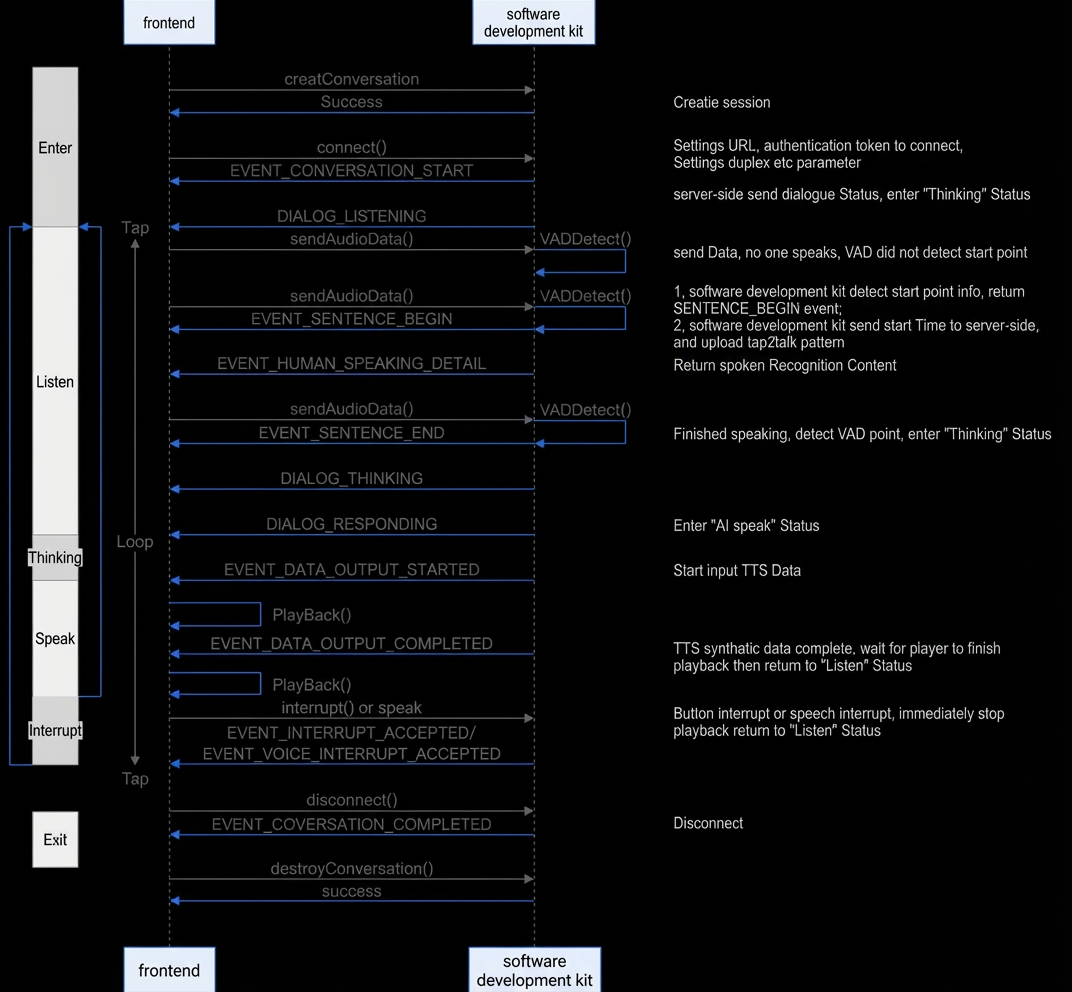
push2talk
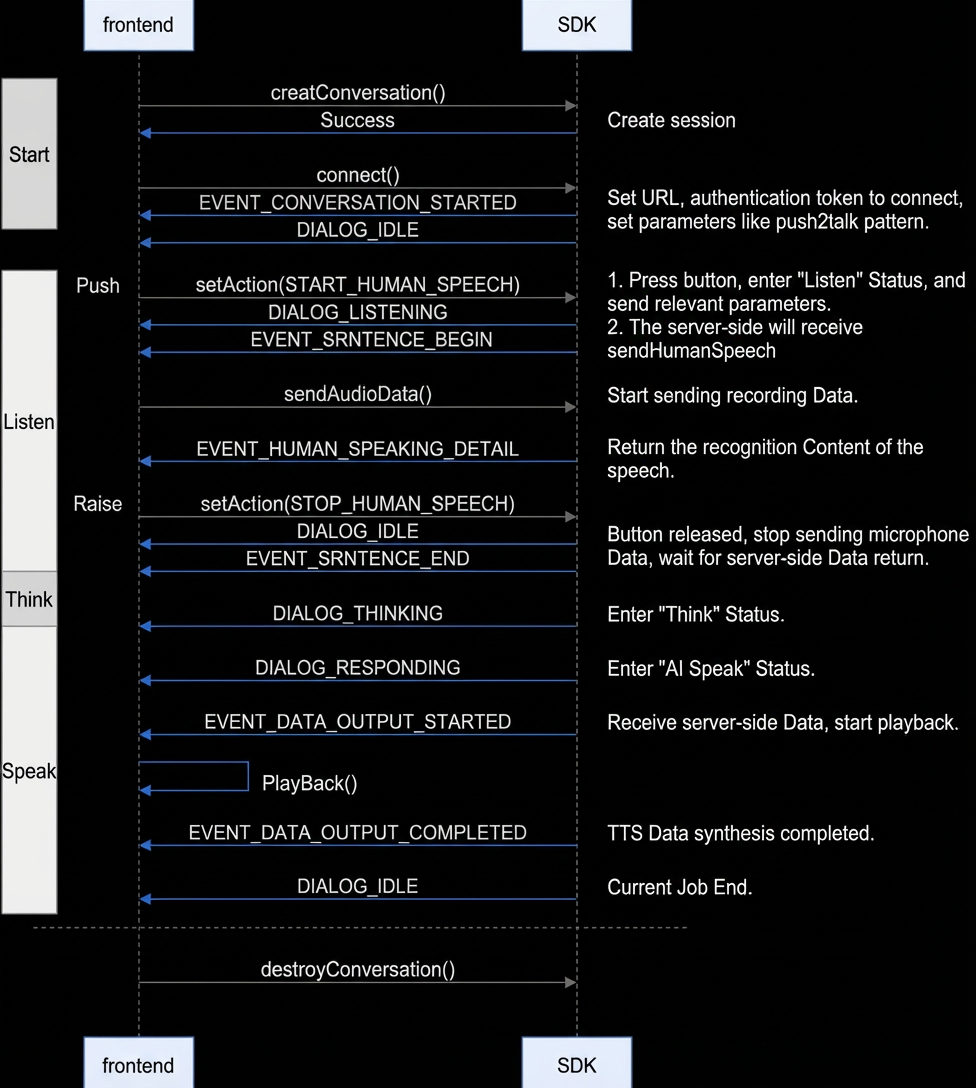
tap2talk