This topic describes how to use the real-time multimodal interaction iOS Lite SDK provided by Alibaba Cloud Model Studio for Large Language Models. It covers SDK download and installation, key interfaces, and code examples.
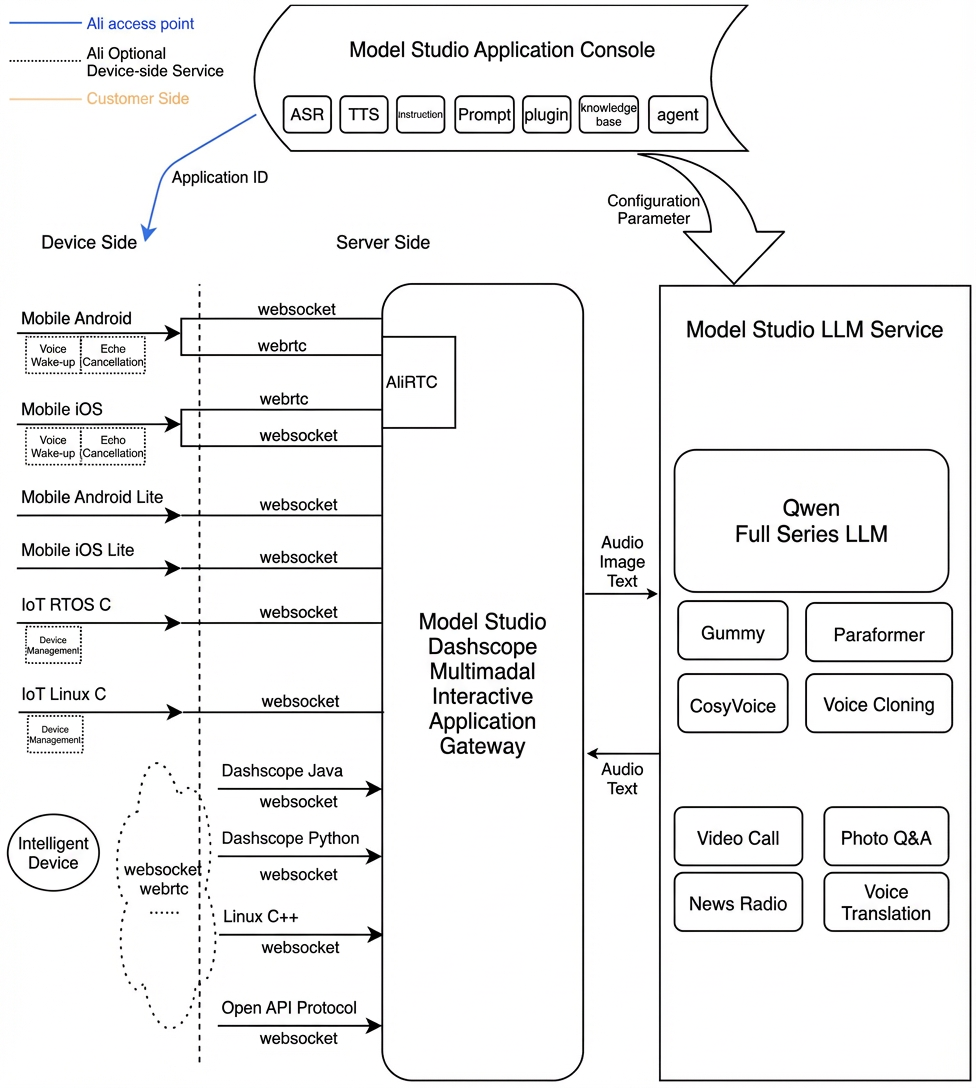
Architecture of the Multimodal Real-Time Interaction Service
Prerequisites
Enable an Alibaba Cloud Model Studio real-time multimodal interaction application to get your workspace ID, app ID, and API key.
Interaction Data Link
The multimodal dialog iOS Lite SDK uses WebSocket connections exclusively to interact with the server. It supports AudioOnly mode for voice conversations.
-
Audio interaction: Uses WebSocket connections. These connections establish quickly and require low performance overhead.
-
Audio format for WebSocket links:
- Uplink: Supports PCM and Opus formats for speech recognition.
- Downlink: Supports PCM and MP3 audio streams.
-
Audio format for WebSocket links:
Interaction Modes
The SDK supports three interaction modes: Push2Talk, Tap2Talk, and Duplex (full-duplex).
- Push2Talk: Press and hold to speak. Release to stop. Alternatively, tap to start and tap again to stop.
- Tap2Talk: Tap to start speaking. The system automatically detects when you finish speaking.
- Duplex: Full-duplex interaction. You can speak at any time after connecting. Voice interruption is supported. Note: Full-duplex interaction requires echo cancellation (AEC) on the client side. The Lite SDK does not include an AEC module. You can integrate your own AEC module or use the full-featured Alibaba Cloud Model Studio iOS SDK for Mobile.
Environment and Dependencies
-
Import the SDK dashscope-lite-ios-demo-1.0.1.zip
- DashscopeLite.framework: The Lite SDK for multimodal dialog.
-
Other dependencies:
- 'SocketRocket', '~> 0.7.1'
-
Connect to the Alibaba Cloud Model Studio environment
- The multimodal dialog service runs on Alibaba Cloud Model Studio. Authentication uses your Alibaba Cloud Model Studio API key. Create an API key in the Alibaba Cloud Model Studio console. For security, you can also generate short-term tokens on your server and send them to the client. See short-term token.
Interface Reference
MultimodalDialog
Service entry class
1 MultiModalDialog
Initialize the service object. Set dialog parameters and callbacks.
2 start
Start the dialog service. Returns the onConversationStarted callback.
3startSpeech
Notify the server to start uploading audio. Call this only when the state is Listening. Use it only in Push2Talk or Tap2Talk mode.
4sendAudioData
Send audio data to the server.
5stopSpeech
Notify the server to stop uploading audio. Call this only in Push2Talk mode.
6 interrupt
Notify the server that the client wants to interrupt the current interaction and start speaking. Returns RequestAccepted.
7sendLocalRespondingStarted
Notify the server that the client has started playing TTS audio.
8sendLocalRespondingEnded
Notify the server that the client has stopped playing TTS audio.
9 stop
End the current round of dialog. Disconnect from the server.
10requestToRespond
Initiate text-to-speech (TTS) synthesis from the client side. Or send other requests—such as image requests—to the server.
11updateInfo
Update parameter information.
Callback
Callbacks for your app layer.
MultiModalRequestParam
Request parameter class
All request parameters support builder-style setup. See the table below for parameter values and descriptions. These are parameters your client must configure or may optionally configure.
Parameters for the Start Connection Request
Top-level parameter | Second-level parameter | Third-level parameter | Fourth-level parameter | Type | Required | Description |
|---|---|---|---|---|---|---|
input | workspace_id | string | Yes | |||
app_id | string | Yes | Your App ID, created in the console. Use it to identify which dialog system to use. | |||
dialog_id | string | No | Dialog ID. If set, continue the existing conversation. | |||
parameters | upstream | type | string | Yes | Uplink type: AudioOnly: Audio-only calls AudioAndVideo: Upload video | |
mode | string | No | Client mode. Options:
Default: tap2talk | |||
audio_format | string | No | Audio format. Supports PCM and Opus. Default: PCM. | |||
downstream | voice | string | No | Timbre of synthetic speech | ||
sample_rate | int | No | Sample rate for speech synthesis. Default: 24000 Hz. | |||
intermediate_text | string | No | Which intermediate text to return: transcript: Return speech recognition results dialog: Return intermediate responses from the dialog system Use comma-separated values. Default: transcript | |||
audio_format | string | No | Audio format. Supports PCM and MP3. Default: PCM. | |||
client_info | user_id | string | Yes | End user ID. Used for user-specific processing. | ||
device | uuid | string | No | A globally unique client ID. Generate it yourself and pass it to the SDK. | ||
network | ip | string | No | Public IP address of the caller. | ||
location | latitude | string | No | Caller Dimensions | ||
longitude | string | No | Longitude of the caller. | |||
city_name | string | No | City where the caller is located. | |||
biz_params | user_defined_params | object | No | Other parameters to pass through to the agent. | ||
user_defined_tokens | object | No | Authentication tokens to pass through to the agent. | |||
tool_prompts | object | No | Prompts to pass through to the agent. |
Parameters for requestToRespond
Top-level parameter | Second-level parameter | Third-level parameter | Type | Required | Description |
|---|---|---|---|---|---|
input | type | string | Yes | Interaction type the service should use: transcript: Convert text directly to speech prompt: Send text to the large language model for a response | |
text | string | Yes | Text to process. Can be an empty string (""). Must not be null. | ||
parameters | images | list[] | No | Images to analyze. | |
biz_params | object | No | Same as biz_params in the Start request. Passes custom parameters to the dialog system. This biz_params applies only to the current request. |
Parameters for updateInfo
Top-level parameter | Second-level parameter | Third-level parameter | Type | Required | Description |
|---|---|---|---|---|---|
parameters | images | list[] | No | Image data. | |
client_info | status | object | No | Current client status. | |
biz_params | object | No | Same as biz_params in the Start request. Passes custom parameters to the dialog system. |
Dialog States (DialogState)
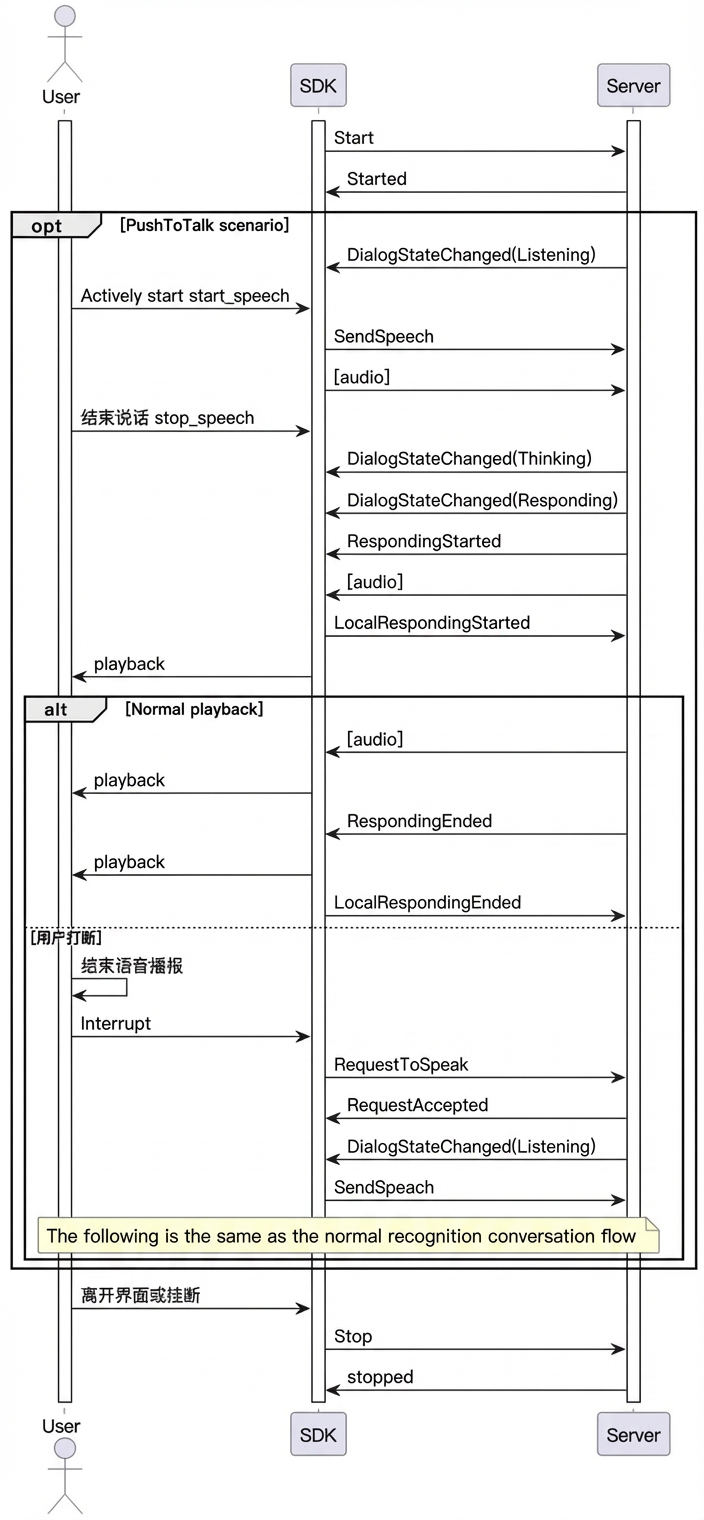
The voice chat service has three states: LISTENING, THINKING, and RESPONDING.
LLM Output from Dialog
Dialog results are delivered through the onMessageReceived callback. The format is shown below.
Top-level parameter | Second-level parameter | Third-level parameter | Type | Required | Description |
|---|---|---|---|---|---|
output | event | string | Yes | Event name. Example: RequestAccepted | |
dialog_id | string | Yes | Dialog ID. | ||
round_id | string | Yes | ID for this round of interaction. | ||
llm_request_id | string | Yes | Request ID for the LLM call. | ||
text | string | Yes | Text output by the system. Sent as a complete stream. | ||
spoken | string | Yes | Text used for speech synthesis. Sent as a complete stream. | ||
finished | bool | Yes | Whether output has finished. | ||
extra_info | object | No | Additional info. Supported fields: commands: Command string agent_info: Agent info tool_calls: Plugin response dialog_debug: Dialog debug info timestamps: Timestamps for each node in the link |
Call Sequence Diagram
Usage Examples
Initialize Dialog Parameters
Use builder methods in the MultiModalRequestParam class to build parameters.
Create a MultiModalDialog Object
Complete Usage Example
See the ChatViewController calls in the Demo project downloaded in the Environment and Dependencies section.
More SDK Interface Details
VQA Interaction
VQA lets users send images during a dialog to enable multimodal interaction with both images and voice.
The core flow starts with a voice or text request that triggers a photo-capture intent. That intent sends the "visual_qa" command.
After receiving the photo-capture command, send an image URL or Base64-encoded image data. Images must be under 180 KB.
Send the photo-capture request after connecting.
Call LiveAI over WebSocket
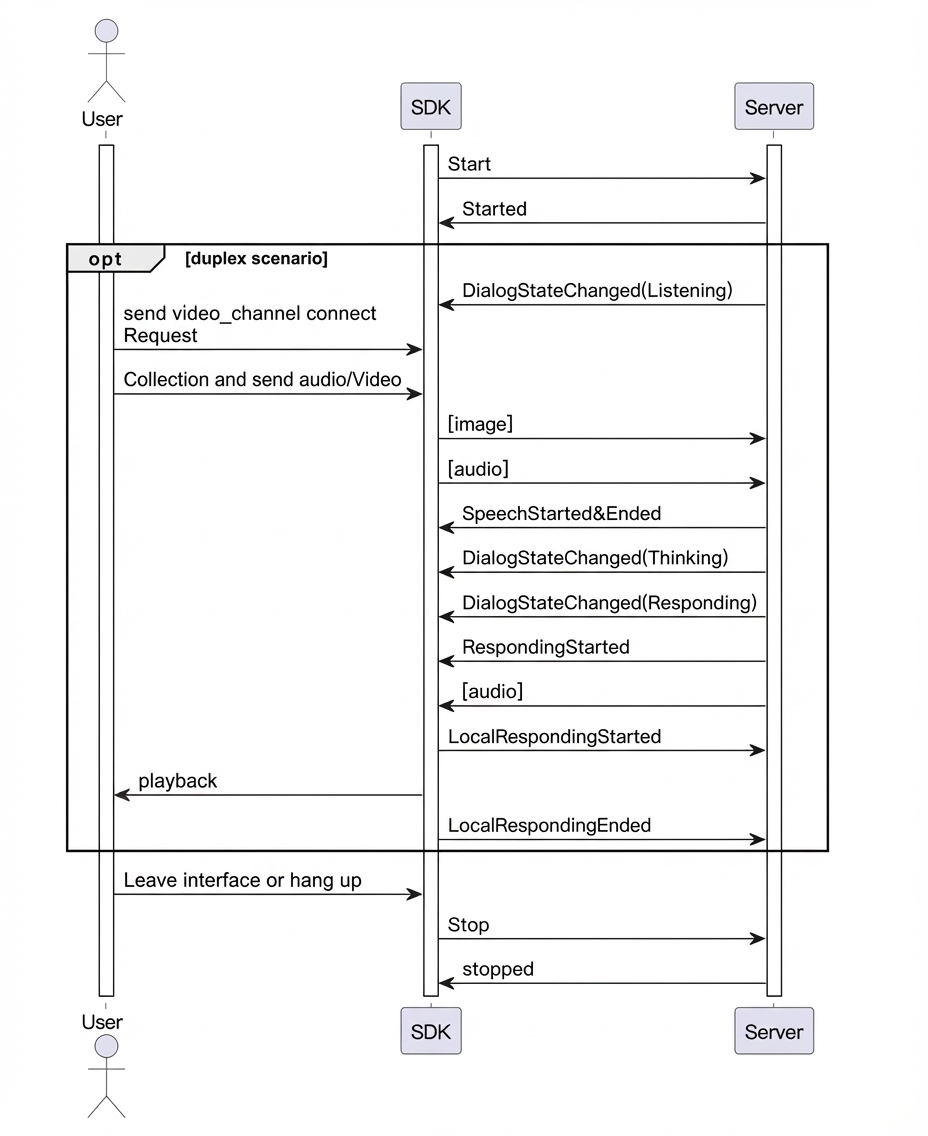
LiveAI (video calling) is an official agent provided by Alibaba Cloud Model Studio for multimodal interaction. Using the iOS Lite SDK, you can call LiveAI over WebSocket by recording video frames yourself.
Note: When calling LiveAI over WebSocket, only Base64-encoded images are supported. Each image must be under 180 KB.
- LiveAI call sequence
- Key code example
Text-to-Speech (TTS)
Custom Prompt Variables and Values
- In the console, go to your project's Prompt settings. Add a custom variable.
user_name field for the user's nickname. It inserts the variable user_name into the prompt as a placeholder: ${user_name}.
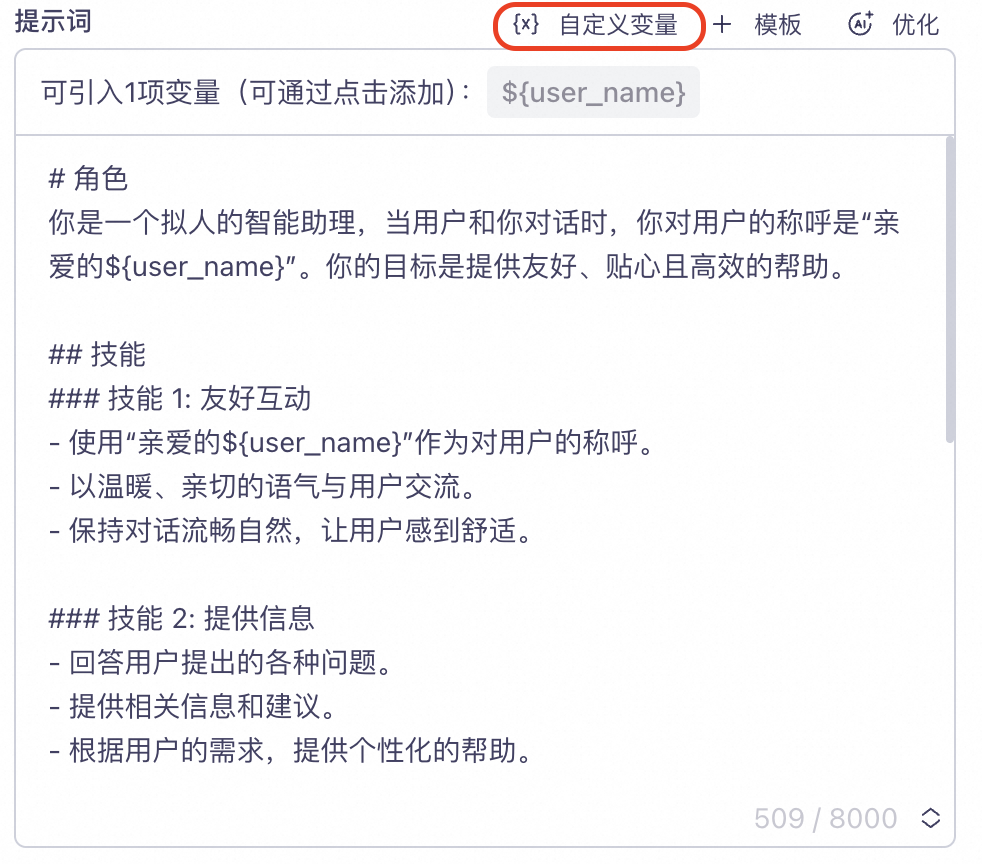
- Set the variable in code.
"user_name" = "Da Mi".
- Request response