This document explains how to use the real-time multimodal interactive iOS SDK from the Alibaba Cloud Model Studio large model service, covering SDK download and installation, key interfaces, and code samples.
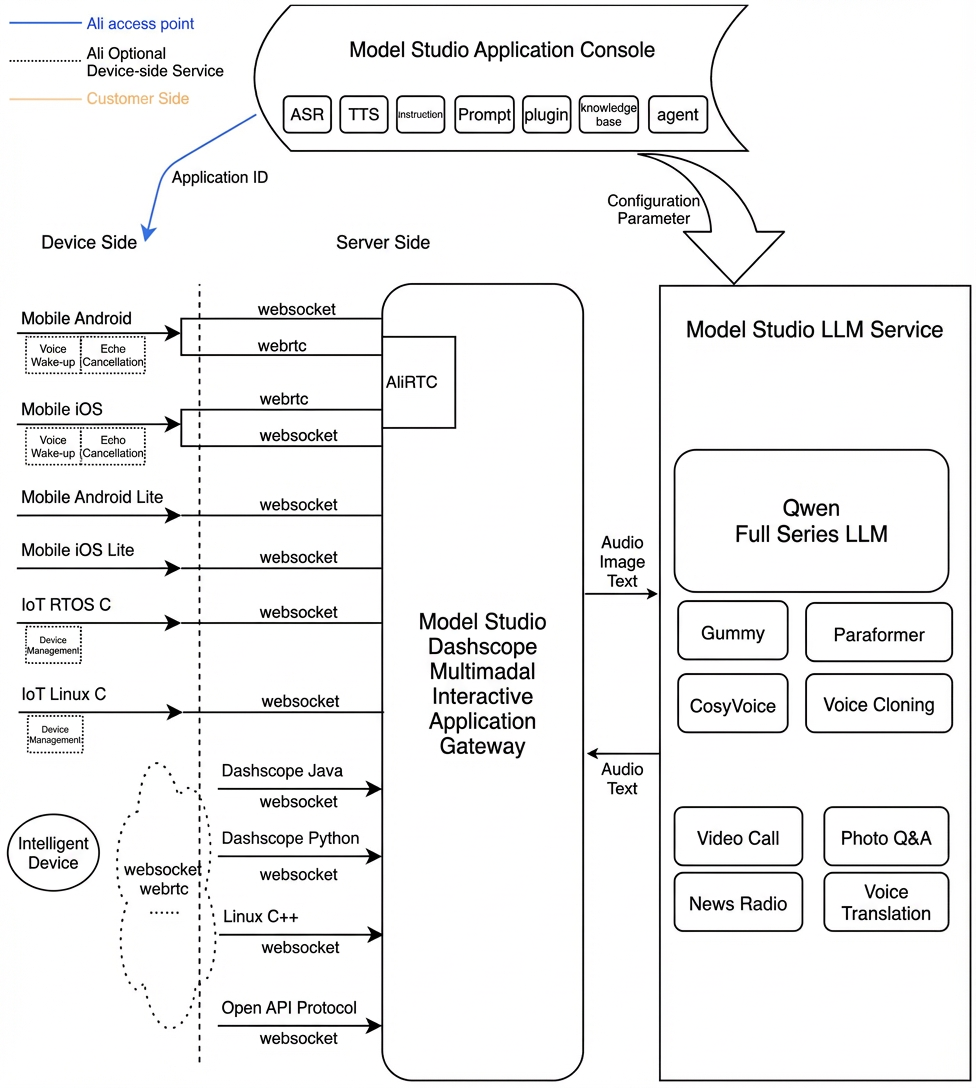
Multimodal real-time interactive service architecture
Prerequisites
Enable an Alibaba Cloud Model Studio real-time multimodal interaction application to get your workspace ID, app ID, and API key.
Interactive data links
The SDK enables multi-modal interaction with the server over WebSocket and RTC in two modes: AudioOnly and AudioAndVideo.
-
For audio interaction, a WebSocket connection is recommended because it provides faster connections and requires fewer resources.
-
Audio formats for the WebSocket link:
- Upstream: Send pcm and opus audio formats for speech recognition.
- Downstream: Receive pcm and mp3 audio streams.
-
Audio formats for the WebSocket link:
- For video interaction, use a WebSocket link. See Request LiveAI through a WebSocket link.
Interaction modes
The SDK supports three interaction modes: Push2Talk, Tap2Talk, and Duplex (full-duplex).
- Push2Talk: Press and hold to speak, and release to stop (or tap to start and tap to stop).
- Tap2Talk: Tap to start speaking; the SDK then automatically detects the end of speech.
- Duplex: Enables full-duplex interaction, allowing you to speak at any time once connected. This mode supports barge-in and is recommended for video interaction.
Environment and dependencies
-
Import the SDK (multimodal-dialog-ios-1.0.7.zip)
multimodal_dialog.framework: The Model Studio multimodal dialog SDK.MultimodalDialogTongyiMetathings.framework: SDK for license mode.
-
Connect to Model Studio
- The multimodal dialog service is built on Model Studio, Alibaba Cloud's large model service platform. It uses a Model Studio API key for authentication. Create an API key in Model Studio. To enhance mobile client security, you can also generate a short-lived token on the server side and pass it to the client.
API
MultimodalDialog
Endpoint Types
1 MultiModalDialog
Initialize the service object with the conversation parameters and callback.
Step 2: Start
Starting the dialog service triggers the on_started callback, which receives the dialog_id.
3startSpeech
Notifies the server to start an audio upload. This method applies only to push2talk and tap2talk modes and must be called in the Listening state.
4sendAudioData
Instructs the server to upload the audio file.
5stopSpeech
Stops the server-side audio upload. This method should only be called in push-to-talk mode.
6 Interrupt
Notifies the server that the client will interrupt the current interaction to begin speaking. It returns RequestAccepted.
7sendLocalRespondingStarted
Notifies the server that the client has started playing tts audio.
8sendLocalRespondingEnded
Notifies the server when the client finishes playing the TTS audio.
9. Stop
Ends the dialogue turn and closes the server-side connection.
10Request to respond
The client sends text-to-speech (TTS) requests or other requests, such as for images, to the server.
11UpdateInfo
Update parameters and more.
Callback
This is the callback function for the user layer.
MultiModalRequestParam
request parameter class
You can set all request parameters using the builder pattern. The required and optional client parameters are described below.
Start connection parameters
Parameter level 1 | Parameter level 2 | Parameter level 3 | Parameter level 4 | Type | Required | Description |
input | workspace_id | string | Yes | The workspace ID. | ||
app_id | string | Yes | The application ID. It is created in the console and is used to determine which dialog system to use. | |||
dialog_id | string | No | The dialog ID. If specified, this continues the existing conversation. | |||
parameters | upstream | type | string | Yes | The upstream type:
| |
mode | string | No | The client interaction mode. Valid values are:
The default is | |||
audio_format | string | No | The audio format for the upstream data. Supported formats are | |||
downstream | voice | string | No | The voice for the synthesized speech. | ||
sample_rate | int | No | The sample rate of the synthesized speech. The default is 24,000 Hz. | |||
intermediate_text | string | No | Controls which intermediate text results are returned to the client:
This parameter accepts multiple comma-separated values. The default is | |||
audio_format | string | No | The audio format of the synthesized speech. Supported formats are | |||
client_info | user_id | string | Yes | The end user's ID, used for user-specific processing. | ||
device | uuid | string | No | A universally unique identifier (UUID) for the client device. The client must generate this ID and pass it to the SDK. | ||
network | ip | string | No | The public IP address of the client. | ||
location | latitude | string | No | The client's latitude. | ||
longitude | string | No | The client's longitude. | |||
city_name | string | No | The city where the client is located. | |||
biz_params | user_defined_params | object | No | Additional parameters to pass through to the agent. | ||
user_defined_tokens | object | No | Authentication information to pass through to the agent. | |||
tool_prompts | object | No | Prompts to pass through to the agent. |
RequestToRespond parameters
Level 1 parameter | Level 2 parameter | Level 3 parameter | Type | Required | Description |
input | type | string | Yes | Specifies the interaction type:
| |
text | string | Yes | The text to process. It can be an empty string, but it cannot be | ||
parameters | images | list[] | No | The images to analyze. | |
biz_params | object | No | Passes custom parameters to the dialogue system, similar to the |
UpdateInfo parameters
Level 1 parameter | Level 2 parameter | Level 3 parameter | Type | Required | Description |
parameters | images | list[] | No | A list of image data. | |
client_info | status | object | No | Current client status. | |
biz_params | object | No | Specifies custom parameters for the dialogue system. Same as |
Dialog state (DialogState)
The voice chat service has three states: LISTENING, THINKING, and RESPONDING.
LLM dialog response
The onMessageReceived callback returns the dialog result in the following format.
Parameter level 1 | Parameter level 2 | Parameter level 3 | Type | Required | Description |
output | event | string | Yes | The event name, such as | |
dialog_id | string | Yes | A unique identifier for the dialog. | ||
round_id | string | Yes | A unique identifier for the current interaction. | ||
llm_request_id | string | Yes | The request ID for the LLM call. | ||
text | string | Yes | The user-facing text, provided as a full streaming output. | ||
spoken | string | Yes | The text for speech synthesis, provided as a full streaming output. | ||
finished | bool | Yes | Indicates whether the output is complete. | ||
extra_info | object | No | Extended information. Supported fields include:
|
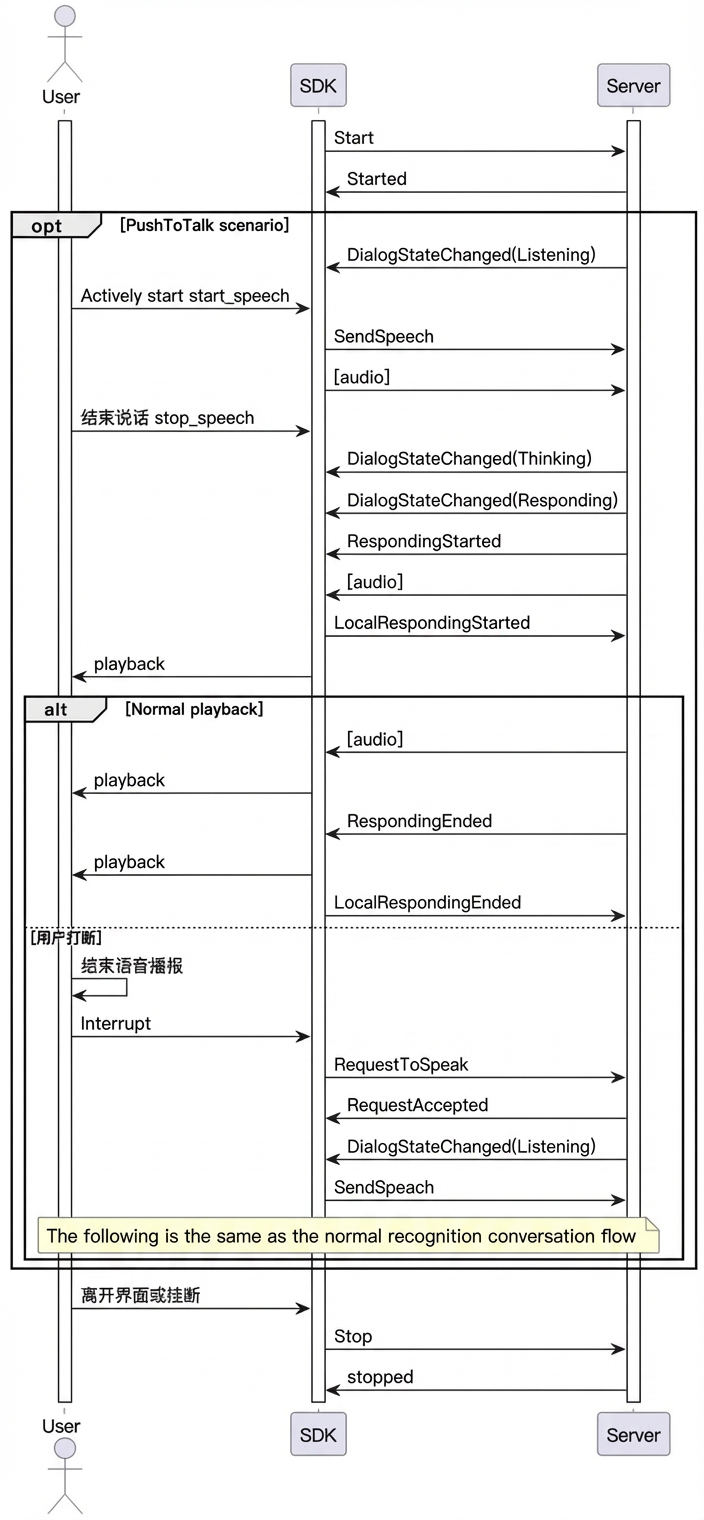
Sequence diagram
Example
Conversation parameters
Call the builder methods on the MultiModalRequestParam subclasses to build the parameters.
Create MultiModalDialog
Complete example
Exception handling
- Server-Side Errors
"VoiceChat.", such as "VoiceChat.40000000".
Error code | Parameter | Description |
|---|---|---|
40000000 | ClientError | Indicates a general client-side error. |
40000001 | InvalidParameter | A required parameter is missing or a parameter value is invalid. |
40000002 | DirectiveNotSupported | The directive is not supported, for example, due to an incorrect name. |
40000003 | MessageInvalid | The message is invalid, for example, due to an incorrect format. |
40000004 | ConnectError | Indicates a connection error, for example, when the client or digital human disconnects from the RTC channel. |
40010000 | AccessDenied | Access to the requested resource is denied. |
40010001 | UNAUTHORIZED | The request is not authorized. Ensure that you have the required permissions. |
40020000 | DataInspectionFailed | The input or output text triggered Content Moderation. |
50000000 | InternalError | An internal server error occurred. Contact support for assistance. |
50000001 | UnknownError | An unknown internal server error occurred. Contact support for assistance. |
50010000 | InternalAsrError | An internal error occurred in the Automatic Speech Recognition (ASR) service. |
50020000 | InternalLLMError | An internal error occurred in the Large Language Model (LLM) service. |
50030000 | InternalSynthesizerError | An internal error occurred in the Text-to-Speech (TTS) service. |
- Client-Side Errors
Error code | Description |
|---|---|
PermissionFailed | Could not obtain permissions for audio and video recording. |
RTC.AuthFailed | RTC channel authentication failed. |
RTC.JoinChannelFailed | Failed to join the RTC channel. |
VoiceChat.ConversationFailed | The request to the conversation service failed. |
Further SDK API usage
Duplex interaction
The mobile client iOS SDK supports duplex interaction mode. In this mode, the SDK accepts recorded audio data during speech synthesis playback. If a user speaks during playback, the service automatically interrupts the current playback stream (your application must clear the client-side player's buffer) and starts a new response.
Duplex interaction requires Acoustic Echo Cancellation (AEC). The iOS SDK has a built-in echo cancellation algorithm. However, you must configure it before using duplex interaction.
- Send microphone audio
- Send reference audio
Request LiveAI over the RTC link
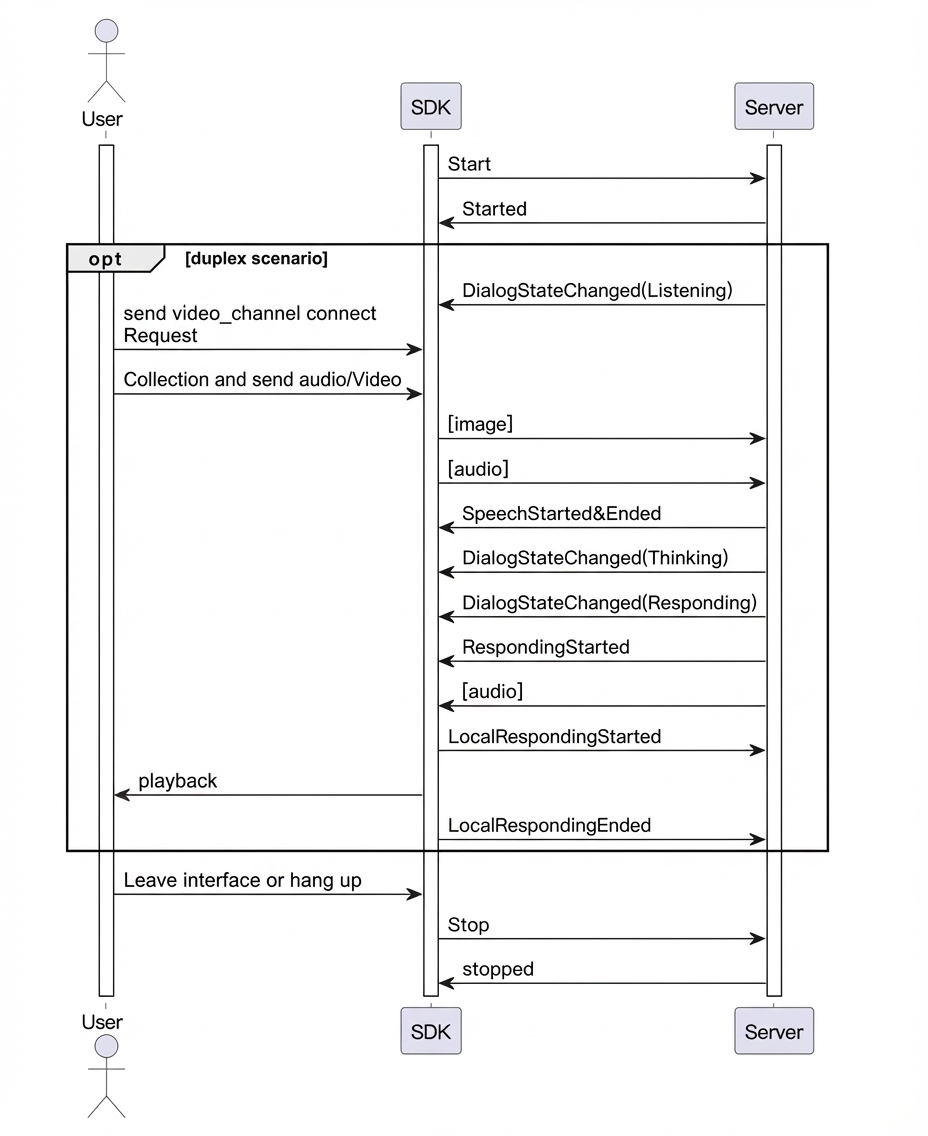
LiveAI (video call) is the Model Studio agent for multimodal interaction. With the full-featured iOS SDK, you can add video calling to your app. This SDK includes a built-in RTC protocol for real-time, full-duplex audio and video interaction.
- LiveAI call sequence
- Key code examples
LiveAI over WebSocket
LiveAI is the official video call agent from Model Studio. The full-featured iOS SDK also allows you to implement the video call feature over a WebSocket link by capturing and sending video frames from your application.
Note: Images sent to LiveAI over a WebSocket link must be base64-encoded and smaller than 180 KB.
- LiveAI call sequence
- Key code examples
VQA interaction
Visual Question Answering (VQA) enables multi-modal interaction, combining images with voice or text in a conversation.
The core process begins when a voice or text request triggers the "visual_qa" capture instruction.
After you receive the capture instruction, send an image URL or base64 data smaller than 180 KB.
Once a connection is established, send the capture request.
Text-to-speech
Custom prompt variables and value passing
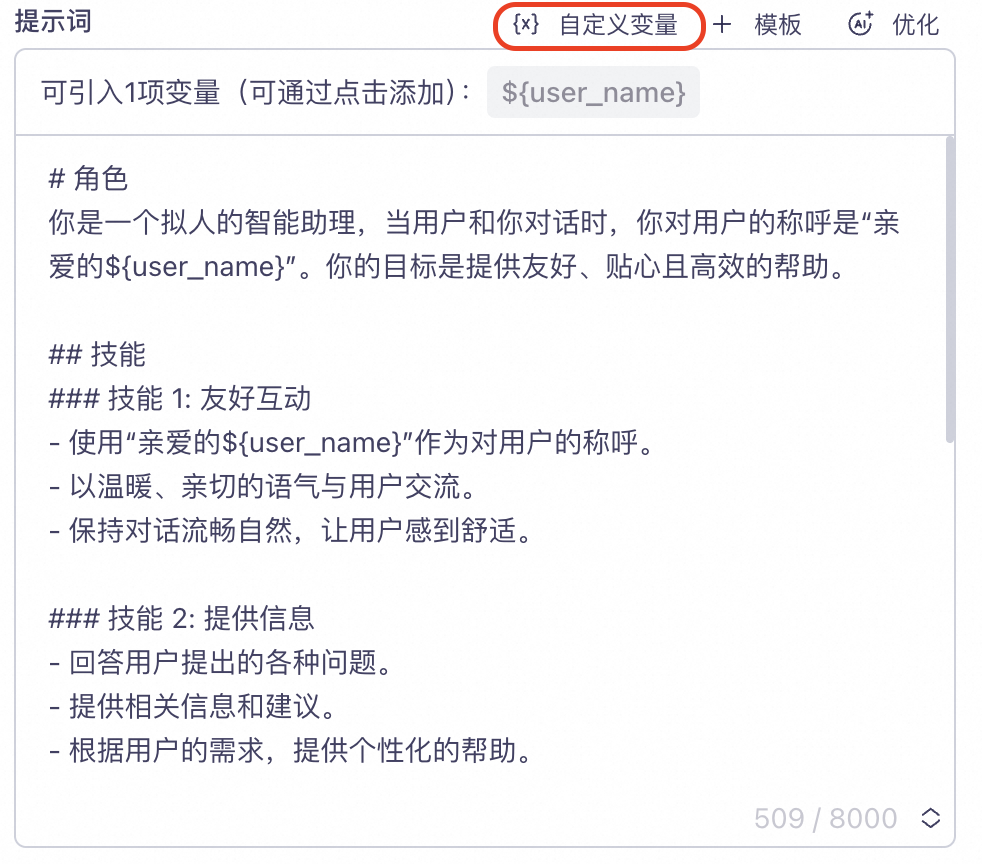
- In the console, configure a custom variable in your project's "Prompt" section.
user_name field is defined to represent the user nickname. The user_name variable is inserted into the Prompt as the placeholder ${user_name}.
- Set the variable in your code.
"user_name" = "Jack".
- Example request and response