

Download and integrate the HarmonyOS SDK for real-time multimodal interaction in Alibaba Cloud Model Studio, and learn its key APIs through code examples.
The MultiModalDialog SDK from the Alibaba Cloud Qwen team supports end-to-end, real-time multimodal audio and video interaction. It connects to Qwen models and backend agents to provide voice conversations, weather queries, music, news, and other capabilities, and supports video and images in model conversations.
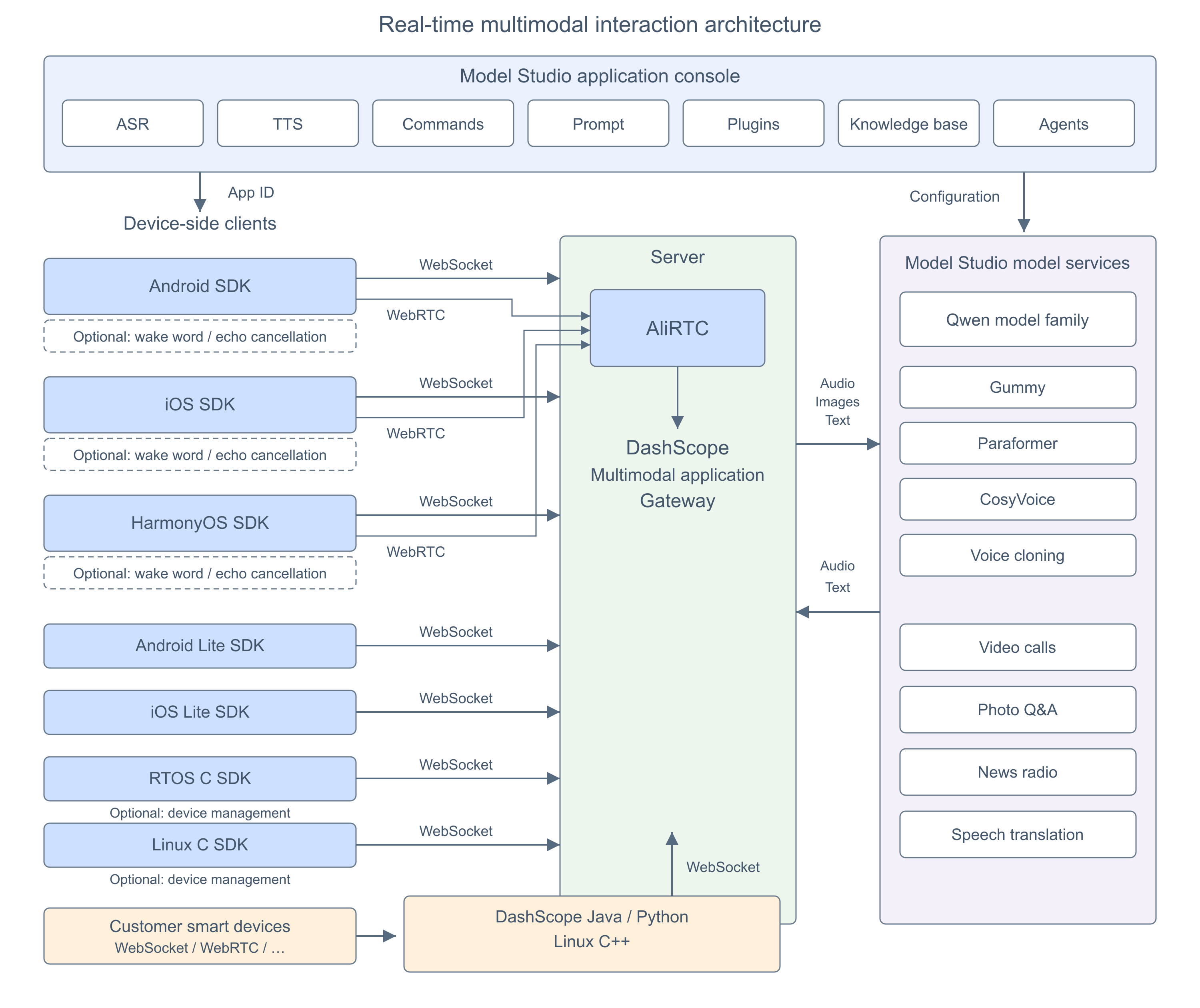
The SDK communicates with the server over WebSocket and supports AudioOnly and AudioAndVideo modes:
The SDK supports Push2Talk, Tap2Talk, and Duplex (full-duplex):
The HarmonyOS SDK is integrated as a HAR (Harmony Archive). The release project has the following SDK dependencies:
The HarmonyOS SDK supports two links:
Connection and authentication parameters:
Pass
The release project (
Request protocol fields:
The following table describes the requests sent by the SDK to the server, not the methods of
parameters.upstream:
parameters.downstream:
parameters.client_info:
parameters.biz_params:
The HarmonyOS conversation callback interface is
For troubleshooting HarmonyOS SDK errors, see Multimodal real-time interaction error codes.
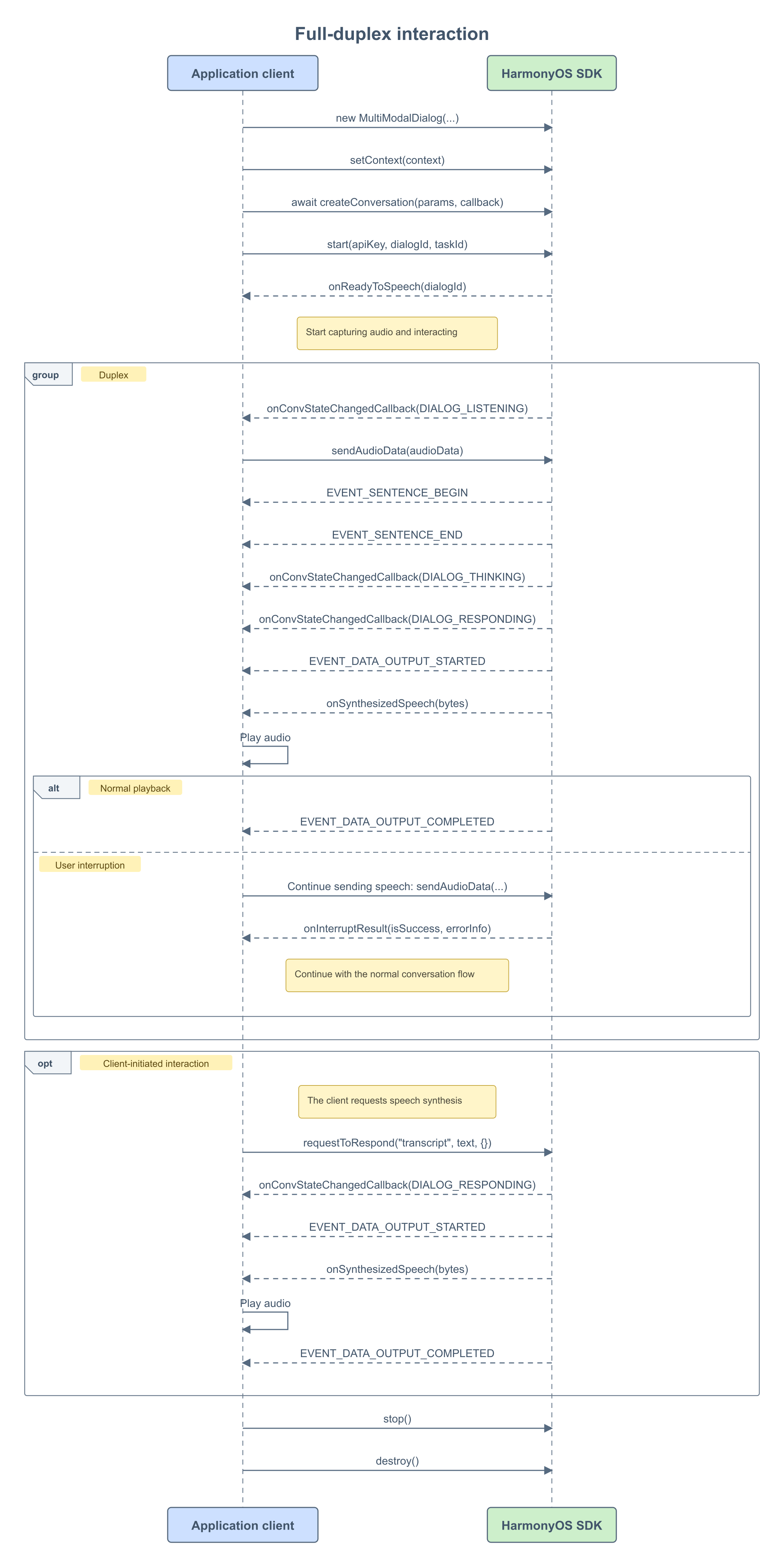 Full-duplex (Duplex): Over WebSocket, the application captures microphone audio and continuously sends it through
 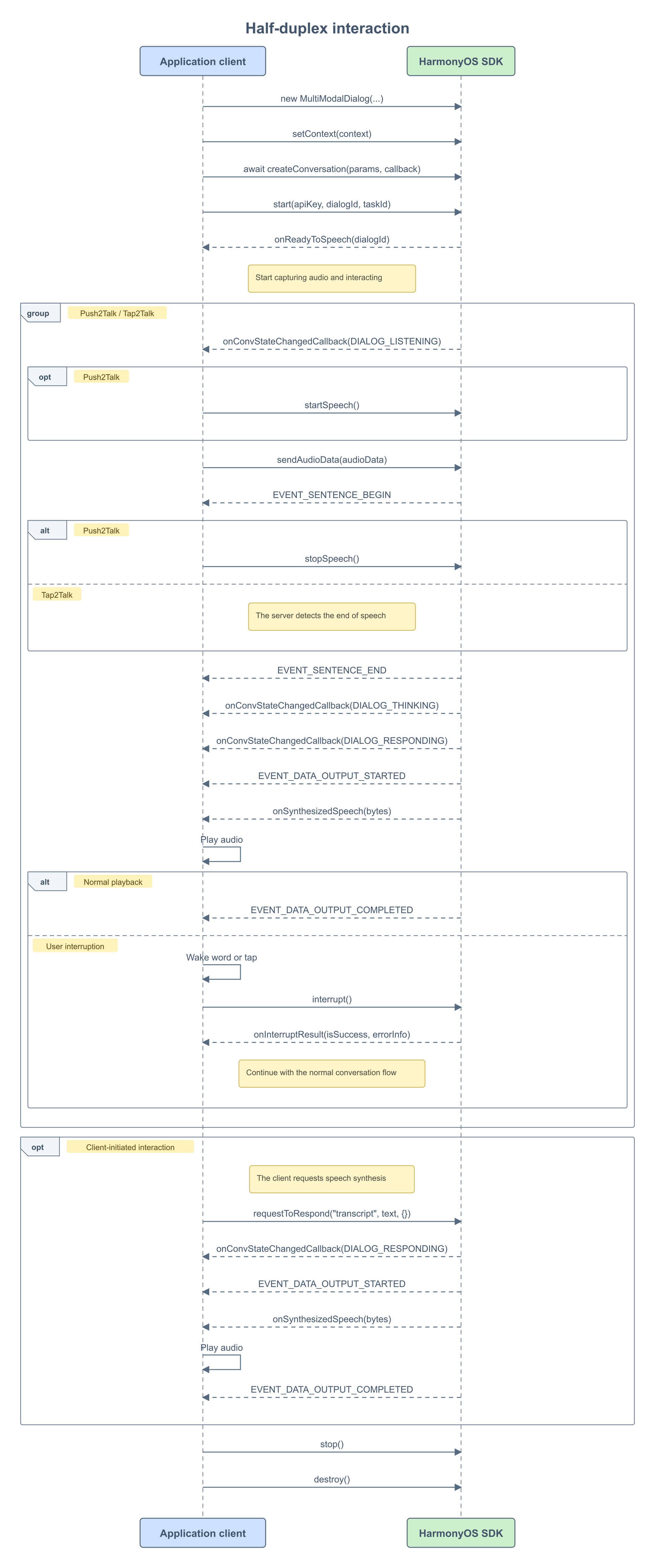 Half-duplex (Push2Talk / Tap2Talk): In Push2Talk, press and hold to speak, and release to finish. In Tap2Talk, tap to start, and the server automatically detects the end of speech.
The HarmonyOS SDK supports Duplex full-duplex interaction. In WebSocket duplex mode, the application continuously captures and sends recorded audio while playing the AI's spoken response, allowing voice interruptions at any time.
In duplex mode:
VQA enables multimodal image-and-voice interaction by sending images during a conversation.
A spoken request to take a photo triggers a "visual_qa" command. When the client receives this command through
LiveAI (video calling) is the official agent for Model Studio multimodal real-time interaction. When calling LiveAI over WebSocket, the SDK continuously sends video frames using the
Note: In the current version, the external video frame push interfaces (
TTS converts text into speech. The HarmonyOS SDK uses
ASR results may contain errors or unexpected text during a conversation. In addition to configuring hotwords, you can upload a correction vocabulary through the real-time correction API.
Parameters:
Service architecture
Prerequisites
- To use real-time multimodal interaction in Alibaba Cloud Model Studio:
- Enable a real-time multimodal interaction application and obtain a workspace ID, app ID, and API key.
- Download the HarmonyOS SDK and demo, and configure the required environment and dependencies.
- Import the sample code and follow the API call sequence to integrate the SDK.
- To test the SDK, run the HAP test application in the
entrymodule of the release project (multimodal-dialog-harmony-V1.4.9-V1.0.0) and enter the three parameters above.
| Package | Version |
|---|---|
| multimodal-dialog-harmony-V1.4.9-V1.0.0.tar.gz | V1.4.9-V1.0.0 |
SDK integration
Interaction data links
The SDK communicates with the server over WebSocket and supports AudioOnly and AudioAndVideo modes:
- Audio interaction: Supports audio and text conversations only.
- Audio and video interaction: A command switches the conversation to video call mode. The client continuously sends video frames to the server for end-to-end multimodal audio and video interaction.
Interaction modes
The SDK supports Push2Talk, Tap2Talk, and Duplex (full-duplex):
- Push2Talk: Press and hold to speak, and release to finish.
- Tap2Talk: Tap to start speaking. The end of speech is detected automatically.
- Duplex: Start speaking at any time after connection, with support for voice interruptions.
API usage
SDK dependencies
The HarmonyOS SDK is integrated as a HAR (Harmony Archive). The release project has the following SDK dependencies:
- WebSocket (
ChainMode.WEBSOCKET): Supports AudioOnly and AudioAndVideo. - RTC (
ChainMode.RTC): An audio and video link for LiveAI video calls.
Key parameters
Connection and authentication parameters:
Pass url, chainMode, workspaceId, appId, and dialogMode to the MultiModalDialog constructor. Pass apiKey to start or startTwo. These are not parameters of MultiModalRequestParam.
| Parameter | Subparameter | Type | Required | Description |
|---|---|---|---|---|
| url | string | Yes | Server URL. For WebSocket, use wss://dashscope.aliyuncs.com/api-ws/v1/inference. For RTC audio and video, pass the RTC URL. | |
| apiKey | string | Yes | Model Studio API key for server authentication. | |
| workspaceId | string | Yes | Workspace ID in the Model Studio console. | |
| appId | string | Yes | ID of the application created in the Model Studio console. | |
| dialogMode | DialogMode | Yes | Interaction mode: PUSH2TALK, TAP2TALK, or DUPLEX. | |
| chainMode | ChainMode | Yes | Link mode: WEBSOCKET or RTC. |
Demo overview
The release project (multimodal-dialog-harmony-V1.4.9-V1.0.0) includes these pages:
- ConfigPage: The entry page for configuring url, api_key, workspace_id, app_id, and other settings.
- MultimodalSessionPage: A multimodal session page for real-time multimodal interaction and VQA (image-to-text). It supports VQA requests such as "take a photo to identify xxx":
- After taking a photo, send its URL or base64 data (image ≤ 180 KB) to trigger recognition and conversation for a single image.
- In audio and video mode, the demo accepts externally captured image sequences to facilitate capture and video conversation integration for IoT devices such as smart glasses.
API design
MultiModalDialog entry class
MultiModalDialog Initialize the dialog class with the required global parameters.- setContext
UIAbilityContext. Call this method before createConversation.
- createConversation
- start
- stop
- destroy
- setDialogTimeout
- interrupt
- startSpeech / stopSpeech / cancelSpeech
- sendAudioData
- sendRefData
- requestToRespond
- sendVideoFrame
- sendResponseStarted / sendResponseEnded
- Other APIs
- Static configuration APIs (RTC audio and video capture switches)
Key enumerations
| Parameter | Value | Description |
|---|---|---|
| ChainMode | WEBSOCKET | WebSocket link supporting AudioOnly and AudioAndVideo |
| RTC | RTC audio and video link | |
| DialogMode | PUSH2TALK | Start and stop manually |
| TAP2TALK | Start manually and detect the end of speech automatically | |
| DUPLEX | Full-duplex interaction |
MultiModalRequestParam.builder(). Configure upstream, downstream, client information, and business parameters through upStream, downStream, clientInfo, and bizParams, respectively. Upstream and downstream protocol parameters without dedicated setters can be passed through passThroughParams on the corresponding object.
| Field path | Type | Required | Description |
|---|---|---|---|
| header.action | string | Yes | Request action, fixed to "run-task" |
| header.task_id | string | Yes | Task ID in UUID format |
| header.streaming | string | Yes | Streaming mode, fixed to duplex |
| payload.task_group | string | Yes | Task group, fixed to "aigc" |
| payload.task | string | Yes | Task name, fixed to "multimodal-generation" |
| payload.function | string | Yes | Function, fixed to "generation" |
| payload.model | string | Yes | Model name, fixed to "multimodal-dialog" |
| payload.input.directive | string | Yes | Request directive |
| payload.input.workspace_id | string | Yes | Workspace ID |
| payload.input.app_id | string | Yes | Application ID |
| payload.input.dialog_id | string | No | Dialog ID |
| payload.parameters.upstream | object | Yes | Upstream parameters |
| payload.parameters.downstream | object | No | Downstream parameters |
| payload.parameters.client_info | object | Yes | Client information |
| payload.parameters.biz_params | object | No | Business parameters |
| Parameter | Type | Required | Description |
|---|---|---|---|
| type | string | Yes | Upstream type: AudioOnly for audio calls only, or AudioAndVideo for audio and video |
| mode | string | No | Client mode: push2talk, tap2talk, or duplex. Default: tap2talk. |
| audio_format | string | No | Audio format: pcm or raw-opus. Default: pcm. |
| sample_rate | int | No | ASR sample rate: 8000, 16000, 24000, or 48000. Default: 16000. |
| vocabulary_id | string | No | Hotword vocabulary ID. Overrides the hotword configuration in the console. |
| language | string | No | ASR language. Defaults to the console setting. |
| Parameter | Type | Required | Description |
|---|---|---|---|
| voice | string | No | TTS voice. Available voices depend on the TTS model selected in the console. |
| sample_rate | int | No | TTS sample rate: 8000, 16000, 24000, or 48000. The SDK's DownStream default is 24000. Qwen TTS models support only 24000. |
| audio_format | string | No | Audio format: pcm, opus, or raw-opus. Default: pcm. Qwen TTS models support only pcm. |
| frame_size | int | No | TTS audio frame size: 10, 20, 40, 60, 100, or 120. Default: 60 ms. Applies only to opus or raw-opus. |
| volume | int | No | TTS volume, from 0 to 100. Default: 50. |
| speech_rate | int | No | TTS speech rate, from 50 to 200. Default: 100. |
| pitch_rate | int | No | TTS pitch, from 50 to 200. Default: 100. |
| bit_rate | int | No | TTS bitrate, from 6 to 510 kbps. Default: 32. Applies only to mp3, opus, or raw-opus. |
| intermediate_text | string | No | Intermediate text to return: transcript for the user's ASR result, or dialog for intermediate conversation responses. Separate multiple values with commas. Default: transcript. |
| word_timestamp_enabled | boolean | No | Whether to return timestamps for synthesized speech. Default: false. Returned in RespondingContent.extra_info. |
| transmit_rate_limit | int | No | Downstream audio transmission rate limit, in bytes per second. |
| incremental_response | boolean | No | Whether to return incremental model output. Default: false, which returns the full output. |
| instruction | string | No | Instructions to control synthesis effects such as dialect and emotion. |
| language | string | No | TTS language. Defaults to the console setting. |
| Parameter | Subparameter | Type | Required | Description |
|---|---|---|---|---|
| user_id | string | Yes | End-user ID generated according to your business rules. Up to 36 characters. | |
| device | uuid | string | No | Globally unique client ID, up to 40 characters. A user can have multiple devices with different uuid values and the same user_id. |
| network | ip | string | No | Caller's public IP address. |
| location | latitude | string | No | Caller's latitude. |
| longitude | string | No | Caller's longitude. | |
| city_name | string | No | Caller's city. |
| Parameter | Subparameter | Type | Required | Description |
|---|---|---|---|---|
| user_defined_params | json object | No | Parameters passed through to agent and MCP services. In the extra_config child node, set enable_web_search to control web search, and agent_timeout to set the agent connection timeout (10–120 seconds, default: 10). | |
| user_prompt_params | json object | No | Custom prompt variables, with JSON keys and values defined by you. | |
| user_query_params | json object | No | Custom conversation variables, with JSON keys and values defined by you. |
IDialogCallback interface
The HarmonyOS conversation callback interface is IDialogCallback. Pass it to createConversation to receive conversation states and events.
onConvEventCallback response details
- EVENT_HUMAN_SPEAKING_DETAIL
- EVENT_RESPONDING_DETAIL
payload.output.text. Example:
Error handling
onErrorReceived - response
Conversation errors are reported through theonErrorReceived callback:
Common error codes
For troubleshooting HarmonyOS SDK errors, see Multimodal real-time interaction error codes.
Call sequences
Full-duplex interaction
sendAudioData. Downstream synthesized audio is passed to the application for playback through onSynthesizedSpeech. Keep sending recorded audio during playback to support voice interruptions at any time.
Half-duplex interaction
Additional SDK API usage
Duplex interaction
The HarmonyOS SDK supports Duplex full-duplex interaction. In WebSocket duplex mode, the application continuously captures and sends recorded audio while playing the AI's spoken response, allowing voice interruptions at any time.
- For audio interaction, pass
DialogMode.DUPLEXto theMultiModalDialogconstructor to enable full-duplex mode. - Duplex interaction requires acoustic echo cancellation (AEC). The HarmonyOS SDK integrates internal AEC, which is disabled by default. Explicitly enable it by setting
MultiModalDialog.wsUseInternalAEC = true. When internal AEC is disabled, external AEC is used. The application must send downstream TTS playback data throughsendRefDataas the echo reference.
VQA interaction
VQA enables multimodal image-and-voice interaction by sending images during a conversation.
A spoken request to take a photo triggers a "visual_qa" command. When the client receives this command through onConvEventCallback, it sends an image URL or base64 data (images smaller than 180 KB) to enable image understanding in the conversation.
Call LiveAI over WebSocket
LiveAI (video calling) is the official agent for Model Studio multimodal real-time interaction. When calling LiveAI over WebSocket, the SDK continuously sends video frames using the AudioAndVideo upstream type.
sendVideoFrame / PushExternalVideoFrame) support only base64-encoded images for image interaction over WebSocket. Each image must be smaller than 180 KB. For real-time video calls, use the RTC link (ChainMode.RTC), where the SDK captures camera video and streams it using its built-in camera capture functionality.
Text-to-speech synthesis
TTS converts text into speech. The HarmonyOS SDK uses requestToRespond to request synthesized audio from the server.
Custom prompt variables and values
- Configure custom prompt variables in the project's Prompt settings in the console.
user_name for a user's nickname and insert it into the prompt as ${user_name}.
- Set the values in code:
Real-time ASR correction
ASR results may contain errors or unexpected text during a conversation. In addition to configuring hotwords, you can upload a correction vocabulary through the real-time correction API.
Parameters:
| Parameter | Level 1 | Level 2 | Type | Description |
|---|---|---|---|---|
| asrPostProcessing | ReplaceWord[] | ASR correction vocabulary in the SDK upstream parameters | ||
| ReplaceWord | Object | Each ReplaceWord defines a text replacement rule | ||
| source | String | Text to replace | ||
| target | String | Replacement text | ||
| matchMode | String | Matching mode: exact for an exact sentence match, or partial for a partial match. Default: exact. |