

Terminology
Direct path: A request path that bypasses nodes such as automatic speech recognition (ASR), intent recognition, and text-to-speech (TTS). Instead, it sends the request directly to the agent and returns the agent's response.
Scenarios
You can send images directly to the agent for analysis without intent recognition or voice processing. This approach is ideal for camera-equipped products that require image understanding, such as photo-based learning devices or educational tablets with visual question-answering features.
Prerequisites
Activate Alibaba Cloud Model Studio and obtain an API key
For more information, see Obtain an API key. The API key is your authentication credential for Alibaba Cloud Model Studio.
Enable the photo-based Q&A direct path in the console
- In the Multimodal Development Suite, create a multimodal interactive application. Select the Full-Featured template (do not select the Vision-only template) and disable interactive voice response.
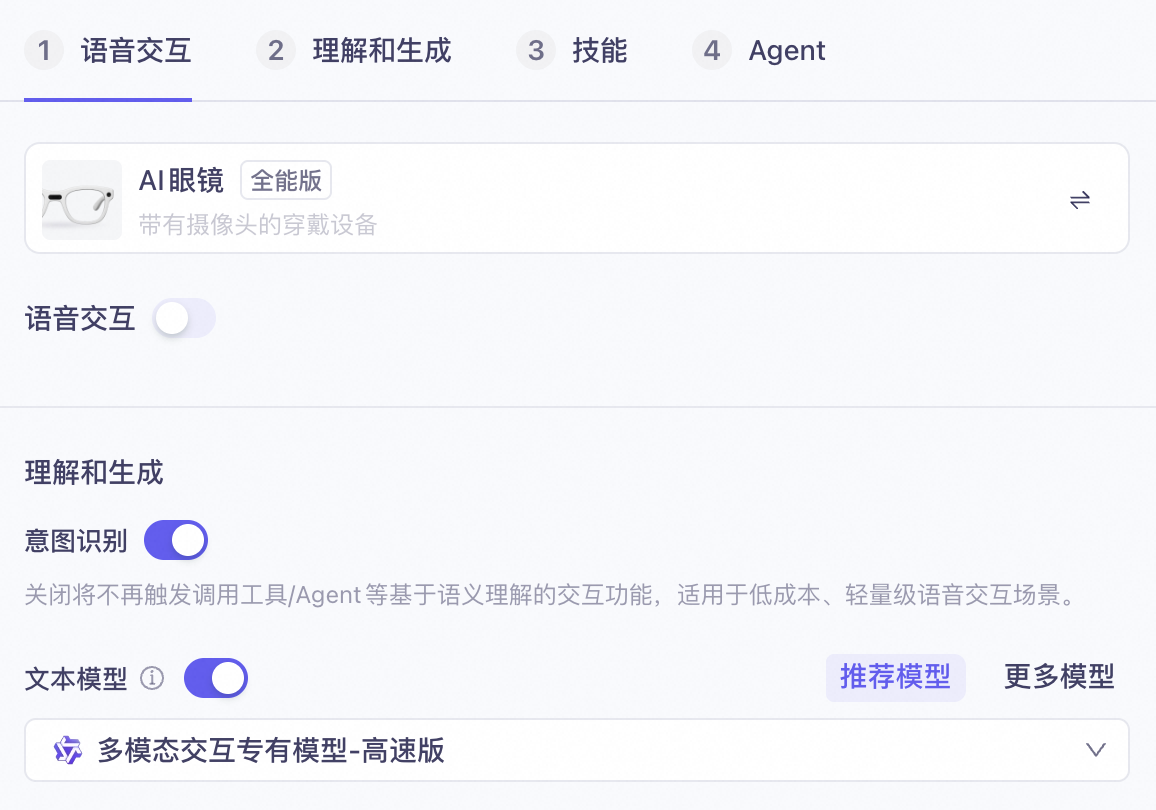
- Disable conversation carryover, knowledge base, web search, and long-term memory configurations.
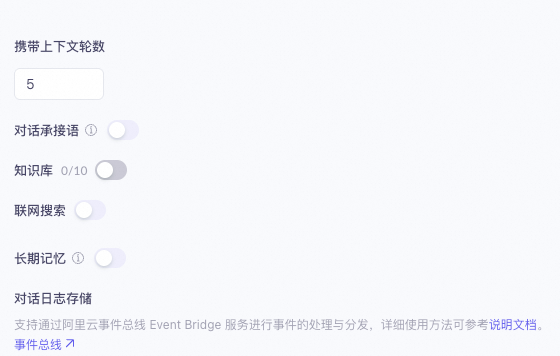
- Clear all skill configurations and keep only the photo-based Q&A agent in the agent configuration.
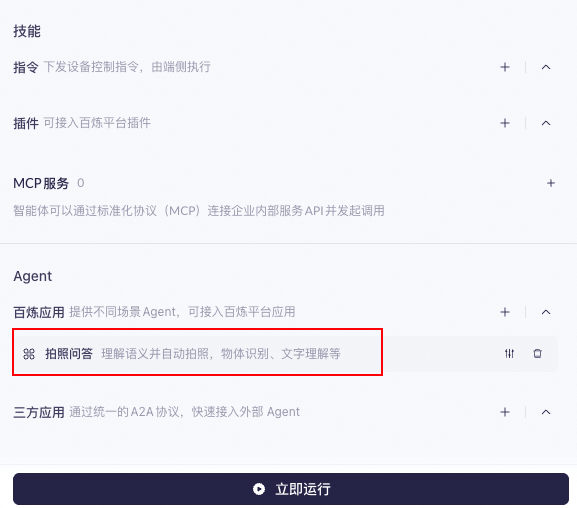
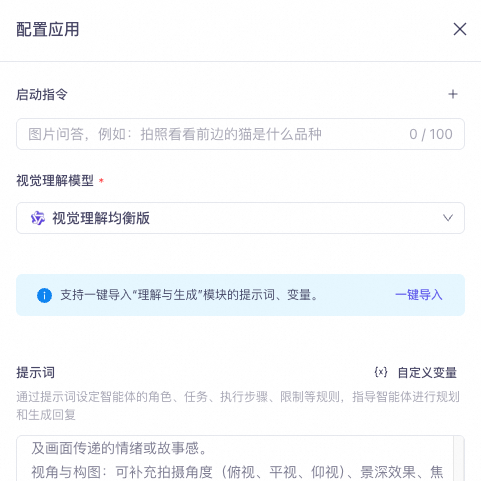
- Configure the photo-based Q&A agent. Leave the launch instruction empty. We recommend that you select the “Balanced Visual Understanding” model. You can customize the prompt as needed.
- After you complete the configuration, click Publish in the upper-right corner. You must publish the application before you can test it.
Connect using the HTTP protocol
Request parameters
Top-level parameter | Secondary parameters | Type | Required | Description |
model | string | Yes | Alibaba Cloud Model Studio model name. Always use "multimodal-dialog". Copy this value directly. | |
input | directive | string | Yes | Directive name: Request |
app_id | string | Yes | Your application ID (see Obtain an app ID). You can find it on the My Applications page in the Multimodal Interactive Development Suite console. | |
dialog_id | string | No | Dialog ID. If left blank, a new dialog starts. The server generates a dialog ID automatically and returns it in the response. Example format: "12345678-1234-1234-1234-1234567890ab" (36 characters total). To continue a previous dialog, pass the dialog_id previously returned by the server. | |
text | string | Yes | Text to process. In this scenario, leave it as an empty string (""). | |
parameters | client_info | object | Yes | See the table below for parameters under parameters.client_info. |
images | list[] | No | Image data for analysis. Only multimodal applications support image-based Q&A. See the table below for parameters under parameters.images. | |
biz_params | object | No | Configure as needed. See the table below for parameters under parameters.biz_params. |
parameters.client_info parameters
Top-level parameter | Secondary parameters | Type | Required | Description |
|---|---|---|---|---|
user_id | string | Yes | End user ID. Generate this ID according to your business rules to enable customized features per end user. Maximum length: 36 characters. | |
device | uuid | string | No | Globally unique client device ID. Generate and pass this ID into the SDK yourself. Maximum length: 40 characters. One end user can have multiple devices, each with a different uuid but the same user_id. |
parameters.images parameters
Top-level parameters | Type | Required | Description |
|---|---|---|---|
type | string | Yes | Image type. Supported values: base64 or url. |
value | string | Yes | Image content.
|
parameters.biz_params parameters
Top-level parameter | Secondary Parameters | Type | Required | Description |
|---|---|---|---|---|
commands[i] | name | string | Yes | Indicates direct routing to the agent. In this scenario, always use “agent_command”. Copy this value directly. |
exec_params | object | Yes | Specifies the target agent. In this scenario, this value is fixed. See the commands.exec_params parameter table below for details. |
exec_params | app_id | string | Yes | Specifies the target agent. In this scenario, always use "visual_qa". Copy this value directly. |
intent | string | Yes | Specifies the agent action. In this scenario, always use "open_visual_qa". Copy this value directly. |
Sample request
curl request example
Text response event fields
Top-level parameter | Secondary Parameters | Type | Required | Description |
|---|---|---|---|---|
output | event | string | Yes | Event name: RespondingContent |
dialog_id | string | Yes | Dialog ID | |
round_id | string | Yes | ID of the current conversation round | |
llm_request_id | string | Yes | Request ID for the LLM call | |
text | string | Yes | Text output from the system. Streamed as incremental updates. | |
spoken | string | Yes | Text used for speech synthesis. Streamed as incremental updates. | |
finished | bool | Yes | Indicates whether output has finished | |
finish_reason | string | No | Reason for completion. Currently supports only one value:
| |
extra_info | object | No | Additional extended information. Currently supports:
|
extra_info.agent_info parameters
Top-level parameter | Secondary parameters | Type | Required | Description |
|---|---|---|---|---|
round | string | Yes | Conversation round | |
device | device_id | string | Yes | The device.uuid used in the request |
intent_infos | intent | string | Yes | Agent used. In this scenario, always "visual_qa". |
domain | string | Yes | Agent used. In this scenario, always "visual_qa". |