

Qwen-MT is a machine translation model fine-tuned from Qwen3. It supports 92 languages -- including Chinese, English, Japanese, Korean, French, Spanish, German, Thai, Indonesian, Vietnamese, and Arabic -- and offers term intervention, domain prompting, and translation memory to control translation quality.
How it works
-
Provide the text to translate: The
messagesarray must contain exactly one message withroleset touser, and itscontentis the text to translate. -
Set languages: Refer to Supported languages and set the source language (
source_lang) and target language (target_lang) intranslation_options. To automatically detect the source language, setsource_langtoauto.Specifying the source language helps improve translation accuracy.
Qwen-MT also supports setting languages through custom prompts.
translation_options parameter.
translation_options, you can also implement translation customization features such as term intervention, translation memory, and domain prompting.
Usage restrictions:
- Single-turn translation only: The model is designed for translation tasks and does not support multi-turn conversations.
- System messages are not supported: You cannot use a
systemmessage to define global behavior. Translation options are defined intranslation_options.
Model selection
- For general scenarios,
qwen-mt-flashis the first choice. It strikes the best balance between translation quality, speed, and cost, and supports incremental streaming output. - For the highest translation quality (professional literature, formal documents), choose
qwen-mt-plus. - For the lowest latency (simple scenarios such as real-time chat), choose
qwen-mt-lite.
| Model | Recommended scenarios | Quality | Speed | Cost | Supported languages | Incremental streaming output |
|---|---|---|---|---|---|---|
| qwen-mt-plus | Scenarios with high translation quality requirements, such as professional fields, formal documents, papers, and technical reports | Best | Standard | Relatively high | 92 | Not supported |
| qwen-mt-flash | General-purpose first choice, suitable for scenarios such as website/App content, product descriptions, daily communication, and blog posts | Good | Fast | Relatively low | 92 | Supported |
| qwen-mt-lite | Simple, latency-sensitive scenarios such as real-time chat and live comment translation | Basic | Fastest | Lowest | 31 | Supported |
Getting started
The following example translates “我看到这个视频后没有笑” into English.
You must first obtain and configure an API key and configure the API key in environment variables. If you call the API through the OpenAI SDK or DashScope SDK, you must also install the SDK.
- OpenAI compatible
- DashScope
Streaming output
Streaming output returns translated content in real time and reduces user waiting time. qwen-mt-flash and qwen-mt-lite support incremental streaming output, which is enabled with the incremental_output parameter and returns only newly generated content each time. qwen-mt-plus supports only non-incremental streaming output and returns the complete sequence generated so far each time. For more information, see Streaming output.
- OpenAI compatible
- DashScope
Improve translation quality
Standard translation meets daily communication needs, but the following issues may occur in professional scenarios:
- Inconsistent terminology: Product names or industry terms are translated incorrectly.
- Style mismatch: The translation style does not conform to the conventions of specific fields such as legal or marketing content.
Term intervention
When the text contains brand names, product names, or technical terms, you can provide a glossary through the terms field to guide the model to translate with accuracy and consistency.
Usage steps:
-
Define terms
Create a JSON array and assign it to the
termsfield. Each object represents one term:
-
Pass in terms
Pass the
termsarray through thetranslation_optionsparameter.
- OpenAI compatible
- DashScope
“生物传感器” (biological sensor) and “身体健康状况” (the health status of the body).Translation memory
When you need the model to follow a specific translation style or sentence pattern, provide source-target sentence pairs through the tm_list field as references. The model imitates the style of these examples in the current translation task. This is suitable for maintaining terminology consistency across large document sets or following existing enterprise writing conventions.
-
Define translation memory
Create a JSON array and assign it to
tm_list. Each object contains a source sentence and its translation:
-
Pass in translation memory
Pass the translation memory array through the
translation_optionsparameter.
- OpenAI compatible
- DashScope
Domain prompting
If the translation style must conform to a specific domain (for example, legal documents require a serious and formal style, while social media content requires a colloquial style), pass a domain prompt through the translation_options parameter.
- OpenAI compatible
- DashScope
Custom prompts
Qwen-MT supports guiding translation with custom prompts (such as specifying languages and styles). The translation_options parameter and custom prompts can be passed at the same time. However, when both are set, the settings in translation_options (such as target_lang and source_lang) take precedence over the corresponding settings in the custom prompt and override the language or style specified in the prompt.
We recommend using the translation_options parameter to configure translation options first for the best translation results.
The following example translates Chinese legal text into English:
- OpenAI compatible
- DashScope
Use in production
-
Control the number of input tokens
The input token limit of Qwen-MT models is 8,192. When the input is long, consider the following strategies:
- Translate in segments: Split long text at semantic boundaries (paragraphs or complete sentences) instead of truncating by character count, to preserve context integrity and improve translation quality.
- Pass in only the most relevant references: Terms, translation memory, and domain prompts are all appended to the prompt as input tokens. Pass in only content directly relevant to the current translation task, and avoid large and generic reference lists.
-
Set
source_langbased on the scenario- When the source language is uncertain (for example, multilingual social chat), set
source_langtoautoand the model detects the language automatically. - For scenarios with a fixed language and high accuracy requirements (such as technical documentation and operation manuals), always specify
source_langexplicitly, which effectively improves translation accuracy.
- When the source language is uncertain (for example, multilingual social chat), set
FAQ
Q: How do I integrate Qwen-MT with Immersive Translate?
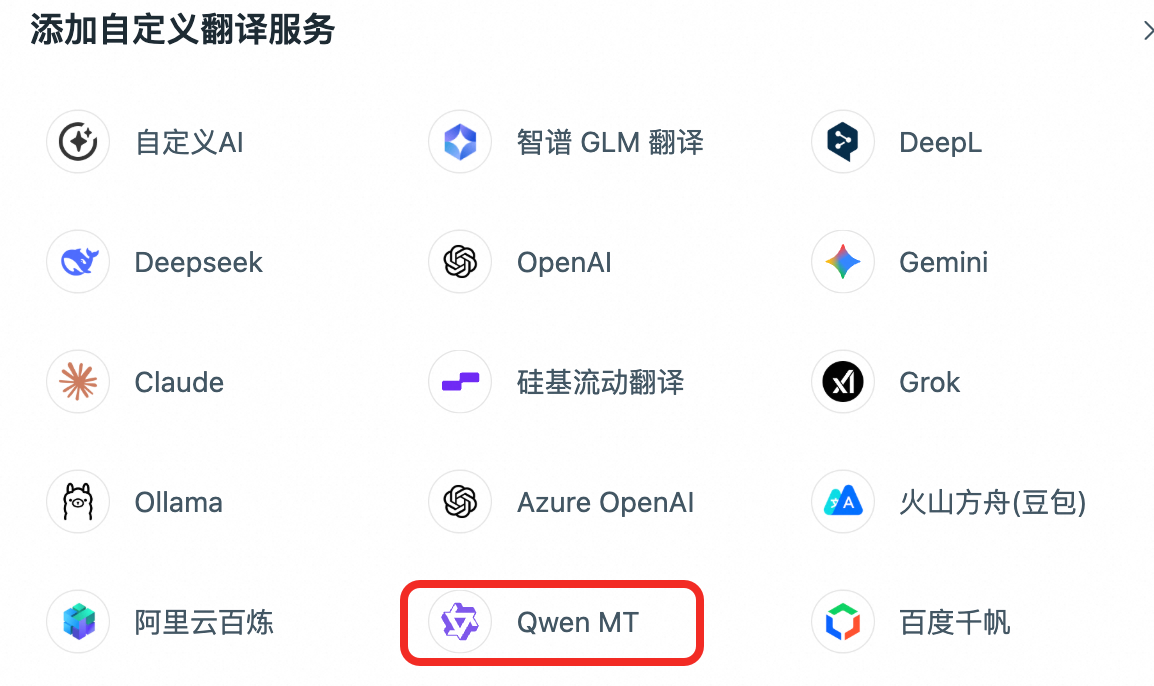
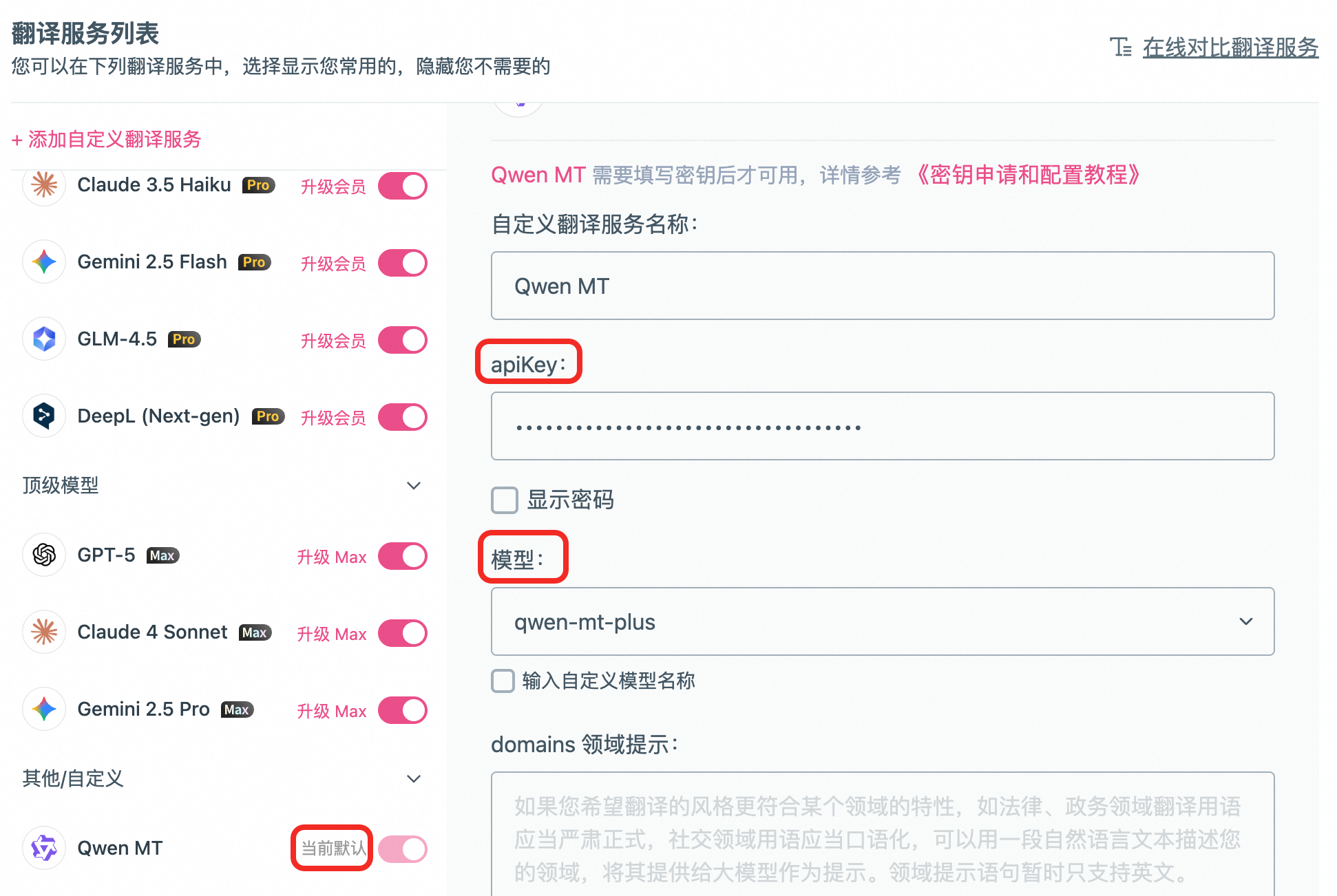
A: In the latest version of the plugin, add a custom translation service and select Qwen MT.
qwen-mt-plus or qwen-mt-flash from the model drop-down list, and set Qwen MT as the default in the left sidebar.
Q: How do I integrate Qwen-MT with other third-party tools?
A: The latest Tongyi Qianwen (Qwen) plugin of Dify supports Qwen-MT models.
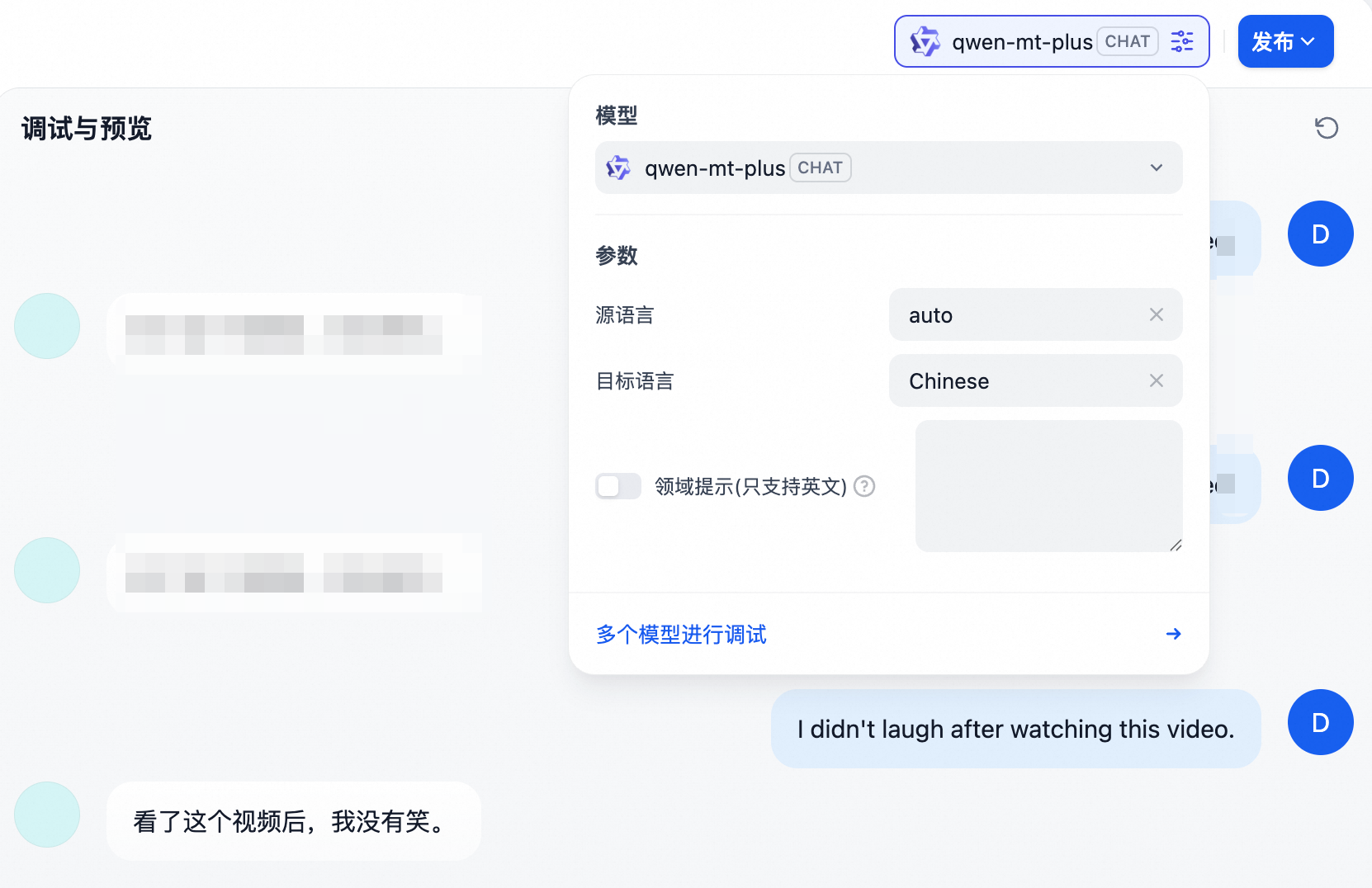
Whether other third-party tools support Qwen-MT depends on their actual status.
Supported languages
When sending a request, use the English name or code in the following table to specify languages.
When the source language is uncertain, set thesource_langparameter toautofor automatic detection.
- Languages supported by qwen-mt-plus/flash (92)
- Languages supported by qwen-mt-lite (31)
Language | English name | Code |
|---|---|---|
English | English | en |
Simplified Chinese | Chinese | zh |
Traditional Chinese | Traditional Chinese | zh_tw |
Russian | Russian | ru |
Japanese | Japanese | ja |
Korean | Korean | ko |
Spanish | Spanish | es |
French | French | fr |
Portuguese | Portuguese | pt |
German | German | de |
Italian | Italian | it |
Thai | Thai | th |
Vietnamese | Vietnamese | vi |
Indonesian | Indonesian | id |
Malay | Malay | ms |
Arabic | Arabic | ar |
Hindi | Hindi | hi |
Hebrew | Hebrew | he |
Burmese | Burmese | my |
Tamil | Tamil | ta |
Urdu | Urdu | ur |
Bengali | Bengali | bn |
Polish | Polish | pl |
Dutch | Dutch | nl |
Romanian | Romanian | ro |
Turkish | Turkish | tr |
Khmer | Khmer | km |
Lao | Lao | lo |
Cantonese | Cantonese | yue |
Czech | Czech | cs |
Greek | Greek | el |
Swedish | Swedish | sv |
Hungarian | Hungarian | hu |
Danish | Danish | da |
Finnish | Finnish | fi |
Ukrainian | Ukrainian | uk |
Bulgarian | Bulgarian | bg |
Serbian | Serbian | sr |
Telugu | Telugu | te |
Afrikaans | Afrikaans | af |
Armenian | Armenian | hy |
Assamese | Assamese | as |
Asturian | Asturian | ast |
Basque | Basque | eu |
Belarusian | Belarusian | be |
Bosnian | Bosnian | bs |
Catalan | Catalan | ca |
Cebuano | Cebuano | ceb |
Croatian | Croatian | hr |
Egyptian Arabic | Egyptian Arabic | arz |
Estonian | Estonian | et |
Galician | Galician | gl |
Georgian | Georgian | ka |
Gujarati | Gujarati | gu |
Icelandic | Icelandic | is |
Javanese | Javanese | jv |
Kannada | Kannada | kn |
Kazakh | Kazakh | kk |
Latvian | Latvian | lv |
Lithuanian | Lithuanian | lt |
Luxembourgish | Luxembourgish | lb |
Macedonian | Macedonian | mk |
Maithili | Maithili | mai |
Maltese | Maltese | mt |
Marathi | Marathi | mr |
Mesopotamian Arabic | Mesopotamian Arabic | acm |
Moroccan Arabic | Moroccan Arabic | ary |
Najdi Arabic | Najdi Arabic | ars |
Nepali | Nepali | ne |
North Azerbaijani | North Azerbaijani | az |
North Levantine Arabic | North Levantine Arabic | apc |
Northern Uzbek | Northern Uzbek | uz |
Norwegian Bokmål | Norwegian Bokmål | nb |
Norwegian Nynorsk | Norwegian Nynorsk | nn |
Occitan | Occitan | oc |
Odia | Odia | or |
Pangasinan | Pangasinan | pag |
Sicilian | Sicilian | scn |
Sindhi | Sindhi | sd |
Sinhala | Sinhala | si |
Slovak | Slovak | sk |
Slovenian | Slovenian | sl |
South Levantine Arabic | South Levantine Arabic | ajp |
Swahili | Swahili | sw |
Tagalog | Tagalog | tl |
Ta’izzi-Adeni Arabic | Ta’izzi-Adeni Arabic | acq |
Tosk Albanian | Tosk Albanian | sq |
Tunisian Arabic | Tunisian Arabic | aeb |
Venetian | Venetian | vec |
Waray | Waray | war |
Welsh | Welsh | cy |
Western Persian | Western Persian | fa |