image-to-video - based on first frame

The Wan Image-to-Video model accepts multimodal input (text, image, or audio) and generates videos up to 15 seconds long at 1080P resolution.

  • Basic Settings: Supports integer video durations from 2 to 15 seconds, configurable video resolution (480P, 720P, or 1080P), smart prompt rewriting, and optional watermarking.
  • Audio Capabilities: Supports automatic dubbing or uploading an audio file to achieve audio-visual synchronization. (Supported by Wan 2.5 and Wan 2.6)
  • Multi-shot Narrative: Generates multi-shot videos while preserving subject consistency across shot transitions. (Supported by Wan 2.6 only)
  • Video Effects: Includes built-in templates such as “Magic Float” and “Balloon Expand.” Use them directly.
Quick links:Try it online (Beijing|Singapore|Virginia)|API reference| Video effects list

Getting Started

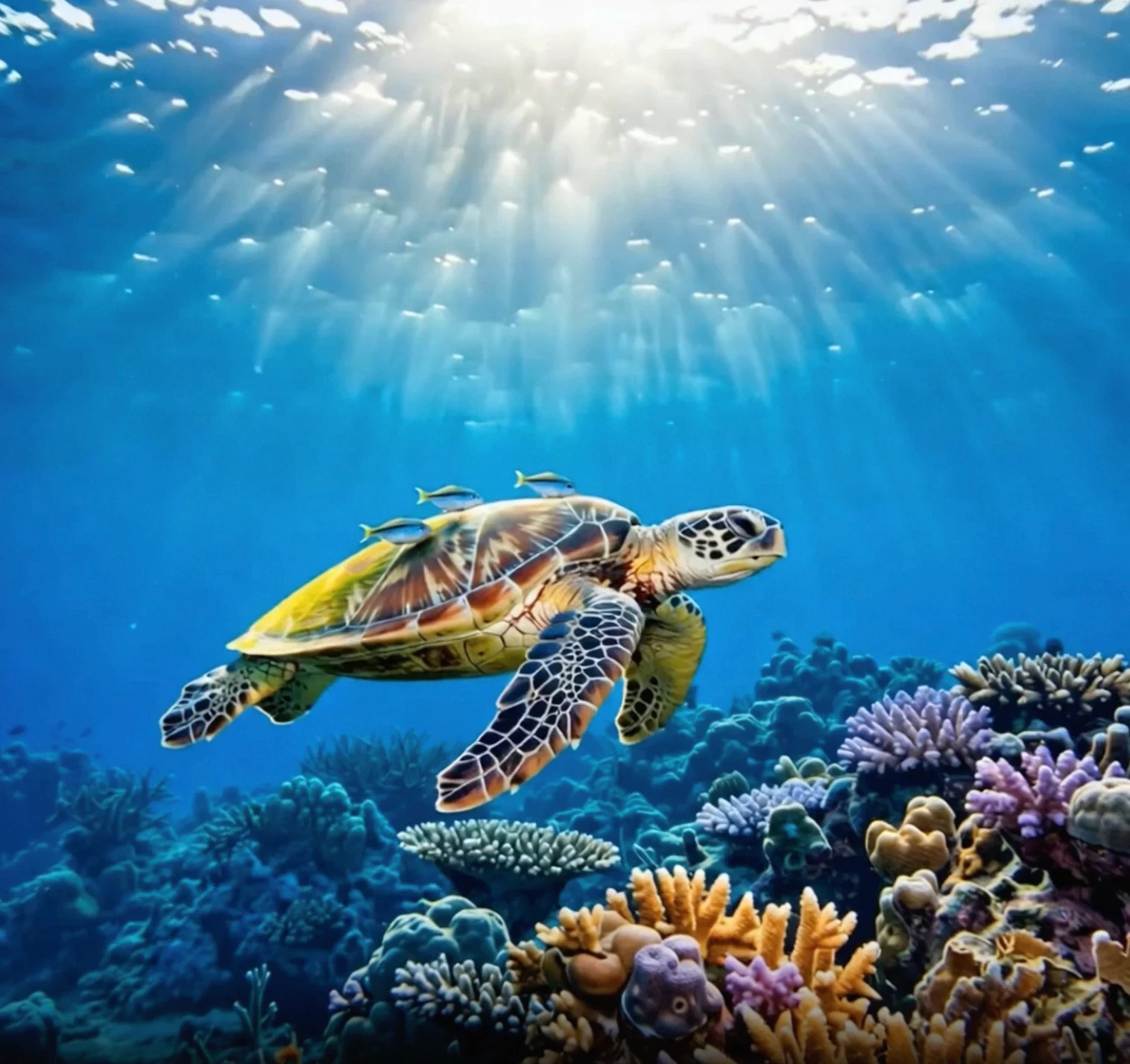
Input PromptInput First Frame ImageOutput Video (Multi-shot, Audio Video)
The camera slowly moves up from below the turtle, which swims gracefully, its belly details clearly visible.
wan-i2v-haigui
Before making calls, first obtain and configure an API Key, then configure the API Key in environment variables. To call through the SDK, please install the DashScope SDK.
  • Python SDK
  • Java SDK
  • curl
Make sure the DashScope Python SDK version is no lower than 2.0.1 before running the following code.If the version is too old, errors such as “url error, please check url!” may occur. Refer to Install SDK to update.
import os
import dashscope
from dashscope import DashScopeError

# 以下为华北2(北京)地域的配置。请将 {WorkspaceId} 替换为您的百炼业务空间ID,各地域的region取值不同。
# 各地域的API Key不同。获取API Key:https://help.aliyun.com/zh/model-studio/get-api-key
client = dashscope.Client(
    api_key=os.getenv("DASHSCOPE_API_KEY"),
    workspace="{WorkspaceId}",
    region="cn-beijing",
)

print('please wait...')
# generate 为一步式调用(提交任务并等待完成),返回已完成的 Job
# shot_type 不在具名签名内,经 parameters 透传
try:
    job = client.videos.generate(model='wan2.6-i2v-flash',
                                 prompt='镜头从海龟下方缓缓上移,海龟悠然游动,腹部细节清晰可见。',
                                 image_url="https://help-static-aliyun-doc.aliyuncs.com/file-manage-files/zh-CN/20260121/zlpocv/wan-i2v-haigui.webp",
                                 resolution="720P",
                                 duration=10,
                                 prompt_extend=True,
                                 watermark=True,
                                 parameters={'shot_type': "multi"})
    print(job)
    print("video_url:", job.video_url)
except DashScopeError as e:
    print(f"HTTP返回码:{e.status_code}")
    print(f"错误码:{e.code}")
    print(f"错误信息:{e.message}")
    print("请参考文档:https://help.aliyun.com/zh/model-studio/developer-reference/error-code")
Sample Output (HTTP API response)
The video_url is valid for 24 hours. Download the video promptly.
{
    "request_id": "c1209113-8437-424f-a386-xxxxxx",
    "output": {
        "task_id": "966cebcd-dedc-4962-af88-xxxxxx",
        "task_status": "SUCCEEDED",
        "video_url": "https://dashscope-result-sh.oss-accelerate.aliyuncs.com/xxx.mp4?Expires=xxx",
         ...
    },
    ...
}

Applicable scope

  • The models supported vary by region, and resources are independent of each other. For the models supported in each region, see the Bailian console.
  • When making calls, ensure that the model, Endpoint URL, and API Key all belong to the same region; cross-region calls will fail.
The sample code in this document applies to the Beijing region.

Core capabilities

Creating multi-shot videos

Supported models: wan2.6 series models. Overview: The model can automatically switch between shots, for example from a wide shot to a close-up, making it suitable for scenarios such as MV production. Parameter settings:
  • shot_type: must be set to "multi".
  • prompt_extend: must be set to true (enables intelligent rewriting to optimize shot descriptions).
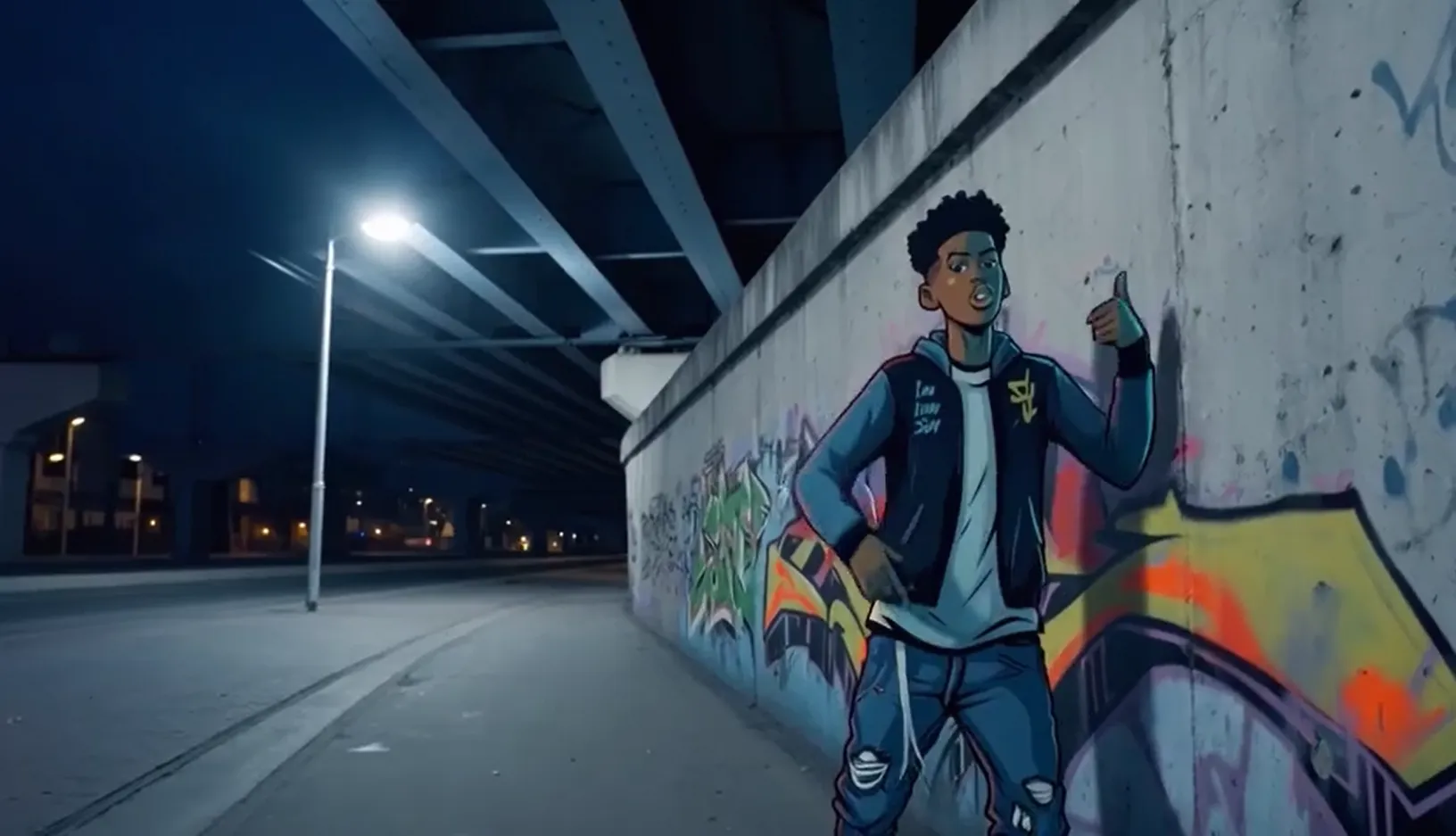
Input PromptInput First Frame ImageOutput video (wan2.6, multi-shot video)
An urban fantasy art scene. A dynamic graffiti art character. A youth painted with spray paint is coming to life from a concrete wall. He performs an English rap at a breakneck pace while striking a classic, energetic rapper pose. The scene is set under an urban railway bridge at night. The lighting comes from a single lonely streetlamp, creating a cinematic atmosphere full of high energy and stunning detail. The audio portion of the video consists entirely of rap, with no other dialogue or noise.rap-转换自-pngInput audio:
  • Python SDK
  • Java SDK
  • curl
Make sure the DashScope Python SDK version is no lower than 2.0.1. See Install SDK to update.
import os
import dashscope
from dashscope import DashScopeError

# 以下为华北2(北京)地域的配置。请将 {WorkspaceId} 替换为您的百炼业务空间ID,各地域的region取值不同。
client = dashscope.Client(
    # 若没有配置环境变量,请用百炼API Key将下行替换为:api_key="sk-xxx"
    # 各地域的API Key不同。获取API Key:https://help.aliyun.com/zh/model-studio/get-api-key
    api_key=os.getenv("DASHSCOPE_API_KEY"),
    workspace="{WorkspaceId}",
    region="cn-beijing",
)

def sample_async_call_i2v():
    # 异步调用,返回一个task_id
    try:
        # audio_url / negative_prompt 为 input 段字段,不在具名签名内,经 extra_input 透传
        # shot_type(多镜头)为 parameters 段字段,经 parameters 透传
        job = client.videos.jobs.create(model='wan2.6-i2v-flash',
                                        prompt='一幅都市奇幻艺术的场景。一个充满动感的涂鸦艺术角色。一个由喷漆所画成的少年,正从一面混凝土墙上活过来。他一边用极快的语速演唱一首英文rap,一边摆着一个经典的、充满活力的说唱歌手姿势。场景设定在夜晚一个充满都市感的铁路桥下。灯光来自一盏孤零零的街灯,营造出电影般的氛围,充满高能量和惊人的细节。视频的音频部分完全由rap构成,没有其他对话或杂音。',
                                        image_url="https://help-static-aliyun-doc.aliyuncs.com/file-manage-files/zh-CN/20250925/wpimhv/rap.png",
                                        extra_input={'audio_url': "https://help-static-aliyun-doc.aliyuncs.com/file-manage-files/zh-CN/20250925/ozwpvi/rap.mp3",
                                                     'negative_prompt': ""},
                                        resolution="720P",
                                        duration=10,
                                        prompt_extend=True,
                                        watermark=True,
                                        seed=12345,
                                        parameters={'shot_type': "multi"})
        print(job)
        print("task_id: %s" % job.task_id)
    except DashScopeError as e:
        print(f"HTTP返回码:{e.status_code}")
        print(f"错误码:{e.code}")
        print(f"错误信息:{e.message}")
        print("请参考文档:https://help.aliyun.com/zh/model-studio/developer-reference/error-code")
        return

    # 等待异步任务结束(指数退避轮询,默认总预算24小时)
    try:
        done = client.videos.jobs.wait(job)
        print(done)
        print(done.video_url)
    except DashScopeError as e:
        print(f"HTTP返回码:{e.status_code}")
        print(f"错误码:{e.code}")
        print(f"错误信息:{e.message}")
        print("请参考文档:https://help.aliyun.com/zh/model-studio/developer-reference/error-code")

if __name__ == '__main__':
    sample_async_call_i2v()

Achieving audio-visual synchronization

Supported models: wan2.5 and wan2.6 series models. Overview: Make the person in a photo "speak" or sing, with lip movements matched to the audio. For more examples, see Video voice generation. Parameter settings:
  • Provide an audio file: pass in audio_url. The model aligns lip movements with the audio file.
  • Automatic dubbing: no need to pass in audio_url; a video with audio is output by default. The model automatically generates background sound effects, music, or vocals based on the visuals.
Input PromptInput First Frame ImageOutput video (video with audio)
An urban fantasy art scene. A dynamic graffiti art character. A youth painted with spray paint is coming to life from a concrete wall. He performs an English rap at a breakneck pace while striking a classic, energetic rapper pose. The scene is set under an urban railway bridge at night. The lighting comes from a single lonely streetlamp, creating a cinematic atmosphere full of high energy and stunning detail. The audio portion of the video consists entirely of rap, with no other dialogue or noise.rap-转换自-pngInput audio:
  • Python SDK
  • Java SDK
  • curl
Make sure the DashScope Python SDK version is no lower than 2.0.1. See Install SDK to update.
import os
import dashscope
from dashscope import DashScopeError

# 以下为华北2(北京)地域的配置。请将 {WorkspaceId} 替换为您的百炼业务空间ID,各地域的region取值不同。
client = dashscope.Client(
    # 若没有配置环境变量,请用百炼API Key将下行替换为:api_key="sk-xxx"
    # 各地域的API Key不同。获取API Key:https://help.aliyun.com/zh/model-studio/get-api-key
    api_key=os.getenv("DASHSCOPE_API_KEY"),
    workspace="{WorkspaceId}",
    region="cn-beijing",
)

def sample_async_call_i2v():
    # 异步调用,返回一个task_id
    try:
        # audio_url / negative_prompt 为 input 段字段,不在具名签名内,经 extra_input 透传
        job = client.videos.jobs.create(model='wan2.6-i2v-flash',
                                        prompt='一幅都市奇幻艺术的场景。一个充满动感的涂鸦艺术角色。一个由喷漆所画成的少年,正从一面混凝土墙上活过来。他一边用极快的语速演唱一首英文rap,一边摆着一个经典的、充满活力的说唱歌手姿势。场景设定在夜晚一个充满都市感的铁路桥下。灯光来自一盏孤零零的街灯,营造出电影般的氛围,充满高能量和惊人的细节。视频的音频部分完全由rap构成,没有其他对话或杂音。',
                                        image_url="https://help-static-aliyun-doc.aliyuncs.com/file-manage-files/zh-CN/20250925/wpimhv/rap.png",
                                        extra_input={'audio_url': "https://help-static-aliyun-doc.aliyuncs.com/file-manage-files/zh-CN/20250925/ozwpvi/rap.mp3",
                                                     'negative_prompt': ""},
                                        resolution="720P",
                                        duration=10,
                                        prompt_extend=True,
                                        watermark=True,
                                        seed=12345)
        print(job)
        print("task_id: %s" % job.task_id)
    except DashScopeError as e:
        print(f"HTTP返回码:{e.status_code}")
        print(f"错误码:{e.code}")
        print(f"错误信息:{e.message}")
        print("请参考文档:https://help.aliyun.com/zh/model-studio/developer-reference/error-code")
        return

    # 等待异步任务结束(指数退避轮询,默认总预算24小时)
    try:
        done = client.videos.jobs.wait(job)
        print(done)
        print(done.video_url)
    except DashScopeError as e:
        print(f"HTTP返回码:{e.status_code}")
        print(f"错误码:{e.code}")
        print(f"错误信息:{e.message}")
        print("请参考文档:https://help.aliyun.com/zh/model-studio/developer-reference/error-code")

if __name__ == '__main__':
    sample_async_call_i2v()

Generate silent videos

Supported models: wan2.6-i2v-flash, wan2.2 series models, and wanx2.1 series models. Overview: Suitable for purely visual display scenarios that do not require audio, such as dynamic posters and silent short videos. Parameter settings:
  • wan2.6-i2v-flash: Generates videos with audio by default. To generate a silent video, you must explicitly set audio=false. Even if audio_url is passed in, as long as audio=false, the output is still a silent video and is billed as a silent video.
  • wan2.2 and earlier series models: Generate silent videos by default; no additional configuration is required.
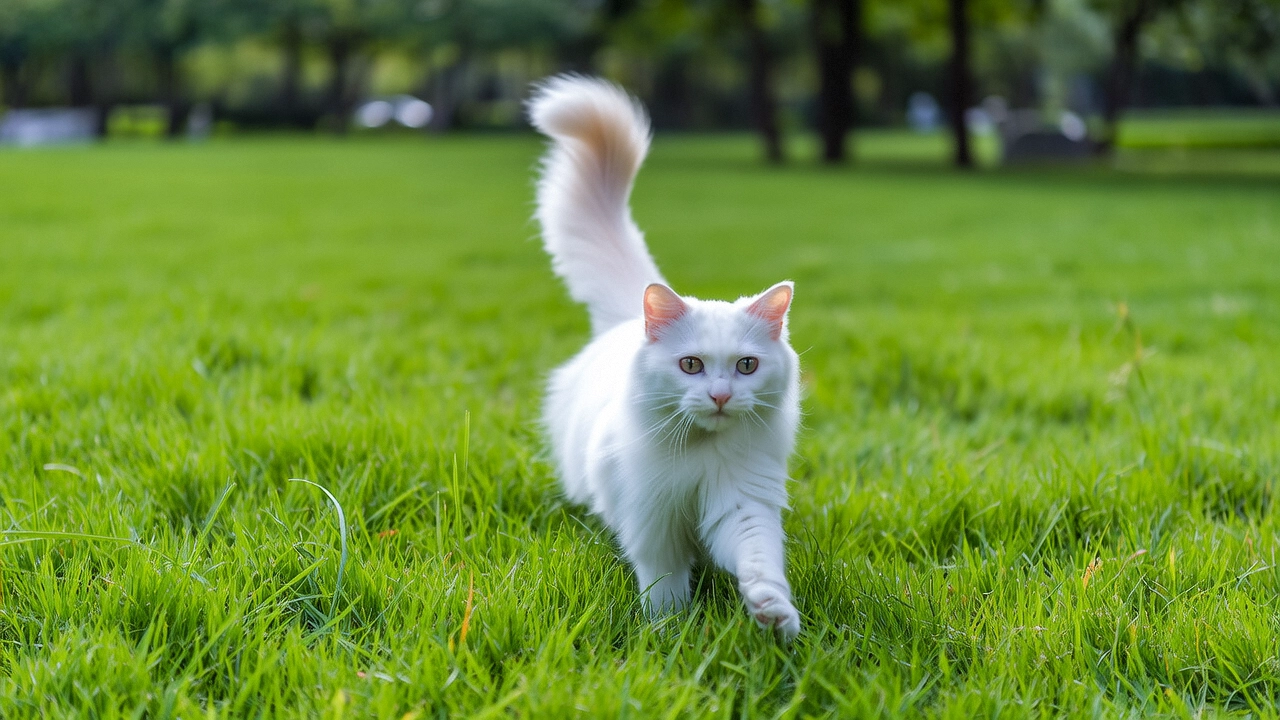
PromptInput First Frame ImageOutput video (silent video)
A cat running on the grassimage
  • Python SDK
  • Java SDK
  • curl
Make sure the DashScope Python SDK version is no lower than 2.0.1. See Install SDK to update.
import os
import dashscope
from dashscope import DashScopeError

# 以下为华北2(北京)地域的配置。请将 {WorkspaceId} 替换为您的百炼业务空间ID,各地域的region取值不同。
client = dashscope.Client(
    # 若没有配置环境变量,请用百炼API Key将下行替换为:api_key="sk-xxx"
    # 各地域的API Key不同。获取API Key:https://help.aliyun.com/zh/model-studio/get-api-key
    api_key=os.getenv("DASHSCOPE_API_KEY"),
    workspace="{WorkspaceId}",
    region="cn-beijing",
)

def sample_async_call_i2v():
    # 异步调用,返回一个task_id
    try:
        # negative_prompt 为 input 段字段,经 extra_input 透传
        # audio(必须显式设置为False,表示输出无声视频)为 parameters 段字段,经 parameters 透传
        job = client.videos.jobs.create(model='wan2.6-i2v-flash',
                                        prompt='一只猫在草地上奔跑',
                                        image_url="https://cdn.translate.alibaba.com/r/wanx-demo-1.png",
                                        extra_input={'negative_prompt': ""},
                                        resolution="720P",
                                        duration=5,
                                        prompt_extend=True,
                                        watermark=True,
                                        seed=12345,
                                        parameters={'audio': False})
        print(job)
        print("task_id: %s" % job.task_id)
    except DashScopeError as e:
        print(f"HTTP返回码:{e.status_code}")
        print(f"错误码:{e.code}")
        print(f"错误信息:{e.message}")
        print("请参考文档:https://help.aliyun.com/zh/model-studio/developer-reference/error-code")
        return

    # 等待异步任务结束(指数退避轮询,默认总预算24小时)
    try:
        done = client.videos.jobs.wait(job)
        print(done)
        print(done.video_url)
    except DashScopeError as e:
        print(f"HTTP返回码:{e.status_code}")
        print(f"错误码:{e.code}")
        print(f"错误信息:{e.message}")
        print("请参考文档:https://help.aliyun.com/zh/model-studio/developer-reference/error-code")

if __name__ == '__main__':
    sample_async_call_i2v()

Use video effects

Supported models: wanx2.1-i2v-turbo and wanx2.1-i2v-plus. Overview: No prompt is required. Simply use the built-in effect templates (such as "magic levitation" and "balloon inflation") to bring static images to life. Parameter settings:
  • template: Required. Specifies the effect name (for example, "flying" for magic levitation). Before calling, check the video effects list to confirm that the model supports the effect, to avoid call failures.
  • prompt: Ignored. When using effects, the prompt field is invalid; it is recommended to leave it empty or not pass it.
PromptInput First Frame ImageOutput video ("magic levitation" effect)
Noneimage
  • Python SDK
  • Java SDK
  • curl
Make sure the DashScope Python SDK version is no lower than 2.0.1. See Install SDK to update.
import os
import dashscope
from dashscope import DashScopeError

# 以下为华北2(北京)地域的配置。请将 {WorkspaceId} 替换为您的百炼业务空间ID,各地域的region取值不同。
client = dashscope.Client(
    # 若没有配置环境变量,请用百炼API Key将下行替换为:api_key="sk-xxx"
    # 各地域的API Key不同。获取API Key:https://help.aliyun.com/zh/model-studio/get-api-key
    api_key=os.getenv("DASHSCOPE_API_KEY"),
    workspace="{WorkspaceId}",
    region="cn-beijing",
)

def sample_async_call_i2v():
    # 异步调用,返回一个task_id
    try:
        # template(模型特效)为 input 段字段,不在具名签名内,经 extra_input 透传
        job = client.videos.jobs.create(model='wanx2.1-i2v-turbo',
                                        image_url="https://cdn.translate.alibaba.com/r/wanx-demo-1.png",
                                        extra_input={'template': "flying"},
                                        resolution="720P",
                                        watermark=True)
        print(job)
        print("task_id: %s" % job.task_id)
    except DashScopeError as e:
        print(f"HTTP返回码:{e.status_code}")
        print(f"错误码:{e.code}")
        print(f"错误信息:{e.message}")
        print("请参考文档:https://help.aliyun.com/zh/model-studio/developer-reference/error-code")
        return

    # 等待异步任务结束(指数退避轮询,默认总预算24小时)
    try:
        done = client.videos.jobs.wait(job)
        print(done)
        print(done.video_url)
    except DashScopeError as e:
        print(f"HTTP返回码:{e.status_code}")
        print(f"错误码:{e.code}")
        print(f"错误信息:{e.message}")
        print("请参考文档:https://help.aliyun.com/zh/model-studio/developer-reference/error-code")

if __name__ == '__main__':
    sample_async_call_i2v()

How to input images and audio

Input an image

  • Number of images: 1.
  • Input methods: Image URL, local file path, or Base64-encoded string.

Method 1: Image URL (HTTP interface and SDK) Recommended

The file path requirements differ slightly between Python and Java. Strictly follow the rules below to format the path.Python SDK: Supports absolute and relative paths. The file path rules are as follows:

Operating system

Input file path

Example (absolute path)

Example (relative path)

Linux / macOS

file://{absolute_or_relative_path_of_the_file}

file:///home/images/test.png

file://./images/test.png

Windows

file://D:/images/test.png

file://./images/test.png

Java SDK: Supports only absolute paths. The file path rules are as follows:

Operating system

Input file path

Example (absolute path)

Linux / macOS

file://{absolute_path_of_the_file}

file:///home/images/test.png

Windows

file:///{absolute_path_of_the_file}

file:///D:/images/test.png

  • Example value: data:image/png;base64,iVBORw0KGgoAAAANSUhEUgAABDg...... (The example is truncated for demonstration purposes only).
  • Format requirements: Follow the data:{MIME_type};base64,{base64_data} format, where:
    • {base64_data}: The Base64-encoded string of the image file.
    • {MIME_type}: The Multipurpose Internet Mail Extensions (MIME) type of the image. It must correspond to the file format.

      Image format

      MIME Type

      JPEG

      image/jpeg

      JPG

      image/jpeg

      PNG

      image/png

      BMP

      image/bmp

      WEBP

      image/webp

Example code: Three input methods
Python SDK
import base64
import os
import mimetypes
import dashscope
from dashscope import DashScopeError

# 以下为华北2(北京)地域的配置,调用时请将 {WorkspaceId} 替换为真实的业务空间ID,各地域的region取值不同。
client = dashscope.Client(
    # 若没有配置环境变量,请用百炼API Key将下行替换为:api_key="sk-xxx"
    # 获取API Key:https://help.aliyun.com/zh/model-studio/get-api-key
    api_key=os.getenv("DASHSCOPE_API_KEY"),
    workspace="{WorkspaceId}",
    region="cn-beijing",
)

# --- 辅助函数:用于 Base64 编码 ---
# 格式为 data:{MIME_type};base64,{base64_data}
def encode_file(file_path):
    mime_type, _ = mimetypes.guess_type(file_path)
    if not mime_type or not mime_type.startswith("image/"):
        raise ValueError("不支持或无法识别的图像格式")
    with open(file_path, "rb") as image_file:
        encoded_string = base64.b64encode(image_file.read()).decode('utf-8')
    return f"data:{mime_type};base64,{encoded_string}"

"""
图像输入方式说明:
以下提供了三种图片输入方式,三选一即可

1. 使用公网URL - 适合已有公开可访问的图片
2. 使用本地文件 - 适合本地开发测试
3. 使用Base64编码 - 适合私有图片或需要加密传输的场景
"""

# 【方式一】使用公网可访问的图片URL
# 示例:使用一个公开的图片URL
img_url = "https://help-static-aliyun-doc.aliyuncs.com/file-manage-files/zh-CN/20250925/wpimhv/rap.png"

# 【方式二】使用本地文件(支持绝对路径和相对路径)
# 格式要求:file:// + 文件路径
# 示例(绝对路径):
# img_url = "file://" + "/path/to/your/img.png"    # Linux/macOS
# img_url = "file://" + "/C:/path/to/your/img.png"  # Windows
# 示例(相对路径):
# img_url = "file://" + "./img.png"                # 相对当前执行文件的路径

# 【方式三】使用Base64编码的图片
# img_url = encode_file("./img.png")

# 设置音频audio url
audio_url = "https://help-static-aliyun-doc.aliyuncs.com/file-manage-files/zh-CN/20250925/ozwpvi/rap.mp3"

def sample_call_i2v():
    # generate 为一步式调用(提交任务并等待完成),返回已完成的 Job
    print('please wait...')
    # audio_url / negative_prompt 为 input 段字段,不在具名签名内,经 extra_input 透传
    try:
        job = client.videos.generate(model='wan2.6-i2v-flash',
                                     prompt='一幅都市奇幻艺术的场景。一个充满动感的涂鸦艺术角色。一个由喷漆所画成的少年,正从一面混凝土墙上活过来。他一边用极快的语速演唱一首英文rap,一边摆着一个经典的、充满活力的说唱歌手姿势。场景设定在夜晚一个充满都市感的铁路桥下。灯光来自一盏孤零零的街灯,营造出电影般的氛围,充满高能量和惊人的细节。视频的音频部分完全由他的rap构成,没有其他对话或杂音。',
                                     image_url=img_url,
                                     extra_input={'audio_url': audio_url,
                                                  'negative_prompt': ""},
                                     resolution="720P",
                                     duration=10,
                                     prompt_extend=True,
                                     watermark=False,
                                     seed=12345)
        print(job)
        print("video_url:", job.video_url)
    except DashScopeError as e:
        print(f"HTTP返回码:{e.status_code}")
        print(f"错误码:{e.code}")
        print(f"错误信息:{e.message}")
        print("请参考文档:https://help.aliyun.com/zh/model-studio/developer-reference/error-code")

if __name__ == '__main__':
    sample_call_i2v()

Input Audio

Output video

  • Number of videos: 1.
  • Output video specifications: Output specifications vary by model. For more information, see Scope.
  • Output video URL validity period: 24 hours.
  • Output video dimensions: Dimensions depend on the input image and the configured resolution.
    • The model attempts to maintain the input image’s aspect ratio while scaling it to a total pixel count near the target value. To comply with encoding standards, the width and height must be multiples of 16. The model automatically fine-tunes the dimensions.
    • For example: For an input image of 750 × 1000 pixels (aspect ratio 3:4 = 0.75) with resolution set to “720P” (target pixel count of about 920,000), the final output might be 816 × 1104 pixels (aspect ratio ≈ 0.739, total pixels ≈ 900,000). Both the width and height are multiples of 16.

Billing and throttling

  • For the model’s free quota and pricing, see Model pricing.
  • For model throttling, see Wan series.
  • Billing details:
    • Inputs are not billed. Outputs are billed based on the duration in seconds of successfully generated videos.
    • Failed model invocations or processing faults do not incur any fees and do not consume the free quota for new users.
    • Image-to-video also supports savings plans.

API reference

Image-to-video (first frame) API reference

FAQ

Q: Why can’t I set the video aspect ratio directly (such as 16:9)?

A: The current API does not support setting the video aspect ratio directly. You can only configure the video resolution using the resolution parameter. The resolution parameter controls the total number of pixels—not a fixed aspect ratio. The model preserves the original aspect ratio of the first input frame (approximately) and then fine-tunes it to meet video encoding requirements. Specifically, both the width and height must be multiples of 16.

Q: Why does the SDK code return “url error, please check url!”?

A: Make sure that:
  • Your DashScope Python SDK version is at least 2.0.1.
  • Your DashScope Java SDK version is at least 2.22.6.
If your SDK version is too low, you may see the “url error, please check url!” error. For instructions, see Upgrading the SDK.