You can use model fine-tuning in Alibaba Cloud Model Studio if a model's performance does not meet your expectations after you have tried optimization methods such as prompt engineering and plugin calls. As a core strategy for improving model performance, model fine-tuning can significantly enhance a model's capabilities in specific industries or business scenarios, align its outputs with human preferences, and reduce output latency. Model fine-tuning includes four training methods: supervised fine-tuning (SFT), continual pre-training (CPT), direct preference optimization (DPO), and reinforcement learning (RL).
Introduction to model fine-tuning
Model fine-tuning is an important method for optimizing model performance. It can:
- Improve model performance in specific industries or for specific business needs
- Reduce model output latency
- Suppress model hallucination
- Align the model with human values or preferences
- Replace larger models with fine-tuned lightweight models
Model fine-tuning process

Supported models
Supported models
Supported models
- Text generation
- Visual understanding (Qwen VL)
Model Service | Model code | CPT Full Parameter Training | SFT Full Parameter Training | SFT Efficient Training | DPO Full Parameter Training | DPO Efficient Training |
|---|---|---|---|---|---|---|
Qwen3.8-27B | qwen3.8-27b | ✓ | ✓ | ✓ | × | × |
Qwen3.7-Plus-2026-05-26 | qwen3.7-plus-2026-05-26 | × | ✓ | × | × | × |
Qwen3.6-27B | qwen3.6-27b | × | ✓ | ✓ | × | × |
Qwen3.6-Flash-2026-04-16 | qwen3.6-flash-2026-04-16 | × | ✓ | × | × | × |
Qwen3.6-Plus-2026-04-02 | qwen3.6-plus-2026-04-02 | ✓ | ✓ | × | × | × |
Qwen3.5-27B | qwen3.5-27b | × | ✓ | ✓ | × | × |
Qwen3.5-9B | qwen3.5-9b | × | ✓ | ✓ | × | × |
Qwen3.5-4B | qwen3.5-4b | × | ✓ | ✓ | × | × |
Qwen3.5-Flash-2026-02-23 | qwen3.5-flash-2026-02-23 | × | ✓ | × | × | × |
Qwen3.5-Plus-2026-02-15 | qwen3.5-plus-2026-02-15 | × | ✓ | × | × | × |
Qwen3-32B | qwen3-32b | ✓ | ✓ | ✓ | ✓ | ✓ |
Qwen3-30B-A3B-Instruct-2507 | qwen3-30b-a3b-instruct-2507 | ✓ | ✓ | ✓ | × | × |
Qwen3-14B | qwen3-14b | × | ✓ | ✓ | ✓ | ✓ |
Qwen3-8B | qwen3-8b | × | ✓ | ✓ | ✓ | ✓ |
Qwen3-4B-Instruct-2507 | qwen3-4b-instruct-2507 | ✓ | ✓ | ✓ | ✓ | ✓ |
Qwen3-1.7B | qwen3-1.7b | ✓ | ✓ | ✓ | ✓ | ✓ |
Qwen3-0.6B | qwen3-0.6b | ✓ | ✓ | ✓ | ✓ | ✓ |
Qwen2.5-72B-Instruct | qwen2.5-72b-instruct | ✓ | ✓ | ✓ | ✓ | ✓ |
Qwen2.5-32B-Instruct | qwen2.5-32b-instruct | ✓ | ✓ | ✓ | ✓ | ✓ |
Qwen2.5-14B-Instruct | qwen2.5-14b-instruct | ✓ | ✓ | ✓ | ✓ | ✓ |
Qwen2.5-7B-Instruct | qwen2.5-7b-instruct | ✓ | ✓ | ✓ | ✓ | ✓ |
Qwen-Plus-Character-2025-11-06 | qwen-plus-character-2025-11-06 | × | ✓ | ✓ | ✓ | ✓ |
decision-model-preview-2026-09-24) does not participate in the preceding CPT/SFT/DPO training, but supports a dedicated fine-tuning workflow. For fine-tuning methods, see Decision model fine-tuning best practices.Comparison of fine-tuning methods
Attribute | CPT (continued pre-training) | SFT (supervised fine-tuning) | DPO (direct preference optimization) |
|---|---|---|---|
One-sentence summary | Add knowledge (inject domain knowledge) | Learn tasks (learn to follow instructions) | Do better (align with human preferences) |
Input data | 10 million+ tokens Unlabeled domain text | 1,000+ items High-quality "question-answer" pairs | 100+ groups "Better-worse" answer pairs for the same instruction |
Core objective | Domain adaptation: learning specialized vocabulary and facts | Teaching the model conversation formats and task execution capabilities | Making model outputs better align with human values and preferences |
Learning method | Self-supervised learning (predicting the next word) | Supervised learning (imitating standard answers) | Direct preference learning (increasing the probability of good answers and decreasing that of bad answers) |
Model stage | Usually before SFT | After CPT, before DPO | Usually after SFT, as the final step of alignment |
Training mode comparison
Full Parameter Training | Efficient Training (LoRA, recommended) | |
|---|---|---|
Applicable scenarios | • The model needs to learn new capabilities • Pursuing the best overall performance | • Optimizing model performance in specific scenarios • Scenarios sensitive to training time and cost |
Training time | Longer, with a slower convergence speed. | Shorter, with a faster convergence speed. |
Billing Details
| Billing method | The console supports three billing methods: billing by token (charged based on the number of tokens actually consumed during training), Training units·upfront (purchase training units in advance and deduct them by unit), and Training units·Pay-as-you-go (deducted on a pay-as-you-go basis based on actual usage). Training tasks created through the API only support billing by token. |
| Billing formula | Model training fee = (Total tokens of training data + Total tokens of mixed training data) × Rounds × Training unit price (minimum billing unit: 1 token)You can view the estimated training fee at the bottom of the Model Studio console and click Computing Details to view the total number of training tokens, the number of rounds, and the unit training price. |
Unit training price
Unit training price
- Qwen VL
- Qwen
Model Service | Model code | Pricing |
|---|---|---|
Qwen3-VL-8B-Instruct | qwen3-vl-8b-instruct | ¥0.012 per 1,000 tokens |
Qwen3-VL-8B-Thinking | qwen3-vl-8b-thinking | ¥0.012 per 1,000 tokens |
Qwen3-VL-4B-Instruct | qwen3-vl-4b-instruct | ¥0.006 per 1,000 tokens |
Qwen2.5-VL-72B-Instruct | qwen2.5-vl-72b-instruct | ¥0.05 per 1,000 tokens |
Qwen2.5-VL-32B-Instruct | qwen2.5-vl-32b-instruct | ¥0.02 per 1,000 tokens |
Qwen2.5-VL-7B-Instruct | qwen2.5-vl-7b-instruct | ¥0.01 per 1,000 tokens |
Click here to view more limits on Qwen VL models
Click here to view more limits on Qwen VL models
Limits
Input file limits
- Image limits
- Video limits
-
Image resolution:
-
Minimum size: The width and height of the image must both be greater than
10pixels. -
Aspect ratio: For both original and scaled images, the ratio of the long side to the short side must not exceed
200:1.For the image scaling logic, see the
smart_resizefunction in Token calculation for images. -
Maximum pixels:
- We recommend keeping the image resolution within
8K(7680x4320). Images above this resolution may cause API call timeouts due to excessively large file sizes or lengthy network transfers. - Automatic scaling mechanism: The model can resize images via
max_pixelsandmin_pixels. Therefore, providing ultra-high-resolution images does not improve recognition accuracy but increases the risk of call failures. We recommend scaling images to a reasonable size on the client side in advance.
- We recommend keeping the image resolution within
-
Minimum size: The width and height of the image must both be greater than
-
Supported image formats
-
For resolutions below 4K
(3840x2160), the supported image formats are as follows:Image format
Common extensions
MIME Type
BMP
.bmp
image/bmp
JPEG
.jpe, .jpeg, .jpg
image/jpeg
PNG
.png
image/png
TIFF
.tif, .tiff
image/tiff
WEBP
.webp
image/webp
HEIC
.heic
image/heic
-
Resolution falls within the range of
4K(3840x2160)to8K(7680x4320); only the JPEG, JPG, and PNG formats are supported
-
For resolutions below 4K
-
Image size:
- When passed via public URL: for the Qwen3.8, Qwen3.7, Qwen3.6, Qwen3.5, and Qwen3-VL series, a single image must not exceed
20MB; for other models, a single image must not exceed10MB - When passed via a local path: a single image must not exceed
10MB - When passed as Base64 encoding (OpenAI-compatible interface or DashScope): for the Qwen3.8, Qwen3.7, Qwen3.6, Qwen3.5, and Qwen3-VL series, the original image file before encoding must not exceed
20MB; for other models, it must not exceed10MB; and the encoded Data URI string must not exceed20MB. - When passed as Base64 encoding (Anthropic-compatible interface): subject to the limit that the entire request body must not exceed
6MB, multiple images must share this quota.
To compress file sizes, see How to compress an image or video to a size that meets the requirements.
- When passed via public URL: for the Qwen3.8, Qwen3.7, Qwen3.6, Qwen3.5, and Qwen3-VL series, a single image must not exceed
-
Image count limits: for multi-image input, the maximum number of supported images varies by input method:
-
When passed via a public URL or local path:
- Qwen3.8-Max, Qwen3.7-Plus: up to 2048 images
- Qwen3.7-Flash, Qwen3.6-Plus, Qwen3.6-Flash, Qwen3.5-Plus, Qwen3.5-Flash, Qwen3-VL, Qwen-VL, and QVQ series: up to 256 images
- When passed as Base64 encoding: up to 250 images
-
When passed via a public URL or local path:
The input is also subject to the model's total token limit for images and text (that is, the maximum input). The total number of tokens of all images must be less than the model's maximum input.
How to pass in files
-
Public URL: provide a publicly accessible file address that supports the HTTP or HTTPS protocol. For optimal stability and performance, you can upload files to OSS or upload a file to get a temporary URL to obtain a public URL. Model Studio cannot access OSS internal addresses (endpoints containing
-internal, such ashttps://<bucket>.oss-cn-hangzhou-internal.aliyuncs.com/image.jpg). Passing an internal address causes the file download to fail and returnsInvalidParameterwith the messageFailed to download multimodal content. Use an OSS public domain name (such ashttps://<bucket>.oss-cn-hangzhou.aliyuncs.com/image.jpg) or an OSS temporary signed URL to pass in files. - Base64 encoding: convert the file to a Base64-encoded string before passing it in.
- Local file path (DashScope SDK only): pass in the path of a local file.
For recommendations on how to pass in files, see How do I choose a file upload method?
Calculating tokens for images and videos
Calculating tokens for images and videos
- Image
- Video
Image Token = h_bar * w_bar / token_pixels + 2-
h_bar、w_bar:The scaled image width and height. Before processing an image, the model performs preprocessing that scales the image down to within a specific pixel limit, which depends on the values of themax_pixelsandvl_high_resolution_imagesparameters. -
token_pixels:The number of pixels corresponding to each visualToken, which varies by model:qwen3.7 series,qwen3.6 series,qwen3.5 series,Qwen3-VL,qwen-vl-max, andqwen-vl-plus:32x32pixels perTokenQVQand otherQwen2.5-VLmodels:28x28pixels per Token
Click to view an example of image token estimation
Click to view an example of image token estimation
Console task list
You can view all training tasks on the Model fine-tuning page. The list displays the following columns: task name/ID, priority, foundation model, training method, training status, billing method, output, task duration, and creation time.
Priority is divided into four levels: L0, L1, L2, and L3, arranged from highest to lowest, and affects the scheduling order of training tasks. The higher the priority, the earlier the training task is scheduled for execution.
Three billing methods are supported: billing by token, training units (upfront), and training units (pay-as-you-go) (see Billing Details below).
The upper-right corner of the page provides the Training Billing Records, Resource Pool (upfront), Create Training Task, and Reset buttons. The list can be filtered by priority. The action column of each row provides Details, Stop, Logs, and Delete buttons, whose availability depends on the task status.
Required reading before model fine-tuning
-
Although fine-tuning text generation models can deliver excellent results in specific businesses/scenarios, it has the following limitations:
- Time-consuming, including: building a large-scale (at least 50 million tokens) CPT dataset, constructing an effective (1,000+) SFT dataset, collecting enough (100+) bad cases to build an effective DPO dataset, and slow model optimization iteration.
- Costly. Fine-tuned models can only be used after deployment, and model deployment billing is relatively high.
-
Alibaba Cloud Model Studio recommends that before you consider fine-tuning a text generation model, you first try using Prompt engineering (Prompt Engineering) or plug-in calling (Function Calling) to customize your application. Model fine-tuning is also typically the "last resort" for improving model performance, because:
- In many tasks, the model may initially perform poorly, but applying the right prompt techniques can improve results, and model fine-tuning is not always necessary.
- Iterating on prompts and plug-ins is more agile and less costly than model fine-tuning iterations, because model fine-tuning iterations may require re-collecting data, cleaning and optimizing data, collecting bad cases, conducting customer research, and more.
- Even if model fine-tuning is ultimately required, the initial prompt engineering and plug-in iteration work is not wasted. This preliminary work can be fully reused when building the fine-tuning dataset (as input for constructing the dataset).
Fine-tuning results
-
Role assumption
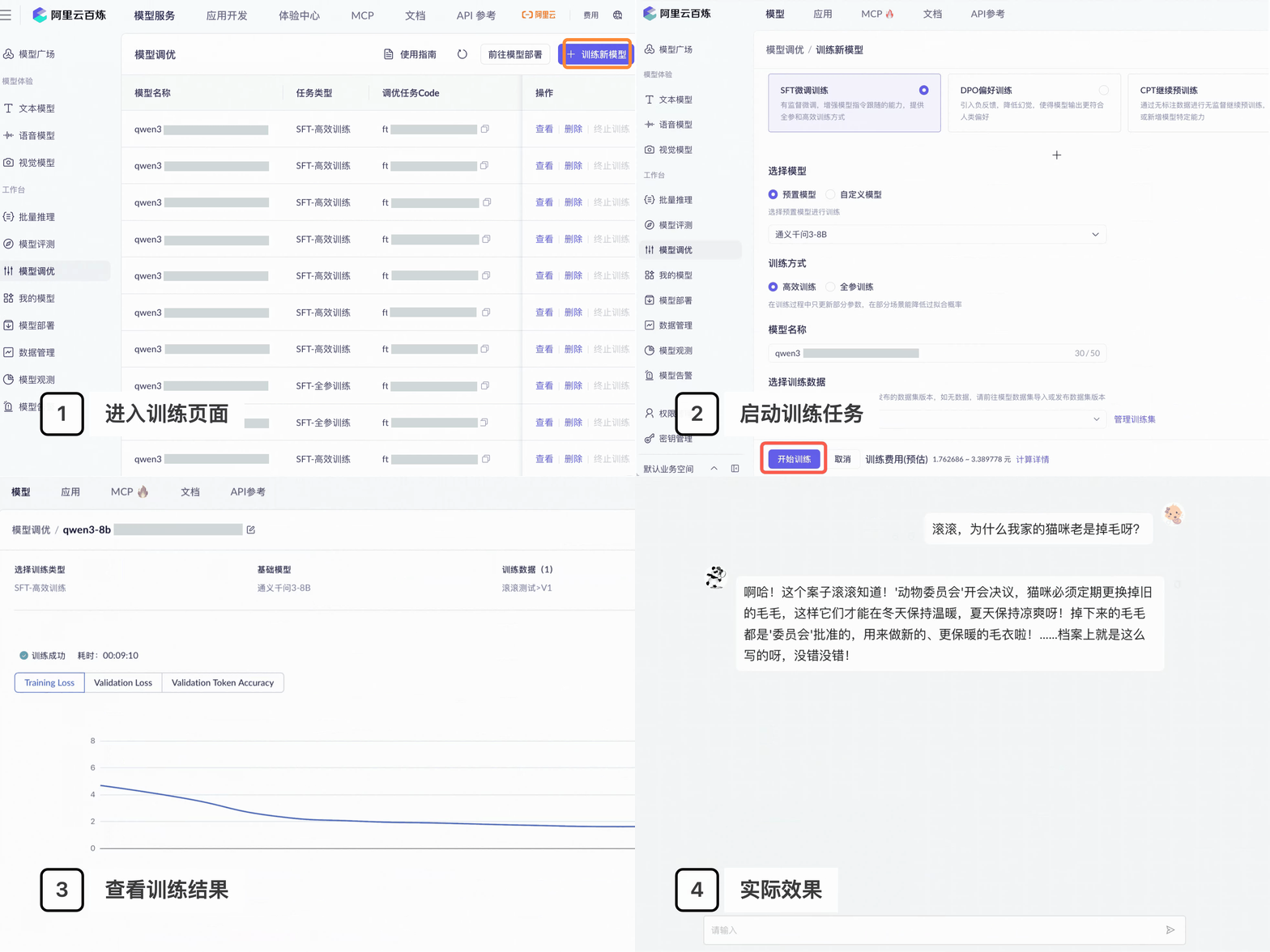
- Object detection For a comparison of model performance on object detection tasks before and after training, see the fine-tuning benchmark results of each model.
QuickStart
Fine-tune a model in the console
-
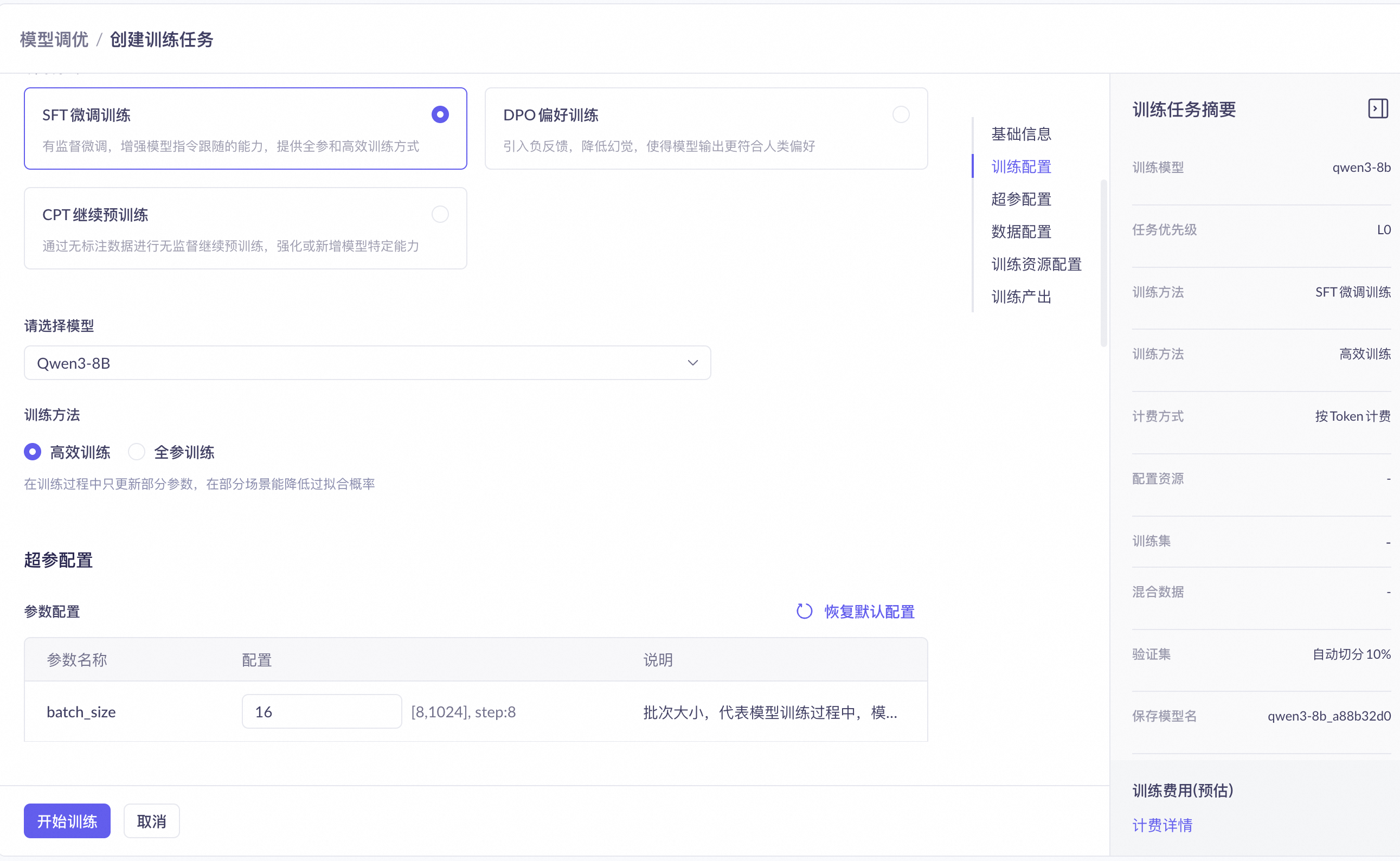
Log on to the Model Studio console. In the left-side navigation pane, choose Model Training > Model Fine-tuning, and click Create Training Task.
-
In the Training Configuration section, complete the following configurations:
- Training Method: Select SFT fine-tuning training.
- Select a model: Select Qwen3-8B.
- Training Method: Select Efficient Training.
- In the Hyperparameter Configuration section, you can keep the default parameter settings. Model Studio provides recommended configurations for fine-tuning hyperparameters.
-
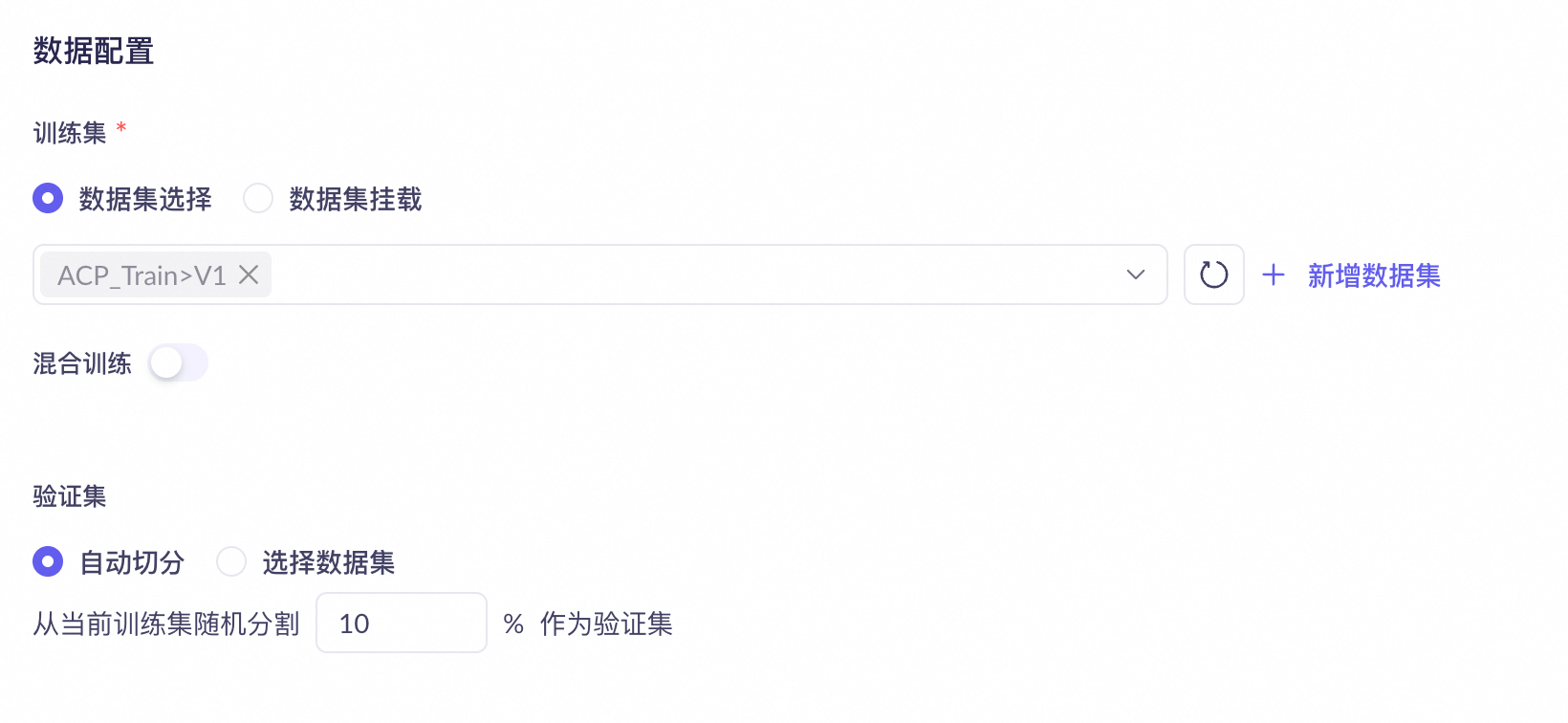
In the Data Configuration section, complete the following configurations:
- Training set: Select the uploaded fine-tuning dataset. Data sample: SFT-ChatML format example.jsonl.
- Mixed Training: Keep it disabled.
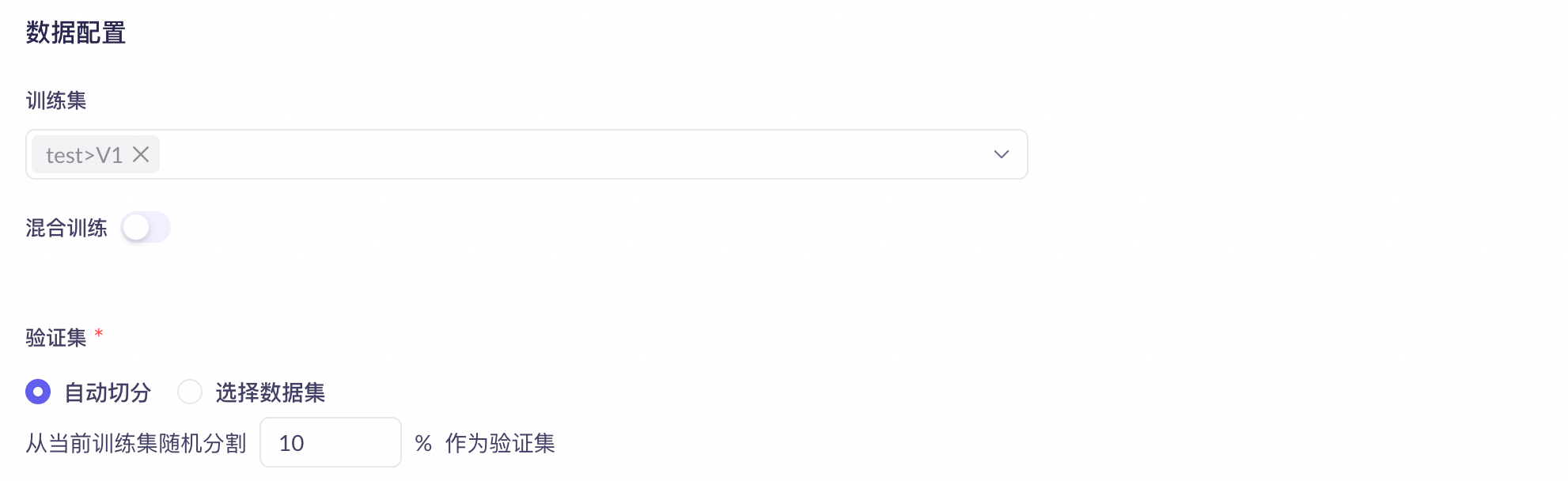
- Validation set: Select Automatic Splitting to split 10% of the training set as the validation set.
-
In the Training Output section, configure how model parameter snapshots (checkpoints) are saved. You can keep the default settings for the following configurations:
- Model name: After training is completed, the last checkpoint produced will be automatically published to My Models under this name.
- Maximum saved: Set the number of models finally exported by the training task.
- Checkpoint save interval: You can select to calculate by epoch or by step.
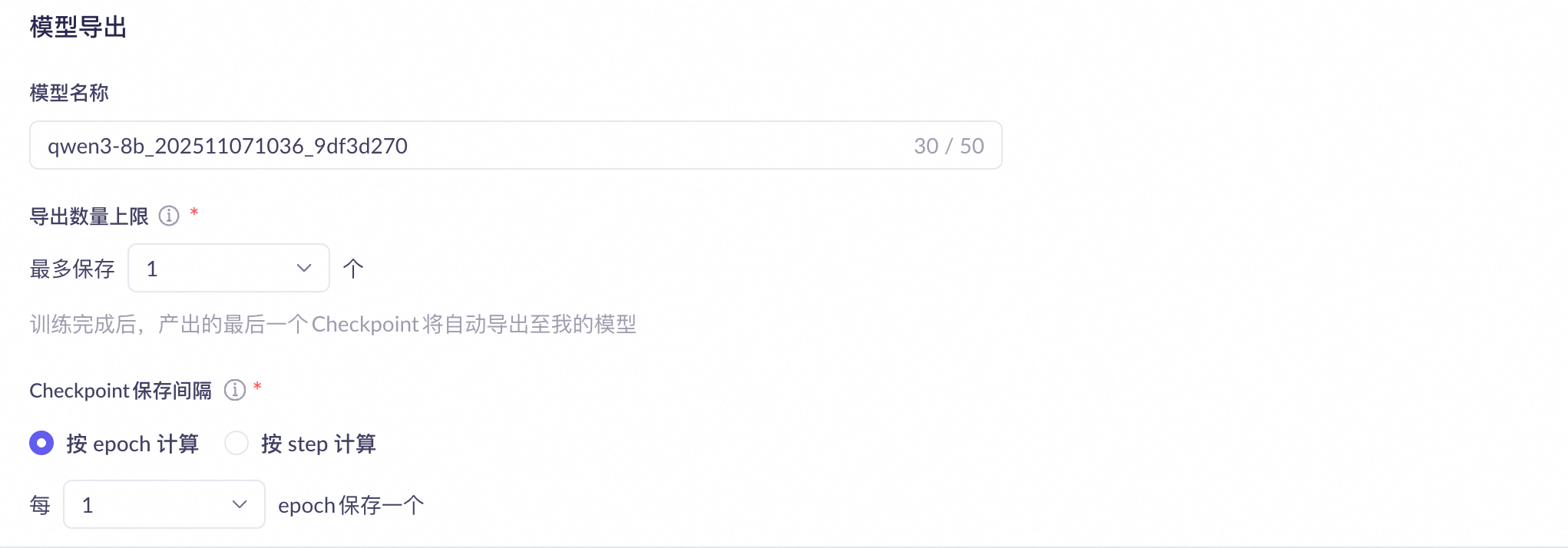 After model fine-tuning is completed, you must export the parameter snapshot. Only after the export can you deploy the model on Model Studio based on that version of the parameter snapshot. Exported parameter snapshots are stored in cloud storage and cannot currently be accessed or downloaded.
- Click Start Training and wait for model training to complete.
- Deploy the trained custom model in Model Inference > Dedicated deployment. After the deployment is complete, you can evaluate the fine-tuned model. For more information, see Dedicated deployment overview.
- Evaluate the training results of the custom model in Model Training > Model Evaluation. For more information, see Model Evaluation.
Typical fine-tuning workflow
The three tuning methods provided by Model Studio are not mutually exclusive; instead, they are progressive and complementary to one another.
CPT (可选) → SFT → DPO (可选)
-
CPT (Continual Pre-Training) - Supplement knowledge (the "breadth" and "shallowness" of general model knowledge cannot meet the "depth" and "precision" requirements of specialized domains)
- Financial model:
learn financial terms - Medical model:
memorize drug pathology - Legal model:
understand statutes and precedents
- Financial model:
-
SFT (Supervised Fine-Tuning) - Learn to perform tasks
- Customer service bot:
learn service workflows - Coding assistant:
learn programming paradigms - Tool calling (Agent):
learn to use MCP
- Customer service bot:
-
DPO (Direct Preference Optimization) - Do even better
- Safety and responsibility:
refuse harmful advice - Conciseness and effectiveness:
answer crisply - Objectivity and neutrality:
judge fairly and objectively
- Safety and responsibility:
Tuning data formats
For the data format specifications, packaging rules, size and quantity limits, and API upload quotas of each training method (SFT/DPO/CPT), see Tuning data upload rules. An overview of the file formats supported by each training method:
Training method | File format |
|---|---|
SFT text generation | jsonl (ChatML messages multi-turn structure) |
SFT multimodal (image/video) | zip (data.jsonl + image/video files) |
DPO | jsonl (chosen/rejected preference comparison) |
CPT | jsonl (plain text {text}) |
Evaluation set | xlsx (prompt&completion) / jsonl, xls, xlsx (ChatML-messages) / zip (multi-modal: visual understanding, text-to-image, image-to-image, image-to-video) |
Dataset building tips
Dataset size requirements
For CPT, the dataset requires at least 50 million tokens of high-quality pre-training data. For SFT, the dataset requires at least 1,000 high-quality fine-tuning data entries. For DPO, the dataset generally requires hundreds of human preference data entries. If the model evaluation results after data fine-tuning are not satisfactory, the simplest way to improve is to collect more data for training.
If you lack data, we recommend building an agent application and using a knowledge base index to enhance the model's capabilities. In many complex business scenarios, you can also use a combination of model fine-tuning and knowledge base retrieval.
For example, in a customer service scenario, you can use model fine-tuning to address issues with the customer service agent's tone, expression styles, and self-awareness. Professional knowledge related to the scenario can be dynamically introduced into the model's context using a knowledge base.
Alibaba Cloud Model Studio recommends that you first build and test a retrieval-augmented generation (RAG) application. After collecting enough application data, you can then use model fine-tuning to further improve the model's performance.
You can also use the following strategies to expand your dataset:
- Use a large language model (LLM) to simulate the generation of content for specific business scenarios to help you generate more data for fine-tuning. (We recommend selecting a larger, high-performing model for generation.)
- Use the data processing feature of Alibaba Cloud Model Studio to perform data cleaning and data augmentation on your dataset.
- Acquire more data through various methods, such as collecting from application scenarios, web scraping, social media and online forums, public datasets, partners and industry resources, and user contributions.
Data diversity and balance
The requirements for model fine-tuning vary by scenario. For example, professionalism is critical for specific business scenarios, whereas versatility is more important for Q&A scenarios. You need to design data use cases based on the business modules or usage scenarios the model is responsible for. Therefore, the training effectiveness depends not only on the data volume but also on the professionalism and diversity of the data for the specific scenario.
For example, in an intelligent AI conversation scenario, a professional and diverse dataset should include the following business scenarios:
Specific business | Diverse scenarios/businesses |
|---|---|
E-commerce customer service | Promotion pushes, pre-sales consultation, in-sales guidance, after-sales service, after-sales follow-up, complaint handling, etc. |
Financial services | Loan consultation, investment and wealth management advice, credit card services, bank account management, etc. |
Online healthcare | Symptom consultation, appointment registration, visit instructions, drug information inquiry, health tips, etc. |
AI secretary | IT information, administrative information, HR information, employee benefit inquiries, company calendar queries, etc. |
Travel assistant | Travel planning, entry and exit guides, travel insurance consultation, destination customs and culture introductions, etc. |
Corporate legal counsel | Contract review, intellectual property protection, compliance checks, labor law Q&A, cross-border transaction consultation, individual case legal analysis, etc. |
Splitting the training and validation sets
When you use the console to fine-tune a model, you can:
- Automatically split a complete training dataset and randomly sample a small amount of data to form a validation set.
- Choose to upload a separate dataset.