

Home safety · photo-based hazard check

Take a photo of your home and hand it to a visual understanding model that reads spatial relationships along the way, and check hazards in a three-part format.

Disclaimer: The content shown on this page is all generated by AI models and is for reference only; it does not constitute any guarantee of results. Actual output and Credits consumption are subject to "Usage Details" in the console.
This playbook walks through a home safety check with a single indoor demo photo containing 5 hazards: have the model output in a three-part format — hazard list / items to verify on-site / one-sentence reminder. Whether the power strip is right next to the sink, whether a cord is lying across the walkway, whether old newspapers are piled on the radiator, whether the hallway is blocked by cardboard boxes — the model reads the spatial relationships along the way, making it easier to spot problems than checking against a checklist yourself. Call chain: wan2.7-image (generate an indoor image with hazards as a placeholder demo, no real private photos used) → qwen3.7-plus (visual understanding, output in three parts: hazard list / items to verify on-site / one-sentence reminder).

Actual output

The submitted material is a demo photo generated by wan2.7-image, containing 5 deliberately arranged hazards (not a real home):
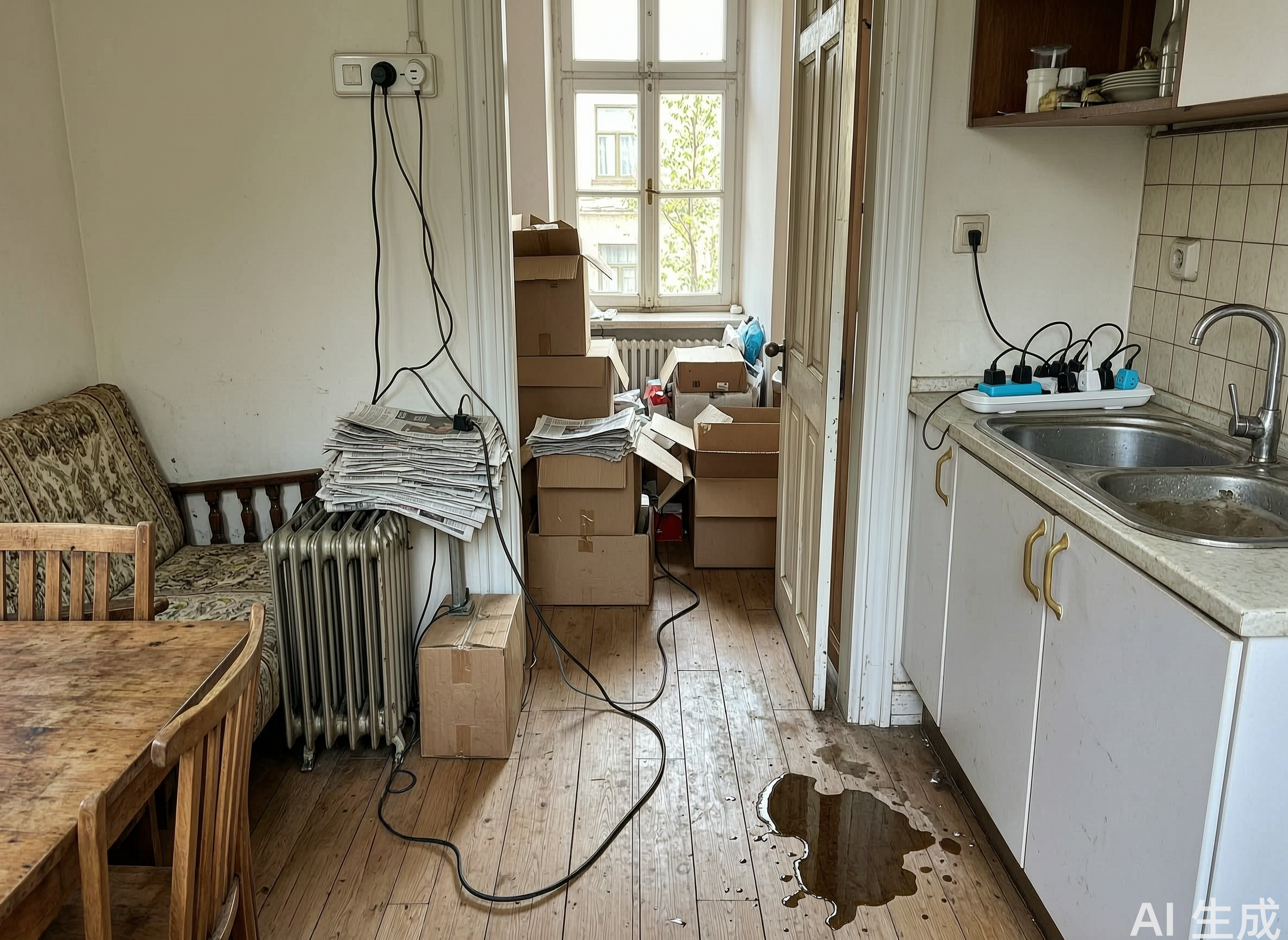
Indoor demo photo with hazards
Give it an indoor photo and have it list hazards by danger level. The list it returns —

1. Power strip placed at the edge of the sink      Danger level: High
   Location: kitchen counter on the right side of the frame, right next to the stainless steel sink
   Why it's dangerous: when washing vegetables or dishes, water splashes in easily, which can cause a short circuit, burn out appliances, or even cause electric shock
   How to fix: move the power strip to a dry spot away from the sink

2. Water on the floor with cords dragging         Danger level: High
   Location: a large puddle of water on the floor in the lower right of the frame
   Why it's dangerous: the elderly can easily slip on it; cords soaking in water can leak electricity

3. Walkway severely blocked by boxes and clutter   Danger level: High
   Location: the hallway leading to the window in the middle of the frame
   Why it's dangerous: a daily tripping hazard, and in a fire or medical emergency it seriously blocks escape and entry

4. Cords hanging loose from a high point and dragging  Danger level: Medium
5. A large pile of old newspapers stacked on the radiator  Danger level: Medium (high temperature right against flammable material, fire risk)

Needs on-site confirmation (can't be seen in the photo): whether the outlets are aging, whether cords are damaged, whether the radiator is currently in use.
One sentence for your parents: first move the power strip by the sink away, and wipe up the water on the floor.

Steps: three-part safety check

Send the indoor photo along with the following prompt to qwen3.7-plus:
You are a home safety assessor. This is a photo I took of my parents' home. Please help me check for any safety hazards.

Please output in the following structure:

1. Hazard list (ordered by danger level from high to low)
For each item give:
- What the hazard is and where in the frame it is
- Why it's dangerous (explain the possible consequences clearly)
- Danger level (High / Medium / Low)
- Specifically how to fix it (an action that can be done in one sentence)

2. Things in this photo that aren't clear and need on-site confirmation
For example, blocked areas, poor lighting, or angles you can't see — list the items you can't judge but that are worth checking on-site.

3. A one-sentence reminder for your parents
In words they understand, name the one thing most worth fixing right away.

Requirement: only mention things actually visible in the photo; for anything uncertain, explicitly write "uncertain"; don't make up hazards just to fill the list.

Notes

  • Consumption: This playbook involves image generation + visual understanding; generating the image and reading it are two separate calls, each billed independently. In the reading step, the photo itself converts into image_tokens and accounts for the vast majority of the input, while the text prompt is a tiny share; if you photograph multiple shots of your home, ask one at a time — stuffing many images into one call multiplies the input.
  • Boundary: This playbook only provides photo-based hazard tips and does not replace a professional safety inspection. For gas, electrical, or load-bearing issues, please have a certified professional come inspect on-site. It's good at reading the positional relationships between objects — such as next to, lying across, stacked on top — and this kind of "something's off overall" is easier to spot than checking item by item against a checklist; but don't skip the "needs on-site confirmation" part — those are the risks a photo can't show.
  • Privacy: The demo photo is generated by wan2.7-image (with an "AI-generated" mark in the lower-right corner) and is not a real home. When using it for a real check, note that photos may contain private information, so judge for yourself whether to upload.
Model Playground
Fine-tuning
Model Compression
Statistics and Monitoring
Support