

This document uses Qwen model deployment as an example to demonstrate the full workflow of deploying models in Alibaba Cloud Model Studio via API (HTTP), including deployment, status query, inference, deletion, and permission troubleshooting.
Prerequisites
- Read Model deployment to understand the supported models and basic steps for model deployment in Alibaba Cloud Model Studio.
- Obtain an API key and export the API key as an environment variable. Replace
DASHSCOPE_API_KEYin the sample code with your own Bailian API key; if you use the dashscope CLI, also setDASHSCOPE_HTTP_BASE_URLto your obtained API Host.
1. Deploy a model
The following command deploys a fine-tuned custom model qwen3-8b-ft-202511132025-0260 as a dedicated service named qwen3-8b-ft-202511132025-0260.
To obtain a custom model ID, go to the Model Studio console – Model fine-tuning, click the Task Name you want to deploy → Outputs → click the blue model name to open the My Models page. The model ID appears in the basic model information section.
Use the model ID as the value for the model_name parameter to deploy the model via API.
- Billing by provisioned throughput units (PTU)
- Billing by model unit usage duration
- Billing by token usage
- dashscope CLI
deployed_model field is the unique ID of the dedicated service. In subsequent query and delete API paths, use this deployed_model value (not the name request parameter).
2. Check service status
Use the following command to query details for a specific dedicated service:
RUNNING, deployment is complete.
3. Make an inference request
model should be the model code generated after successful deployment. Go to the Dedicated Deployment console (Beijing) to obtain it.
Inference parameter alignment
Model Studio's inference engine may use different default parameter values than your local framework. To ensure consistent results, adjust the following parameters when calling the API:
Parameter name | Recommended value (matches vLLM defaults) |
|---|---|
temperature | Range: [0, 2). Set to 1.0 to match vLLM's default. |
top_p | Range: (0, 1.0]. Set to 1.0 to match vLLM's default. |
top_k | Set to None or a value greater than 100 to disable top_k sampling (only top_p applies). Setting to 99 approximates vLLM's default value of 0 (full sampling). |
presence_penalty | Range: [-2.0, 2.0]. Set to 0 to match vLLM's default. |
repetition_penalty (DashScope protocol) | Increasing repetition_penalty reduces repetition in generated text. A value of 1.0 means no penalty. Range: greater than 0. Set to 1.0 to match vLLM's default. |
4. Delete a dedicated service
Delete unused dedicated services using the following command:
Permission troubleshooting
If you encounter a permission error during model deployment, follow the troubleshooting path that matches your deployment method:
Console deployment
- If "Missing permission for this module" is displayed, please ensure that your account has the Model Deployment - Operation permission on the permission management page of the business space. If you cannot operate normally, please contact your organization or IT administrator to add the relevant permissions or check the permission issues on your behalf.
-
If the error "xx business space does not have permission to deploy the xx model" is reported during deployment, please go to the Business Space Management page of Model Studio to add the deployment permission of the corresponding model for the corresponding business space.
API call error:
Workspace xxx does not have deployment privilege for model xxxx. If insufficient permissions are prompted, please contact your organization or IT administrator to add the relevant permissions or operate on your behalf.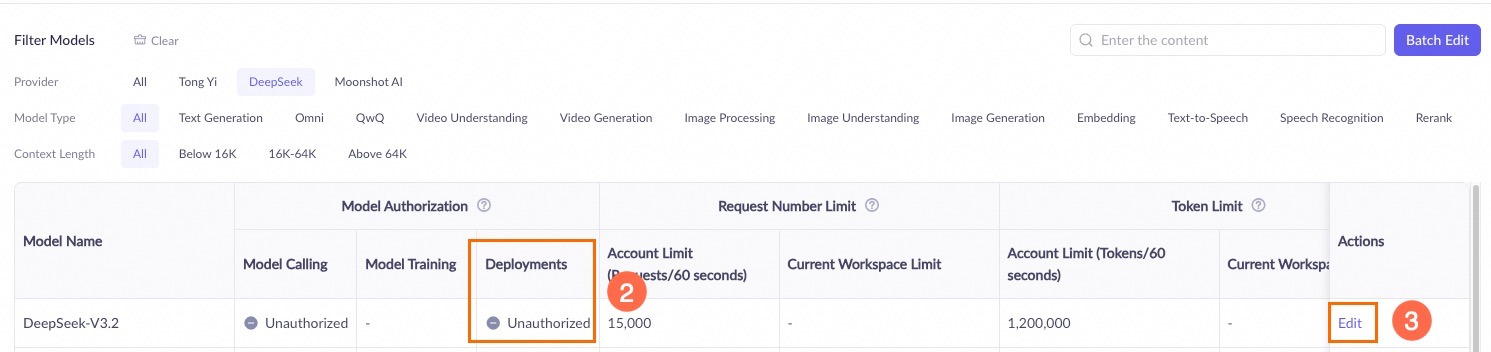
API deployment
When deploying a model using the API, ensure the following:
-
The Workspace associated with your API key has permission to manage the model. Go to the Model Studio Workspace management page and check the model deployment permissions for the relevant workspace.
API call error:
In the Actions column, click Model permission and throttling settings. In the Model List, find your target model and check the authorization status in the Model deployment column. If it shows Unauthorized, click Edit in the Actions column to grant permission.Workspace xxx does not have deployment privilege for model xxxx. -
The Owner Account associated with your API key has operation permissions in its Workspace. Go to the Model Studio console, click the workspace in the bottom-left corner to switch to the correct workspace, then click
 to check model deployment permissions.
API error:
In the navigation pane on the left, click Permission Management and confirm that the user list includes the API key’s associated account (type: Alibaba Cloud account).Workspace access denied.