

Use visual understanding to read the image, OCR to extract fields into JSON, and provide an archive file name.
Disclaimer: The content shown on this page is generated by an AI model and is for reference only. It does not constitute any guarantee of effectiveness. Actual output and Credits consumption are subject to "Usage Details" in the console.
qwen3.7-plus and in one sentence get structured JSON plus a suggested file name generated by the rule "date_seller_amount"—image reading, field extraction, and named archiving in one shot.
Call chain: qwen3.7-plus (visual understanding, per-image OCR + structuring) → rename and archive by field.
Measured output
Run through with a real invoice (sensitive fields redacted). The OCR structured output:
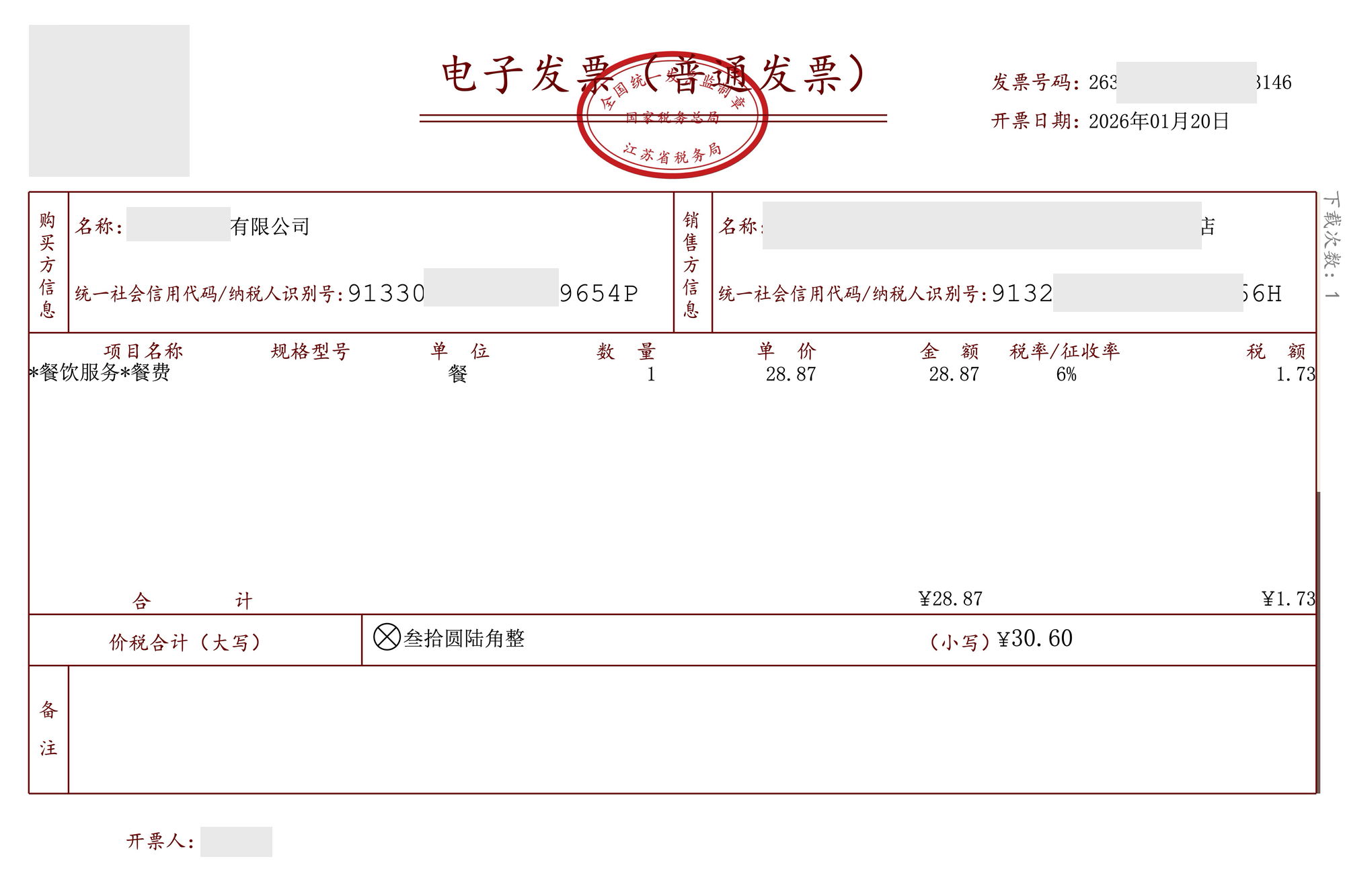
Steps: Invoice recognition and archiving
Send the receipt image along with the following instruction to qwen3.7-plus:
Notes
- Consumption: This playbook involves visual understanding (
qwen3.7-plusreading the image). - Boundaries: The image itself is converted into tokens and counted toward input; this is the main consumption source for this type of task. The larger the image, the more tokens it typically consumes.
- Redaction: The company name, tax ID, invoice number, and issuer in the sample invoice have all been redacted.