

The portrait style repainting model transforms portrait photos into various preset or custom artistic styles.
Model overview
Model name | Billing price | Throttling (shared by Alibaba Cloud account and RAM users) | Free quota(View) | |
|---|---|---|---|---|
QPS limit for task submission API | Number of concurrent tasks | |||
wanx-style-repaint-v1 | CNY 0.12 per image | 2 | 1 | 500 images |
Model effects
The model supports two repainting methods:
1. Preset style repainting
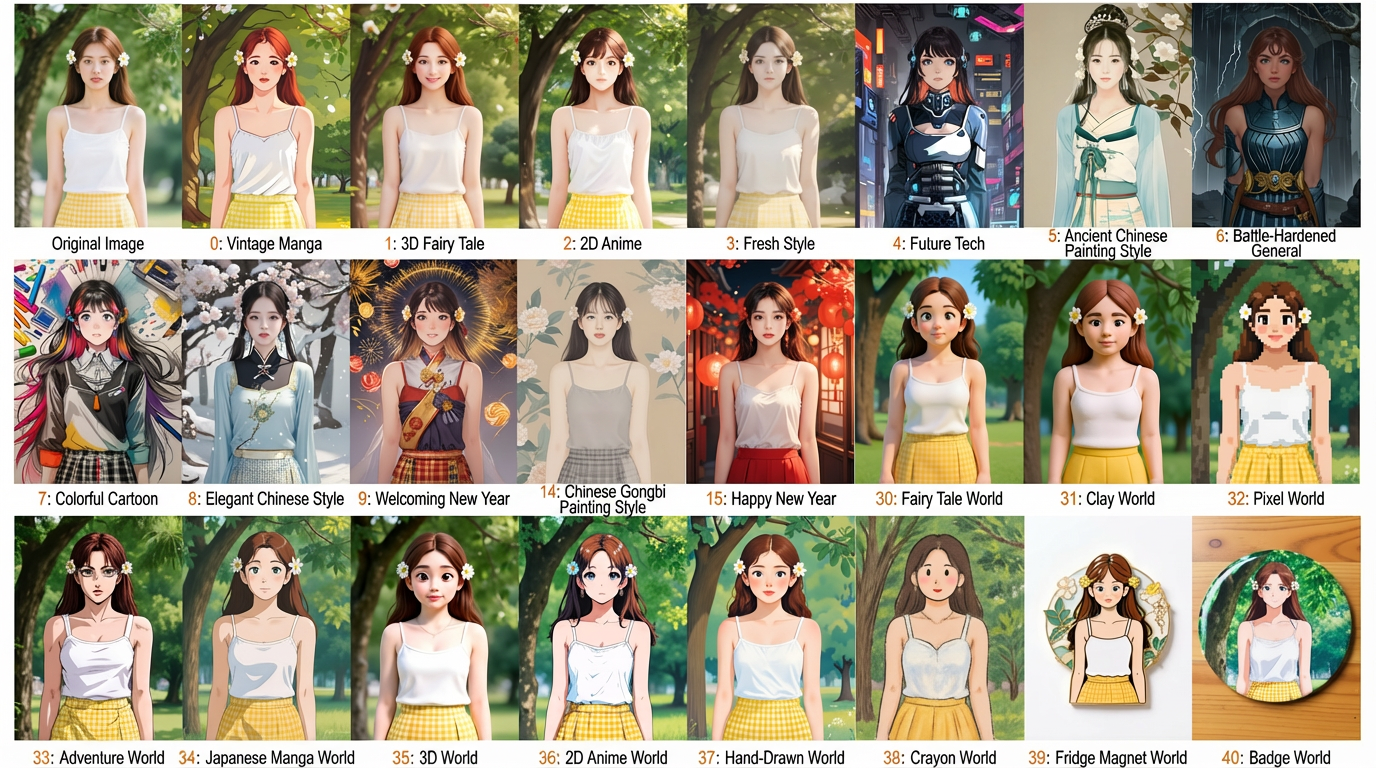
You can upload a portrait photo and select a preset style ID to quickly generate various stylized portraits.
- Built-in styles: Retro Comic, 3D Fairy Tale, Anime, Fresh, Future Tech, Traditional Chinese Painting, Battle-Hardened General, and more.
- Examples:
2. Custom style repainting
You can upload a portrait photo and a style reference image. The model learns the style from the reference image and applies it to the portrait.
- Scenarios: You can use this feature to transfer the artistic style from any image when preset styles do not meet your needs.
- Examples:

Getting started
Prerequisites
Obtain an API key and configure it as an environment variable.
Sample code
This model provides only an HTTP API. Refer to the curl sample code.
- curl
- Python
For a beginner's guide to HTTP calls, see Postman.
Step 1: Create a task to get the task ID
This API returns a unique task ID (task_id).Sample request- Use a preset style
- Use a custom style
Set
style_index. Do not set it to -1.task_id is valid for queries for 24 hours.Step 2: Query the task result
Use thetask_id to poll the task status until it is complete and you obtain the generated image URL.Sample requestReplace {task_id} with the task_id value returned by the previous API call. The task_id is valid for queries for 24 hours, Replace {WorkspaceId} with your actual workspace ID.The image URL is valid for 24 hours. Download the image promptly.
Input image limits
Portrait image
-
Image resolution: The resolution must be at least
256*256pixels and no more than5760*3240pixels. The aspect ratio of the longer side to the shorter side cannot exceed 2:1. - Image quality: To ensure high-quality output, upload a clear photo of a face. The face should not be too small in the frame. Avoid exaggerated poses and expressions.
- Image format: JPEG, PNG, JPG, BMP, WEBP.
- Image size: No larger than 10 MB.
-
Image URL:
- HTTP/HTTPS URLs accessible over the public network are supported. The URL cannot contain Chinese characters. Base64-encoded strings are also supported.
-
For local files, you can obtain a valid parameter value in one of two ways:
- Obtain a URL: For more information, see Upload a file to obtain a temporary URL.
- Generate a Base64-encoded string: For more information, see Pass an image as a Base64-encoded string.
Style reference image
-
Image resolution: The resolution must be at least
256*256pixels and no more than5760*3240pixels. For best results, the aspect ratio of the longer side to the shorter side should not exceed 2:1. Otherwise, generation may be affected or an error may occur. - Image format: JPEG, PNG, JPG, BMP, WEBP.
- Image size: No larger than 10 MB.
-
Image URL:
- HTTP/HTTPS URLs accessible over the public network are supported. The URL cannot contain Chinese characters. Base64-encoded strings are also supported.
-
For local files, you can obtain a valid parameter value in one of two ways:
- Obtain a URL: For more information, see Upload a file to obtain a temporary URL.
- Generate a Base64-encoded string: For more information, see Pass an image as a Base64-encoded string.
Pass an image as a Base64-encoded string
You can convert a local image file to a Base64-formatted string and concatenate it in the following format: data:{MIME_type};base64,{base64_data}.
- {MIME_type}: The media type of the image, which must correspond to the file format.
- {base64_data}: The complete data string of the image file after Base64 encoding.
-
The mapping between image formats and Multipurpose Internet Mail Extensions (MIME) types is as follows:
Image format
MIME Type
JPEG
image/jpeg
JPG
image/jpeg
PNG
image/png
BMP
image/bmp
WEBP
image/webp
-
Example value:
"image_url": "data:image/png;base64,iVBORw0KGgoAAAANSUhEUgAABDg......". Note: The Base64 string is truncated for display purposes. In practice, you must pass the complete encoded string. - Sample code: Obtain the Base64-encoded string of an image.
Billing and throttling
Billing rules
- Billable item: You are billed for the number of successfully generated images on a pay-as-you-go basis.
- Billing formula: Fee = Unit price × Number of images.
-
Consumption order: Free quotas are consumed first. After your free quota is used up, the pay-as-you-go billing method is used by default.
- You can enable the "Free quota only" option to prevent charges after your free quota is exhausted. For more information, see Free quota for new users.
- No charge for failures: Failed model calls or processing errors do not incur fees or consume free quotas.
API reference
For the API input and response parameters, see Portrait style repainting.
FAQ
Q: How do I process local images?
A: This API supports public URLs and Base64 encoding. To use a local file, you can obtain a valid parameter value in one of two ways:- Obtain a URL: Upload the image to an object storage service, such as Alibaba Cloud OSS, or use the temporary storage provided by Alibaba Cloud Model Studio.
- Generate a Base64-encoded string: For more information, see Pass an image as a Base64-encoded string.
Q: How can I optimize the image generation quality?
A: The quality of the output depends on the quality of the input. You can try the following methods to optimize the results:- Improve portrait photo quality: Use a high-definition, well-lit, frontal photo with clear, unobstructed facial features.
- Select a style reference image: Choose an image with a distinct style that matches the subject of the portrait.
Q: Can I use preset and custom styles at the same time?
A: No, you cannot. These modes are mutually exclusive. You must choose one of the two modes:- Use a preset style: Set style_index to a value other than -1. For a list of enumeration values, see Portrait style repainting.
-
Use a custom style: Provide a style reference image URL (style_ref_url) and set style_index to -1.
If you pass both and do not set style_index to -1, the system may default to the preset style, causing the custom style to not take effect.