

Make characters move · precise image-to-video motion

Write motion as measurable numbers so image-to-video actually moves through the frame instead of marching in place.

Disclaimer: All content shown on this page is generated by AI models and is for reference only; it does not constitute any guarantee of results. Actual output and Credits consumption are subject to "Usage Details" in the console.
This playbook runs a walking shot through a city-wall corridor with motion control: making the character truly cross the frame from left to right, not march in place. The most common failure of image-to-video is the character marching in place or drifting while changing size; what you want is "he walks from this end to that end," but what you get is a jittery freeze-frame. The fix isn't to write the prompt more poetically—it's to write motion as measurable numbers: starting at what percentage of the frame, reaching where by which second, crossing at least how many reference markers. Call chain: wan2.7-image (produce the first frame, place the character at about 25% from the left of the frame, place evenly spaced reference markers in the scene as a ruler) → happyhorse-1.1-i2v (drive the walk with a timeline + displacement-percentage constraint).

Result

The output 5-second walking shot (camera fixed, character crossing the wall corridor from left to right): The starting first frame places the character at about 25% from the left of the frame, with evenly spaced lanterns on the wall serving as "rulers":
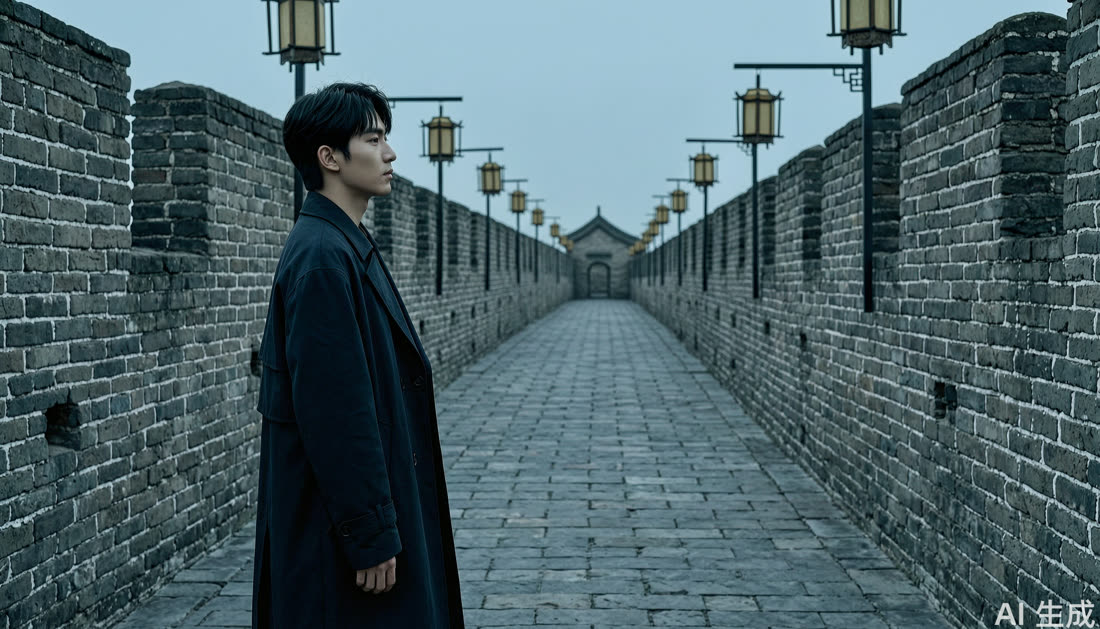
Walking first frame
Actual result: the character did walk from about 25% to about 65% of the frame, passing multiple lantern reference markers along the way, with the camera staying fixed—no marching in place.

Step: Pin down motion with numbers

Send the first frame along with the following prompt to happyhorse-1.1-i2v:
In the first frame, the character is at about 25% of the frame width, facing right.
Motion timeline: from 0 to 2 seconds, walk from the starting point to about 45% of the frame width; from 2 to 4 seconds, continue to about 65%;
within 5 seconds the character must travel horizontally past at least 3 {reference markers, e.g. lanterns}, with rightward displacement of no less than 35% of the frame width—no marching in place.
The camera and the entire scene are completely fixed—no follow, no pan, no zoom, no cut;
use the character's position relative to {reference markers} and {buildings} to prove real forward motion.
{environmental force, e.g. strong wind always from right to left}, the hem of the coat and sleeves keep drifting left.
Keep the character's clothing, hairstyle, limbs and the buildings, reference markers, and skyline stable throughout.
No pausing, turning, showing the face directly, running, duplication, disappearance, or size changes;
no building deformation, reference-marker addition or removal, camera movement, cuts, flicker, text, or watermarks.

Notes

  • Consumption: This playbook involves image generation + image-to-video. Motion-controlled shots aren't guaranteed to land on the first try; you may need several iterations. Video consumption is high—start with 5 seconds / 720P to validate the motion before deciding whether to extend or raise the resolution.
  • Stability: Motion control is the least stable part of image-to-video; running the same prompt multiple times will produce different results. When reviewing, don't just check whether there's movement—check whether the character has actually displaced relative to the reference markers in the scene, which is why the first frame must include evenly spaced reference markers.
  • Tuning: To make displacement more obvious, break the timeline down more finely (one position per second), raise the N in "pass at least N reference markers," and keep "camera completely fixed" non-negotiable.
Model Playground
Fine-tuning
Model Compression
Statistics and Monitoring
Support